
Sony SRS-XV800
Sony SRS-XV800 X-Series Speaker and Blackmore Pro Audio BMP-4 Microphone Instruction Manual
Model: SRS-XV800
1. Introduction
This manual provides essential instructions for the safe and effective use of your Sony SRS-XV800 X-Series Wireless Portable Bluetooth Karaoke Party Speaker and the included Blackmore Pro Audio BMP-4 Wired Unidirectional Dynamic Microphone. Please read this manual thoroughly before operating the devices and retain it for future reference.
2. Safety Information
- Do not expose the speaker to extreme temperatures, direct sunlight, or excessive humidity.
- Ensure proper ventilation around the speaker to prevent overheating.
- The speaker has an IPX4 water-resistance rating, meaning it is protected against splashing water from any direction. Do not submerge the speaker in water.
- Use only the specified power adapter for charging.
- Keep the microphone away from moisture and extreme temperatures.
- Do not attempt to disassemble or modify either device. Refer all servicing to qualified personnel.
3. Package Contents
Verify that all items are present in your package:
- Sony SRS-XV800 X-Series Wireless Portable Bluetooth Karaoke Party Speaker
- Blackmore Pro Audio BMP-4 Wired Unidirectional Dynamic Microphone with 10 Feet Cable
- AC Power Cord
- Optical Digital Cable (for TV Sound Booster)
- Documentation (this manual, warranty information)

Image 1: Sony SRS-XV800 Speaker and Blackmore Pro Audio BMP-4 Microphone. The image shows the tall, rectangular black Sony speaker with a mesh front, standing upright. To its right is the black wired dynamic microphone.
4. Product Overview
4.1 Sony SRS-XV800 Speaker

Image 2: Front view of the Sony SRS-XV800 Speaker. The speaker is black with a large mesh grille covering the front, and the Sony logo is visible at the top.

Image 3: Top panel of the Sony SRS-XV800 Speaker. This image displays the touch-sensitive control panel with various buttons for power, Bluetooth, playback, volume, and lighting.

Image 4: Rear panel of the Sony SRS-XV800 Speaker. This view shows the various input and output ports, including AC power, USB, Audio In, Optical In, MIC1, and MIC2/Guitar inputs, along with control knobs for microphone volume and echo.
The SRS-XV800 features omnidirectional sound with five tweeters, an X-Balanced speaker unit for clear bass, ambient lighting, and a touch panel user interface. It is designed for portable use with up to 25 hours of battery life and an IPX4 splash-resistant rating.
- Touch Panel UI: Located on the top of the speaker for easy access to controls.
- Inputs: MIC1, MIC2/Guitar, Audio In, Optical In, USB.
- X-Balanced Speaker Unit: Unique rectangular diaphragm for enhanced sound clarity.
- Ambient Lights: Integrated lighting effects.
4.2 Blackmore Pro Audio BMP-4 Microphone

Image 5: Blackmore Pro Audio BMP-4 Wired Dynamic Microphone. The microphone is black with a mesh grille at the top and an on/off switch on the body.
The BMP-4 is a wired unidirectional dynamic microphone, suitable for vocal performances and karaoke. It includes a 10-foot cable for flexible placement.
- Type: Wired, Unidirectional Dynamic.
- Cable: 10 feet long.
- Switch: On/Off switch located on the microphone body.
5. Setup
5.1 Charging the Speaker
- Connect the supplied AC power cord to the AC input on the rear of the SRS-XV800 speaker.
- Plug the other end of the AC power cord into a wall outlet.
- The speaker will begin charging. The battery indicator on the top panel will show the charging status.
- A full charge provides up to 25 hours of playback, depending on usage conditions.
5.2 Connecting the Microphone
- Locate the MIC1 or MIC2/Guitar input on the rear panel of the SRS-XV800 speaker.
- Connect the 10-foot cable from the Blackmore Pro Audio BMP-4 microphone into either the MIC1 or MIC2/Guitar input.
- If using MIC2/Guitar input, ensure the input is set to microphone mode if applicable (refer to speaker's on-screen or app settings if available).
5.3 Bluetooth Pairing
- Power on the SRS-XV800 speaker by pressing the power button on the top panel.
- Press the Bluetooth button on the top panel. The Bluetooth indicator will flash, indicating pairing mode.
- On your smartphone or other Bluetooth device, navigate to the Bluetooth settings and select "SRS-XV800" from the list of available devices.
- Once connected, the Bluetooth indicator on the speaker will stop flashing and remain lit.
5.4 TV Sound Booster Connection
- Connect one end of the supplied optical digital cable to the Optical In port on the rear of the SRS-XV800 speaker.
- Connect the other end of the optical digital cable to the optical digital audio output port on your television.
- Select the Optical In source on the speaker using the input selection button on the top panel.
- Adjust TV audio settings as needed to output sound via optical digital.
6. Operating Instructions
6.1 Power On/Off
- To power on, press the Power button on the top panel.
- To power off, press and hold the Power button until the speaker turns off.
6.2 Volume Control
- Use the Volume + and Volume - buttons on the top panel to adjust the speaker's main output volume.
- For microphone volume, use the dedicated MIC1 VOL and MIC2/GUITAR VOL knobs on the rear panel.
6.3 Karaoke Function
- Ensure the microphone is connected to the MIC1 or MIC2/Guitar input.
- Turn on the microphone using its on/off switch.
- Adjust the microphone volume using the corresponding knob on the speaker's rear panel.
- Use the ECHO knob on the rear panel to add reverberation to the microphone sound.
- The KEY CONTROL buttons on the top panel allow you to adjust the key of the music playing through the speaker to match your vocal range.
- A guitar can also be connected to the MIC2/Guitar input and used as an amplifier.
6.4 Ambient Lights
The SRS-XV800 features integrated ambient lighting. Use the dedicated LIGHT button on the top panel to cycle through different lighting modes or turn the lights off.
6.5 USB Playback and Charging
- USB Playback: Insert a USB flash drive containing audio files into the USB port on the rear panel. The speaker will automatically detect and play compatible audio files. Use the playback controls on the top panel.
- USB Charging: The USB port can also be used to charge external devices (5V = 1.5A output). Connect your device's USB charging cable to the speaker's USB port.
7. Maintenance
7.1 Cleaning
- Wipe the exterior surfaces of the speaker and microphone with a soft, dry cloth.
- For stubborn stains, lightly dampen the cloth with water and a mild detergent, then wipe dry.
- Do not use abrasive cleaners, alcohol, benzene, or thinners, as these can damage the finish.
7.2 Storage
- Store the devices in a cool, dry place away from direct sunlight and extreme temperatures.
- If storing for an extended period, charge the speaker's battery to approximately 50% every six months to maintain battery health.
7.3 Battery Care (SRS-XV800)
- Avoid fully discharging the battery frequently.
- Do not expose the battery to heat sources or direct flame.
- If the battery performance significantly decreases, contact Sony customer support for service.
8. Troubleshooting
| Problem | Possible Cause | Solution |
|---|---|---|
| No power | Battery is depleted; AC cord not connected. | Charge the speaker using the AC power cord. Ensure the power cord is securely connected. |
| No sound from speaker | Volume too low; incorrect input selected; Bluetooth not connected. | Increase volume. Select the correct input source (Bluetooth, Audio In, Optical In, USB). Re-pair Bluetooth device. |
| No sound from microphone | Microphone off; microphone volume too low; microphone not connected properly. | Turn on the microphone's switch. Increase MIC1/MIC2/Guitar volume knob. Ensure microphone cable is fully inserted into the correct input. |
| Bluetooth pairing fails | Speaker not in pairing mode; device too far; interference. | Ensure speaker's Bluetooth indicator is flashing. Move device closer to speaker. Turn off other Bluetooth devices. |
| Sound distortion | Volume too high; audio source quality low. | Reduce speaker or source device volume. Use a higher quality audio source. |
9. Specifications
9.1 Sony SRS-XV800 Speaker
- Model: SRS-XV800
- Dimensions (L x W x H): 31.1 x 16.8 x 15.6 inches
- Weight: 45 pounds
- Connectivity: Bluetooth, Aux, Optical In, USB
- Power Source: Battery Powered (up to 25 hours), AC
- Water Resistance: IPX4 Splash-Resistant
- Audio Input: Microphone (x2), Aux
- USB Output: 5V = 1.5A (for charging external devices)
- Manufacturer: Sony
9.2 Blackmore Pro Audio BMP-4 Microphone
- Model: BMP-4
- Type: Wired Unidirectional Dynamic Microphone
- Cable Length: 10 feet
- Material: Metal, Plastic
- Connector Type: Standard microphone connector (e.g., XLR to 1/4" TS, typically)
10. Warranty and Support
The Sony SRS-XV800 speaker is covered by a Sony USA Warranty. For specific warranty terms and conditions, please refer to the warranty card included in your package or visit the official Sony support website. For technical support or service inquiries, please contact Sony customer service.
For the Blackmore Pro Audio BMP-4 microphone, please refer to the documentation provided by Blackmore Pro Audio for warranty and support information.
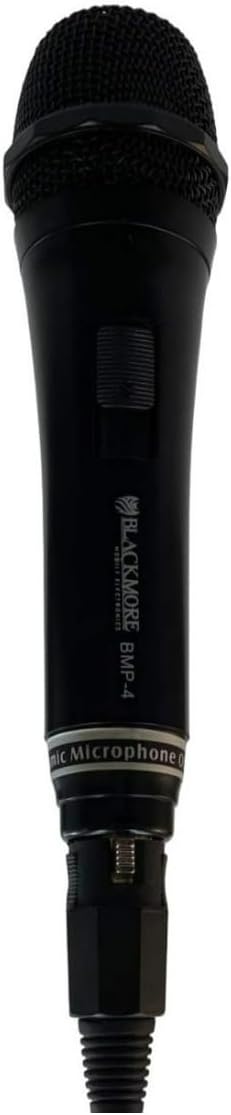
Image 6: Focus Camera Authorized Dealer of Sony. This image indicates that the Sony USA warranty is valid if the product is purchased from Focus Camera.
Ask a question about this manual
Ask about setup, troubleshooting, compatibility, parts, safety, or missing instructions. Manuals+ will review the question and use this page’s manual context to help answer it.