
1. Introduction
This manual provides instructions for the safe and effective use of the Tekswamp DirecTV AC Adapter Power Supply, Model EPS18R-15. This 18W power supply is designed to provide reliable power to compatible DirecTV Home Clients.
1.1. Product Overview
The Tekswamp DirecTV AC Adapter is a genuine replacement or spare power supply for various DirecTV Home Client models. It converts standard AC wall power to the required DC voltage for your device.
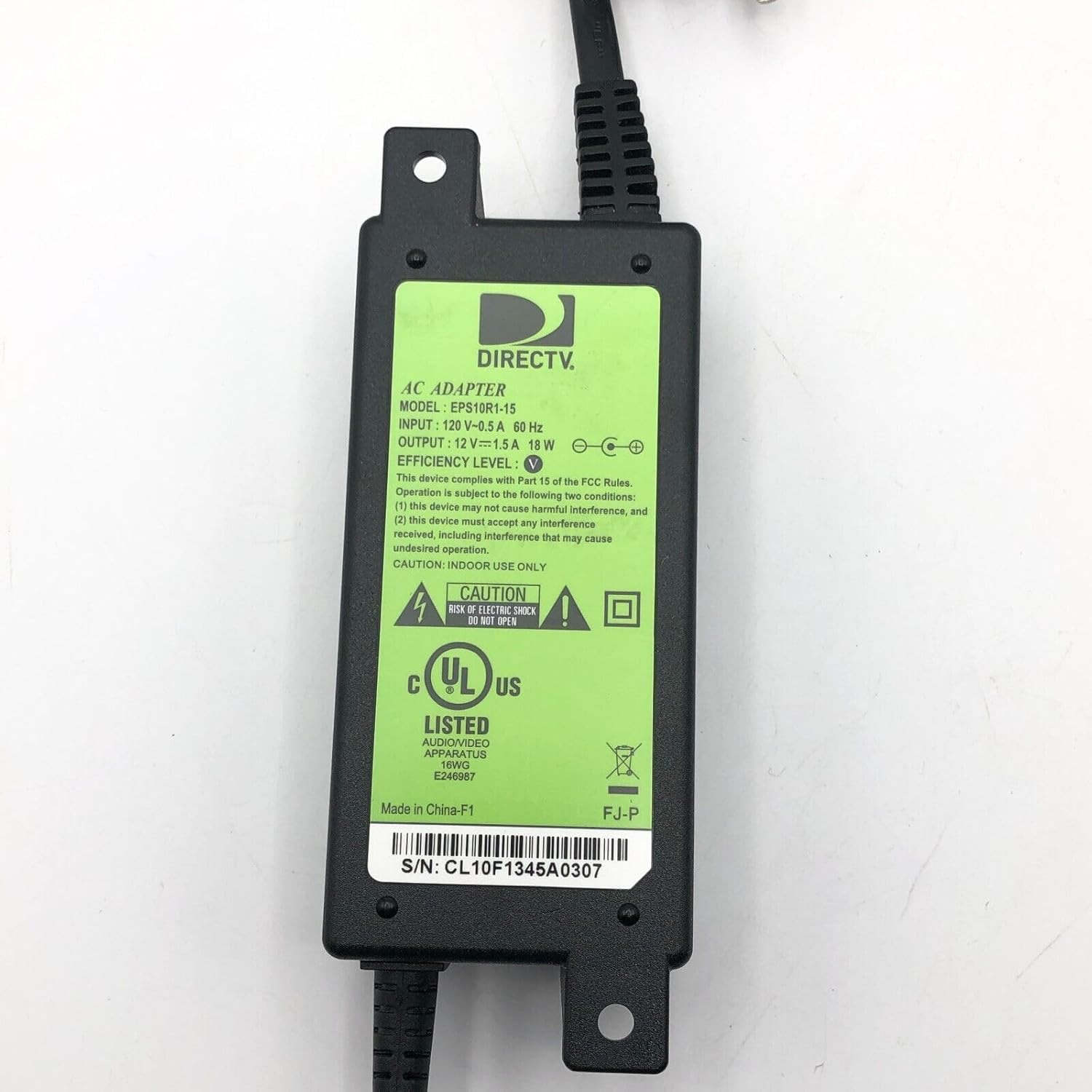
Image 1.1: Front view of the Tekswamp DirecTV AC Adapter, displaying its label with model number EPS18R-15, input/output specifications, and safety certifications. The serial number CL10F1345A0307 is visible on the label.
1.2. What's in the Box
- 1 x Tekswamp DirecTV AC Adapter (Model: EPS18R-15)
- 1 x Power Cord
2. Safety Information
WARNING: RISK OF ELECTRIC SHOCK. DO NOT OPEN.
- Always ensure the adapter and power cord are free from damage before use.
- Do not expose the adapter to water, moisture, or extreme temperatures.
- Use only with compatible devices as specified in this manual.
- Disconnect from the power outlet before cleaning or if not in use for extended periods.
- Keep out of reach of children.
3. Setup
Follow these steps to properly connect your AC adapter to your DirecTV Home Client:
- Verify Compatibility: Before connecting, ensure that your DirecTV Home Client requires a 12.5V 1.5A power supply with a 5.5 x 3.3mm + Pin connector tip. Incorrect voltage or polarity can damage your device.
- Connect to Device: Insert the DC output connector of the AC adapter firmly into the power input port of your DirecTV Home Client.
- Connect Power Cord: Plug one end of the provided power cord into the AC input port of the adapter.
- Connect to Wall Outlet: Plug the other end of the power cord into a standard 100-240V AC wall outlet.

Image 3.1: Close-up view of the 5.5 x 3.3mm + Pin DC output connector tip, which connects to the DirecTV Home Client.

Image 3.2: The Tekswamp AC Adapter shown with both the detachable power cord and the integrated DC output cable connected, ready for use.
4. Operating Instructions
Once the adapter is correctly connected to both your DirecTV Home Client and a power outlet, the client device should power on automatically or be ready to be powered on via its own power button. The adapter operates continuously when plugged in.
5. Maintenance
- Cleaning: Use a dry, soft cloth to clean the adapter. Do not use liquid cleaners or aerosols.
- Storage: Store the adapter in a cool, dry place when not in use. Avoid wrapping the cables too tightly.
- Inspection: Periodically inspect the adapter and cables for any signs of wear, cuts, or damage. If damage is found, discontinue use immediately.
6. Troubleshooting
If your DirecTV Home Client is not receiving power, consider the following:
- No Power:
- Ensure all connections are secure: the power cord to the adapter, the adapter to the wall outlet, and the DC connector to the DirecTV Home Client.
- Test the wall outlet with another device to confirm it is functional.
- Verify that the adapter's specifications (voltage, amperage, connector tip size, and polarity) precisely match the requirements of your DirecTV Home Client.
- Overheating:
- If the adapter feels excessively hot, disconnect it immediately. Ensure it is placed in a well-ventilated area and not covered.
- The adapter includes built-in protections against internal overheating (IO), short circuits (SC), and incorrect voltage (IV) to ensure safe operation.
- Device Malfunction: If the adapter appears to be working but the DirecTV Home Client is not, consult the client device's manual or support resources.
7. Specifications
| Brand | Tekswamp (Compatible with DirecTV) |
| Model | EPS18R-15 |
| Wattage | 18W |
| Output | 12.5V 1.5A |
| Input Voltage | 100-240V AC, 50-60Hz |
| Connector Tip Size | 5.5 x 3.3mm + Pin |
| Special Features | Short Circuit Protection, Incorrect Voltage Protection, Internal Overheating Protection |
| Compatible Devices | DirecTV C41W-100, C41W-500, C41-100, C41-500, C41-700, C61W-400, C61W-700 Home Clients |
8. Warranty and Support
This product is designed and tested for quality and reliability. While specific warranty details are not provided in the product information, Tekswamp is committed to providing great customer service. For support or inquiries, please refer to the seller's contact information on your purchase platform.