
1. Introduction
This manual provides essential information for the proper installation, maintenance, and compatibility of your Eztronics Corp replacement filters. These filters are designed to be compatible with specific Shark HV380 series vacuum cleaner models, offering an effective filtration solution.
2. Product Components
The filter set includes the following components:
- Foam Filters: Designed for initial particle capture.
- Felt Filters: Positioned after the foam filters for finer particle filtration.
- Post-Filters: The final stage of filtration to capture very fine dust.
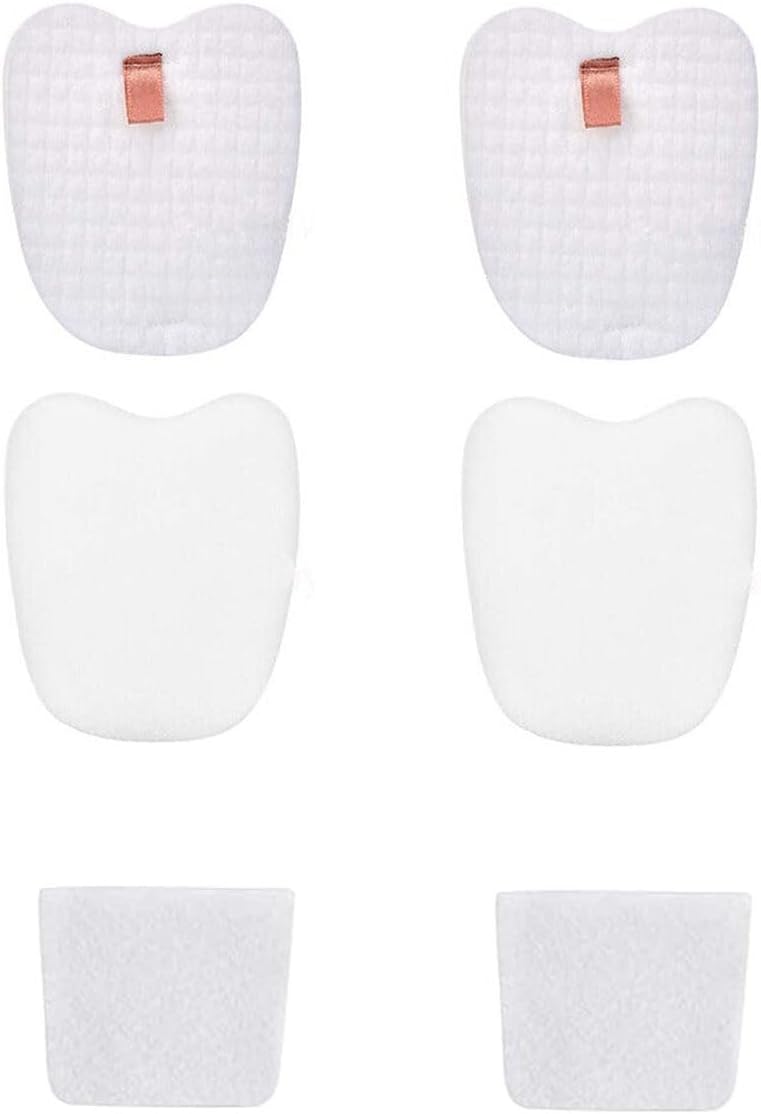
Figure 1: Overview of the Eztronics Corp replacement filter set, showing the foam, felt, and post-filters.
3. Compatibility Information
Important: Please verify your existing filter's shape and model before purchasing or installing, as Shark HV380 series vacuums may have different filter versions despite similar model numbers.
These replacement filters are compatible with the following Shark vacuum models:
- Shark Rocket DuoClean Ultra-Light Corded Stick Vacuum: HV380, HV380C, HV380W, HV381, HV381C, HV382, HV382BRN, HV383, HV384Q, UV380.
- Shark Vacuum with DuoClean & Self-Cleaning Brushroll: QS360QBL, QS360QGN, QS360QPL, QS360QRD, QS360QS.
- Shark Rocket Stick Vacuum with DuoClean & Self-Cleaning Brushroll: ZS360C, ZS361C.
- Shark APEX Stick Vacuum with DuoClean & Self-Cleaning Brushroll: ZS360, ZS362.
These filters are designed to compare to Shark Part # XPMFK320 & XPSTFH380.

Figure 2: Visual guide for identifying the correct filter type for Shark HV380 series vacuums. Ensure your post-filters are square and foam/felt filters are without a hole for compatibility with this set.
4. Installation Instructions
Follow these steps to install the replacement filters into your compatible Shark vacuum cleaner:
- Power Off: Ensure your vacuum cleaner is unplugged from the power outlet before beginning any maintenance or installation.
- Locate Filter Compartment: Refer to your vacuum cleaner's original manual to locate the foam, felt, and post-filter compartments. These are typically found near the dust cup.
- Remove Old Filters: Carefully remove the old foam, felt, and post-filters. Dispose of them appropriately.
- Insert New Filters:
- Place the new foam filter into its designated slot.
- Place the new felt filter on top of the foam filter, ensuring it sits correctly.
- Insert the new post-filter into its compartment.
- Close Compartment: Close the filter compartment cover securely.
- Test: Plug in your vacuum and perform a brief test to ensure proper operation.
5. Maintenance and Cleaning
Regular cleaning and timely replacement of your filters are crucial for maintaining optimal vacuum performance and suction power.
Cleaning Instructions:
- Remove Filters: Unplug the vacuum and remove the foam, felt, and post-filters as described in the installation section.
- Rinse: Rinse the foam and felt filters under warm running water until the water runs clear. A mild detergent may be used if necessary.
- Air Dry: Squeeze out excess water and allow the filters to completely air dry for at least 24 hours before reinstallation. Do not use a dryer or heat gun, as this can damage the filter material.
- Post-Filter: The post-filter should generally be tapped clean to remove loose debris. Avoid washing the post-filter unless specifically instructed by your vacuum's original manual, as some post-filters are not designed for wet cleaning.
Replacement Frequency:
It is recommended to replace the foam, felt, and post-filters every 2-3 months, or more frequently depending on usage and household conditions (e.g., presence of pets, high dust levels). Regularly replacing filters helps maintain suction and filtration efficiency.
6. Specifications
| Feature | Detail |
|---|---|
| Material Type | Foam, Felt |
| Filter Density (Foam) | 60 PPI |
| Reusability | Reusable (after proper cleaning and drying) |
| Compatible Part Numbers | XPMFK320, XPSTFH380 |
| Product Dimensions (Approximate) | Foam/Felt: 4.21" L x 3.5" W x 1" H; Post-Filter: 3.19" L x 2.36" W x 2.76" H |

Figure 3: Detailed dimensions of the foam, felt, and post-filters for accurate fit verification.
7. Troubleshooting
If you experience reduced suction or unusual noise after filter replacement, consider the following:
- Incorrect Installation: Ensure all filters are correctly seated and the filter compartment is securely closed.
- Wet Filters: If filters were recently washed, ensure they are completely dry before reinstallation. Damp filters can restrict airflow.
- Other Blockages: Check the vacuum's hose, brush roll, and dust cup for any blockages that might be affecting suction.
- Filter Condition: If filters are old or heavily soiled, they may need replacement even if recently cleaned.
8. Customer Support
For further assistance or inquiries regarding your Eztronics Corp replacement filters, please contact your retailer or the manufacturer directly. Always refer to your original vacuum cleaner manual for specific instructions related to your Shark model.