
Introduction
This manual provides essential instructions for the safe and efficient operation of your ION Explorer Express Outdoor Party Speaker. Please read this manual thoroughly before using the product and retain it for future reference.
The ION Explorer Express is a portable outdoor speaker featuring a rechargeable battery, Bluetooth connectivity, and an integrated radio. It is designed for various outdoor and indoor audio applications.
Important Safety Information
- Do not expose the unit to water or rain beyond its specified water-resistant rating.
- Do not use near heat sources such as radiators, heat registers, stoves, or other apparatus (including amplifiers) that produce heat.
- Only use attachments/accessories specified by the manufacturer.
- Refer all servicing to qualified service personnel. Servicing is required when the apparatus has been damaged in any way, such as power-supply cord or plug is damaged, liquid has been spilled or objects have fallen into the apparatus, the apparatus has been exposed to rain or moisture, does not operate normally, or has been dropped.
- Protect the power cord from being walked on or pinched, particularly at plugs, convenience receptacles, and the point where they exit from the apparatus.
- Unplug the unit during lightning storms or when unused for long periods.
Package Contents
- Explorer Express Speaker
- Power Cable
- Quickstart Guide (refer to this manual for full details)
Features
- Bluetooth 5.0 for wireless audio streaming
- Rechargeable battery for portable use
- Integrated AM/FM radio with presets
- USB charging port for external devices
- Wide sound dispersion with three speakers (woofer and two tweeters)
- Water-resistant design (IPX4)
- Control via ION Sound XP App
Setup
Charging the Battery
Before first use, ensure the battery is fully charged. Connect the power cable to the speaker's power input and then to a standard power outlet. The charging indicator will illuminate. A full charge typically takes several hours. The speaker can be used while charging.
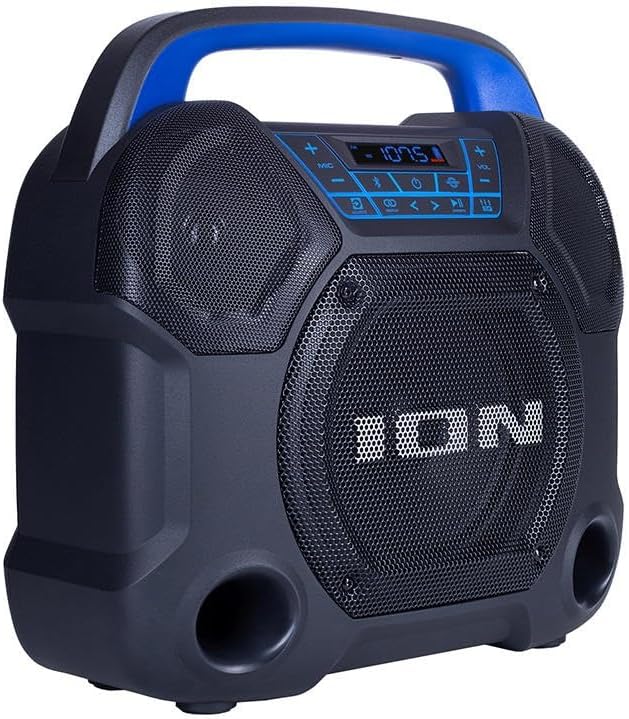
Image 1: Front view of the ION Explorer Express speaker, featuring a dark gray casing, a blue handle, and a central speaker grille with the ION logo. The control panel is visible above the grille. This image illustrates the general appearance of the device during charging or operation.
Powering On/Off
Press and hold the Power button, typically located on the control panel, to turn the speaker on or off. The display will illuminate when the unit is powered on.

Image 2: Top-down view of the ION Explorer Express speaker, highlighting the central control panel. The panel includes buttons for power, Bluetooth, radio mode, play/pause, track navigation, and volume, along with a digital display. The power button is clearly visible on this panel.
Operating Instructions
Bluetooth Pairing
- Ensure the Explorer Express is powered on.
- Press the Bluetooth button on the control panel. The Bluetooth indicator on the display will flash, indicating the speaker is in pairing mode.
- On your Bluetooth-enabled device (e.g., smartphone, tablet), navigate to the Bluetooth settings menu.
- Select "Explorer Express" from the list of available devices.
- Once successfully paired, the Bluetooth indicator on the speaker's display will glow solid, and you will hear an audible confirmation from the speaker.

Image 3: The ION Explorer Express speaker positioned on a wooden table in a home setting, next to a plant and books. This view showcases the speaker's compact size and aesthetic, demonstrating its typical use environment when connected via Bluetooth to a nearby device.
Radio Operation (AM/FM)
- Press the Radio button on the control panel to cycle between AM and FM modes. The current mode and frequency will be shown on the display.
- Use the Tune/Track buttons (< and >) to manually tune to a specific station.
- Press and hold the Tune/Track buttons to automatically seek the next available strong station.
- To save a preset station, tune to the desired station, then press and hold one of the Preset buttons (1-5) until the display confirms the station has been saved. To recall a preset, simply press the corresponding Preset button.
Using the ION Sound XP App
Download the free ION Sound XP App from your device's app store (Apple App Store or Google Play Store). The app allows for remote control of various speaker functions, including volume adjustment, EQ settings, and potentially other features specific to the Explorer Express. Ensure your device is connected via Bluetooth to the Explorer Express for the app to function correctly.
USB Charging
The USB port on the Explorer Express can be used to charge external devices such as smartphones or tablets. Connect your device's USB charging cable to the speaker's USB port. This port provides power for charging but does not support audio playback from USB devices.
Maintenance
- Cleaning: Use a soft, dry cloth to clean the speaker's exterior. Do not use abrasive cleaners, waxes, or solvents, as these may damage the finish.
- Battery Care: For optimal battery life and performance, avoid fully discharging the battery frequently. Recharge the battery regularly, even if the speaker is not in use for extended periods (e.g., once every 3 months).
- Storage: Store the speaker in a cool, dry place away from direct sunlight, extreme temperatures, and excessive humidity. Ensure the unit is turned off before storing.
Troubleshooting
| Problem | Solution |
|---|---|
| No sound from speaker |
|
| Bluetooth device not connecting |
|
| Radio reception is poor |
|
| Speaker turns off unexpectedly |
|
Specifications
| Feature | Detail |
|---|---|
| Model Name | Explorer Express |
| Speaker Type | Outdoor |
| Connectivity Technology | Bluetooth, USB |
| Wireless Communication Technology | Bluetooth |
| Bluetooth Range | Up to 10 Meters (30 feet) |
| Power Source | Battery Powered (Rechargeable) |
| Speaker Maximum Output Power | 65 Watts |
| Woofer Diameter | 6.5 Inches |
| Tweeter Diameter | 2.5 Inches |
| Audio Output Mode | Stereo |
| Control Method | On-unit controls, App |
| Water Resistance | IPX4 (Water-resistant) |
| Product Dimensions (W x D x H) | 7 x 13.48 x 13.23 inches |
| Item Weight | 9.58 pounds (4.35 Kilograms) |
| UPC | 842655103565 |
Warranty Information
The ION Explorer Express Outdoor Party Speaker comes with a Limited Warranty. For specific terms and conditions, including coverage details and duration, please refer to the warranty card included with your product or visit the official Ion Audio website. It is recommended to retain your proof of purchase for any warranty claims.
Customer Support
For technical support, troubleshooting assistance, or to inquire about replacement parts, please visit the official Ion Audio support website or contact their customer service department. Contact information can typically be found on the manufacturer's website or in the product packaging.
Website: www.ionaudio.com/support (Please verify the current support URL on the official Ion Audio website.)

