
Introduction
Thank you for choosing the Fossil BQ2799 Men's Watch. This manual provides detailed instructions for setting up, operating, and maintaining your new timepiece. Please read this manual carefully to ensure proper use and to enjoy the full functionality of your watch.
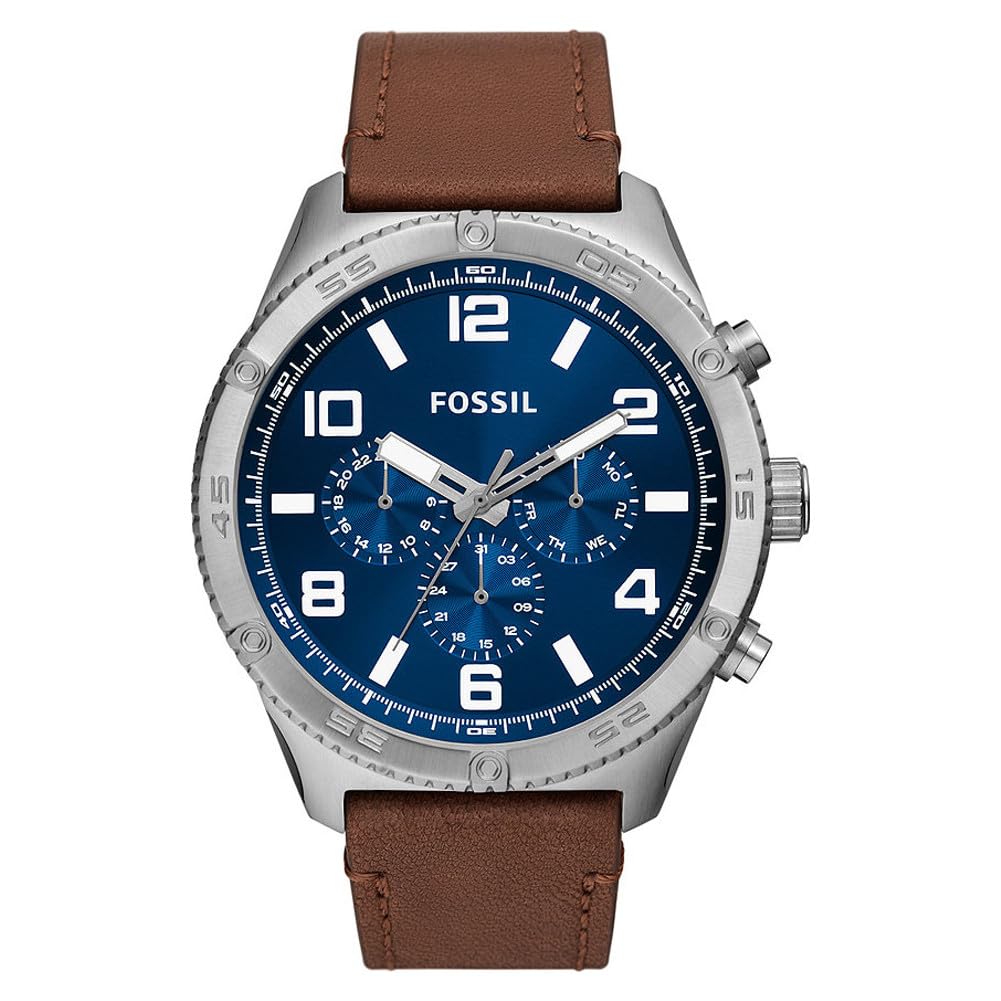
Image: Front view of the Fossil BQ2799 Men's Watch, showcasing the blue dial, silver-tone case, and brown leather strap.
Setup and Initial Use
Setting the Time
- Pull out the crown: Gently pull the crown (the knob on the side of the watch) out to position 2.
- Adjust the time: Turn the crown clockwise or counter-clockwise to set the hour and minute hands to the correct time.
- Push in the crown: Once the time is set, push the crown back into position 1 to start the watch.
Setting the Date
Your Fossil BQ2799 watch features a date display. To set the date:
- Pull out the crown: Gently pull the crown out to position 1 (first click).
- Adjust the date: Turn the crown clockwise or counter-clockwise to set the date. Avoid setting the date between 9 PM and 3 AM, as this can damage the movement.
- Push in the crown: Push the crown back into its original position.

Image: Side view of the Fossil BQ2799 watch, showing the crown and chronograph pushers on the right side of the case.
Operating the Chronograph Function
The Fossil BQ2799 is equipped with a chronograph, allowing you to measure elapsed time. The chronograph features three sub-dials and two pushers.

Image: Close-up of the Fossil BQ2799 watch dial, highlighting the chronograph sub-dials and main hands.
- Start: Press the top pusher (A) to start the chronograph. The chronograph second hand will begin to move.
- Stop: Press the top pusher (A) again to stop the chronograph. The elapsed time will be indicated by the chronograph hands.
- Reset: Press the bottom pusher (B) to reset the chronograph hands to their zero positions.
Understanding the Sub-dials
- 24-Hour Indicator: Displays the time in a 24-hour format, useful for distinguishing AM/PM.
- Chronograph Minutes: Measures elapsed minutes when the chronograph is active.
- Chronograph Seconds: Measures elapsed seconds when the chronograph is active.
Care and Maintenance
Cleaning Your Watch
- Wipe the watch case and crystal with a soft, dry cloth.
- For the leather strap, avoid prolonged exposure to water, direct sunlight, and harsh chemicals to prevent damage and discoloration.
- Do not use chemical cleaners, as they may damage the watch's finish.
Water Resistance
Your Fossil BQ2799 watch has a water resistance rating of 50 meters (5 ATM). This means it is suitable for short periods of recreational swimming, but not for diving or snorkeling. Avoid operating the crown or pushers when the watch is wet to prevent water ingress.
Battery Replacement
The watch is powered by a quartz movement and requires a battery. When the battery runs low, the watch may stop or the second hand may skip. Battery replacement should be performed by a qualified watch technician to ensure the watch's water resistance is maintained.

Image: View of the Fossil BQ2799 watch, focusing on the brown leather strap and the buckle closure.
Troubleshooting
- Watch not running: Check if the crown is fully pushed in. If it is, the battery may need replacement.
- Incorrect time/date: Refer to the "Setting the Time" and "Setting the Date" sections to re-adjust.
- Chronograph hands not resetting to zero: This may require a chronograph reset procedure. Consult a professional watch repair service if the issue persists after attempting to reset.
Specifications
| Feature | Detail |
|---|---|
| Model Number | BQ2799-AMZUK |
| Movement Type | Quartz |
| Display Type | Analog |
| Case Material | Stainless Steel |
| Case Diameter | 50 Millimeters |
| Case Thickness | 13 Millimeters |
| Band Material | Leather |
| Band Width | 24 Millimeters |
| Band Color | Brown |
| Dial Color | Blue |
| Crystal Material | Mineral Glass |
| Water Resistance | 50 Meters (5 ATM) |
| Special Features | Chronograph |
| Item Weight | 250 Grams |
Warranty Information
Fossil watches typically come with a limited warranty covering manufacturing defects. Please refer to the official documentation included with your watch for specific warranty terms and conditions. For warranty claims or service, retain your proof of purchase.
Note: Independent of your legal right of withdrawal, you have a 30-day return right for many products. For exceptions and conditions, please consult the relevant policies.
Customer Support
For further assistance, technical support, or service inquiries regarding your Fossil BQ2799 watch, please visit the official Fossil website or contact their customer service department. Contact information can typically be found in the documentation provided with your watch or on the Fossil brand website.
You can also visit the Fossil Store on Amazon for more product information.
