
Introduction
This instruction manual provides essential information for the safe and effective installation, operation, and maintenance of your new ORIGPARTS 2500300019 Control Board PCB. This component is a genuine replacement part designed to restore the proper functionality of compatible Magic Chef and Danby top freezer refrigerators. Please read this manual thoroughly before proceeding with any installation or service.
Safety Information
WARNING: Electrical shock hazard. Disconnect power before servicing. Only qualified technicians should attempt installation or repair of this component. Failure to follow these instructions could result in serious injury or death.
- Always disconnect the refrigerator from the power supply before beginning any work.
- Wear appropriate personal protective equipment, including insulated gloves.
- Handle the control board by its edges to avoid damaging electronic components or introducing static discharge.
- Ensure all connections are secure and correctly oriented before restoring power.
Compatibility
The ORIGPARTS 2500300019 Control Board PCB (Manufacturer Part #: W19-48) is compatible with various Magic Chef and Danby top freezer refrigerator models, including but not limited to:
- HMDR1000BE
- HMDR1000WE
- HMDR1000ST
- DFF101B1WDB
Always verify the part number on your existing control board matches 2500300019 or W19-48 to ensure correct compatibility.
Installation
This section outlines the general procedure for replacing the control board. Specific steps may vary slightly depending on your refrigerator model. Refer to your appliance's service manual for detailed instructions if available.
- Disconnect Power: Unplug the refrigerator from the wall outlet or turn off the circuit breaker supplying power to the appliance.
- Access the Control Board: Locate the control board compartment, typically found at the back of the refrigerator or behind a control panel. You may need to remove screws or panels to gain access.
- Document Connections: Before disconnecting any wires, take clear photos or make a diagram of all wire connections to the old control board. This is crucial for correct reassembly.
- Disconnect Wires: Carefully disconnect all wire harnesses and connectors from the old control board. Note that some connectors may have locking tabs.
- Remove Old Board: Unscrew or unclip the old control board from its mounting brackets.
- Install New Board: Position the new ORIGPARTS 2500300019 control board in the same location and secure it with the original screws or clips.
- Reconnect Wires: Using your photos or diagram, carefully reconnect all wire harnesses and connectors to the new control board. Ensure each connection is firm and correctly seated.
- Secure Panels: Reattach any panels or covers that were removed to access the control board.
- Restore Power: Plug the refrigerator back into the wall outlet or turn on the circuit breaker.
- Test Functionality: Verify that the refrigerator powers on and operates correctly. Check for proper cooling in both the freezer and refrigerator compartments.

Image 1: Top view of the 2500300019 Control Board PCB. This image displays the component side of the circuit board, highlighting the main relays, transformers, capacitors, and various connection points. A label with 'W19-48' and 'RoHS' is clearly visible, along with a 'High Voltage' warning symbol.
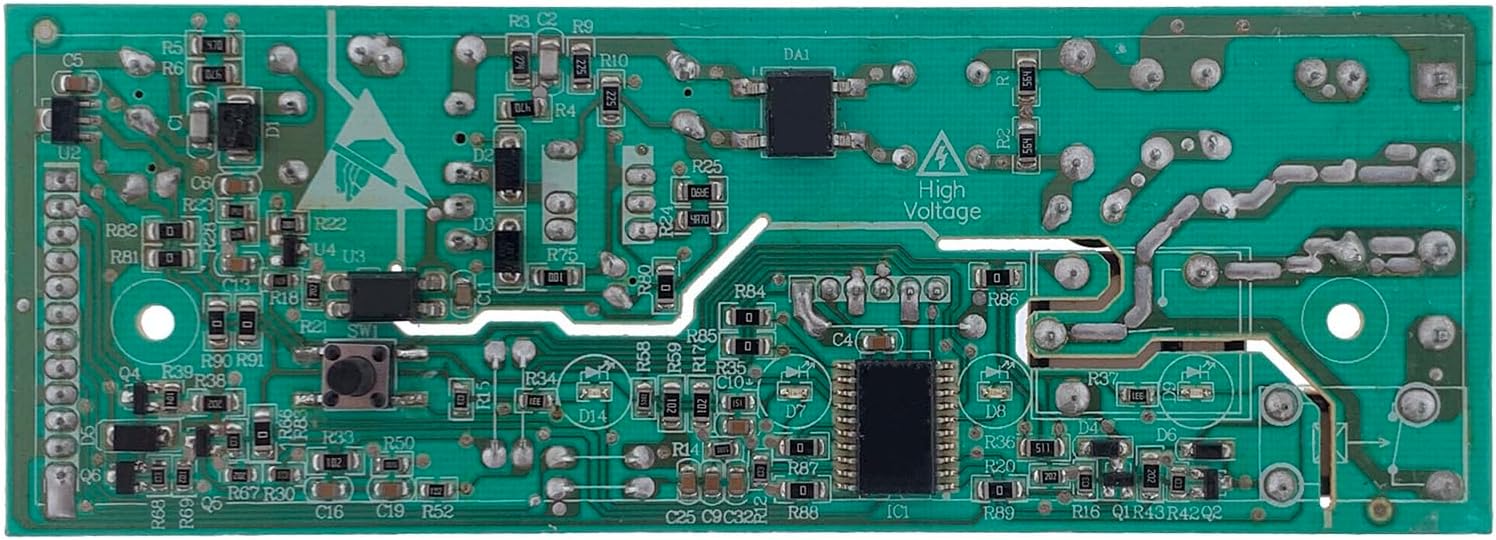
Image 2: Bottom view of the 2500300019 Control Board PCB. This image shows the solder side of the circuit board, revealing the intricate green traces and the soldered connections of the electronic components. A 'High Voltage' warning symbol is also present on this side.
Operation
The control board is an integral component of your refrigerator's electronic system. Once correctly installed, it operates automatically to manage various functions, including temperature regulation, defrost cycles, and compressor operation. No direct user interaction with the control board itself is required for its operation; it functions as part of the refrigerator's overall system.
Maintenance
The ORIGPARTS 2500300019 Control Board PCB is designed for long-term reliability and typically requires no routine maintenance. To ensure its longevity:
- Keep the area around the control board clean and free from dust and debris.
- Ensure proper ventilation around the refrigerator to prevent overheating of electronic components.
- Avoid exposing the control board to moisture or extreme temperature fluctuations.
Troubleshooting
If your refrigerator experiences issues after control board replacement, consider the following troubleshooting steps:
- No Power: Check if the refrigerator is properly plugged in and if the circuit breaker has tripped. Verify all wire connections to the control board are secure.
- Incorrect Operation: Double-check all wire connections against your diagram or photos to ensure they are correctly seated and in the right terminals.
- Error Codes: Consult your refrigerator's user manual or service manual for specific error code interpretations.
- Persistent Issues: If problems persist after verifying connections and power, it may indicate an issue with another component or a faulty installation. Professional assistance is recommended.
Specifications
| Attribute | Detail |
|---|---|
| Part Number | 2500300019 |
| Manufacturer Part # | W19-48 |
| Brand | ORIGPARTS |
| Compatibility | Magic Chef, Danby Top Freezer Refrigerators (e.g., HMDR1000BE, HMDR1000WE, HMDR1000ST, DFF101B1WDB) |
| Power Source | AC |
| Item Weight | 3.68 ounces |
| Package Dimensions | 7.1 x 2.5 x 1.2 inches |
Warranty and Support
For warranty information or technical support regarding the ORIGPARTS 2500300019 Control Board PCB, please contact the seller or ORIGPARTS customer service directly. Keep your purchase receipt as proof of purchase.