
Gurexl JZL-9222-27
Gurexl RGB Night Stand Instruction Manual
Model: JZL-9222-27 | Brand: Gurexl
Introduction
This manual provides detailed instructions for the assembly, operation, and maintenance of your Gurexl RGB Night Stand. Designed for modern living spaces, this nightstand features a wireless charging station, USB and Type-C ports, and an auto-sensing 24-color dimmable LED light system. Please read this manual thoroughly before use to ensure proper functionality and safety.
Important Safety Information
WARNING:
Always follow the assembly instructions carefully to avoid injury. Do not exceed the maximum weight recommendation of 200 pounds to maintain stability and prevent accidents. Keep the charging station and LED lights out of reach of children and pets to avoid potential hazards.
Package Contents
Verify that all components are present before beginning assembly:
- 1 x Gurexl RGB Night Stand (Model JZL-9222-27)
- Assembly Hardware Kit
- Instruction Manual (this document)
For a detailed list of parts, please refer to the official installation manual.
Setup and Assembly
Assembly of the Gurexl RGB Night Stand requires careful attention to detail. It is recommended to have two people for assembly. Please follow the step-by-step instructions provided in the dedicated installation manual for optimal results.
Download Official Installation Manual (PDF)
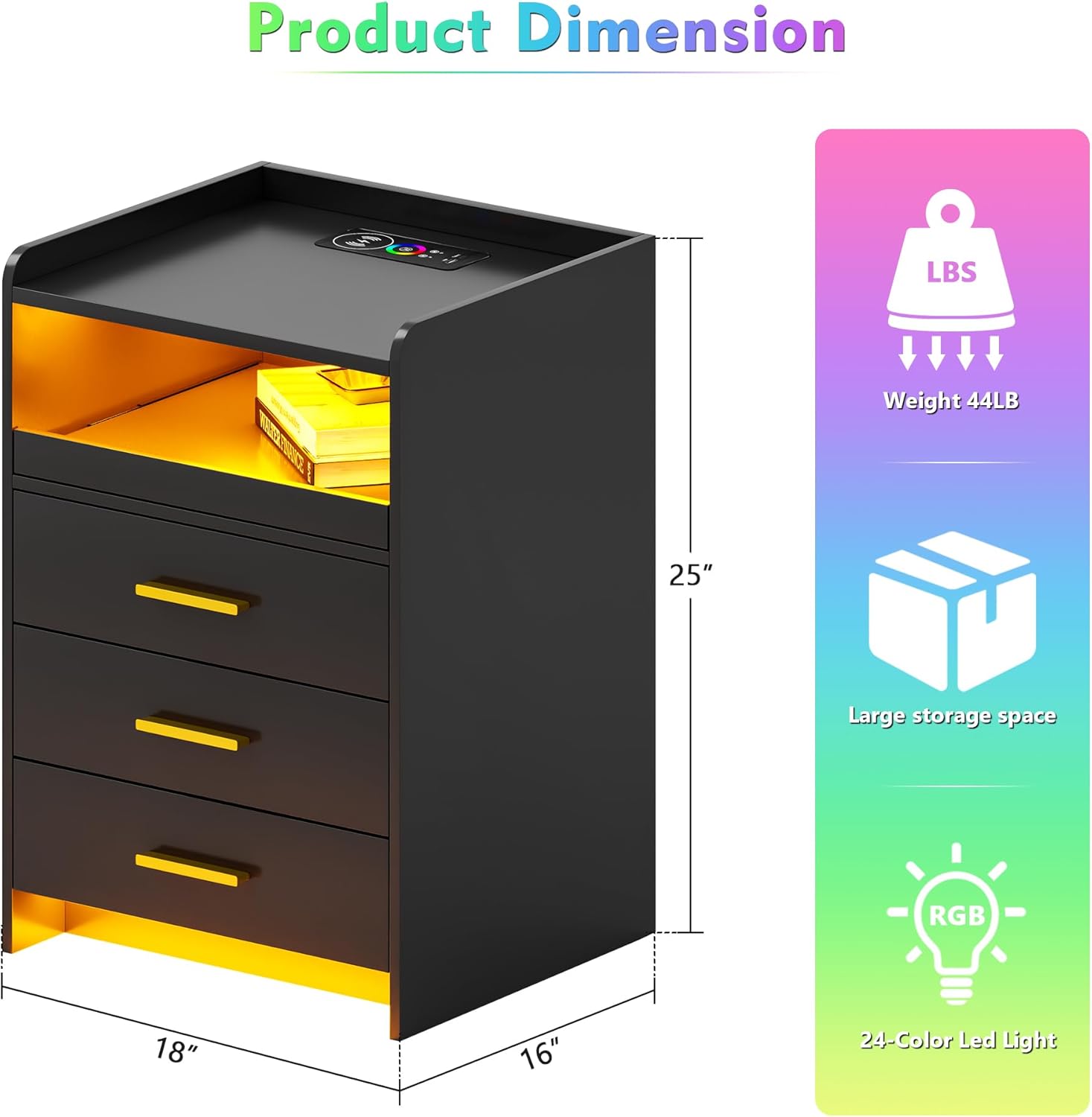
Image: The Gurexl RGB Night Stand showing its dimensions (15.7"D x 17.7"W x 25.2"H) and weight capacity (44 lbs), highlighting its compact design and storage capabilities.
Ensure all screws are tightened securely but do not overtighten to prevent damage to the engineered wood components. It is advisable to loosely assemble parts first, then tighten them once the structure is aligned.
Operating Instructions
Wireless Charging Station and USB Ports
The nightstand is equipped with a built-in wireless charging pad, one USB-A port, and one USB-C port for convenient device charging. Simply place your compatible smartphone on the wireless charging pad, or connect your devices to the respective USB ports.

Image: The Gurexl RGB Night Stand with a smartphone wirelessly charging on top and another device connected via USB, demonstrating the integrated charging features.
Note: Wireless charging efficiency may vary depending on device placement and phone case thickness. USB charging speed may be slower than dedicated wall chargers, especially when the phone screen is active.
Auto Sensor 24-Color Dimmable LED Light
The integrated LED lighting system offers 24 dimmable color options to customize your ambiance. The human body sensing function automatically illuminates the nightstand when motion is detected within 3-4 meters, turning off after 30 seconds of inactivity.

Image: A person walking past the Gurexl RGB Night Stand, illustrating the human body induction sensor activating the LED light automatically.

Image: A visual guide demonstrating the 24 available RGB colors and the touch controls for adjusting brightness on the Gurexl RGB Night Stand.
To change colors, gently touch the designated control area on the nightstand's surface. Long press to adjust the brightness level.
Storage Space and Pull-out Tray
The nightstand features three spacious drawers for organizing personal items. Additionally, a convenient pull-out tray provides extra surface area when needed, ideal for holding beverages or small accessories.

Image: A close-up view of the Gurexl RGB Night Stand with its three drawers partially open, revealing ample storage space for various items.

Image: A close-up of the Gurexl RGB Night Stand's pull-out tray extended, holding a coffee cup and books, demonstrating its utility as an additional surface.
Care and Maintenance
- Cleaning: Wipe surfaces with a soft, damp cloth. Avoid harsh chemicals or abrasive cleaners that may damage the finish.
- Spills: Immediately wipe up any spills to prevent water damage or staining, especially on the glossy finish.
- Electrical Components: Ensure the nightstand is unplugged before cleaning any electrical components. Do not immerse any part of the nightstand in water.
- Weight Limit: Adhere to the maximum weight recommendation of 200 pounds to prevent structural damage.
Troubleshooting
| Problem | Possible Cause | Solution |
|---|---|---|
| Wireless charging not working. | Device not aligned, thick phone case, incompatible device. | Ensure device is centered on the charging pad. Remove thick phone cases. Verify device supports Qi wireless charging. |
| USB/Type-C ports not charging. | Loose connection, faulty cable, power issue. | Check all cable connections. Try a different USB cable. Ensure the nightstand is properly plugged into a power outlet. |
| LED lights not turning on/off or changing colors. | Power issue, sensor obstruction, control malfunction. | Verify power connection. Ensure the human body sensor is not obstructed. Gently touch the control area. If issues persist, unplug and re-plug the nightstand. |
| Drawers are stiff or not sliding smoothly. | Misalignment during assembly, debris in tracks. | Check assembly for proper alignment of drawer slides. Clean tracks of any dust or debris. |
Product Specifications
| Brand | Gurexl |
| Model Name | JZL-9222-27 |
| Product Dimensions (D x W x H) | 15.7"D x 17.7"W x 25.2"H |
| Item Weight | 40 Pounds |
| Maximum Weight Recommendation | 200 Pounds |
| Color | RGB Black (available with White or Grey top color options) |
| Material Type | Engineered Wood (Frame), Metal (Handle) |
| Finish Type | Glossy |
| Number of Drawers | 3 |
| Features | Wireless Charging Station, USB & Type-C Ports, Auto Sensor 24-Color Dimmable LED Light, Pull-out Tray |
| Indoor/Outdoor Usage | Indoor |
| UPC | 726451413144 |
Warranty and Support
Gurexl stands behind the quality of its products. For specific warranty details and support inquiries, please refer to your purchase documentation or visit the official Gurexl store.
Visit the Official Gurexl Store on Amazon
For technical assistance or replacement parts, please contact Gurexl customer service with your model number and purchase information readily available.