Introduction
This manual provides detailed instructions for the safe and effective use of your Generic KM-01 Knee Massager. Please read this manual thoroughly before operating the device and retain it for future reference. The KM-01 is designed to provide heat, vibration, and red light therapy to the knee joint, aiming to alleviate discomfort and promote relaxation.
Safety Information
- Consult a physician before use if you have pre-existing medical conditions, are pregnant, have a pacemaker, or have any concerns about using this device.
- Do not use on open wounds, swollen areas, or areas with skin irritation.
- Keep out of reach of children.
- Do not immerse the device in water or use it in excessively humid environments.
- Always ensure the device is fully charged before use to avoid interruptions.
- Discontinue use immediately if you experience any discomfort or adverse reactions.
Product Overview
The Generic KM-01 Knee Massager combines red infrared heat, vibration, and pulse modes to target knee discomfort. It features an ergonomic design for a secure fit and an LED touch screen for easy operation.

Image: The KM-01 Knee Massager in use, illustrating its application on the knee with visual cues for heat and vibration.
Components and Controls

Image: Detailed diagram of the KM-01 Knee Massager, highlighting its various components and control indicators such as battery capacity, time display, heating mode, massage mode, red light therapy, laser diodes, power/charging indicator, and the on/off switch.
- Battery Capacity Indicator: Displays current battery level.
- Time Display: Shows remaining operation time.
- Heating Mode (H): Activates and adjusts heat intensity.
- Massage Mode (M): Activates and adjusts vibration intensity.
- Red Light Therapy (R): Activates red light function.
- 3-in-1 Laser Diodes: Internal components for red light therapy.
- Power/Charging Indicator: Light indicating power status or charging.
- Turn On/Off Switch: Side button for powering the device.
Setup
Charging the Device
- Before first use, fully charge the device.
- Connect the charging cable to the device's charging port and a suitable power source.
- The power/charging indicator will show charging status. The battery capacity indicator on the LED screen will also update.
- Once fully charged, disconnect the cable.
Wearing the Device
- Place the massager on your knee, ensuring the internal red light area is centered over the knee joint.
- Adjust the retractable strap to secure the device firmly but comfortably around your knee. The ergonomic design helps prevent it from falling off during use.
Operating Instructions
The KM-01 Knee Massager offers three primary modes: Heating (H), Massage (M), and Red Light Therapy (R). These modes can be used independently or in combination.
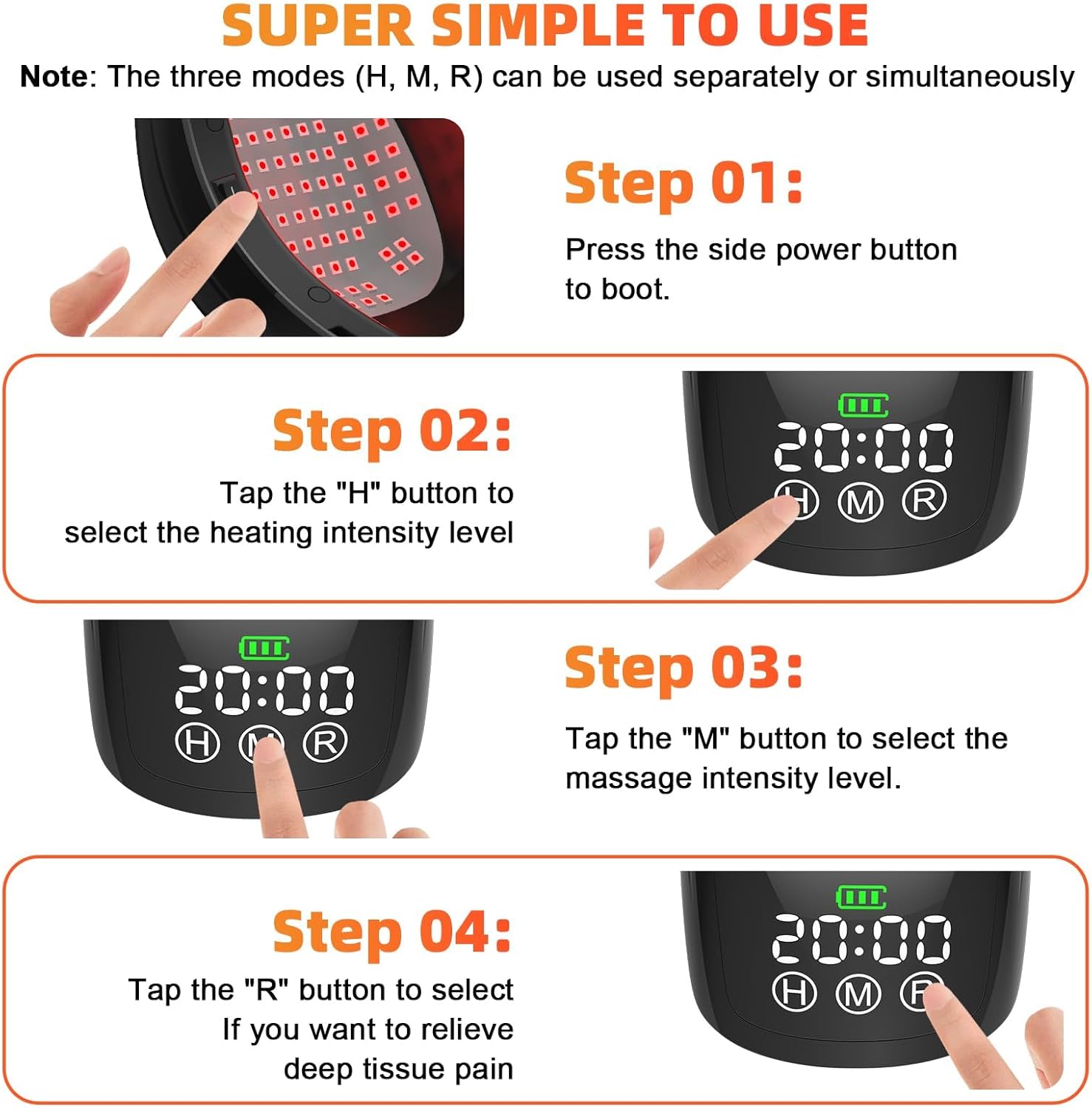
Image: Visual guide demonstrating the four steps to operate the KM-01 Knee Massager: powering on, adjusting heat, adjusting massage, and activating red light therapy.
- Step 1: Power On
Press the side power button to turn on the device. The LED screen will illuminate, displaying the default time (e.g., 20:00) and mode indicators (H, M, R). - Step 2: Select Heating Intensity
Tap the "H" button on the touch screen to cycle through the available heating intensity levels. The device offers two heating settings (e.g., 40°C and 45°C, or 104°F and 120°F). - Step 3: Select Massage Intensity
Tap the "M" button to select the desired massage (vibration) intensity level. There are two massage vibration modes available. - Step 4: Activate Red Light Therapy
Tap the "R" button to activate the red light therapy function. This mode is designed to support deep tissue relief.
The device has a default operating time, typically 20 minutes. The time display will count down during operation. The combination of modes can be adjusted at any point during the session.
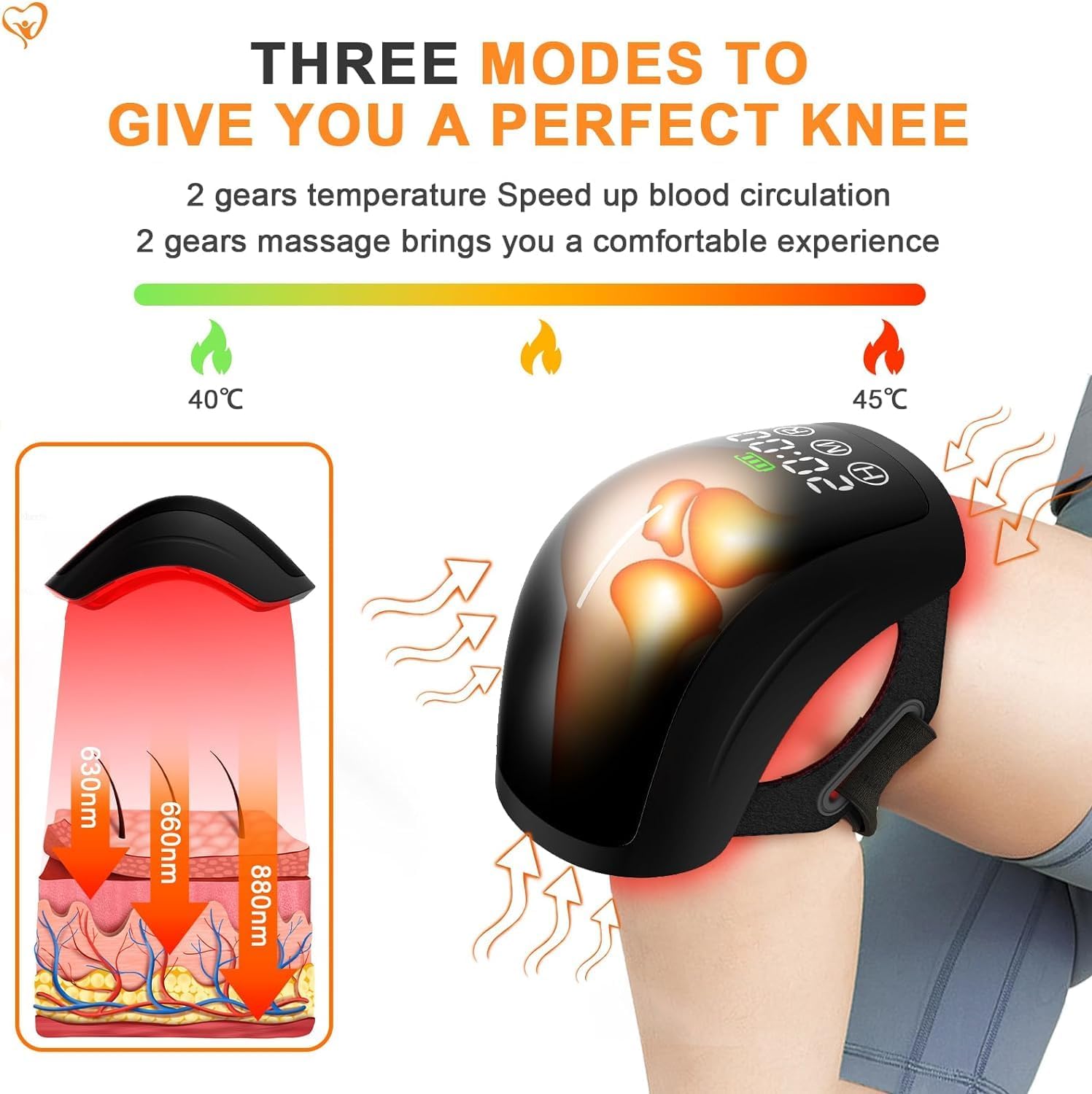
Image: An illustration detailing the three operational modes of the KM-01 Knee Massager, showing temperature ranges, massage intensity, and the penetration depth of red light therapy at different wavelengths.
Pulse Mode vs. Continuous Mode
The device supports two distinct operational approaches for energy release:
- Pulse Mode: Delivers energy in short, intense bursts (up to 500J), designed for deeper penetration.
- Continuous Mode: Provides a steady, gentle release of energy, allowing for accumulated heat and wider thermal diffusion over a longer duration.
The combination of these modes can assist in improving knee joint conditions, accelerating recovery, and enhancing overall knee comfort.
Maintenance
Cleaning
- Ensure the device is turned off and unplugged before cleaning.
- Wipe the exterior of the device with a soft, damp cloth. Do not use abrasive cleaners or immerse the device in water.
- Allow the device to air dry completely before storing or next use.
Storage
- Store the device in a cool, dry place, away from direct sunlight and extreme temperatures.
- Keep the device in its original packaging or a protective case to prevent damage.
Troubleshooting
| Problem | Possible Cause | Solution |
|---|---|---|
| Device does not turn on. | Low battery or no charge. | Charge the device fully using the provided cable. |
| No heat or vibration. | Mode not activated or set to lowest intensity. | Ensure 'H' or 'M' mode is selected and intensity is adjusted via the touch screen. |
| Red light not visible. | 'R' mode not activated. | Tap the 'R' button on the touch screen to activate red light therapy. |
| Device feels loose on knee. | Strap not adjusted correctly. | Tighten the retractable adjustment strap for a secure fit. |
Specifications
- Model Number: KM-01
- Product Dimensions: 5"L x 5"W x 5"H
- Item Weight: 1 Kilogram (2.2 Pounds)
- Special Features: Heat, Vibration, Red Light Therapy
- Heating Settings: 2 levels (e.g., 40°C/104°F, 45°C/120°F)
- Massage Modes: 2 vibration levels
- Power Source: Rechargeable Battery
- Manufacturer: HaSoCare
Support
For any questions, concerns, or technical assistance regarding your Generic KM-01 Knee Massager, please contact our customer support. We are committed to resolving your issues promptly.
Please refer to your purchase documentation for specific contact information or visit the manufacturer's website.


