
1. Product Overview
The TonyPi Pro is a high-performance AI vision robot designed for advanced AI education and applications. Powered by the Raspberry Pi 5, it integrates OpenCV for image processing and robotic inverse kinematics algorithms. This open-source platform supports sophisticated AI robotics development, offering a flexible environment for learning and innovation.

Figure 1: The TonyPi Pro AI Humanoid Robot, a white bipedal robot with multiple joints, holding a red cube.
Key Features:
- AI-Driven & Raspberry Pi Powered: High-performance AI vision robot utilizing Raspberry Pi 5, OpenCV, and robotic inverse kinematics.
- AI Large Model ChatGPT Integration: Enhanced human-machine interaction through a multimodal model with ChatGPT, enabling advanced embodied AI applications.
- AI Voice Command & Recognition: Understands voice commands, analyzes visual scenes, and performs appropriate actions for smooth voice interaction.
- AI Vision Recognition and Tracking: Equipped with an HD camera for color recognition, target tracking, ball kicking, line following, and MediaPipe-based motion control.
- High-Voltage Intelligent Bus Servos: 16 servos provide rapid response and stable output for precise multi-joint coordination and complex motion control.
- Comprehensive Learning Resources: Abundant educational content, source codes, software, and online support for robotic motion control, OpenCV, deep learning, and AI models.
2. Setup and Assembly
The TonyPi Pro kit requires assembly. Follow the detailed instructions provided in the included user manual and video tutorials for proper construction. Ensure all components are securely connected before powering on the device.

Figure 2: Illustration of the TonyPi Pro assembly process, highlighting its ease of construction.
2.1 Package Contents:
Verify all components are present according to the packing list. The TonyPi Pro Kit includes:

Figure 3: Visual representation of the TonyPi Pro Kit contents, including robot parts, controller, and accessories.
2.2 Powering On:
The robot is powered by a Lithium Ion battery (11.1V 2000mAh 10C). Ensure the battery is fully charged before first use. Connect the battery to the designated port on the robot's main control board. The robot features a real-time voltage display to monitor battery levels.

Figure 4: The robot's real-time voltage display, allowing users to monitor battery status.
2.3 Software Installation:
The TonyPi Pro operates with dedicated software for various control and programming functions. Refer to the provided learning materials and online resources for detailed instructions on installing the necessary APP (Android/iOS) and PC software. The Raspberry Pi Control System features the Raspberry Pi 5, an expansion board, and an active heat sink for stable performance.

Figure 5: Diagram illustrating the Raspberry Pi Control System components.
3. Operating Instructions
The TonyPi Pro offers multiple modes of operation and interaction, leveraging its advanced AI capabilities.
Video 1: An overview of the TonyPi Pro Hiwonder Humanoid Robot's various functions and capabilities.
3.1 AI Voice Command & Recognition:
Equipped with ChatGPT and an AI voice interaction box, TonyPi Pro can understand and respond to voice commands, enabling natural human-machine interaction. It can analyze visual scenes and carry out appropriate actions based on verbal instructions.
Video 2: Demonstrates TonyPi's ability to engage in AI voice interactions and answer questions using ChatGPT.
Video 3: Illustrates how to use programming to integrate ChatGPT for AI vision and voice capabilities.

Figure 6: TonyPi Pro's voice control and scene understanding capabilities, powered by ChatGPT.

Figure 7: TonyPi Pro functioning as a smart assistant and reporting environmental conditions like temperature.
3.2 AI Vision Recognition and Tracking:
TonyPi Pro's HD camera and OpenCV integration enable various vision-based tasks, including object tracking, color recognition, face detection, and QR code recognition. Its 2DOF head provides a wide field of view for dynamic tracking.

Figure 8: Examples of AI vision capabilities: Object Tracking, Color Tracking, Face Recognition, and QR Code Recognition.
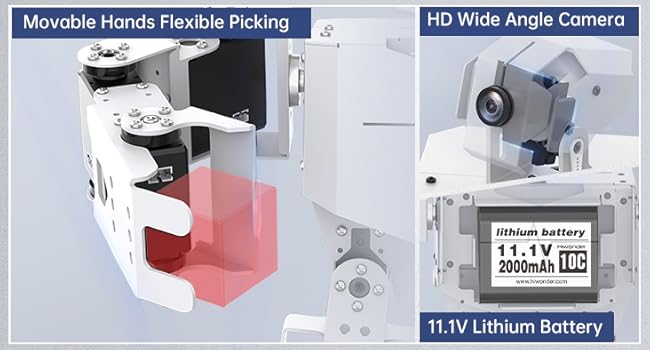
Figure 9: Detailed view of object tracking and tag recognition using OpenCV algorithms.
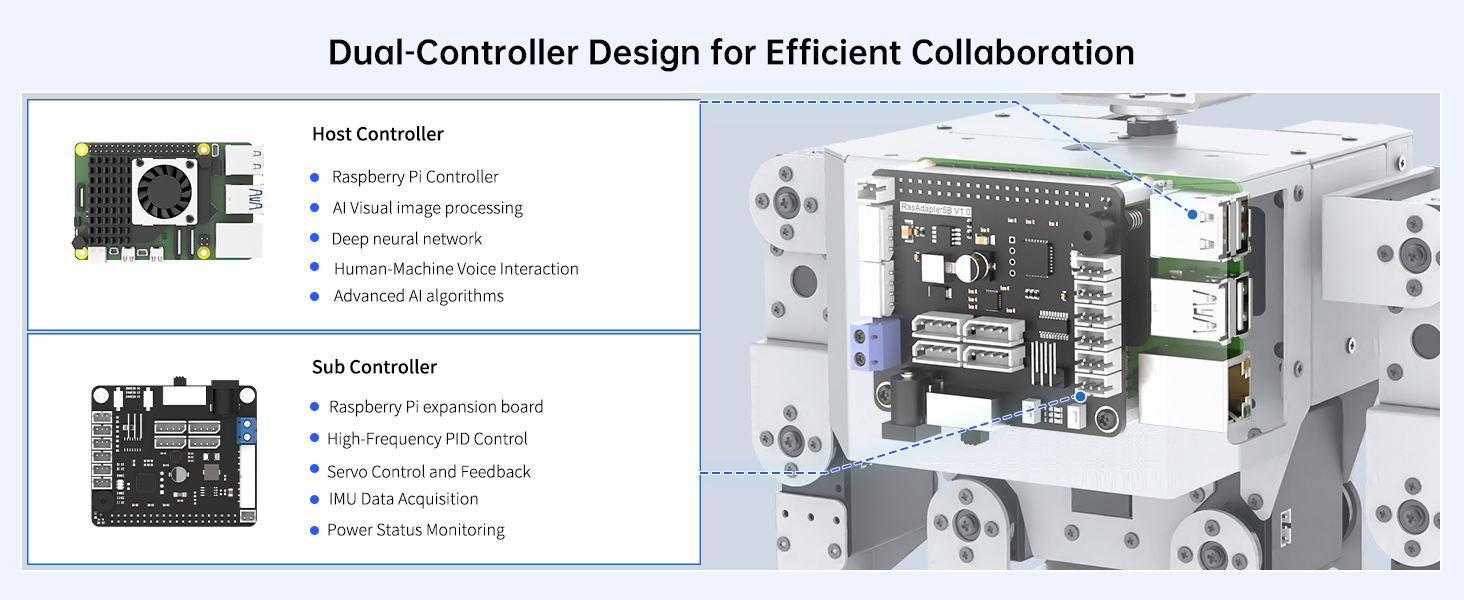
Figure 10: TonyPi Pro's capabilities in face detection and autonomous line following.
Video 4: Demonstrates AI humanoid robot's line-tracking capabilities with ChatGPT integration and Raspberry Pi 5 controller.
3.3 Advanced Motion Control:
With 16 high-voltage intelligent bus servos, TonyPi Pro can perform complex movements and interactive actions, including ball kicking, obstacle crossing, and intelligent transport.
Video 5: Smart AI robot with ChatGPT, programmable in Python with Raspberry Pi 5 for ball tracking & kicking.

Figure 11: TonyPi Pro performing auto shooting by tracking a ball and kicking it into a goal.
Video 6: TonyPi AI smart robot demonstrating cross hurdle, up & down step, and kick ball for bionics & programming learning.

Figure 12: TonyPi Pro autonomously crossing hurdles by identifying their position.

Figure 13: TonyPi Pro navigating stairs through independent visual judgment.
Video 7: Smart AI robot with ChatGPT, Python programming, and Raspberry Pi 5 for intelligent transport tasks.

Figure 14: TonyPi Pro performing intelligent transport by identifying and moving objects to designated locations.
3.4 Control Methods:
TonyPi Pro can be controlled via a dedicated mobile application (Android/iOS), PC remote control, or PC software with a graphical interface for editing robot actions.

Figure 15: Overview of control methods: APP Control, PC Remote Control, and PC Software Control.
4. Maintenance
Regular maintenance ensures the longevity and optimal performance of your TonyPi Pro robot.
4.1 Cleaning:
Use a soft, dry cloth to clean the robot's exterior. Avoid using abrasive cleaners or solvents that may damage the finish or internal components. Keep the camera lens clean for optimal vision performance.
4.2 Battery Care:
The robot uses a Lithium Ion battery. Always use the provided charger. Do not overcharge or completely drain the battery. Store the robot and battery in a cool, dry place when not in use.
4.3 Servo Maintenance:
The TonyPi Pro is equipped with high-voltage intelligent bus servos. These servos are designed for durability, but avoid excessive force or continuous stalling, which can lead to overheating and damage. If a servo malfunctions, refer to the troubleshooting section or contact support.

Figure 16: Details of the intelligent high-voltage bus servos used in TonyPi Pro.
5. Troubleshooting
This section provides solutions to common issues you might encounter with your TonyPi Pro robot.
| Problem | Possible Cause | Solution |
|---|---|---|
| Robot does not power on. | Low battery or loose connection. | Ensure battery is charged and securely connected. Check power switch. |
| AI Vision not tracking objects accurately. | Poor lighting, dirty camera lens, or incorrect software calibration. | Ensure adequate lighting. Clean camera lens. Recalibrate vision software as per manual. |
| Voice commands not recognized. | Noisy environment, incorrect microphone setup, or software issue. | Reduce background noise. Verify microphone connection and settings. Restart voice recognition software. |
| Robot movements are jerky or unresponsive. | Loose servo connections, low battery, or software error. | Check all servo connections. Charge battery. Restart robot and software. |
6. Technical Specifications
Detailed specifications for the TonyPi Pro AI Humanoid Robot.

Figure 17: Comprehensive table of TonyPi Pro technical specifications.
- Package Dimensions: 17 x 13 x 7 inches
- Item Weight: 7 pounds
- ASIN: B0C99DDMF9
- Item Model Number: [ModelNumberStartingWithTonyPiPro]
- Manufacturer Recommended Age: 15 years and up
- Batteries: 1 Lithium Ion battery required (included)
- Manufacturer: Hiwonder
- Camera Pixel: 480P
- Pan-tilt DOF: 2DOF
- Battery Capacity: 11.1V 2000mAh 10C lithium battery
- Working Hour: About 60 minutes
- Hardware: Raspberry Pi and Raspberry Pi expansion board
- Software: APP + PC software
- Communication: WiFi, Ethernet
- Servo Type: LX-824HV Bus servo / LFD-01M anti-blocking servo
7. Warranty and Support
HIWONDER is committed to providing high-quality products and excellent customer service. For any inquiries, technical support, or warranty claims, please refer to the following resources:
- Online Resources: Visit the official HIWONDER website for comprehensive learning materials, source codes, software updates, and video tutorials.
- Customer Service: Contact HIWONDER customer support directly through their website or the platform where the product was purchased for assistance with any issues.
- Warranty Information: Specific warranty details are typically provided with the product packaging. Please retain your proof of purchase for warranty validation.