
Introduction
This manual provides detailed instructions for the assembly, operation, and maintenance of your Yoobure Nightstand with Charging Station. Please read all instructions carefully before assembly and use to ensure safe and proper functionality. Keep this manual for future reference.
Safety Information
- Ensure all connections for the charging station are secure before use.
- Do not overload the electrical outlets. Refer to the specifications for maximum electrical ratings.
- Keep liquids away from the charging station to prevent electrical shock.
- Place the nightstand on a flat, stable surface to prevent tipping.
- Do not exceed the maximum weight capacity: 33 lbs for the tabletop and 22 lbs for each shelf.
- Keep small parts away from children during assembly.
Package Contents
Before beginning assembly, verify that all parts are present and undamaged. If any parts are missing or damaged, please contact customer support.
- Tabletop Panel
- Drawer Front, Sides, and Back Panels
- Drawer Bottom Panel
- Metal Frame Legs (4)
- Bottom Shelf Panel
- Charging Station Assembly (with 2 AC outlets, 2 USB ports, and 6.56 ft power cord)
- Adjustable Feet (4)
- Hardware Pack (screws, bolts, drawer knob, Allen wrench)
- Instruction Manual
Setup and Assembly
Assembly is designed to be straightforward. All necessary tools and numbered parts are included. It is recommended that one person performs the assembly.
- Unpack and Identify Parts: Carefully remove all components from the packaging. Lay them out and compare them against the parts list in this manual to ensure everything is present.
- Assemble the Drawer: Attach the drawer sides and back to the drawer front using the provided hardware. Slide the drawer bottom into the grooves. Secure the drawer knob to the front panel.
- Attach Frame to Tabletop: Secure the metal frame legs to the underside of the tabletop panel using the designated screws.
- Install Charging Station: Insert the charging station assembly into the pre-cut opening on the side of the nightstand frame. Ensure it clicks securely into place or is fastened with provided screws.
- Attach Bottom Shelf: Fasten the bottom shelf panel to the lower part of the metal frame legs.
- Insert Drawer: Carefully slide the assembled drawer into its designated slot beneath the tabletop.
- Attach Adjustable Feet: Screw the adjustable feet into the bottom of each metal leg. Adjust them as needed to ensure the nightstand is level and stable on your floor.

This diagram illustrates the precise measurements of the nightstand, including height, width, depth, drawer dimensions, and shelf clearance, along with weight capacities for the tabletop (33 lbs) and shelf (22 lbs).
This video provides a visual guide to assembling the nightstand and showcases its key features, including the charging station, drawer, and storage shelf.
Operating Instructions
The Yoobure Nightstand is designed for convenient use in your bedroom or living space.
- Charging Station: Plug the nightstand's power cord into a standard 120V AC wall outlet. The integrated charging station features two AC outlets and two USB ports (5V/2A). Use these to power and charge your electronic devices such as phones, tablets, and lamps.
- Drawer Storage: Utilize the spacious drawer for discreet storage of personal items, keeping your tabletop clutter-free.
- Open Shelf: The bottom open shelf provides additional storage or display space for books, decorative items, or a radio.

A detailed view of the charging station, showing the two AC outlets and two USB ports, along with a connected device being charged.

This image compares the integrated, hidden power strip design of the Yoobure nightstand, which keeps the tabletop tidy, against a design with an exposed power strip that can lead to clutter.
Maintenance
To maintain the appearance and longevity of your nightstand:
- Cleaning: Wipe the surfaces with a soft, damp cloth. Avoid using harsh chemicals or abrasive cleaners that may damage the finish.
- Spills: Promptly wipe up any spills, especially near the charging station, to prevent damage.
- Inspection: Periodically check all screws and connections to ensure they remain tight. Retighten if necessary.
Troubleshooting
| Problem | Possible Cause | Solution |
|---|---|---|
| Charging station not working | Power cord not fully plugged in; Wall outlet not active; Device not properly connected. | Ensure the nightstand's power cord is securely plugged into a working wall outlet. Check device connections. Test the wall outlet with another appliance. |
| Nightstand is wobbly | Uneven floor; Loose assembly screws. | Adjust the leveling feet at the bottom of each leg until the nightstand is stable. Check and tighten all assembly screws. |
| Drawer does not slide smoothly | Drawer not assembled correctly; Obstruction in the slide mechanism. | Recheck drawer assembly. Ensure no items are obstructing the drawer slides. |
Specifications
| Feature | Detail |
|---|---|
| Product Dimensions (L x W x H) | 15.75" x 11.81" x 23.62" |
| Item Weight | 289.28 Ounces (approx. 18.08 lbs) |
| Tabletop Weight Capacity | 33 lbs |
| Shelf Weight Capacity | 22 lbs (each shelf) |
| Frame Material | Metal |
| Top Material Type | Engineered Wood |
| Color | Grey |
| Charging Ports | 2 AC Outlets (120V/12A), 2 USB Ports (5V/2A) |
| Power Cord Length | 6.56 ft |
| Number of Drawers | 1 |
| Number of Shelves | 2 |
| Assembly Required | Yes (Tools included) |
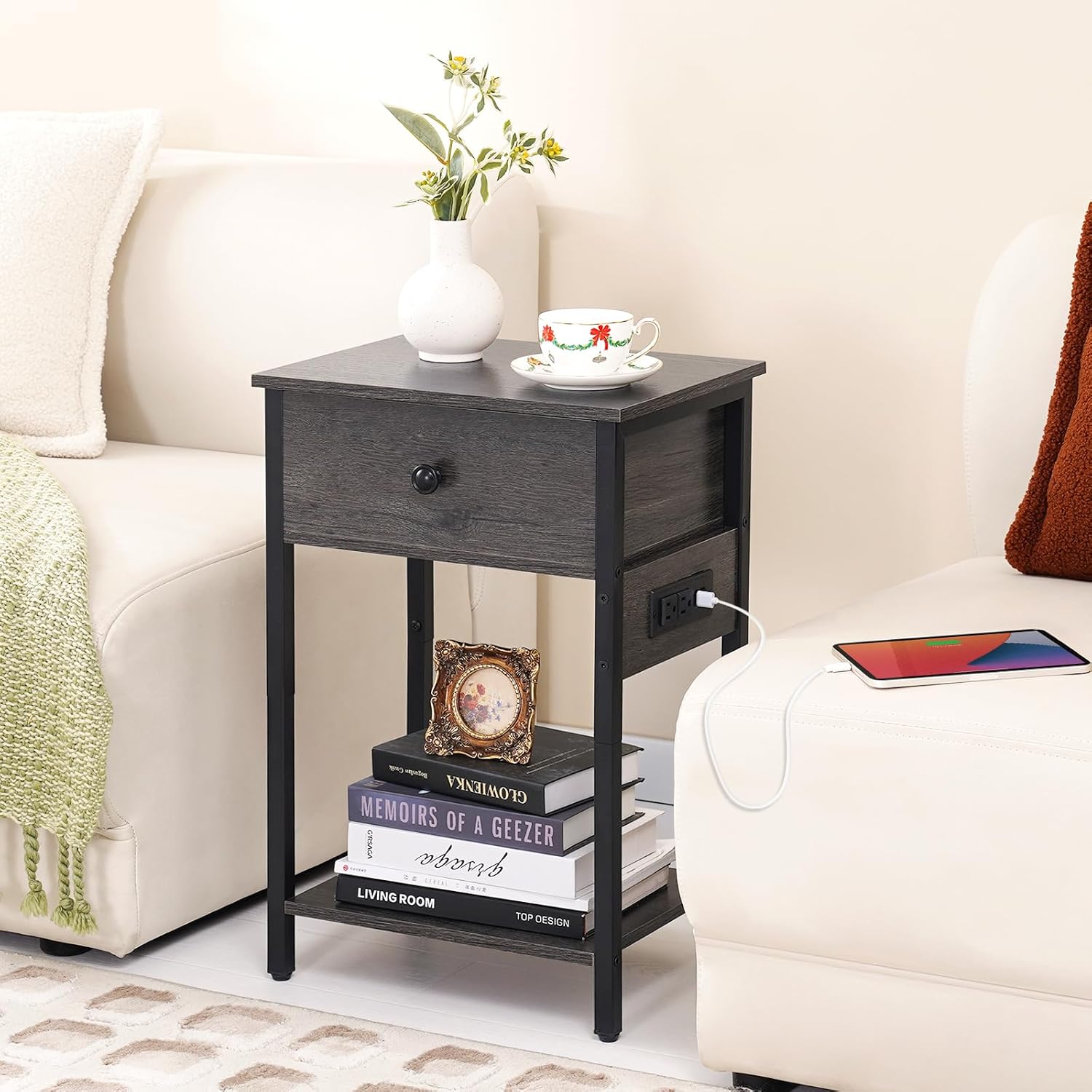
This image shows the assembled nightstand with a drawer, open shelf, and integrated charging station, positioned next to a sofa.

The nightstand is shown in a bedroom environment, demonstrating its use as a bedside table with a lamp and a person using a laptop in bed, highlighting the convenience of the charging station.

This image shows the nightstand in a living room, with its overall dimensions (15.75"L x 11.81"W x 23.62"H) overlaid, illustrating its compact size and fit next to furniture.
Warranty and Support
Yoobure offers a full 2-year warranty for this nightstand with charging station. This warranty covers manufacturing defects and ensures the quality of your product.
For any questions, concerns, or assistance regarding your Yoobure Nightstand, please do not hesitate to contact our customer support team. We are committed to providing a response within 12 hours to address your inquiries.
Contact Information: Please refer to your purchase documentation or the retailer's website for specific contact details.