
1. Safety Information
Please read and understand all safety instructions before assembly and use. Failure to follow these instructions may result in injury or damage to the product.
- Always assemble the desk according to the provided instructions.
- Ensure all screws are tightened securely after leveling the table top.
- This desk is designed to hold up to 150 pounds (68 kg) of weight evenly distributed. Do not exceed this weight limit to maintain the desk's stability and safety.
- Keep small parts away from children during assembly.
2. Product Overview
The SEDETA Gaming Desk SD-2989B is a multifunctional workstation designed for gaming, working, or studying. It features a spacious desktop, integrated LED lighting, a pegboard, a monitor stand, speaker stands, a top storage shelf, and CPU holders.

Image 2.1: Overall dimensions and features of the SEDETA Gaming Desk SD-2989B.
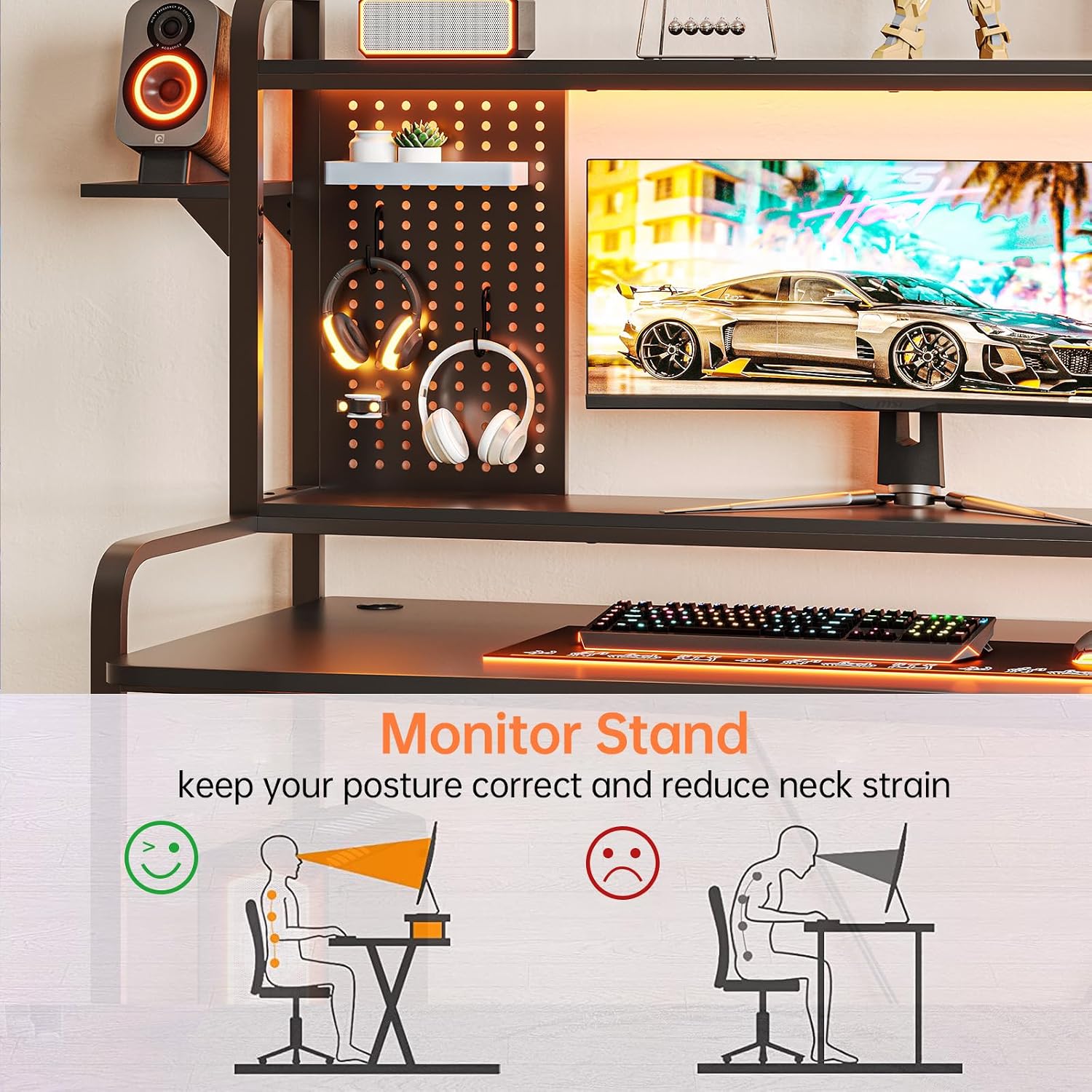
Image 2.2: The SEDETA Gaming Desk SD-2989B integrated into a modern room setup, showcasing its LED lighting and storage capabilities.
3. Setup and Assembly
Assembly of the SEDETA Gaming Desk is designed to be straightforward. Clear and detailed instructions, along with numbered parts, are included in the packaging. It is recommended that two people assemble the desk for ease and safety.
3.1 Assembly Steps
- Unpack all components and verify against the parts list provided in your package.
- Follow the step-by-step instructions in the included manual to assemble the frame.
- Attach the desktop, hutch, shelves, and other accessories as indicated.
- Ensure all connections are secure before placing items on the desk.
- Adjust the leg pads to ensure the desk is stable and level on uneven surfaces.
3.2 Assembly Video Guide
For a visual guide, please refer to the official installation video:
Video 3.1: Official installation video for the SEDETA Gaming Desk, demonstrating the assembly process step-by-step.
4. Operating Instructions
4.1 LED Light Strips
The SEDETA Gaming Desk features integrated RGB LED light strips to enhance your gaming or working atmosphere. These lights are controlled via a dedicated mobile application.
- APP Control: Download the specified mobile application (refer to the included LED light manual for details) to control the LED lights.
- Color Options: Choose from over 60,000 colors to customize your lighting.
- Flashing Modes: Select from 29 different flashing modes.
- Music Sync Function: The built-in sensitivity-adjustable microphone allows the LED light color to change with the rhythm of sound and music.
- Timer Function: Utilize the timer function for automated lighting control.

Image 4.1: The gaming desk illuminated by its LED light strips, demonstrating the customizable color and mode options available via the mobile application.
4.2 Pegboard Usage
The two DIY pegboards provide versatile storage and display options, allowing you to organize small items and personalize your workspace.
- Utilize hooks (not included) to hang headphones, game controllers, or other accessories.
- Arrange small shelves or containers on the pegboard for additional storage.
- Customize the layout to suit your specific needs and preferences.

Image 4.2: The pegboard section of the desk, showing various items like headphones and game controllers neatly organized.
4.3 Monitor Stand
The integrated monitor stand is designed to elevate your monitor to an ergonomic height, helping to reduce neck and back strain during extended use.
- Place your monitor directly on the stand.
- Ensure your eye level is aligned with the top third of your monitor screen for optimal posture.

Image 4.3: Visual representation of correct ergonomic posture with the monitor stand versus incorrect posture without it.
4.4 Adjustable Leg Pads
The desk is equipped with adjustable leg pads to ensure stability on various floor surfaces.
- Rotate the leg pads clockwise or counter-clockwise to adjust the height and level the desk.
- Ensure all four leg pads are firmly in contact with the floor to prevent wobbling.
Video 4.1: A short demonstration of adjusting the desk's leg pads to achieve stability on uneven surfaces.
5. Maintenance
Proper care and maintenance will extend the lifespan of your SEDETA Gaming Desk.
- Cleaning: Wipe the desk surface with a damp cloth to remove dust and spills. Avoid harsh chemicals or abrasive cleaners that may damage the finish.
- Inspection: Periodically check all screws and connections to ensure they remain tight. Re-tighten if necessary.
- Weight Distribution: Distribute weight evenly across the desktop and shelves to prevent stress on any single point.
6. Troubleshooting
If you encounter any issues with your SEDETA Gaming Desk, please refer to the following common troubleshooting tips:
- Desk Wobbles: Ensure all assembly screws are tightened. Adjust the leg pads to compensate for uneven flooring.
- LED Lights Not Working: Check the power connection to the LED strip. Ensure the mobile application is correctly paired and updated. Refer to the separate LED light manual for specific troubleshooting steps.
- Missing Parts: If any parts are missing upon unboxing, please contact customer service immediately with your purchase details.
7. Specifications
| Feature | Specification |
|---|---|
| Brand | SEDETA |
| Model Number | SD-2989B |
| Product Dimensions (D x W x H) | 23.6"D x 55"W x 65.2"H |
| Desktop Dimensions (L x W) | 55"L x 23.6"W |
| Color | Black |
| Material Type | Engineered Wood |
| Item Weight | 71.5 Pounds (32.4 kg) |
| Maximum Weight Recommendation | 150 Pounds (68 kg) |
| Number of Shelves | 1 (Top Hutch) + 2 Speaker Stands |
| Special Features | LED Lights, Pegboard, Monitor Stand, CPU Holder, Adjustable Leg Pads |
| Assembly Required | Yes |
| Recommended Number of People for Assembly | 2 |
| Product Care Instructions | Wipe with Damp Cloth |
8. Warranty and Support
SEDETA provides a 3-year warranty for this product. This warranty covers manufacturing defects and material flaws under normal use.
For any questions, concerns, or warranty claims, please contact our customer service team. Our experienced customer service team will respond within 24 hours.
Please retain your proof of purchase for warranty validation.
