1. Welcome
Thank you for choosing the Ubigbuy 260W USB C GaN Charging Station. This powerful and versatile charging solution is designed to efficiently charge multiple devices simultaneously, including laptops, tablets, and smartphones, with its advanced GaN technology and PD3.1 support. Please read this manual carefully before use to ensure optimal performance and safety.
2. Important Safety Instructions
- Use the charging station indoors only. Avoid exposure to rain, moisture, or extreme temperatures.
- Do not disassemble, modify, or attempt to repair the device. This will void the warranty and may cause electric shock or fire.
- Keep the device away from water, flammable liquids, and excessive heat sources.
- Ensure proper ventilation around the charging station during operation. Do not cover it with cloths or other materials.
- Use only the provided power cord.
- Unplug the charging station during lightning storms or when unused for long periods.
- Keep out of reach of children.
3. Package Contents
- Ubigbuy 260W USB C GaN Charging Station
- Power Cord (5 ft / 2 m)
- User Manual
4. Product Overview
The Ubigbuy 260W Charging Station features multiple ports and an intuitive LCD display for efficient power delivery.

Figure 4.1: Front view of the Ubigbuy 260W Charging Station, highlighting the LCD display and various charging ports.
Port Overview
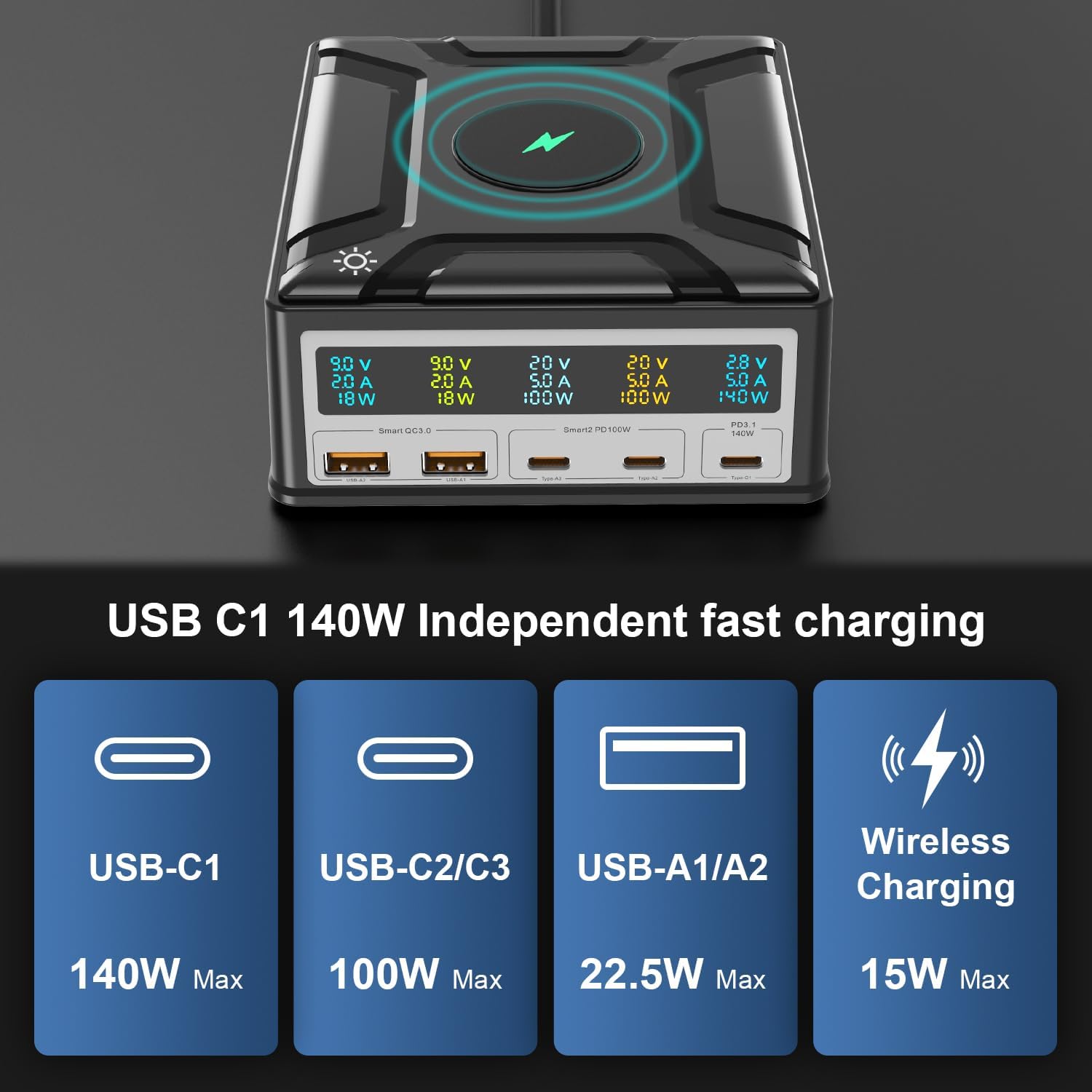
Figure 4.2: Detailed breakdown of power output for each charging port.
- USB-C1 Port: Up to 140W Power Delivery (PD3.1) for high-power devices like MacBook Pro.
- USB-C2 & USB-C3 Ports: Up to 100W Power Delivery each, suitable for laptops, tablets, and other USB-C devices.
- USB-A1 & USB-A2 Ports: Up to 22.5W Quick Charge (QC3.0) each, ideal for smartphones and other USB-A compatible devices.
- Wireless Charging Pad: Up to 15W wireless charging for compatible smartphones and earbuds.
Digital LCD Display

Figure 4.3: The LCD display provides real-time charging information for each connected device.
The integrated HD Digital LCD Color Display shows real-time voltage (V), current (A), and power (W) for each active port, allowing you to monitor charging status at a glance. A touch switch is available to turn the display on or off.
GaN Technology
This charging station utilizes advanced Gallium Nitride (GaN) technology, which allows for higher power output in a more compact and efficient design compared to traditional silicon-based chargers. GaN technology also contributes to better heat dissipation and overall performance.
5. Setup
- Place the Ubigbuy Charging Station on a stable, flat surface with adequate ventilation.
- Connect the provided power cord to the AC input port on the back of the charging station.
- Plug the other end of the power cord into a wall outlet. The LCD display will illuminate, indicating the device is powered on.
6. Operating Instructions
6.1 Charging Devices
To charge your devices, simply connect them to the appropriate ports using compatible charging cables. The charging station intelligently distributes power based on the connected devices' requirements, up to a total of 260W.

Figure 6.1: The charging station can power up to 6 devices simultaneously with a total output of 260W.
6.2 USB-C Ports (PD3.1 140W, PD100W)
For optimal fast charging of high-power devices like laptops, use the USB-C1 port (140W max). The USB-C2 and USB-C3 ports provide up to 100W each, suitable for a wide range of USB-C compatible devices.
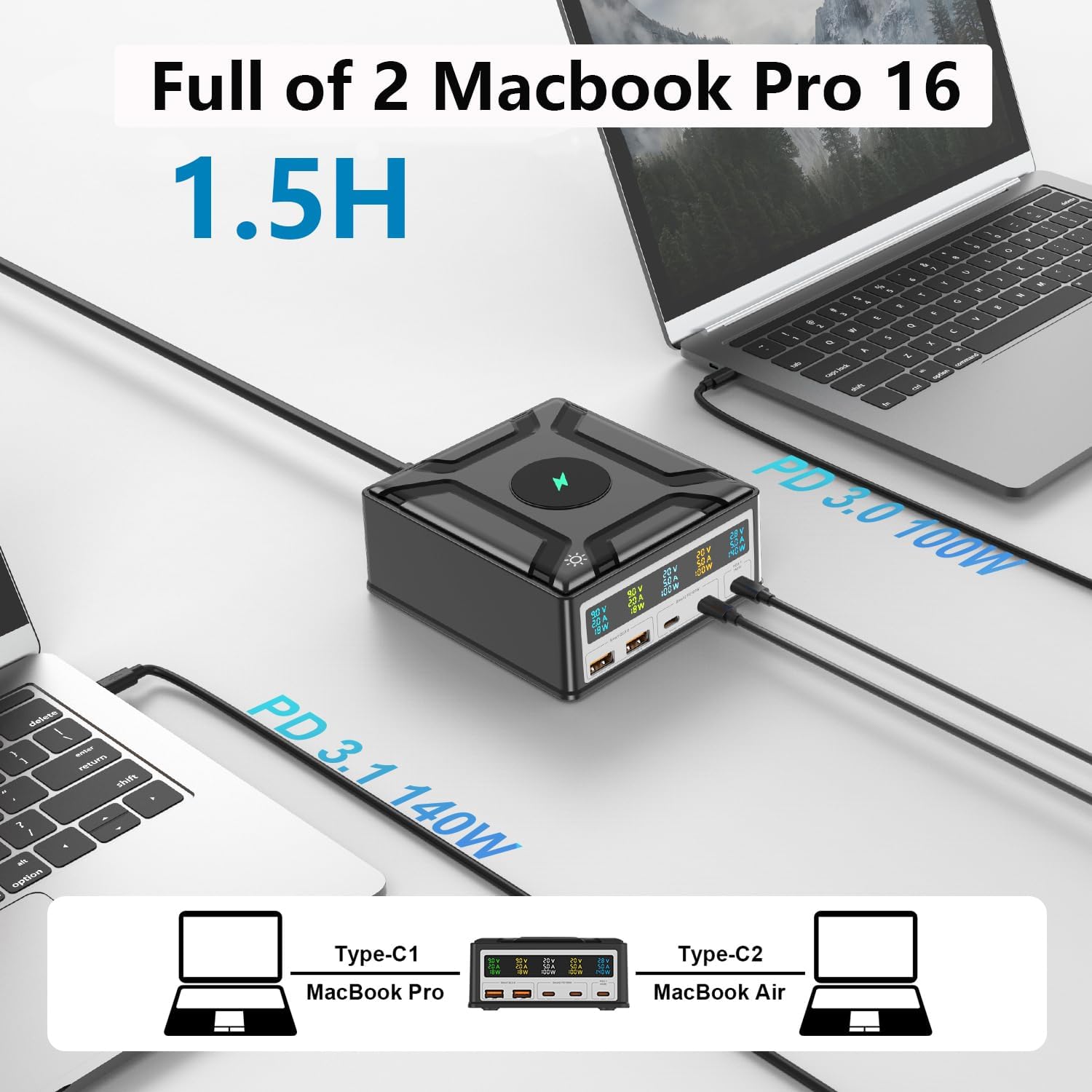
Figure 6.2: Efficiently charge two MacBook Pro 16-inch laptops in approximately 1.5 hours.
6.3 USB-A Ports (QC3.0 18W)
Connect your smartphones, smartwatches, or other USB-A powered devices to the USB-A1 or USB-A2 ports for fast charging up to 22.5W.
6.4 Wireless Charging (15W)
Place your Qi-compatible smartphone or earbuds on the wireless charging pad located on top of the station. Ensure the device is centered for optimal charging. The pad supports charging through cases up to 5mm thick.

Figure 6.3: Wireless fast charging up to 15W with non-slip shell design and case compatibility.
6.5 LCD Display Control
To toggle the LCD display on or off, gently touch the light icon located next to the display panel. This feature is useful for reducing light disturbance in dark environments.
7. Maintenance
- Always unplug the charging station from the power outlet before cleaning.
- Wipe the surface with a soft, dry cloth. Do not use liquid cleaners or aerosol sprays.
- Avoid getting moisture into any openings.
- Store the device in a cool, dry place when not in use.
8. Troubleshooting
If you encounter any issues with your Ubigbuy Charging Station, please refer to the following table for common problems and solutions.
| Problem | Possible Cause | Solution |
|---|---|---|
| Device not charging. | Loose cable connection; incompatible cable; device not supporting fast charging; power outlet issue. | Ensure cables are securely connected. Use MFi or certified cables. Verify device compatibility with charging standards. Try a different power outlet. |
| LCD display is off. | Display turned off; power issue. | Gently touch the light icon on the station to toggle the display. Check power connection. |
| Wireless charging is slow or not working. | Device not centered; thick phone case; foreign objects; device not Qi-compatible. | Reposition the device on the pad. Remove thick cases or metal objects. Ensure your device supports Qi wireless charging. |
| Charging station feels warm. | Normal operation under heavy load; insufficient ventilation. | It is normal for the charger to generate some heat during high-power charging. Ensure adequate airflow around the device. If it becomes excessively hot, disconnect devices and allow it to cool. |
9. Technical Specifications
| Feature | Specification |
|---|---|
| Model Number | UGB-260W |
| Total Power Output | 260W Max |
| USB-C1 Output | PD3.1, 140W Max |
| USB-C2/C3 Output | PD100W Max (each) |
| USB-A1/A2 Output | QC3.0, 22.5W Max (each) |
| Wireless Charging Output | 15W Max |
| Product Dimensions | 4.92 x 4.53 x 2.09 inches |
| Item Weight | 1.9 pounds (0.86 Kilograms) |
| Main Power Connector Type | 2 Pin |
| Compatible Devices | Apple iPhone 14 Pro, Apple iPhone 15, Apple iPhone 15 Pro, Microsoft Surface, Samsung Galaxy S22, MacBook Pro, MacBook Air, iPad Pro, and other USB-C/A compatible devices. |
| Special Features | 140W PD3.1, Lightweight Design, Travel Portable, Magsafe Compatible (Wireless), Fast Charging, HD Digital LCD Color Display, GaN Technology. |
10. Product Demonstration Video
Watch this official video for a visual guide on the features and usage of your Ubigbuy 260W Charging Station.
Video: 260W 6 Port GaN PD Charger 140W PD3.1 Fast Charging Station. This video demonstrates the charging station's features, including the LCD display, various ports, and its ability to charge multiple devices simultaneously. (Duration: 0:37)
11. Warranty Information and Customer Support
The Ubigbuy 260W USB C GaN Charging Station comes with a 1-year limited warranty from the date of purchase. This warranty covers manufacturing defects and workmanship under normal use.
For warranty claims, technical support, or any questions regarding your product, please contact Ubigbuy customer support through the retailer's platform or visit the official Ubigbuy website for contact information.
Please retain your purchase receipt as proof of purchase for warranty purposes.