
Introduction
Thank you for choosing the IZYREC Smart Voice Recorder. This compact and powerful device is designed for high-quality audio recording, featuring AI noise cancellation, voice activation, and seamless integration with a dedicated mobile application. Please read this manual carefully to understand the full capabilities of your new recorder and ensure optimal performance.
Product Overview
Device Components and Accessories
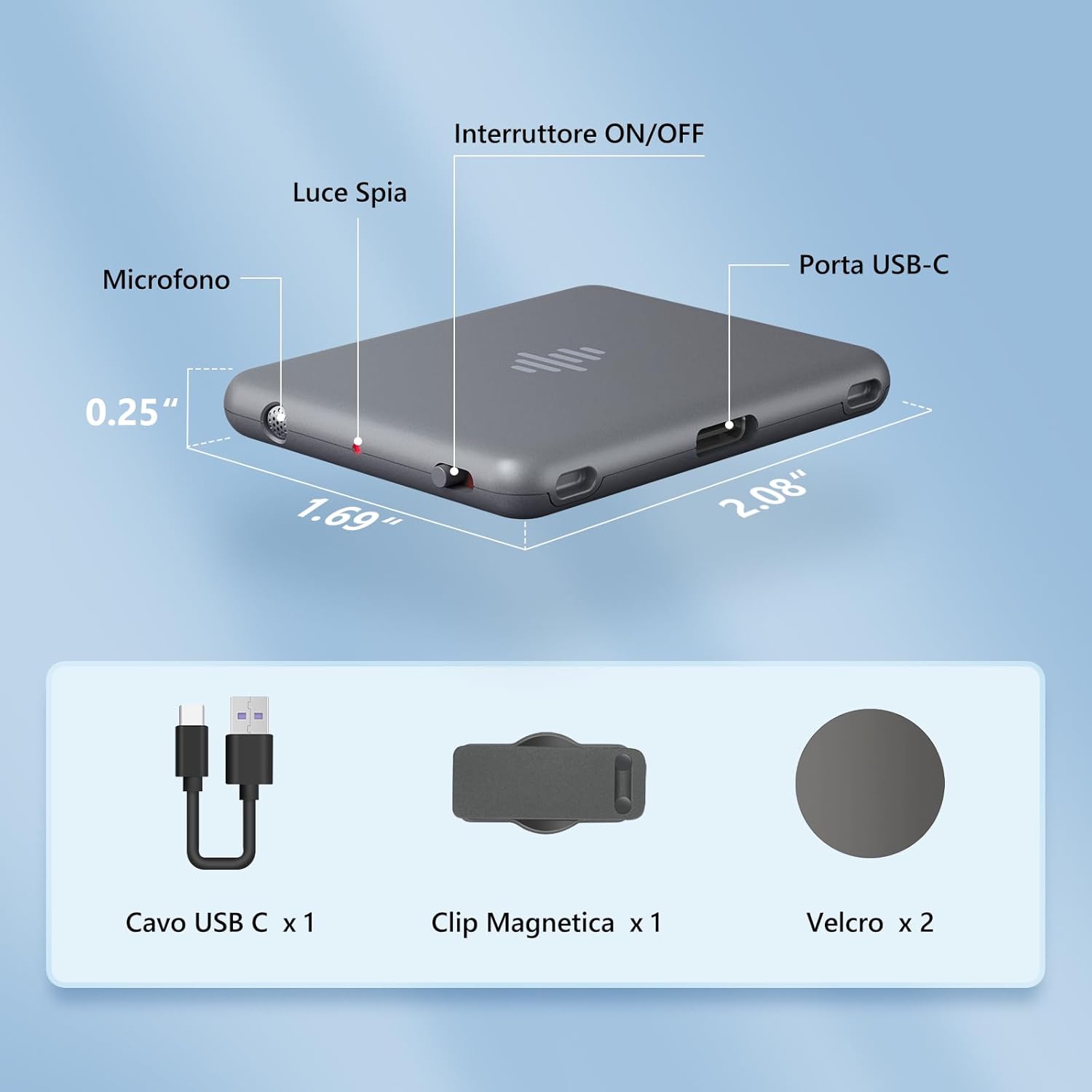
Image: The IZYREC voice recorder showing its microphone, ON/OFF switch, indicator light, and USB-C port with dimensions. Below it are illustrations of the included USB-C cable, magnetic clip, and two adhesive Velcro pads.
- Microphone: Integrated dual Knowles SiSonic microphones for high-quality audio capture.
- ON/OFF Switch: Slide switch to power on/off and initiate recording.
- Indicator Light: Provides status feedback (e.g., recording, charging).
- USB-C Port: For charging and data transfer.
- USB-C Cable: For charging and connecting to a computer.
- Magnetic Clip: For hands-free attachment to clothing or metal surfaces.
- Adhesive Velcro Pads (x2): For versatile mounting options.
Key Features
- Compact and Lightweight: Weighing only 18 grams, it is highly portable and discreet.
- 64GB Storage: Stores up to 480 hours of recorded audio.
- Long Battery Life: Up to 30 hours of continuous recording, or 40 hours with voice activation.
- Dual Microphones with AI Noise Cancellation: Delivers crystal-clear audio up to 1536 Kbps resolution.
- One-Slide Recording: Instant recording activation.
- Mobile App Integration: Easily locate, play, organize, and share audio files.
- Voice Activated Recording (VAR): Automatically starts recording when sound is detected.
- Scheduled Recording: Set specific times for recording.
- File Protection: Secure your voice memos, preventing unauthorized access from smartphones.
Portability and Design
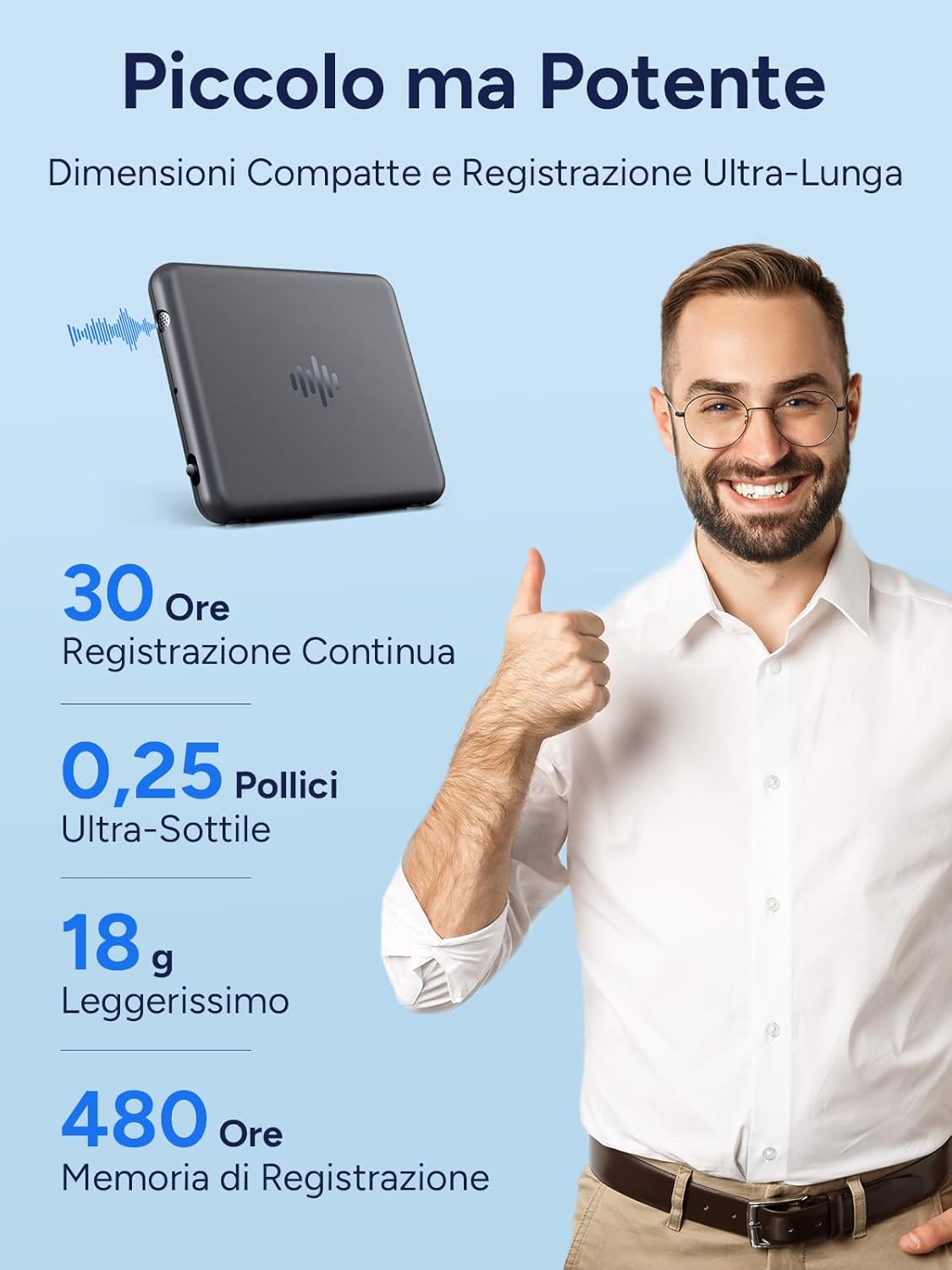
Image: The IZYREC voice recorder is shown to be extremely compact and lightweight, emphasizing its portability and long recording capabilities.
App Interface Overview

Image: A smartphone screen showing the IZYREC app, which allows users to select recording scenes (Memo, Meeting, Classroom, Interview) and configure settings like Voice Activated Recording, recording signal light, and scheduled recording.
Setup
1. Charging the Device
Before first use, fully charge your IZYREC recorder. Connect the included USB-C cable to the device's USB-C port and the other end to a USB power adapter (not included) or a computer's USB port. The indicator light will show charging status and turn off when fully charged.
2. Downloading the IZYREC App
The IZYREC app is compatible with both iPhone and Android devices. Search for "IZYREC" in your device's app store (Apple App Store for iOS, Google Play Store for Android) and download the official application.

Image: The IZYREC voice recorder is compatible with both iPhone and Android smartphones, allowing for seamless control and file management through its dedicated app.
3. Pairing with the App
- Ensure Bluetooth is enabled on your smartphone.
- Open the IZYREC app.
- Turn on the IZYREC recorder by sliding the ON/OFF switch.
- Follow the in-app instructions to search for and connect to your IZYREC device. The app will indicate a successful connection.
Operating Instructions
Basic Recording
To start recording, simply slide the ON/OFF switch to the "ON" position. The device will begin recording immediately. Slide the switch back to "OFF" to stop recording and save the file. The indicator light will provide visual feedback during recording.
Voice Activated Recording (VAR)
The IZYREC recorder supports Voice Activated Recording, which conserves battery and storage by only recording when sound is detected. This feature can be enabled and configured through the IZYREC mobile application. Adjust the sensitivity level within the app settings to suit your environment.
Scheduled Recording
Utilize the IZYREC app to set up scheduled recordings. This allows you to program the device to start and stop recording at specific times, even when you are not physically present. Ensure the device has sufficient power and storage for scheduled tasks.
Managing Recordings with the App
The IZYREC app provides a comprehensive interface for managing your audio files:
- Locate and Play: Browse through your recordings, view timestamps, and play them directly from your smartphone.
- Organize: Categorize and rename files for easy retrieval. The app allows for scene selection (Memo, Meeting, Classroom, Interview) to help organize recordings.
- Share: Share recorded audio files with others via various sharing options available on your smartphone.
- File Protection: Enable file protection within the app to secure your recordings. This prevents unauthorized access to your files even if someone gains physical access to your recorder.
Optimizing Recording Quality

Image: The IZYREC voice recorder features dual microphones and AI noise cancellation for enhanced audio clarity, suitable for various environments like meetings.
For best recording results, ensure the microphone is facing the sound source. The dual microphones and AI noise cancellation work to reduce background noise, but direct placement towards the speaker or sound event will yield the clearest recordings.
Multiple Scene Applications

Image: The IZYREC voice recorder is versatile and can be used in various settings, including interviews, meetings, classrooms, and inside a car, adapting to different recording needs.
The IZYREC recorder is designed for versatility. Use the magnetic clip or adhesive Velcro for discreet placement in various environments such as interviews, meetings, classrooms, or in your car.
Maintenance
- Cleaning: Use a soft, dry cloth to clean the device. Do not use liquid cleaners or aerosols.
- Storage: Store the device in a cool, dry place away from direct sunlight and extreme temperatures.
- Battery Care: To prolong battery life, avoid fully discharging the battery frequently. Charge the device regularly, even if not in use for extended periods.
- Data Backup: Regularly transfer important recordings to a computer or cloud storage to prevent data loss.
Troubleshooting
| Problem | Possible Cause / Solution |
|---|---|
| Device not turning on. | Battery might be depleted. Charge the device for at least 30 minutes. Ensure the ON/OFF switch is in the "ON" position. |
| Cannot connect to the app. |
|
| Poor recording quality / Background noise. |
|
| Recordings not saving. |
|
| Adhesive Velcro not sticking. | Ensure the surface is clean, dry, and smooth before applying. For long-term adhesion, consider alternative mounting methods or stronger adhesives if needed. |
Specifications
| Feature | Detail |
|---|---|
| Brand | IZYREC |
| Model Number | MR01-64G-Grey |
| Color | Grey |
| Storage Capacity | 64 GB (up to 480 hours) |
| Battery Life (Continuous Recording) | Up to 30 hours |
| Battery Life (Voice Activated Recording) | Up to 40 hours |
| Battery Type | Lithium-ion (1 included) |
| Microphone Type | Integrated Dual Knowles SiSonic with AI Noise Cancellation |
| Recording Resolution | Up to 1536 Kbps |
| Audio Format | WAV |
| Connectivity | Bluetooth, USB-C |
| Compatible Devices | MP3 Player, Smartphone, Personal Computer, Tablet |
| Item Weight | 18 Grams |
| Screen Size | 3 Centimeters (Note: Device itself does not have a screen, this likely refers to app interface) |
Warranty and Support
For warranty information and technical support, please refer to the warranty card included with your product or visit the official IZYREC website. You may also contact customer service through the contact information provided on the product packaging or within the IZYREC application.
Please retain your proof of purchase for any warranty claims.