
1. Introduction
The JDSU VIAVI Smart OTDR is a compact, handheld optical time domain reflectometer designed for comprehensive fiber optic network testing. This device serves as a modern replacement for the MTS-2000, offering advanced capabilities for installation, maintenance, and troubleshooting of fiber optic cables. It integrates essential fiber test functions including OTDR, Visual Fault Locator (VFL), Optical Power Meter (OPM), and microscope inspection, providing a complete solution for technicians at any skill level.

Figure 1.1: Front view of the JDSU VIAVI Smart OTDR, showing the display and control buttons.
This manual provides detailed instructions for the safe and efficient operation, setup, maintenance, and troubleshooting of your Smart OTDR device. Please read this manual thoroughly before using the product to ensure proper functionality and to prevent damage or injury.
2. Safety Information
Always observe the following safety precautions when operating the JDSU VIAVI Smart OTDR:
- Laser Safety: This product contains a Class 1 Laser. Do not stare into the laser beam or view directly with optical instruments. Exposure to the laser output may cause eye damage.
- Power Supply: Use only the power adapter supplied with the device. Using an incorrect power adapter may damage the device and void the warranty.
- Environment: Operate the device within the specified environmental conditions (temperature, humidity) to ensure optimal performance and longevity. Avoid exposure to extreme temperatures, direct sunlight, dust, and moisture.
- Cleaning: Disconnect the device from all power sources before cleaning. Use a soft, dry cloth for cleaning. Do not use liquid or aerosol cleaners.
- Servicing: Do not attempt to open or service the device yourself. Refer all servicing to qualified service personnel. Unauthorized modifications may result in damage and void the warranty.

Figure 2.1: Rear view of the Smart OTDR, highlighting the Class 1 Laser Product warning label.
3. Package Contents
Carefully unpack the box and verify that all items listed below are present and in good condition. If any items are missing or damaged, contact your supplier immediately.
- JDSU VIAVI Smart OTDR Unit
- AC Power Adapter with various international plugs
- USB Cable
- Large Carrying Case
- Small Accessory Pouch
- Calibration Certificate / Documentation
- Quick Start Guide / User Manual (this document)
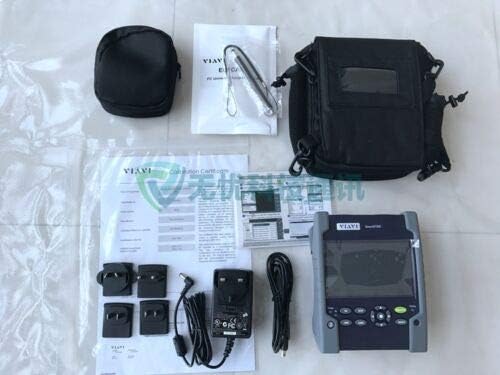
Figure 3.1: Contents of the JDSU VIAVI Smart OTDR package, including the device, carrying case, power adapter, and documentation.
4. Setup
4.1 Initial Inspection
Before first use, inspect the device for any visible damage that may have occurred during shipping. Ensure all ports and connectors are clean and free of debris.
4.2 Charging the Battery
The Smart OTDR is equipped with a rechargeable battery. For optimal performance, fully charge the battery before initial use. Connect the supplied AC power adapter to the device's charging port and plug it into a standard electrical outlet. The charging indicator light will illuminate. A full charge typically takes several hours. The device can be used while charging.
4.3 Powering On/Off
- To Power On: Press and hold the ON/OFF button located on the front panel until the display illuminates.
- To Power Off: Press and hold the ON/OFF button until the shutdown prompt appears on the screen. Follow the on-screen instructions to confirm shutdown.
5. Operating Instructions
5.1 User Interface Overview
The Smart OTDR features a high-visibility outdoor touchscreen display and a set of physical buttons for navigation and control. Key buttons include:
- FILE: Access saved test results and file management options.
- SETUP: Configure device settings, test parameters, and system preferences.
- HOME: Return to the main menu or dashboard.
- CANCEL: Exit current operation or menu.
- RESULTS: View detailed analysis of test results.
- Directional Pad (Arrows): Navigate through menus and adjust parameters.
- OK/Enter Button (Center of D-Pad): Confirm selections.
- TESTING (Green Button): Initiate a test sequence.
5.2 Performing an OTDR Measurement
The Smart OTDR is designed to simplify fiber testing with automated processes. Follow these general steps to perform an OTDR measurement:
- Prepare the Fiber: Ensure the fiber under test is clean and properly connected to the OTDR port. Use appropriate launch cables if necessary.
- Select Test Application: From the main menu, select the desired test application (e.g., OTDR, Smart Link Mapper).
- Configure Test Parameters: Navigate to the SETUP menu to configure parameters such as wavelength (1310nm, 1550nm), pulse width, range, and averaging time. The device supports automated settings for ease of use.
- Start Test: Press the green TESTING button to begin the measurement. The device will automatically acquire data and analyze the fiber link.
- Review Results: Once the test is complete, the results will be displayed on the screen. Use the RESULTS button to view detailed event tables, trace graphs, and pass/fail analysis. The Smart Link Mapper (SLM) feature provides an intuitive icon-based view of the fiber link.
- Save Results: Press the FILE button to save the test results for future reference or reporting.
5.3 Using Integrated Functions
- Visual Fault Locator (VFL): Activate the VFL function to visually locate breaks, bends, or poor connections in short fiber segments.
- Optical Power Meter (OPM): Use the integrated OPM to measure optical power levels.
- Fiber Inspection: Connect a compatible fiber inspection probe (sold separately) to perform automated fiber end-face inspection with pass/fail analysis.
6. Maintenance
6.1 Cleaning the Device
Keep the Smart OTDR clean to ensure reliable operation. Use a soft, lint-free cloth to wipe the exterior of the device. For the touchscreen, use a screen-specific cleaner if necessary, applied to the cloth, not directly to the screen. Ensure all optical ports are kept clean using appropriate fiber optic cleaning tools and procedures to prevent inaccurate measurements.
6.2 Battery Care and Storage
To maximize battery life and performance:
- Avoid fully discharging the battery frequently.
- If storing the device for an extended period, charge the battery to approximately 50% and store in a cool, dry place. Recharge every 3-6 months to prevent deep discharge.
- Do not expose the device or battery to extreme temperatures.
6.3 Firmware Updates
Periodically check the VIAVI Solutions website for firmware updates. Keeping your device's firmware up-to-date ensures access to the latest features, improvements, and bug fixes.
7. Troubleshooting
This section provides solutions to common issues you may encounter with your Smart OTDR. If the problem persists, contact technical support.
| Problem | Possible Cause | Solution |
|---|---|---|
| Device does not power on. | Battery is fully discharged or faulty. Power adapter not connected or faulty. | Connect the AC power adapter and allow the battery to charge for at least 30 minutes. Try a different power outlet. If problem persists, contact support. |
| Inaccurate OTDR measurements. | Dirty optical connectors. Incorrect test parameters. Damaged launch cable. | Clean all optical connectors thoroughly. Verify test parameters (wavelength, range, pulse width) match the fiber under test. Inspect and replace launch cables if damaged. |
| Screen is unresponsive. | Software glitch. Device frozen. | Perform a soft reset by holding the power button until the device restarts. If unresponsive, allow the battery to fully drain and then recharge. |
| Cannot save test results. | Insufficient storage space. File system error. | Check available storage space. Delete old, unnecessary files. Restart the device. If problem persists, consider a factory reset (backup data first) or contact support. |
8. Specifications
The following table outlines the key technical specifications for the JDSU VIAVI Smart OTDR (MTS-2000 Replacement) with 1310/1550nm wavelengths and 35/33dB dynamic range.
| Feature | Detail |
|---|---|
| Model | JDSU VIAVI Smart OTDR (MTS-2000 Replacement) |
| Wavelengths | 1310 nm / 1550 nm |
| Dynamic Range | 35 dB (1310nm) / 33 dB (1550nm) |
| Dimensions (L x W x H) | 8 x 6 x 3 inches (approximate) |
| Weight | 11 pounds (approximate) |
| Connectivity | USB, Bluetooth, WiFi (3G/4G connectivity via USB) |
| Display | 5-inch high-visibility outdoor touchscreen |
| Integrated Functions | OTDR, VFL, Optical Power Meter (OPM), CW Light Source, Fiber Inspection (with optional probe) |
| Battery Life | All-day battery life (typical usage) |
| Country of Origin | USA |
| UPC | 723907964175 |
9. Warranty and Support
9.1 Product Warranty
The JDSU VIAVI Smart OTDR comes with a 3-year warranty from the date of purchase. This warranty covers defects in materials and workmanship under normal use. Please note that this warranty period may vary for specific versions, such as the 100AS model. Retain your proof of purchase for warranty claims.
9.2 Technical Support
For technical assistance, troubleshooting, or service inquiries, please contact VIAVI Solutions support:
- Phone: +1 844 GO VIAVI (+1 844 468 4284)
- Website: For the VIAVI office nearest you and additional support resources, visit viavisolutions.com/contact.
When contacting support, please have your product model number and serial number ready.