1. Introduction
This manual provides detailed instructions for the setup, operation, maintenance, and troubleshooting of your RAPZ Active Talk Smartwatch (Model: RA-Wa_01). Please read this manual carefully to ensure proper use and to maximize the device's features.
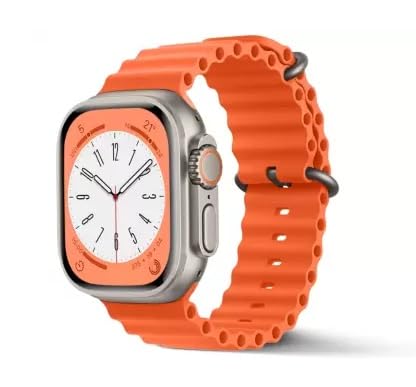
Image 1.1: Front view of the RAPZ Active Talk Smartwatch with an orange strap, displaying a watch face.
This image shows the smartwatch from the front, highlighting its large display and the vibrant orange strap. The watch face displays time and other basic information.
2. What's in the Box
Upon opening the package, verify that all items are present:
- RAPZ Active Talk Smartwatch (Model: RA-Wa_01)
- USB-C Magnetic Fast Charging Cable
- Ocean Band (Strap)
Note: The product title indicates a '2 Strap Smartwatch', suggesting an additional strap may be included or available separately.
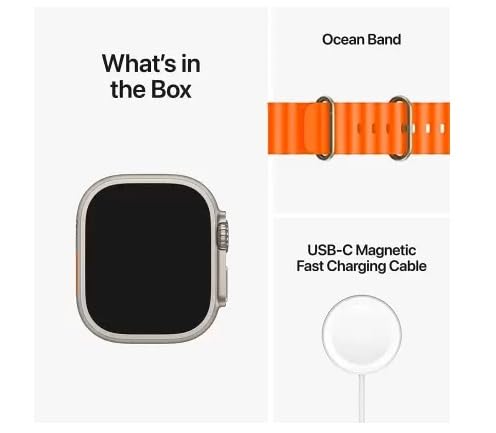
Image 2.1: Contents of the RAPZ Active Talk Smartwatch package.
This image displays the items included in the product package: the smartwatch unit, an Ocean Band (strap), and a USB-C Magnetic Fast Charging Cable.
3. Setup
3.1. Charging the Smartwatch
Before initial use, fully charge your smartwatch. The device supports wireless charging.
- Connect the USB-C Magnetic Fast Charging Cable to a compatible USB power adapter (not included).
- Place the back of the smartwatch onto the magnetic charging pad. Ensure the watch is correctly aligned and the charging indicator appears on the screen.
- Allow the watch to charge until the battery icon indicates a full charge.
3.2. Installing the Hryfine App
To unlock the full functionality of your RAPZ Active Talk Smartwatch, you must install the Hryfine application on your smartphone.
- Scan the QR code provided in the watch's packaging or search for "Hryfine" in your smartphone's app store (Google Play Store for Android, Apple App Store for iOS).
- Download and install the application.
- Follow the on-screen instructions to create an account or log in.
3.3. Pairing with Your Smartphone
After installing the Hryfine app, pair your smartwatch with your phone via Bluetooth.
- Ensure Bluetooth is enabled on your smartphone.
- Open the Hryfine app and navigate to the device pairing section.
- Turn on your smartwatch. It should automatically enter pairing mode or you may need to activate it via the watch settings.
- Select your RAPZ Active Talk Smartwatch from the list of available devices in the Hryfine app.
- Confirm the pairing request on both your smartphone and smartwatch, if prompted.
- Once paired, the app will synchronize data with your watch.
4. Operating Your Smartwatch
4.1. Display and Navigation
The smartwatch features a massive 2.05-inch TFT LCD with 550 nits brightness and a resolution of 240 x 240. Navigation is primarily done via touch gestures and the rotater button.
- Touch Screen: Swipe up, down, left, or right to navigate through menus and notifications. Tap to select items.
- Rotater Button: Rotate the button to scroll through lists or adjust settings. Press the button to return to the home screen or confirm selections.
- Side Button(s): Additional buttons may be present for quick access to specific functions or power control.
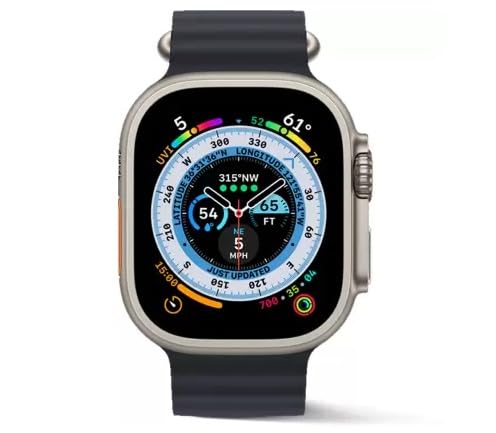
Image 4.1: RAPZ Active Talk Smartwatch displaying a compass and navigation interface.
This image shows the smartwatch with a black strap, displaying a detailed compass and navigation screen, indicating its GPS capabilities and various data points like altitude and speed.
4.2. Bluetooth Calling
The Active Talk smartwatch allows you to make and receive calls directly from your wrist.
- Making Calls: Access the dialpad or your synchronized contacts through the watch interface.
- Receiving Calls: When a call comes in, you can answer or reject it directly from the watch.
- The watch has a built-in high-quality stereo speaker for clear audio during calls and music playback.
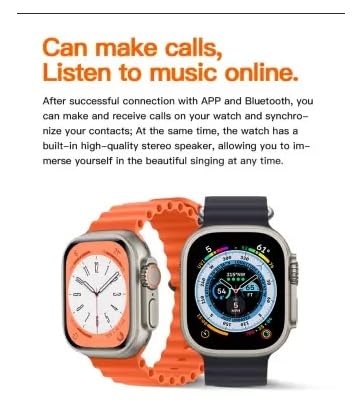
Image 4.2: Smartwatches illustrating calling and music playback features.
This image highlights the smartwatch's ability to make calls and listen to music online. It shows two watches, one with a call interface and another with a music player interface, emphasizing the integrated speaker.
4.3. Health and Sports Tracking
Your smartwatch is equipped with various sensors for health and fitness monitoring.
- Heart Rate Monitoring: Continuously tracks your heart rate. View data in real-time on the watch or in the Hryfine app.
- Sleep Monitor: Analyzes your sleep patterns, including deep sleep, light sleep, and wake times.
- Sedentary Reminder: Alerts you when you've been inactive for too long, encouraging movement.
- GPS: Built-in GPS for accurate tracking of outdoor activities and routes.
- Sports Tracking: Supports various sports modes to track your workouts, including steps, distance, calories burned, and activity duration.
4.4. Additional Features
- Multiple Watch Faces: Customize your watch's appearance by choosing from a variety of pre-installed watch faces or downloading more via the Hryfine app.
- Always on Display: Keep essential information visible without needing to activate the screen.
- Smart DND (Do Not Disturb): Set periods for uninterrupted sleep or focus time.
- Find a Phone: Use your smartwatch to locate your paired smartphone.
- Alarm: Set alarms directly from your watch.
5. Maintenance
5.1. Cleaning Your Smartwatch
- Wipe the screen and body of the watch with a soft, lint-free cloth.
- For stubborn smudges, slightly dampen the cloth with water. Avoid using harsh chemicals or abrasive materials.
- Clean the charging contacts regularly to ensure efficient charging.
5.2. Water Resistance
The RAPZ Active Talk Smartwatch is rated IP67 waterproof. This means it is protected from dust and can withstand immersion in water up to 1 meter for 30 minutes. It is suitable for daily use and light water exposure (e.g., hand washing, rain). However, it is not recommended for swimming, showering with hot water, or diving.
5.3. Battery Care
The smartwatch features a 10-day average battery life. To prolong battery lifespan:
- Avoid extreme temperatures.
- Do not fully discharge the battery frequently.
- Use the provided charging cable.
6. Troubleshooting
| Problem | Possible Cause | Solution |
|---|---|---|
| Watch does not turn on. | Low battery. | Charge the watch for at least 30 minutes. |
| Cannot pair with phone. | Bluetooth off; watch not in pairing mode; app issue. | Ensure phone Bluetooth is on. Restart watch and phone. Reinstall Hryfine app. |
| Inaccurate health data. | Improper fit; sensor obstruction. | Ensure watch is snug on wrist. Clean sensors on the back of the watch. |
| Charging issues. | Misaligned charger; dirty contacts; faulty cable/adapter. | Realign watch on charger. Clean charging contacts. Try a different USB adapter. |
| Display not responding. | Software glitch; low battery. | Restart the watch. Charge the watch. |
7. Specifications
| Brand | RAPZ |
| Model | RA-Wa_01 |
| Model Name | ACTIVE TALK |
| Display Size | 2.05 Inches |
| Display Type | TFT LCD |
| Resolution | 240 x 240 |
| Operating System | Smartwatch OS |
| Connectivity | Bluetooth |
| Special Features | GPS, Sedentary Reminder, Sleep Monitor, Heart Rate, Bluetooth Calling, Always on Display, Rotater Button, Wireless Charging, IP67 Waterproof |
| Battery Life (Average) | 10 Days |
| Water Resistance | IP67 |
| Item Weight | 200 g |
| Product Dimensions | 12 x 12 x 12 cm |
8. Warranty Information
For information regarding the product warranty, please refer to the warranty policy provided at the time of purchase or visit the official RAPZ website. Keep your purchase receipt as proof of purchase for warranty claims.
Note: Warranty terms and conditions may vary by region and retailer.
9. Customer Support
If you encounter any issues not covered in this manual or require further assistance, please contact RAPZ customer support through their official website or the contact information provided with your product packaging.
For app-related queries, refer to the help section within the Hryfine application.