
Product Overview
The PellKing Suction Car Mount Kit is a versatile accessory designed for securely mounting action cameras like Insta360 x5, x4, x3, x2, x, One RS, R, GoPro Max, and DJI OSMO 360 to vehicles. This kit enables unique low-altitude shooting perspectives without the need for a drone, offering robust stability and multiple adjustment options for diverse filming scenarios.

Image: The complete PellKing Suction Car Mount Kit, showcasing the main suction base, adjustable arms, and selfie stick.
Key features include:
- Application: Designed for car mounting to achieve low-altitude shooting effects.
- Multiple Angle Adjustment: Allows vertical and tilt shooting for a wider range of shots.
- Dual Safety: Features five 3.3-inch diameter suction cups for enhanced suction power and security.
- Multi-Scenario Use: Includes a clamping bracket with a double-sleeve arm to reduce wobbling, usable on bicycle/motorcycle handlebars and inside cars.
- Invisible Selfie Stick: An adjustable selfie stick (28-114cm) designed to be invisible in 360 panoramic camera footage.
Package Contents
Verify that all components are present in your package:

Image: All components included in the PellKing Suction Car Mount Kit, laid out for easy identification.
- Main Suction Cup Base (3-cup design)
- Secondary Suction Cup Base (2-cup design)
- Adjustable Selfie Stick (28-114cm)
- Double-Sleeve Arm with Ball Heads
- Handlebar/Clamp Mount
- Additional Ball Head (for main base)
Setup Instructions
1. Attaching the Suction Cups
Ensure the mounting surface is clean, dry, and smooth. Press each suction cup firmly onto the surface and then flip the lever down to create a vacuum seal. For optimal adhesion, avoid dusty or textured surfaces.

Image: Examples of the suction mount securely attached to different exterior surfaces of a vehicle, demonstrating various low-altitude shooting positions.
2. Assembling the Mount
Connect the adjustable selfie stick to the main suction cup base using the provided ball head and tightening knob. The double-sleeve arm can be used to connect the secondary suction cup base to the selfie stick for added stability, especially for longer extensions or higher speeds.
For the handlebar mount, attach it to the desired handlebar or pole, then secure your camera or selfie stick to its ball head.

Image: The adjustable selfie stick and the handlebar mount, showing how they can be used independently or as part of the car mount system.
3. Camera Attachment
The mount features a standard 1/4-20 screw for direct attachment of compatible cameras. Ensure your camera is securely fastened before operation.
Operating Instructions
1. Positioning and Angle Adjustment
Loosen the tightening knobs on the ball heads and double-sleeve arm to adjust the angle and extension of the selfie stick and camera. Once the desired position is achieved, firmly tighten all knobs to prevent movement during recording.

Image: Demonstrations of the mount's versatility, showing it used for internal car shots, external side panel mounting, and a close-up of the ball head locking mechanism.
2. Invisible Selfie Stick Functionality
When using 360 panoramic cameras (e.g., Insta360, DJI OSMO 360), the adjustable selfie stick is designed to be automatically removed from the footage by the camera's software, creating a "flying camera" effect. Ensure your camera's settings are configured for this feature.
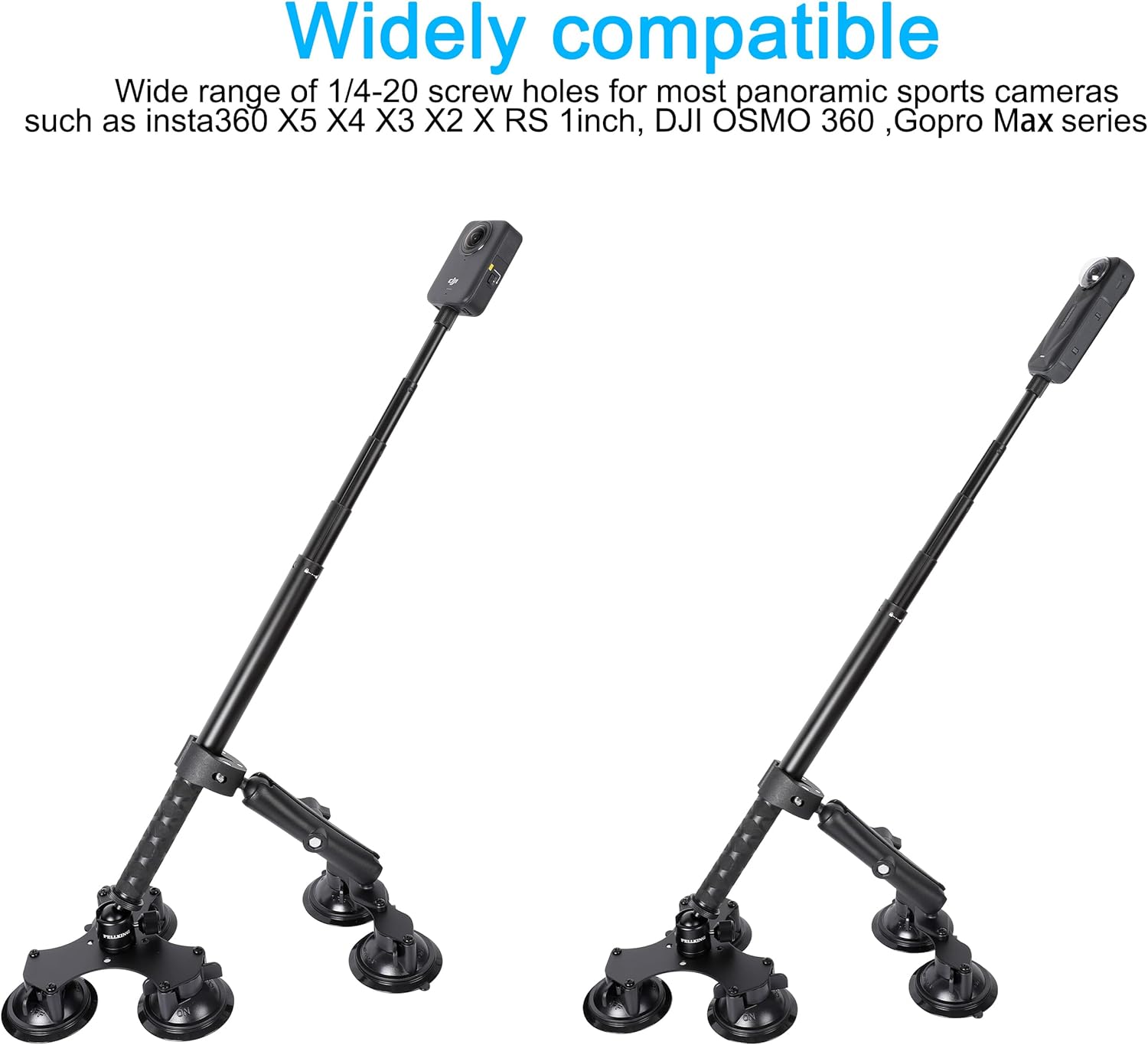
Image: The PellKing mount with various compatible 360-degree cameras, highlighting its wide compatibility and the "invisible selfie stick" effect.
3. Safety Precautions
- Always ensure all suction cups are fully engaged and levers are locked before driving.
- Regularly check the suction cup adhesion, especially during long drives or in varying temperatures.
- Avoid mounting on painted surfaces that are chipped, peeling, or not in good condition, as strong suction could cause damage.
- Do not exceed recommended speeds when the mount is attached to a moving vehicle.
Maintenance
To ensure the longevity and optimal performance of your PellKing Suction Car Mount, follow these maintenance guidelines:
- Cleaning Suction Cups: After each use, clean the suction cup surfaces with a damp cloth to remove any dust or debris. Allow them to air dry completely before storage.
- Storage: Store the mount in a cool, dry place away from direct sunlight. Avoid storing with the suction cups pressed against uneven surfaces, which could deform them.
- Lubrication: Periodically check the moving parts and threads. A small amount of silicone grease can be applied to the threads of the tightening knobs if they become stiff.
- Inspection: Before each use, inspect all components for signs of wear, cracks, or damage. Do not use the mount if any part is compromised.
Troubleshooting
| Problem | Possible Cause | Solution |
|---|---|---|
| Suction cups not adhering properly. | Surface is dirty, wet, textured, or suction cup is damaged. | Clean and dry the mounting surface. Ensure it is smooth. Inspect suction cups for damage; replace if necessary. |
| Mount wobbles or shifts during use. | Tightening knobs are not fully secured; insufficient suction. | Ensure all knobs are firmly tightened. Re-apply suction cups if necessary, ensuring a strong seal. Use the secondary suction base for added stability. |
| Selfie stick not "invisible" in 360 footage. | Camera settings not configured; incorrect camera model. | Verify your camera model is compatible with the invisible selfie stick feature. Check camera settings and firmware for proper configuration. |
Specifications
- Model Number: 691685d8-95b9-44fa-89ec-18609e0631bd
- Brand: PellKing
- Mounting Type: Suction cup holder
- Compatible Devices: Cameras (Insta360 X5 X4 X3 X2 RS, GoPro Max, DJI OSMO 360)
- Selfie Stick Length: 28-114 cm (11-44.9 inches) adjustable
- Suction Cup Diameter: 3.3 inches (each)
- Material: Durable composite and metal alloys
- Color: Black
- Item Weight: 3.25 pounds
- Package Dimensions: 11.69 x 7.44 x 6.61 inches
- Special Features: Rotatable
Warranty and Support
For warranty information and customer support, please refer to the official PellKing website or contact their customer service directly. Keep your purchase receipt as proof of purchase.
PellKing Customer Service: Visit the PellKing Store on Amazon