
1. Introduction
This manual provides essential instructions for the safe and effective installation, operation, and maintenance of your DROMIX EWH-00C Electric Water Heater Thermostats. This product includes both an upper and a lower thermostat, designed for non-simultaneous operation in electric water heaters. These thermostats are Therm-O-Disc (TOD) style and are interchangeable with APCOM style thermostats.
2. Safety Information
WARNING: ELECTRIC SHOCK HAZARD AND SCALD HAZARD
Improper installation, adjustment, alteration, service, or maintenance can cause property damage, injury, or death. Read and understand all instructions thoroughly before proceeding. Only qualified personnel should install or service these components.
- ALWAYS disconnect power to the water heater at the circuit breaker or fuse box before performing any service or maintenance. Failure to do so can result in severe electric shock or electrocution.
- ALWAYS ensure the water heater is drained and cooled before handling internal components to prevent scald injuries.
- Wear appropriate personal protective equipment, including insulated gloves and safety glasses.
- Ensure all wiring connections are secure and comply with local electrical codes.
- The protective terminal covers must be installed correctly after thermostat replacement to prevent accidental contact with live terminals.

Image: Protective terminal covers for DROMIX EWH-00C water heater thermostats. These covers feature prominent warnings regarding electric shock and scald hazards, emphasizing the importance of safety during installation and operation.
3. Package Contents
Your DROMIX EWH-00C package includes the following components:
- 1 x Upper Electric Water Heater Thermostat
- 1 x Lower Electric Water Heater Thermostat
- 2 x Protective Terminal Covers
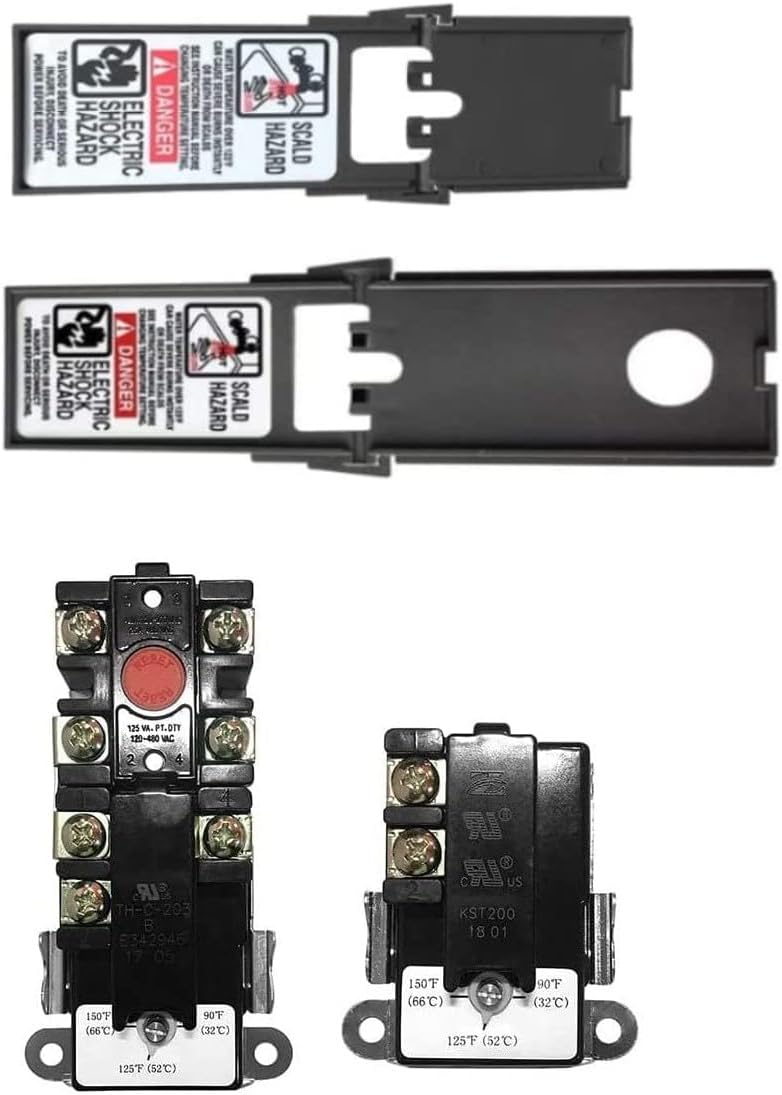
Image: The DROMIX EWH-00C upper and lower electric water heater thermostats are shown alongside their respective protective terminal covers, illustrating the complete package contents.
4. Specifications
| Feature | Specification |
|---|---|
| Model | EWH-00C |
| Type | Upper and Lower Electric Water Heater Thermostats |
| Operation | Non-Simultaneous |
| Voltage Range | 120V ~ 480V |
| Temperature Adjustment Range | 90°F ~ 150°F (32°C ~ 66°C) |
| Style | Therm-O-Disc (TOD) Style, interchangeable with APCOM Style |
| Included Components | Upper Thermostat, Lower Thermostat, Protective Terminal Covers |
5. Setup and Installation
The following steps provide a general guide for replacing electric water heater thermostats. Always refer to your water heater's specific manual for detailed instructions and safety precautions. If you are unsure about any step, consult a qualified electrician or plumber.
5.1 Preparation
- Disconnect Power: Turn off the electricity to the water heater at the main circuit breaker or fuse box. Verify power is off using a voltage tester.
- Turn Off Water Supply: Close the cold water inlet valve to the water heater.
- Drain Water Heater (Optional but Recommended): If replacing lower thermostat or elements, it is recommended to drain some water from the tank to prevent spills. Connect a hose to the drain valve and open it.
- Access Thermostats: Remove the access panels on the side of the water heater, usually held by screws. You will typically find insulation behind these panels. Carefully remove the insulation to expose the thermostats and heating elements.
5.2 Thermostat Replacement
- Remove Old Thermostat: Carefully remove the protective terminal cover from the old thermostat. Disconnect the wires from the terminals, noting their original positions for correct reinstallation. The thermostats are typically held in place by clips. Gently pry them off.
- Install New Thermostat: Place the new DROMIX thermostat into the clips, ensuring it sits flush against the water heater tank. Proper contact with the tank is crucial for accurate temperature sensing.
- Reconnect Wiring: Reconnect the wires to the new thermostat's terminals, matching the original configuration. Ensure all connections are tight and secure.
- Install Protective Covers: Slide the new protective terminal covers over the thermostats. These covers are essential for safety, preventing accidental contact with live electrical parts.

Image: A detailed view of the DROMIX EWH-00C upper and lower thermostats. The upper thermostat features a manual reset button, while both thermostats show the temperature adjustment range from 90°F to 150°F (32°C to 66°C). These are TOD style, interchangeable with APCOM style.
5.3 Post-Installation
- Replace Insulation and Access Panels: Carefully put the insulation back in place and reattach the access panels.
- Refill Water Heater: Open the cold water inlet valve. Open a hot water faucet in your home to allow air to escape the tank. Once water flows steadily from the faucet, close it.
- Restore Power: Turn the electricity back on at the main circuit breaker or fuse box.
6. Operating Instructions
6.1 Temperature Adjustment
The DROMIX EWH-00C thermostats allow for temperature adjustment between 90°F (32°C) and 150°F (66°C). To adjust the temperature:
- Disconnect Power: Always turn off power to the water heater before adjusting thermostat settings.
- Access Thermostat: Remove the access panel and protective cover.
- Adjust Dial: Use a flathead screwdriver to carefully turn the temperature adjustment dial to your desired setting. A common household setting is 120°F (49°C) to balance comfort and energy efficiency while minimizing scald risk.
- Reinstall Covers and Power: Replace the protective cover and access panel, then restore power.
6.2 Manual Reset (Upper Thermostat)
The upper thermostat is equipped with a manual reset button. This button trips if the water temperature exceeds a safe limit, indicating a potential issue. If your water heater stops producing hot water, check the upper thermostat for a tripped reset button.
- Disconnect Power: Turn off power to the water heater.
- Access Upper Thermostat: Remove the upper access panel and protective cover.
- Press Reset Button: Locate the red reset button on the upper thermostat and firmly press it. You should hear a click.
- Inspect for Issues: If the button trips repeatedly, there may be an underlying problem with the heating element, thermostat, or wiring. Consult a qualified technician.
- Reinstall Covers and Power: Replace the protective cover and access panel, then restore power.
7. Maintenance
Regular maintenance helps ensure the longevity and efficiency of your water heater and its components. While the thermostats themselves require minimal maintenance, consider the following:
- Annual Inspection: Have a qualified technician inspect your water heater annually. They can check thermostat function, element condition, and overall system health.
- Check for Loose Connections: During any service, ensure all electrical connections to the thermostats and elements are tight and free from corrosion. (Always disconnect power first).
- Keep Area Clear: Ensure the area around the water heater is clear of obstructions and flammable materials.
8. Troubleshooting
If you encounter issues with your water heater, the following table provides common problems and potential solutions related to the thermostats.
| Problem | Possible Cause | Solution |
|---|---|---|
| No hot water | Tripped circuit breaker Tripped upper thermostat reset button Faulty thermostat Faulty heating element | Check/reset circuit breaker Press manual reset button on upper thermostat (see Section 6.2) Test thermostat for continuity (consult technician) Test heating elements (consult technician) |
| Water not hot enough | Thermostat set too low Thermostat not making proper contact with tank Faulty thermostat Faulty heating element | Adjust thermostat temperature (see Section 6.1) Ensure thermostat is flush against tank Test thermostat (consult technician) Test heating elements (consult technician) |
| Water too hot | Thermostat set too high Faulty thermostat | Adjust thermostat temperature (see Section 6.1) Test/replace thermostat (consult technician) |
| Thermostat repeatedly trips | Overheating due to faulty element Short circuit Improper thermostat contact with tank | Consult a qualified technician for diagnosis and repair. Ensure thermostat is flush against tank. |
For issues not listed or if troubleshooting steps do not resolve the problem, contact a qualified technician.
9. Compatibility
The DROMIX EWH-00C Electric Water Heater Thermostats are designed to be interchangeable with APCOM style thermostats and are compatible with most major brands of water heaters, including but not limited to:
- Whirlpool
- BRADFORD WHITE
- CRAFTMASTER
- GENERAL ELECTRIC
- GS WOOD
- KENMORE
- LOCHINVAR
- A O SMITH
- RELIANCE
- RHEEM
- RICHMOND
- RUUD
- STATE
- MOR-FLO
- APCOM
10. Warranty and Support
10.1 One-Year Warranty
DROMIX provides a one-year warranty for the EWH-00C Electric Water Heater Thermostats. This warranty covers defects in materials and workmanship under normal use and service. If you encounter any issues not limited to quality problems within this period, please contact us for support, return, or refund options.
10.2 Customer Support
For technical assistance, warranty claims, or any questions regarding your DROMIX EWH-00C thermostats, please contact DROMIX customer support through the retailer's platform or the official DROMIX website. Please have your purchase information and model number ready when contacting support.