
1. Product Overview
The Casio G-Shock MUDMAN GW-9500-1JF is a robust timepiece designed for challenging environments. It features a mud-resistant structure and a Triple Sensor system, providing essential data for outdoor activities. This model integrates advanced functionalities while maintaining G-Shock's renowned durability.

Image 1.1: Front view of the Casio G-Shock MUDMAN GW-9500-1JF watch, displaying the digital time, date, and various sensor indicators.
2. Key Features
- Mud Resist Structure: Designed to prevent mud and dirt from entering the watch, ensuring reliable operation in harsh conditions.
- Triple Sensor: Equipped with an altimeter, barometer/thermometer, and compass for environmental data measurement.
- Tough Solar Power: Converts light into energy, eliminating the need for battery replacement.
- Multi Band 6 Atomic Timekeeping: Receives calibration signals from six transmission stations worldwide to ensure accurate timekeeping.
- Duplex LCD: Enhances readability by displaying different information layers.
- World Time: Displays the current time in major cities and specific areas around the world.
- Stopwatch & Timer: Standard timing functions for various activities.
- Alarms: Multiple daily alarms with snooze function.
- Sunrise/Sunset Data: Provides sunrise and sunset times for a specified date.

Image 2.1: The Casio G-Shock MUDMAN GW-9500-1JF watch in an outdoor environment, emphasizing its durable construction and mud-resistant features.
3. Initial Setup
3.1 Charging the Watch (Tough Solar)
The GW-9500-1JF is powered by a solar cell. To ensure optimal performance, expose the watch face to light regularly. Avoid prolonged storage in dark places. A full charge can last for several months in total darkness with power-saving features enabled.
- Place the watch where its face is exposed to direct sunlight or strong artificial light.
- The charge level indicator (if available on the display) will show the current battery status.
- For initial use or after prolonged storage, charge the watch for several hours.
3.2 Time Synchronization (Multi Band 6)
The watch automatically receives time calibration signals to maintain accurate time. Manual reception can also be performed.
- Ensure the watch is in an area with good signal reception, typically outdoors or near a window, away from electronic interference.
- In Timekeeping Mode, press and hold the ADJUST button (top left) until the city code starts to flash.
- Use the MODE button (bottom left) to navigate to the time calibration setting.
- Follow the on-screen prompts to initiate manual reception or check the last successful reception time.
4. Operating Instructions
The GW-9500-1JF features multiple modes and functions accessible via its buttons. Familiarize yourself with the button layout:
- ADJUST Button (Top Left): Used for entering and exiting setting modes, and confirming selections.
- MODE Button (Bottom Left): Cycles through the watch's various modes (Timekeeping, World Time, Stopwatch, Timer, Alarm, Recall, Sensor Modes).
- SENSOR Button (Top Right): Directly accesses the Altimeter/Barometer/Thermometer mode.
- COMPASS Button (Middle Right): Directly accesses the Compass mode.
- ALTI Button (Bottom Right): Directly accesses the Altimeter mode.
- LIGHT Button (Front Bottom): Illuminates the display.

Image 4.1: Various angles of the Casio G-Shock MUDMAN GW-9500-1JF, illustrating button locations and the watch's overall design.
4.1 Basic Timekeeping
In Timekeeping Mode, the watch displays the current time, date, and day of the week. Press the LIGHT button to illuminate the display in low-light conditions.
4.2 Triple Sensor Functions
The GW-9500-1JF integrates an altimeter, barometer, thermometer, and compass. These sensors provide environmental data crucial for outdoor navigation and awareness.
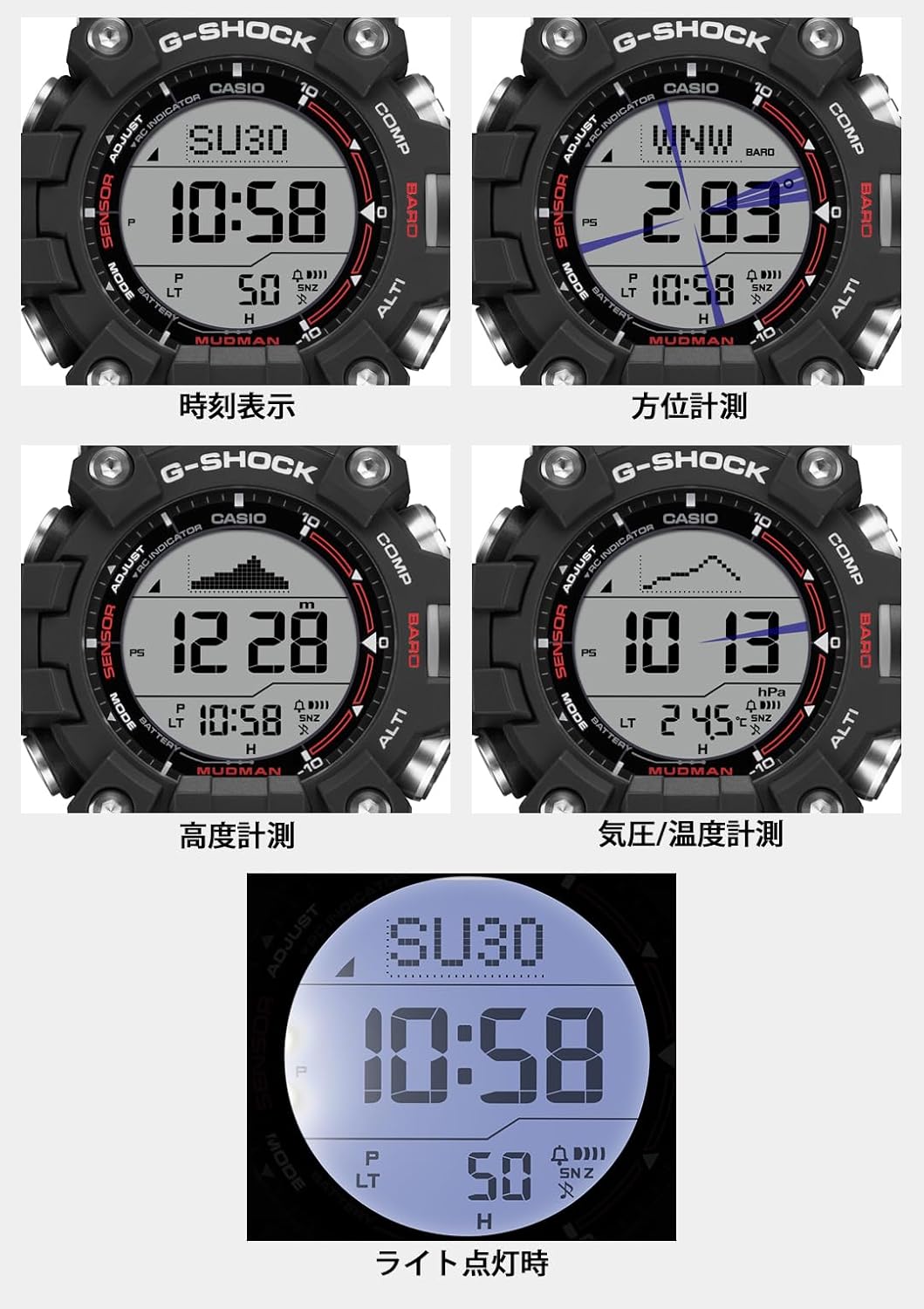
Image 4.2: Visual representation of the watch's display in different modes: Timekeeping, Compass, Altimeter, and Barometer/Thermometer.
4.2.1 Compass (Direction Measurement)
- Press the COMPASS button (middle right) to enter Compass Mode.
- Hold the watch level and point the 12 o'clock position in the desired direction.
- The display will show the direction (e.g., N, NE, E) and a graphic representation of the bearing.
- For accurate readings, avoid strong magnetic fields and ensure the watch is calibrated periodically.
4.2.2 Altimeter (Altitude Measurement)
- Press the ALTI button (bottom right) to enter Altimeter Mode.
- The watch measures atmospheric pressure to estimate altitude. Readings can be affected by changes in temperature, humidity, and weather conditions.
- Calibrate the altimeter using a known altitude reference point for improved accuracy.
4.2.3 Barometer/Thermometer (Atmospheric Pressure & Temperature)
- Press the SENSOR button (top right) to enter Barometer/Thermometer Mode.
- The display will show the current atmospheric pressure and temperature.
- Temperature readings are influenced by body heat. For accurate ambient temperature, remove the watch from your wrist for 20-30 minutes.
- Barometric pressure changes can indicate weather trends.
4.3 Other Functions
- World Time: Press the MODE button to cycle to World Time Mode. Use the other buttons to select different city codes.
- Stopwatch: Press the MODE button to cycle to Stopwatch Mode. Use the SENSOR button to start/stop and ALTI button to reset.
- Timer: Press the MODE button to cycle to Timer Mode. Set the countdown time using the ADJUST and other buttons.
- Alarms: Press the MODE button to cycle to Alarm Mode. Set up to five daily alarms.
- Sunrise/Sunset: This feature is typically found within a specific mode or accessible through a combination of button presses. Refer to the detailed Casio module manual for exact steps.
5. Maintenance
5.1 Cleaning
- Wipe the watch with a soft, dry cloth to remove dirt and moisture.
- For stubborn dirt, use a soft cloth dampened with water and a mild neutral detergent.
- After cleaning, ensure the watch is thoroughly dry.
5.2 Water Resistance
The GW-9500-1JF is water-resistant. However, avoid operating buttons underwater to prevent water ingress. Rinse the watch with fresh water after exposure to saltwater.
5.3 Battery Care (Tough Solar)
Regular exposure to light is essential for maintaining the watch's power. If the charge level drops, functions may be disabled to conserve power. Refer to the power-saving section in the full manual for details.
6. Troubleshooting
This section addresses common issues you might encounter with your GW-9500-1JF watch.
| Issue | Possible Cause / Solution |
|---|---|
| Display is blank or dim. | The watch may be in power-saving mode or the battery charge is low. Expose the watch to strong light for charging. |
| Time is incorrect. | The watch may not have received a time calibration signal. Ensure it's in an area with good reception or perform manual time synchronization. Check your home city setting. |
| Sensor readings (Altimeter, Barometer, Thermometer, Compass) are inaccurate. |
|
| Buttons are stiff or unresponsive. | The mud-resist structure can make buttons feel stiff. Ensure no dirt or debris is lodged around the buttons. Clean the watch thoroughly. |
For more detailed troubleshooting or specific error codes, please refer to the official Casio module manual available on the Casio website.
7. Specifications
- Model Number: GW-9500-1JF
- Manufacturer: Casio
- Power Source: Tough Solar (Rechargeable Lithium Ion battery included)
- Timekeeping: Multi Band 6 Atomic Timekeeping
- Sensors: Altimeter, Barometer, Thermometer, Digital Compass
- Water Resistance: 200 meters (20 Bar)
- Dimensions (Approx.): 5.71 x 4.92 x 3.7 inches (Package Dimensions)
- Weight (Approx.): 2.86 ounces (Package Weight)
- Display: Digital with Duplex LCD
- Additional Functions: World Time, Stopwatch, Countdown Timer, 5 Daily Alarms, Hourly Time Signal, Full Auto LED Backlight, Sunrise/Sunset Data.
8. Warranty and Support
For information regarding product warranty, service, and detailed operational instructions, please visit the official Casio website or contact Casio customer support in your region. The full module manual for the GW-9500-1JF contains comprehensive details on all features and settings.
Official Casio Website: www.casio.com