1. Introduction
The UNI-T UT161B is a reliable True RMS digital multimeter designed for professional use. It features a 6000-count display and is capable of measuring up to 1000V AC/DC. This device is equipped with audible and visual alarms, providing critical warnings during high voltage, current, or temperature measurements. The UT161 series, including the UT161B, is CE, UKCA, and cETLus certified, ensuring compliance with international safety standards.
Key features include:
- True RMS measurement for accurate readings on non-sinusoidal waveforms.
- Data hold and backlight for convenience in various lighting conditions.
- MAX/MIN/Relative modes for advanced analysis.
- USB communication for data logging and PC connectivity.
- Comprehensive input protection.
- Diode and continuity testing.
- Non-Contact Voltage (NCV) detection with audible/visual alarm.
2. Safety Information
Always adhere to safety precautions when using the multimeter to prevent electric shock or personal injury. Read all safety information carefully before operation.
- Do not apply more than the rated voltage, as marked on the meter, between terminals or between any terminal and earth ground.
- Do not use the meter if it appears damaged or if the case is open.
- Exercise extreme caution when working with voltages above 30V AC RMS, 42V peak, or 60V DC. These voltages pose a shock hazard.
- Always ensure the test leads are in good condition, without any damage to the insulation.
- Disconnect the test leads from the circuit before changing functions or ranges.
- Replace the battery immediately when the low battery indicator appears to ensure accurate readings.
- Use the correct input terminals, function, and range for all measurements.
3. Product Overview
The UNI-T UT161B multimeter is designed for ease of use and durability. It features a clear LCD display, a rotary switch for function selection, and various buttons for additional features.
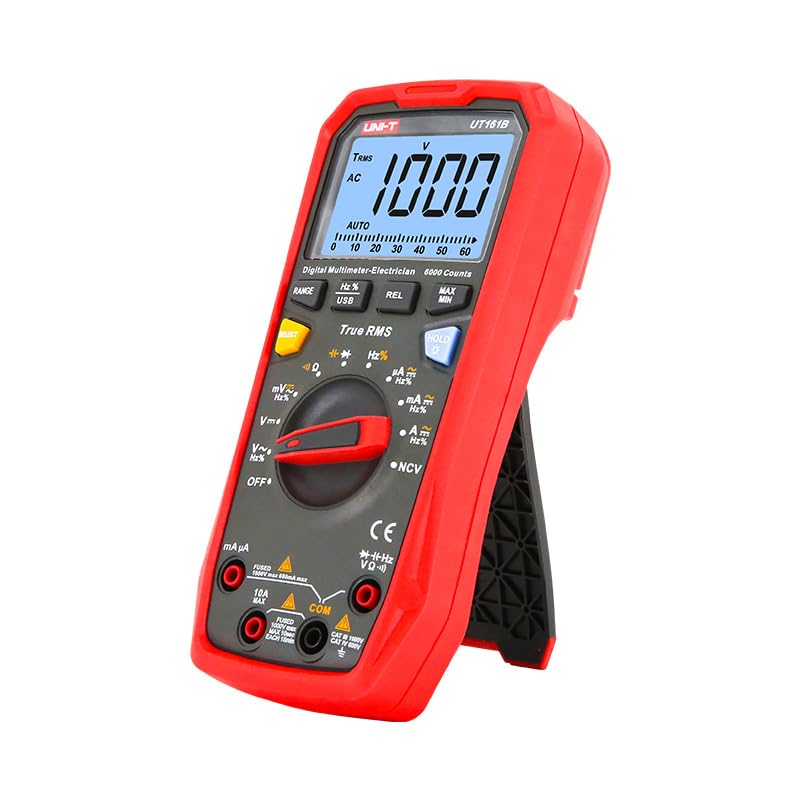
Figure 1: Front view of the UNI-T UT161B Digital Smart Multimeter, showing the display, rotary switch, and function buttons.

Figure 2: Back view of the UNI-T UT161B Digital Smart Multimeter, showing the battery compartment and kickstand.
What's in the Box:
- UNI-T UT161B Digital Smart Multimeter
- Test Leads (Gold plated for quick and accurate measurements)
- USB Cable
- Batteries (1 Lithium Metal battery required, included)
- English Manual
- Cloth Bag
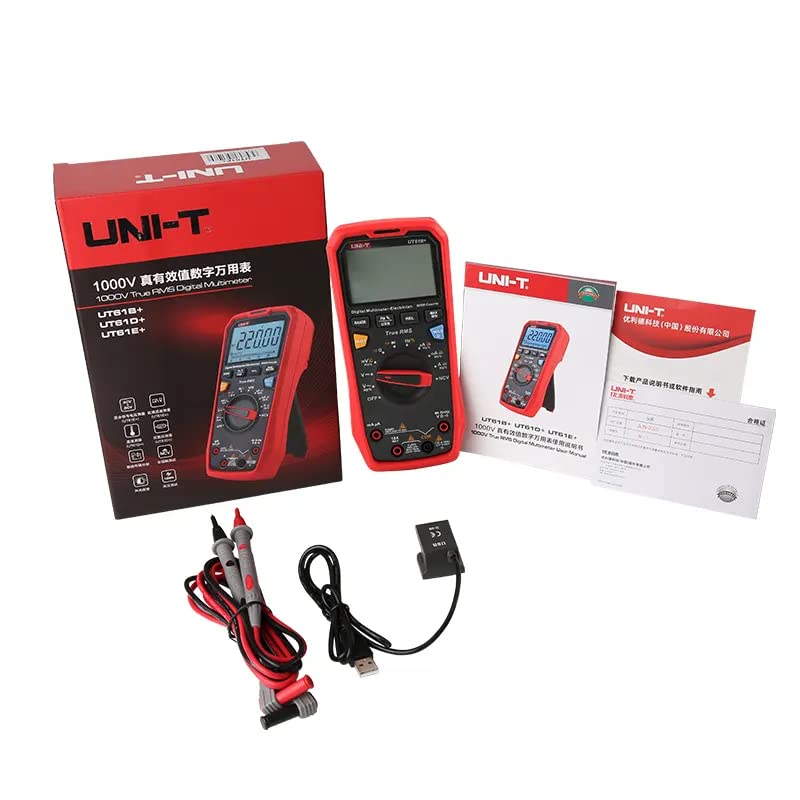
Figure 3: The complete package contents for the UNI-T UT161B Multimeter, including the device, test leads, USB cable, and manual.
4. Setup
Battery Installation
- Ensure the multimeter is powered off and test leads are disconnected.
- Locate the battery compartment on the back of the meter.
- Unscrew the battery cover and remove it.
- Insert four 1.5V (R03) batteries, observing correct polarity.
- Replace the battery cover and secure it with the screw.
Connecting Test Leads
Connect the red test lead to the VΩmA input jack and the black test lead to the COM input jack for most measurements. For high current measurements (up to 10A), connect the red test lead to the 10A input jack.
5. Operating Instructions
The UT161B offers various measurement functions accessible via the rotary switch and function buttons.
General Measurement Steps:
- Turn the rotary switch to the desired measurement function.
- Connect the test leads to the appropriate input jacks and to the circuit under test.
- Read the measurement value on the LCD display.
- Use function buttons (e.g., RANGE, HOLD, REL, MAX/MIN) for additional control or data capture.
Specific Functions:
- Voltage Measurement (AC/DC): Select V~ for AC voltage or V- for DC voltage. The meter can measure up to 1000V.
- Current Measurement (AC/DC): Select A~ for AC current or A- for DC current. Ensure test leads are connected to the correct current input jacks (mA/µA or 10A).
- Resistance Measurement (Ω): Select the Ω function.
- Capacitance Measurement (F): Select the F function.
- Frequency Measurement (Hz): Select the Hz function.
- Diode/Continuity Test: Select the diode/continuity function. A buzzer will sound for continuity.
- Non-Contact Voltage (NCV): Use the NCV function to detect AC voltage without direct contact. The meter will provide audible and visual indications.

Figure 4: The multimeter in use, demonstrating frequency measurement on an active circuit.
USB Communication
The UT161B supports USB communication for connecting to a PC. This allows for real-time data monitoring, logging, and analysis using compatible software.
Video 1: This video demonstrates various functions of the UNI-T UT161 series multimeters, including voltage and frequency measurement, current measurement, continuity testing with audio/visual indication, NCV function, and USB communication for data logging to a PC. It highlights the device's over-molding protection and the high resolution of the UT161E model.
6. Maintenance
Cleaning
Wipe the case with a damp cloth and mild detergent. Do not use abrasives or solvents. Keep the terminals free from dirt and moisture.
Battery Replacement
When the low battery indicator appears on the display, replace the batteries as described in the Setup section. Always use the specified battery type (four 1.5V R03 batteries).
Fuse Replacement
If the current measurement function fails, the fuse may need replacement. Refer to the detailed fuse replacement instructions in the complete user manual for your specific model. Ensure to use a fuse with the correct rating to maintain safety and performance.
7. Troubleshooting
- No Display/Power On: Check battery installation and ensure batteries are not depleted. Replace if necessary.
- Incorrect Readings: Verify correct function and range selection. Ensure test leads are properly connected and not damaged. Check for low battery.
- Continuity Test Not Working: Ensure the circuit is de-energized. Check test leads for continuity.
- Current Measurement Failure: Check if the fuse is blown. Replace with the correct type and rating if needed.
- NCV Not Detecting: Ensure the NCV sensor is close to the AC voltage source.
For more complex issues, consult the full user manual or contact UNI-T customer support.
8. Specifications
Below are the general specifications for the UNI-T UT161B Digital Smart Multimeter. For detailed accuracy and specific ranges, please refer to the complete product manual.

Figure 5: A comprehensive table outlining the specifications for the UT161B, UT161D, and UT161E models, including measurement ranges, display counts, and certifications.
| Feature | Specification (UT161B) |
|---|---|
| Display Count | 6000 |
| AC Voltage (V) | 1000V |
| DC Voltage (V) | 1000V |
| AC Current (A) | 10A |
| DC Current (A) | 10A |
| Resistance (Ω) | 60MΩ |
| Capacitance (F) | 60mF |
| Frequency (Hz) | 10MHz |
| Duty Cycle (%) | 0.1%~99.9% |
| Power | 1.5V battery (R03) x 4 |
| Product Net Weight | 350g |
| Product Size | 190mm x 90mm x 50mm |
| Certifications | CE, UKCA, cETLus |
9. Warranty and Support
For warranty information, technical support, or service inquiries, please refer to the official UNI-T website or the contact information provided in your product packaging. Keep your purchase receipt as proof of purchase for warranty claims.


