
Product Overview
The Toshiba 50-Pint Dehumidifier (Model TDDP5013ES2) is designed to efficiently remove excess moisture from your home environment, covering areas up to 4,500 sq. ft. This ENERGY STAR certified unit offers both automatic and manual humidity control, a 24-hour programmable timer, and convenient portability with its 4-wheel design. It features indicators for a full water container and when the filter needs cleaning, ensuring optimal performance.

Front view of the Toshiba 50-Pint Dehumidifier.
Important Safety Instructions
Before operating this appliance, please read all instructions thoroughly to prevent injury and property damage. Always follow basic safety precautions, including:
- Ensure the unit is plugged into a properly grounded outlet.
- Do not operate the dehumidifier with a damaged cord or plug.
- Keep the unit away from water sources and direct sunlight.
- Do not block air inlets or outlets.
- Always unplug the unit before cleaning or performing any maintenance.
- This appliance is for indoor use only.
Key Features
- High Capacity: Removes up to 50 pints of moisture per day.
- Energy Efficient: ENERGY STAR MOST EFFICIENT 2023 certified for reduced energy consumption.
- Portable Design: Equipped with 4 wheels for easy room-to-room mobility.
- Flexible Operation: Features continuous operation function and automatic or manual humidity setup.
- Programmable Timer: 24-hour timer allows scheduling power on/off.
- User-Friendly Indicators: Includes "Clean Filter" and "Container Full" warnings.
- Automatic Defrost: Prevents ice build-up on coils.
Setup Guide
Unpacking: Carefully remove the dehumidifier from its packaging. Retain packaging for future storage or transport.
Placement: Place the unit on a level, stable surface in the area where dehumidification is desired. Ensure there is at least 8 inches of space around the unit for proper airflow.
Power Connection: Plug the power cord into a grounded 115-Volt AC outlet.
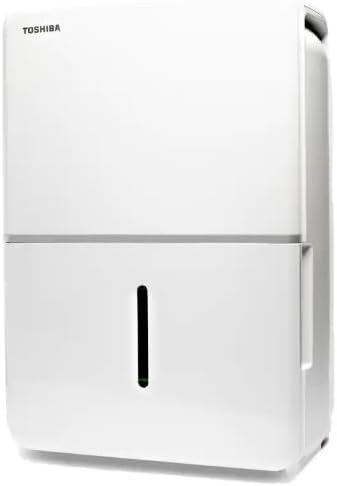
The compact design and wheels allow for easy placement.
Operating Your Dehumidifier
Control Panel: The intuitive control panel allows for easy adjustment of settings.

Detailed view of the dehumidifier's control panel.
Power On/Off: Press the POWER button to turn the unit on or off.
Setting Humidity Level: Use the HUMIDITY buttons (< and >) to set your desired humidity level between 30% and 80% relative humidity. The unit will operate until the set humidity is reached.
Continuous Operation: Press the CONT button for continuous dehumidification, regardless of the humidity level.
Timer Function: Press the TIMER button to program the unit to turn on or off after a set number of hours (1-24 hours).
Fan Speed (Turbo): Press the TURBO button to adjust the fan speed. Higher fan speed results in faster moisture removal.
Comfort Mode: Press the COMFORT button for automatic humidity control based on ambient temperature.
Maintenance and Care
Regular maintenance ensures efficient operation and extends the life of your dehumidifier.
Emptying the Water Bucket: When the "Container Full" indicator illuminates, the unit will stop operating. Carefully pull out the water bucket from the front of the unit, empty the collected water, and slide the bucket back into place until it clicks securely.
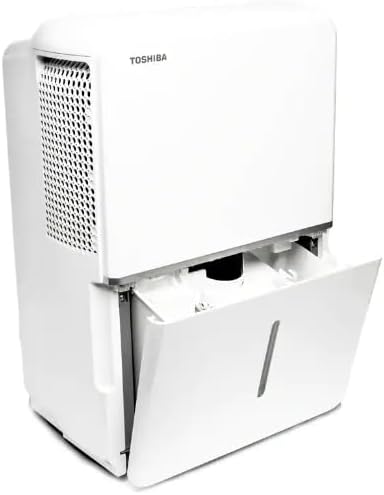
The water collection bucket is easily removable for emptying.
Continuous Draining: For continuous operation without emptying the bucket, connect a standard garden hose (not included) to the continuous drain outlet at the back of the unit. Ensure the hose is sloped downwards to a suitable drain.
Cleaning the Air Filter: The "Clean Filter" indicator will light up periodically. Remove the filter from the back of the unit, wash it with warm, soapy water, rinse thoroughly, and let it air dry completely before reinstalling.
Cleaning the Unit: Wipe the exterior of the unit with a soft, damp cloth. Do not use harsh chemicals or abrasive cleaners.
Troubleshooting Guide
Unit does not turn on:
- Check if the power cord is securely plugged into a grounded outlet.
- Ensure the water bucket is properly inserted and not full.
- Verify the power button has been pressed.
Unit is running but not collecting water:
- Check if the humidity setting is lower than the current room humidity.
- Ensure the air filter is clean and not blocked.
- Verify room temperature is within operating range (typically above 41°F / 5°C).
"Container Full" indicator is on, but bucket is not full:
- The water bucket may not be seated correctly. Remove and reinsert it firmly.
- Check for any obstructions around the float switch inside the bucket.
Unit is noisy:
- Ensure the unit is placed on a level and stable surface.
- Check for any loose parts or obstructions.
If problems persist, please contact customer support.
Product Specifications

Product dimensions for the Toshiba Dehumidifier.
| Attribute | Detail |
|---|---|
| Brand | TOSHIBA |
| Model Name | TDDP5013ES2 |
| Dehumidification Capacity | 50 Pints per Day |
| Floor Area Coverage | Up to 4500 Square Feet |
| Color | White |
| Product Dimensions | 11.73"D x 16.81"W x 24.41"H |
| Operation Mode | Continuous |
| Special Features | Continuous Draining, Automatic Defrost |
| Wattage | 2023 watts |
| UPC | 810040941764 |
Warranty and Customer Support
This Toshiba Dehumidifier (Model TDDP5013ES2) includes a 1 Year Extended CPS Warranty. To activate and benefit from this warranty, it is essential to register your device using the included warranty card.

CPS Extended Warranty logo.
For technical assistance, troubleshooting not covered in this manual, or warranty claims, please refer to the contact information provided with your product documentation or visit the official Toshiba support website.
Online Resources: For additional support and FAQs, please visit the Toshiba Support Website.