
SHIMANO PL-ISCEN500A-4550170234898
SHIMANO Cycle Computer SC-EN500 22.2 mm User Manual
Model: SC-EN500
1. Introduction
Thank you for purchasing the SHIMANO Cycle Computer SC-EN500. This device is designed to provide essential cycling data, including speed, distance, and battery status, to enhance your riding experience. This manual provides detailed instructions for setup, operation, maintenance, and troubleshooting to ensure optimal performance and longevity of your cycle computer. Please read this manual thoroughly before using the product.
2. Safety Information
Always observe the following safety precautions to prevent injury and damage to the product.
- Do not attempt to disassemble or modify the cycle computer. This may cause malfunction and void the warranty.
- Keep the device away from extreme temperatures, direct sunlight, and high humidity.
- Ensure the device is securely mounted to your bicycle handlebar before riding. A loose device may fall off and cause injury or damage.
- Do not operate the device while riding if it distracts you from safe cycling. Always prioritize road safety.
- Use only specified batteries and dispose of them properly according to local regulations.
3. Package Contents
Verify that all the following items are included in your package:
- SHIMANO Cycle Computer SC-EN500 Unit
- Handlebar Mount Bracket (22.2 mm)
- Mounting Hardware (screws, rubber shims)
- User Manual (this document)
4. Setup
4.1 Mounting the Cycle Computer
The SC-EN500 is designed for handlebar mounting. Follow these steps for secure installation:
- Identify a suitable position on your handlebar (22.2 mm diameter) that does not obstruct your view or control of the bicycle.
- Place the handlebar mount bracket on the chosen position. Use the included rubber shims if necessary to ensure a snug fit and prevent rotation.
- Secure the bracket using the provided screws. Tighten them firmly but do not overtighten.
- Slide the SC-EN500 unit onto the mount until it clicks securely into place. Ensure it is facing forward and is level.
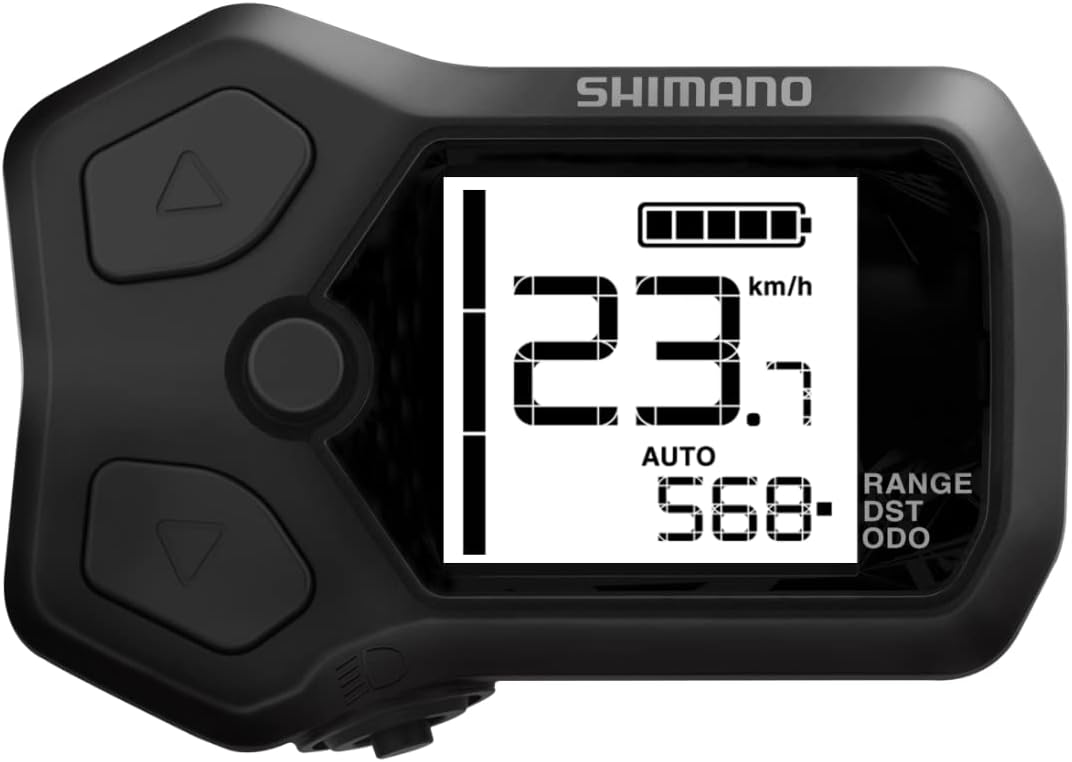
This image displays the SHIMANO Cycle Computer SC-EN500. The screen shows a speed reading of 23.7 km/h, a full battery indicator, and 'AUTO' mode with a distance value of 568. The device has three physical buttons: an up arrow, a down arrow, and a central circular button, along with a light icon at the bottom left.
4.2 Initial Configuration
Upon first power-on or after a battery replacement, you may need to configure basic settings:
- Power On: Press and hold the central button for 3 seconds.
- Language Selection: Use the up/down arrow buttons to select your preferred language. Press the central button to confirm.
- Unit System: Choose between metric (km/h) or imperial (mph) units. Confirm with the central button.
- Wheel Circumference: Input your bicycle's wheel circumference for accurate speed and distance readings. Refer to your bicycle tire's specifications or measure it manually.
5. Operating Instructions
5.1 Basic Functions
- Power On/Off: Press and hold the central button for 3 seconds to power on or off.
- Backlight: A short press of the central button will toggle the backlight on/off.
- Navigation: Use the up (▲) and down (▼) arrow buttons to scroll through display modes or menu options.
- Selection/Confirmation: Press the central button to select an option or confirm a setting.
5.2 Display Modes
The SC-EN500 cycles through various data displays. Use the up/down arrow buttons to switch between them.
| Display Mode | Description |
|---|---|
| Current Speed | Displays your real-time riding speed. |
| Distance (DST) | Shows the distance covered during the current ride. Resets with each new ride. |
| Odometer (ODO) | Displays the total accumulated distance. This value does not reset. |
| Ride Time | Indicates the duration of your current ride. |
| Average Speed | Calculates the average speed for the current ride. |
| Maximum Speed | Records the highest speed achieved during the current ride. |
| Battery Level | Shows the remaining battery charge of the cycle computer. |
5.3 Button Functions
- Up Arrow Button (▲): Navigates upwards through menu options or cycles to the previous display mode.
- Down Arrow Button (▼): Navigates downwards through menu options or cycles to the next display mode.
- Central Button (●): Powers on/off (long press), toggles backlight (short press), confirms selections, or enters sub-menus.
6. Maintenance
6.1 Cleaning
To maintain the appearance and functionality of your SC-EN500:
- Wipe the unit with a soft, damp cloth.
- Do not use abrasive cleaners, solvents, or chemical sprays, as these can damage the display or casing.
- Ensure the device is dry before storing or using it.
6.2 Battery Replacement
The SC-EN500 uses a standard coin cell battery (e.g., CR2032). When the battery indicator shows low charge:
- Carefully remove the cycle computer from its handlebar mount.
- Locate the battery compartment cover on the back of the unit.
- Use a small coin or screwdriver to gently twist and open the battery cover.
- Remove the old battery and insert a new CR2032 battery with the positive (+) side facing up.
- Replace the battery cover, ensuring it is securely sealed to maintain water resistance.
7. Troubleshooting
If you encounter issues with your SHIMANO Cycle Computer SC-EN500, refer to the table below for common problems and solutions.
| Problem | Possible Cause | Solution |
|---|---|---|
| No Display / Unit Won't Turn On | Dead battery; Unit not powered on correctly. | Replace battery; Press and hold central button for 3 seconds. |
| Incorrect Speed/Distance Readings | Incorrect wheel circumference setting; Sensor not properly aligned (if applicable). | Verify and correct wheel circumference in settings; Ensure speed sensor (if external) is correctly installed and aligned. |
| Display is Faint or Flickering | Low battery. | Replace battery. |
| Buttons Unresponsive | Unit frozen; Physical damage. | Remove and reinsert battery to reset; If physical damage, contact support. |
8. Specifications
Key technical specifications for the SHIMANO Cycle Computer SC-EN500:
| Feature | Detail |
|---|---|
| Brand | SHIMANO |
| Model Name | Shimano Cycle Computer Sc-en500 22.2 Mm |
| Part Number | PL-ISCEN500A-4550170234898 |
| Display Type | LCD, LED |
| Mounting Type | Handlebar Mount (22.2 mm) |
| Human Interface Input | Buttons |
| Material | Plastic |
| Included Components | All |
| Item Package Dimensions | 3.94 x 3.94 x 3.94 inches |
| Package Weight | 0.02 Pounds |
9. Warranty and Support
SHIMANO products are manufactured to high standards and are backed by a limited warranty against defects in materials and workmanship. Please refer to the warranty card included with your purchase or visit the official SHIMANO website for detailed warranty terms and conditions.
For technical support, troubleshooting assistance beyond this manual, or warranty claims, please contact SHIMANO customer service through their official website or the retailer where you purchased the product. Have your model number (SC-EN500) and purchase information ready when contacting support.
Related Documents - PL-ISCEN500A-4550170234898
 |
SHIMANO STEPS Cycle Computer and Switch Unit Parts (Gen.2) Dealer's Manual Official dealer's manual from SHIMANO detailing the installation, wiring, and maintenance of SHIMANO STEPS Cycle Computer and Switch Unit components (Gen.2). Includes guidance for models SC-EN600, SC-EN500, SW-M8150, and more. |
 |
Shimano Flight Deck SC-6500 Series Cycle Computer: Service Instructions Comprehensive service instructions for the Shimano Flight Deck SC-6500 series cycle computers, covering installation, data input, display modes, and troubleshooting. |
 |
SHIMANO Clamp Band Type Cycle Computer User's Manual User's manual for the SHIMANO Clamp Band Type Cycle Computer, detailing installation, basic operation, settings, and troubleshooting for SHIMANO STEPS electric bicycle systems. Includes safety information and system compatibility. |
 |
Shimano STEPS 2021 E-Bike Product Catalogue - Enhance Your Ride Explore the 2021 Shimano STEPS E-Bike and E-MTB product catalogue. Discover advanced drive units (EP800, E8000, E7000, E6100, E5000), batteries, and integrated systems for enhanced cycling performance on any terrain. |
 |
Shimano E-TUBE Compatibility Charts: Di2, VTT, and E-BIKE Systems Comprehensive compatibility guide for Shimano E-TUBE Di2, VTT, and SHIMANO STEPS E-BIKE systems, detailing component compatibility for shifters, derailleurs, batteries, and other accessories across various models and generations. |
 |
SHIMANO STEPS Switch Unit Integrated Type Cycle Computer User's Manual (UM-7HU0C-000) User's manual for the SHIMANO STEPS Switch Unit Integrated Type Cycle Computer (model UM-7HU0C-000). Learn about safe operation, basic functions, system settings, and troubleshooting for your electric bicycle's display unit. |