
Hitow TX-KF210203-01
Hitow Vanity Desk with Mirror and Lights User Manual
Model: TX-KF210203-01
Introduction
This manual provides essential information for the assembly, operation, maintenance, and troubleshooting of your Hitow Vanity Desk with Mirror and Lights. Please read these instructions carefully before beginning assembly or use to ensure proper function and longevity of your product.

Figure 1: Fully assembled Hitow Vanity Desk with Mirror and Lights, including the matching stool.
Setup and Assembly
The Hitow Vanity Desk is designed for straightforward assembly. All necessary accessories and detailed instructions are included in the package. It is recommended to assemble the unit in the desired location to avoid moving it after completion.
Assembly Steps Overview:
- Unpack all components and verify against the parts list provided in the instruction manual.
- Identify and separate hardware components.
- Follow the step-by-step diagrams and instructions for assembling the main desk frame.
- Attach the drawers and install the drawer slides.
- Secure the mirror and shelving unit to the desk.
- Assemble the vanity stool.
- Ensure all connections are secure before use.
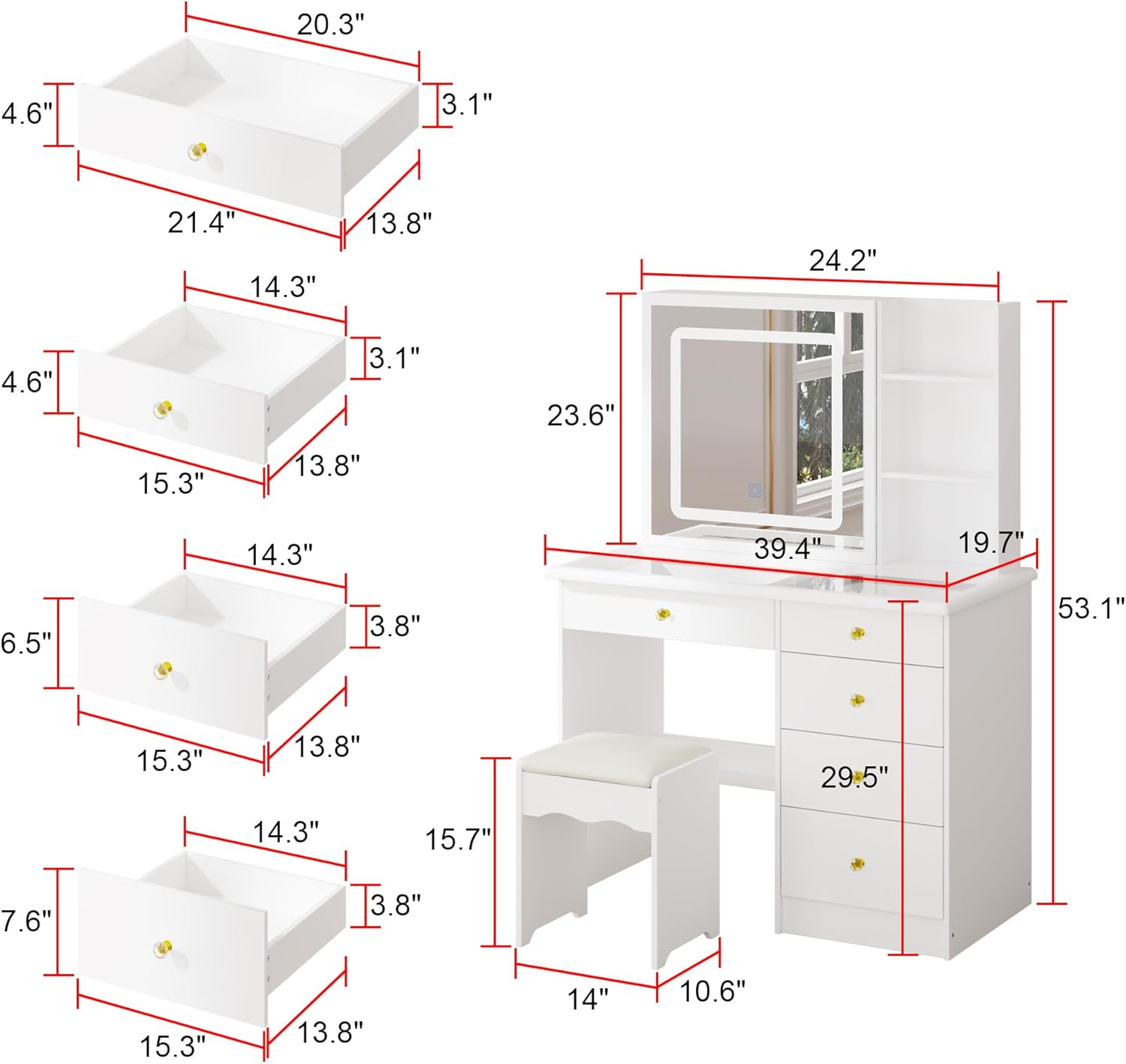
Figure 2: Detailed dimensions of the vanity desk and its individual components, aiding in assembly and placement.

Figure 3: View of the vanity desk with drawers extended, illustrating the internal storage layout.
Operating Instructions
Lighted Mirror Operation:
The integrated mirror features touch-screen controls for adjusting the lighting. It offers three distinct light settings to suit various needs and preferences:
- Warm Yellow Light: Ideal for creating a cozy ambiance or for evening makeup application.
- Warm White Light: A balanced light suitable for general use.
- Cold White Light: Provides bright, clear illumination, excellent for detailed tasks or daytime makeup.
To switch between light settings, gently touch the designated sensor on the mirror surface. Continue touching to cycle through the available options.

Figure 4: Illustration of the touch-screen light control and the three available light color temperatures.
Storage Utilization:
The vanity desk is equipped with ample storage solutions to help organize your items:
- Spacious Drawers: Five drawers are provided for storing jewelry, makeup, and other personal items, keeping them neatly out of sight.
- Open Shelves: Integrated open shelves offer convenient access and display space for cosmetics, perfumes, and other frequently used accessories.

Figure 5: Top-down view demonstrating the organization of items on the glass desktop and within the open shelving unit.

Figure 6: Detail of the decorative drawer knob.

Figure 7: The accompanying vanity stool, designed for comfort and convenience.
Maintenance
To maintain the appearance and longevity of your Hitow Vanity Desk, follow these simple care instructions:
- Cleaning: Wipe surfaces with a dry, soft cloth. Avoid abrasive cleaners or harsh chemicals that may damage the finish.
- Spills: Immediately wipe up any spills to prevent staining or damage to the wood.
- Mirror Care: Clean the mirror surface with a glass cleaner and a lint-free cloth. Do not spray cleaner directly onto the mirror to avoid liquid seeping into the electrical components.
- Drawer Slides: Periodically check drawer slides for smooth operation. If needed, a small amount of silicone lubricant can be applied.
Troubleshooting
If you encounter any issues with your vanity desk, please refer to the following common troubleshooting tips:
- Lights Not Working:
- Ensure the power cord is securely plugged into a functional electrical outlet.
- Check if the touch sensor on the mirror is clean and unobstructed.
- Verify that the power switch (if any) is in the "on" position.
- Drawers Sticking or Not Closing Smoothly:
- Check for any obstructions inside the drawer or along the slides.
- Ensure the drawer slides are properly aligned and securely fastened.
- Confirm that the drawer is not overloaded.
- Desk Wobbles:
- Verify that all assembly screws and fasteners are tightened.
- Ensure the desk is placed on a level surface.
If these steps do not resolve the issue, please contact customer support.
Specifications
| Feature | Detail |
|---|---|
| Brand | Hitow |
| Model Number | TX-KF210203-01 |
| Product Dimensions | 39.4"W x 19.7"D x 53.1"H (Overall) |
| Frame Material | Engineered Wood |
| Color | White |
| Furniture Finish | White |
| Mirror Lighting | 3 Color Settings (Warm Yellow, Warm White, Cold White) |
| Storage | 5 Drawers, Open Shelves |
| Country of Origin | China |
| Product Care | Wipe with Dry Cloth |
Customer Support
Hitow is committed to providing long-term installation guidance and support for all our products. If you have any questions, concerns, or require assistance with assembly, operation, or any other aspect of your vanity desk, please do not hesitate to contact us.
We are dedicated to providing prompt service to resolve any issues you may encounter.
For support, please refer to the contact information provided with your purchase documentation or visit the official Hitow store on Amazon: Hitow Store
Ask a question about this manual
Ask about setup, troubleshooting, compatibility, parts, safety, or missing instructions. Manuals+ will review the question and use this page’s manual context to help answer it.