

Introduction
Thank you for choosing the JETEAGO Power Lift Massage Recliner Chair. This manual provides essential information for the safe and efficient assembly, operation, and maintenance of your new recliner. Please read all instructions carefully before use and retain this manual for future reference.

Image: The JETEAGO Electric Power Lift Recliner Chair in a living room setting.
Safety Instructions
- Ensure all connections are secure before operating the chair.
- Keep children and pets away from the chair's moving parts.
- Do not allow anyone to sit on the footrest when it is extended.
- Avoid placing hands or feet near the lifting mechanism during operation.
- Do not use the chair if any part is damaged or malfunctioning. Contact customer support immediately.
- Only use the provided power adapter.
- Do not expose the chair to excessive moisture or direct sunlight.
Package Contents
Before assembly, ensure all components are present. Carefully unpack all items and check against the list below:
- Chair Base (Seat and Footrest Assembly)
- Chair Backrest
- Left Armrest
- Right Armrest
- Power Adapter
- Remote Control
- Assembly Hardware (screws, washers, etc.)
- User Manual
Assembly Instructions
Follow these steps to assemble your JETEAGO Power Lift Massage Recliner Chair. It is recommended to have two people for assembly.
- Unpack Components: Carefully remove all parts from the packaging. Place them on a soft, clean surface to prevent damage.
- Attach Side Panels: Locate the side panels (armrests). Align the metal brackets on the armrests with the corresponding slots on the chair base. Slide them down firmly until they lock into place.
- Install Backrest: Slide the backrest onto the metal posts on the chair base. Ensure it is fully seated and secure.
- Connect Wiring: Locate the electrical wires extending from the chair back and base. Connect the corresponding wires, ensuring a snug fit. Connect the remote control cable to the appropriate port.
- Connect Power Adapter: Plug the power adapter into the chair's power input, then plug the adapter into a wall outlet.
- Final Checks: Gently push down on all assembled parts to ensure they are securely connected. Test all functions of the chair using the remote control.
Video: Basic Lift Massage Chair Installation Guide. This video demonstrates the step-by-step assembly process for the JETEAGO Power Lift Massage Recliner Chair.

Image: A fully assembled JETEAGO Power Lift Massage Recliner Chair in dark brown fabric.
Operating Instructions
Your recliner is equipped with multiple functions for comfort and convenience. All functions are controlled via the wired remote.
Power Lift and Recline Function
- To Recline: Press and hold the 'Recline' button on the remote. The chair will smoothly recline backward and the footrest will extend. Release the button when you reach your desired position.
- To Sit Up: Press and hold the 'Upright' button on the remote. The chair will return to an upright sitting position.
- To Lift: Continue holding the 'Upright' button past the sitting position. The chair will gently tilt forward, assisting you in standing up from the chair.

Image: Visual representation of the chair's adjustable positions: upright, watching TV, and fully reclined.
Massage and Heat Functions
The remote control allows you to customize your massage and heating experience.
- Power Button: Press 'POWER' to turn on/off the massage function.
- Heat Button: Press 'HEAT' to activate or deactivate the lumbar heating function.
- Intensity: Adjust massage intensity (HIGH/LOW) using the 'INTENSITY' button.
- Mode: Select from 5 massage modes (PULSE, PRESS, WAVE, AUTO, NORMAL) using the 'MODE' button.
- Massage Area: Target specific areas (BACK, LUMBAR, THIGH, LEG) by pressing the corresponding buttons.
- Timer: Set massage duration (15 Min, 30 Min, 60 Min) using the 'TIMER' button.

Image: Detailed view of the remote control showing buttons for power, heat, intensity, massage modes, massage areas, and timer settings.
USB Charging Port & Cup Holders
The chair includes convenient features for your comfort:
- USB Port: A USB charging port is located on the side of the armrest for charging low-power devices such as smartphones or tablets.
- Cup Holders: Two cup holders are integrated into the armrests to securely hold your beverages.

Image: Close-up view of the integrated USB charging port and cup holders on the chair's armrest.
Maintenance
- Cleaning: Wipe clean with a damp cloth. Avoid harsh chemicals or abrasive cleaners.
- Inspection: Regularly check all bolts and connections to ensure they are tight.
- Power Cord: Inspect the power cord for any damage. If damaged, discontinue use and contact customer support.
Troubleshooting
If you encounter any issues with your recliner, please refer to the following common problems and solutions:
- Chair Not Operating:
- Ensure the power cord is securely plugged into both the chair and a working wall outlet.
- Check all internal wiring connections are properly seated.
- Verify the wall outlet is functional by plugging in another device.
- Massage/Heat Not Working:
- Ensure the main power to the chair is on.
- Check the remote control cable connection.
- Confirm the specific massage or heat function is activated on the remote.
- Unusual Noises:
- Inspect for any loose components or obstructions around the motor and frame.
- Ensure the chair is on a level surface.
If the problem persists after attempting these solutions, please contact JETEAGO customer support.
Specifications
| Feature | Detail |
|---|---|
| Brand | JETEAGO |
| Model Name | Charles |
| Special Features | Arm Rest, Cup Holder, Cushion Availability, Power Lift, Massage, Heat |
| Product Care Instructions | Wipe Clean |
| Recommended Uses | Living Room |
| Style | Contemporary |
| Room Type | Bedroom, Living Room |
| Age Range (Description) | Adult |
| Included Components | Remote |
| Form Factor | Recliner |
| Upholstery Fabric Type | Suede |
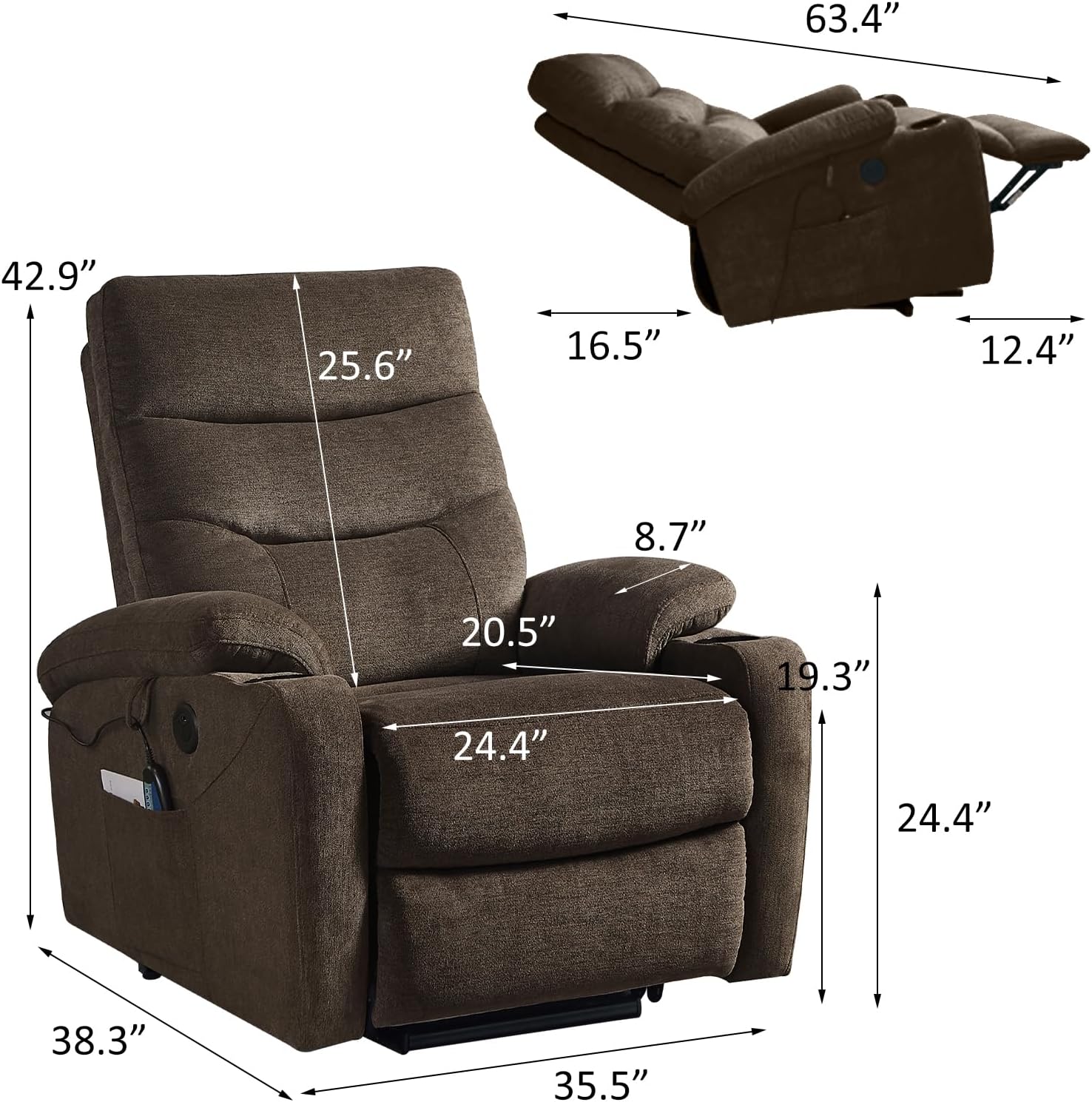
Image: Detailed dimensions of the JETEAGO Power Lift Massage Recliner Chair, including height, width, and depth in various positions.
Warranty and Support
For warranty information or technical support, please refer to the warranty card included with your product or contact JETEAGO customer service directly. Please have your purchase receipt and product model number (Charles) ready when contacting support.