
Introduction
Thank you for choosing the Eujgoov SF-95DR Digital Satellite Finder. This device is designed to assist in the precise alignment of satellite receiving antennas. It features a digital display for signal strength, a built-in compass for initial direction finding, and an audible buzzer for signal indication. This manual provides detailed instructions for the proper setup, operation, and maintenance of your satellite finder to ensure optimal performance.
Safety Information
- Ensure all connections are secure before powering on the device.
- Do not expose the device to extreme temperatures, moisture, or direct sunlight for prolonged periods.
- Avoid dropping or subjecting the device to strong impacts.
- Do not attempt to open or repair the device yourself. Refer all servicing to qualified personnel.
- Keep the device away from strong magnetic fields, which may affect the compass accuracy.
Package Contents
Please check the package for the following items:
- Eujgoov SF-95DR Digital Satellite Finder
- Instruction Manual (this document)
- (Any other accessories, e.g., short coaxial cable, if typically included - not specified in input, so keep it general)
Product Overview
The Eujgoov SF-95DR is a compact and portable digital satellite finder designed for ease of use. It features an LCD graphic display, a backlight for low-light conditions, a built-in compass, and an audible buzzer.

Image 1: Front view of the Eujgoov SF-95DR Digital Satellite Finder. This image shows the device's main display, the "Satellite" input on the left, the "Receiver" output on the right, and the control buttons for ATT (attenuation), Light, Buzzer, and the integrated compass. The LCD screen displays "Digital Satellite Finder" and a signal strength bar with a percentage.
Key Components:
- LCD Graphic Display: Shows signal strength percentage and bar graph.
- Satellite Input (LNB): Connects to the Low Noise Block (LNB) on the satellite dish.
- Receiver Output: Connects to your satellite receiver.
- ATT Buttons: Adjust signal attenuation for optimal reading range.
- Light Button: Activates the display backlight.
- Buzzer Button: Toggles the audible signal strength indicator.
- Compass: Aids in initial dish orientation.
Setup
Follow these steps to connect the SF-95DR Digital Satellite Finder:
- Connect to LNB: Connect a short coaxial cable from the LNB (Low Noise Block) on your satellite dish to the port labeled "Satellite" on the left side of the SF-95DR.
- Connect to Receiver: Connect another coaxial cable from the port labeled "Receiver" on the right side of the SF-95DR to the satellite input on your satellite receiver.
- Power On: Ensure your satellite receiver is powered on. The SF-95DR will receive power directly from the receiver via the coaxial cable. The display should illuminate.
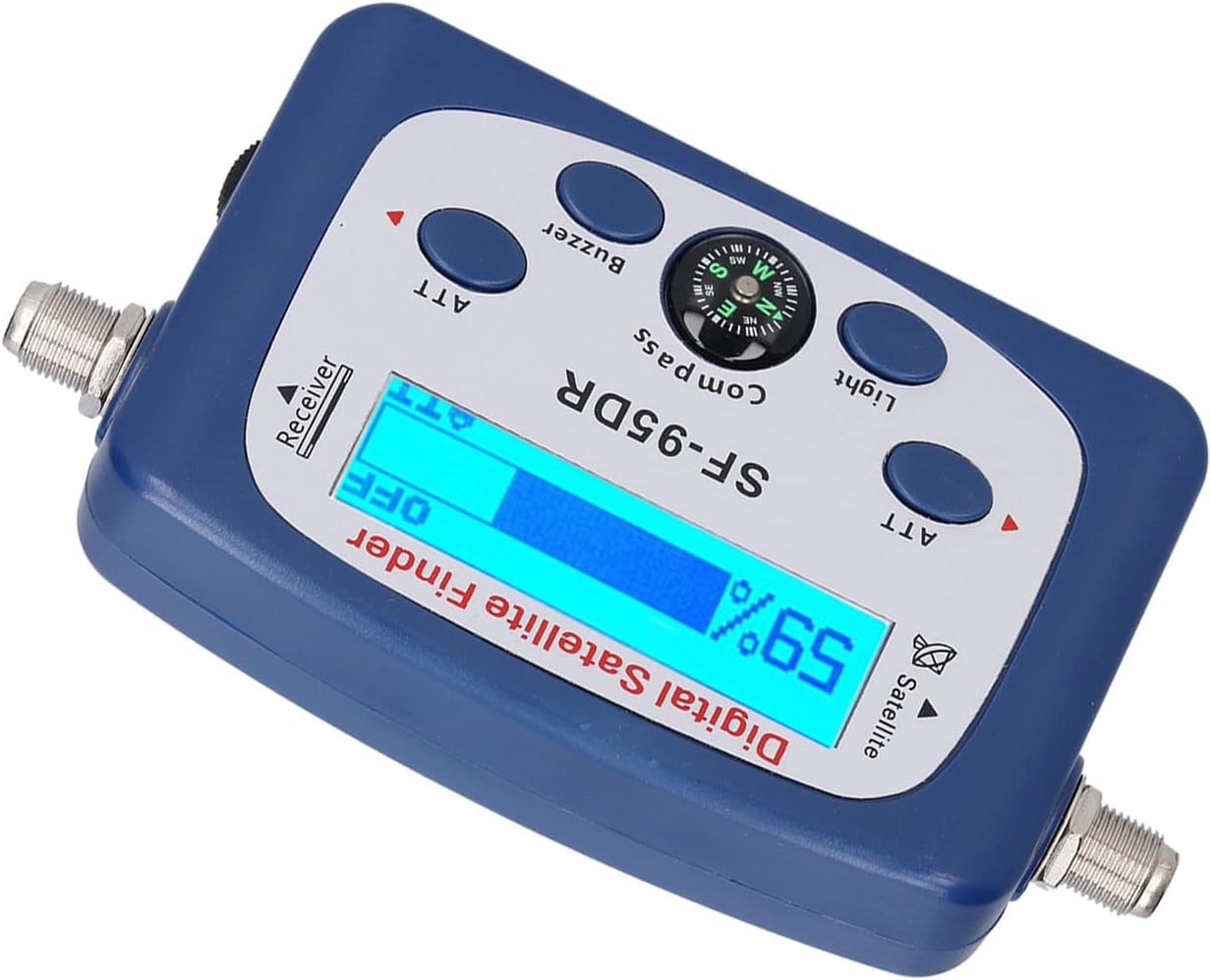
Image 2: Angled view of the Eujgoov SF-95DR, illustrating the coaxial cable connection points. The left connector is for the satellite LNB, and the right connector is for the satellite receiver.
Note: The SF-95DR is designed to be placed in-line between the LNB and the satellite receiver.
Operating Instructions
Once connected and powered, the SF-95DR will display a signal strength reading.
- Initial Dish Positioning: Use the built-in compass to get a general direction for your satellite dish. Consult your satellite provider for the correct azimuth (horizontal angle) and elevation (vertical angle) for your location.
- Adjusting Attenuation (ATT): If the signal strength reading is too high (e.g., consistently at 99% or "OFF" indicating overload), press the ATT buttons (left or right) to decrease the sensitivity. If the signal is too low, press the ATT buttons to increase sensitivity. The goal is to get a reading between 50% and 80% for fine-tuning.
- Fine-Tuning the Dish: Slowly adjust the azimuth and elevation of your satellite dish. Observe the signal strength on the LCD display and listen to the buzzer (if activated). The higher the percentage and the faster the buzzer tone, the stronger the signal.
- Maximizing Signal: Continue making small adjustments to the dish until the highest possible signal strength is achieved on the SF-95DR.
- Using Backlight: In low-light conditions, press the Light button to activate the display backlight for better visibility.
- Using Buzzer: Press the Buzzer button to toggle the audible signal indicator. The pitch and speed of the buzzer will increase with signal strength.

Image 3: Close-up view of the Eujgoov SF-95DR's LCD display and control buttons. This image highlights the signal strength percentage and bar graph on the screen, along with the ATT, Light, and Buzzer buttons, and the central compass.
Once the satellite dish is aligned for maximum signal, you can disconnect the SF-95DR and connect the LNB directly to your satellite receiver.
Maintenance
- Clean the device with a soft, dry cloth. Do not use liquid cleaners or solvents.
- Store the device in a cool, dry place when not in use.
- Ensure coaxial connectors are free from dirt and corrosion for optimal signal transfer.
Troubleshooting
| Problem | Possible Cause | Solution |
|---|---|---|
| No display/No power |
|
|
| Signal reading always 99% or "OFF" |
|
|
| No signal reading (0%) |
|
|
| Compass seems inaccurate |
|
|
Specifications
- Model: SF-95DR
- Frequency Range: 950-2150MHz
- Input Level Range: -40 dBm to -10 dBm
- LNB Gain (Working Range): 52-60dB
- Insertion Gain: ≥10dB
- Power Supply: 13-18V DC (from satellite receiver)
- Display: LCD Graphic Display with Backlight
- Features: Compass, Buzzer Control, Attenuation Adjustment
- Product Dimensions: 6.69 x 4.33 x 2.36 inches (approximately)
- Item Weight: 5.1 ounces (approximately)
Warranty and Support
For warranty information and technical support, please refer to the documentation provided with your purchase or contact the retailer. Keep your proof of purchase for any warranty claims.