1. Introduction
This manual provides detailed instructions for the installation, operation, and maintenance of your LKUWEE Smart Lock LKU-MX-0022. This smart lock offers five convenient unlocking methods: fingerprint, Tuya app, digital password, IC card, and mechanical key. Please read this manual thoroughly before installation and use to ensure proper function and security.
2. Product Overview
2.1 Unlocking Methods
- Fingerprint: Quick and secure biometric access.
- Tuya App: Remote control and management via Bluetooth.
- Digital Password: Keypad entry with anti-peeping function.
- IC Card: Convenient access using provided smart cards.
- Mechanical Key: Traditional key access for emergency backup.

Figure 2.1: The LKUWEE Smart Lock features five distinct unlocking methods for versatile access.
2.2 Included Components
The LKUWEE Smart Lock package includes the following items:
- 1 x Outdoor Lock Body
- 1 x Indoor Lock Body
- 1 x Single Latch
- 2 x Mechanical Keys
- 2 x IC Cards
- 1 x Mounting Screw Kit
- 1 x Installation Instructions (separate document)

Figure 2.2: Contents of the LKUWEE Smart Lock package.
3. Setup and Installation
Before installation, ensure your door meets the following specifications:
- Door Thickness: Between 1-3/8 inches (35mm) to 2-3/16 inches (55mm).
- Adjustable Latch: 2-3/8 inches (60mm) or 2-3/4 inches (70mm).
No hard wiring is required. The lock is designed for easy installation and can be adjusted for left or right-handed doors. Refer to the separate "Installation Instructions" document included in your package for detailed step-by-step guidance.

Figure 3.1: Door and lock dimension requirements for proper installation.
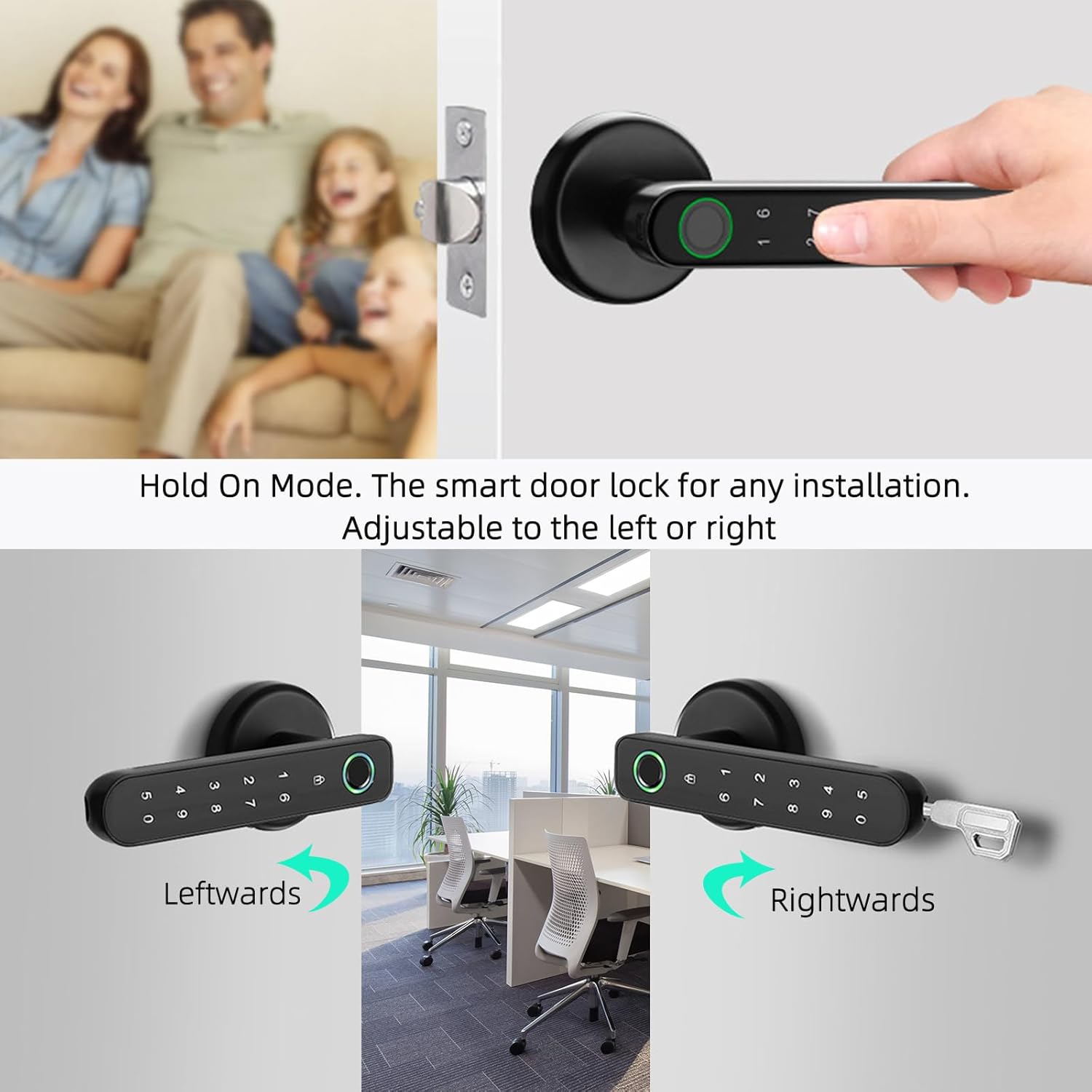
Figure 3.2: The smart lock handle is reversible to accommodate both left and right-handed door installations.
4. Operating Instructions
4.1 Tuya Smart App Control
The lock connects via Bluetooth to the Tuya Smart app. Once the app is opened, it will automatically recognize the lock. Through the app, you can:
- Open and close the lock.
- Manage registered fingerprints.
- Manage digital passwords.
- Set temporary passwords for guests.
- View door entry and exit records.
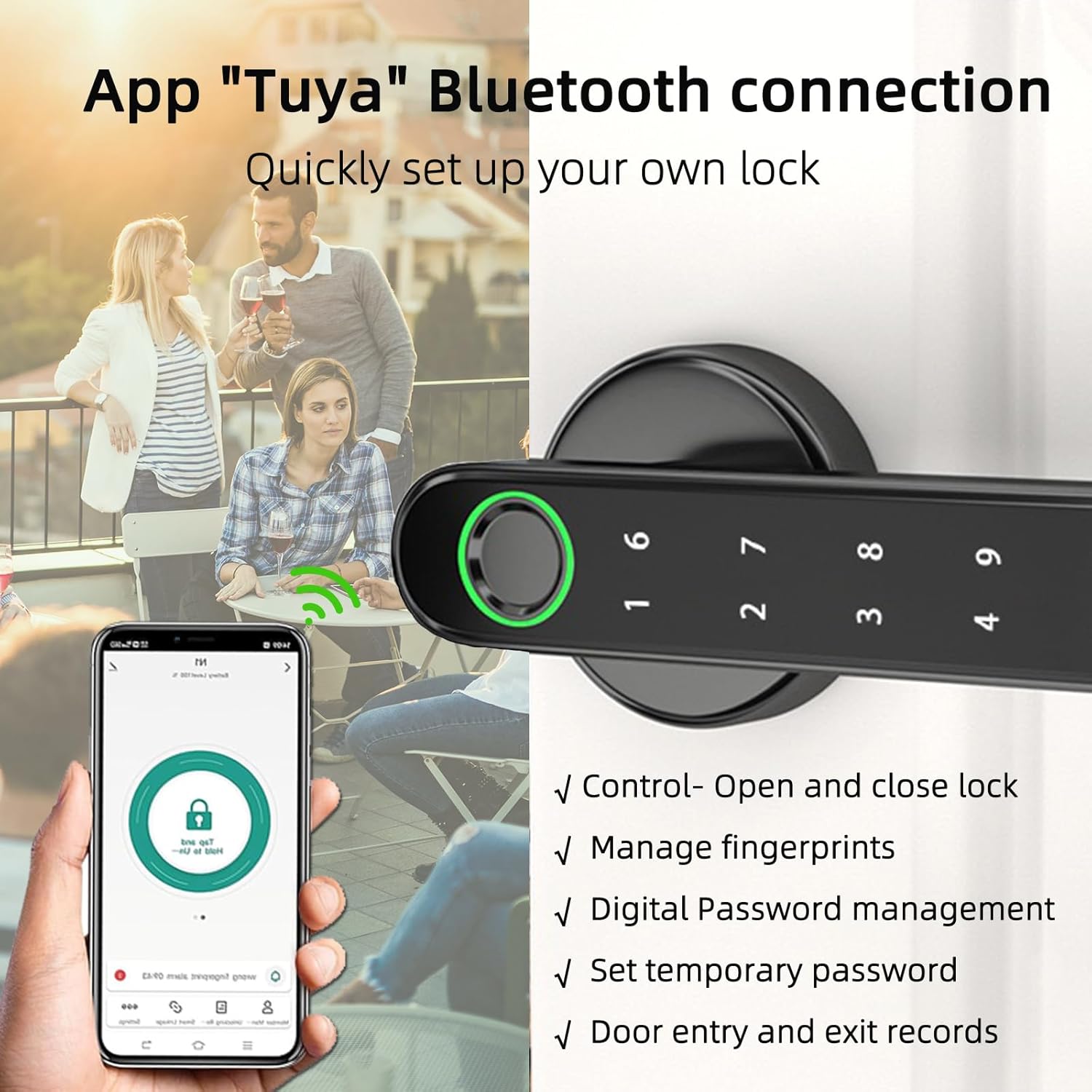
Figure 4.1: Managing your LKUWEE Smart Lock using the Tuya Smart app.
4.2 Fingerprint Unlocking
The lock uses semiconductor technology for fingerprint recognition, supporting up to 50 unique fingerprints. To unlock, simply place your registered fingerprint on the sensor. The lock will unlock in approximately 1 second.

Figure 4.2: Fingerprint sensor in use for unlocking the door.
4.3 Digital Password Entry
The keypad supports up to 100 digital passwords. For enhanced security, the lock features a virtual anti-peeping password function. You can enter random digits before or after your actual password to obscure it from onlookers.

Figure 4.3: Example of using the anti-peeping password feature.
4.4 IC Card Access
Use the provided IC cards for convenient tap-to-unlock access. This method is particularly suitable for elderly users and children.
4.5 Mechanical Key
In case of electronic malfunction or depleted batteries, the lock can always be opened using the mechanical keys provided. The keyhole is discreetly located on the handle.

Figure 4.4: Emergency power via USB and mechanical key access points.
5. Maintenance
5.1 Battery Replacement
The lock requires 4 AAA batteries (not included). It features a low battery alarm function to notify you when replacement is needed. Replace batteries promptly to ensure continuous operation.
5.2 Emergency Power
If batteries are completely depleted, the lock can be temporarily powered via a USB port for emergency access. Connect a power bank to the USB port to provide temporary power and unlock the door. Replace the AAA batteries immediately after gaining access.
5.3 General Care
Clean the lock surface with a soft, dry cloth. Avoid using abrasive cleaners or solvents, which can damage the finish or electronic components. Ensure the fingerprint sensor and keypad are free from dirt or moisture for optimal performance.
6. Troubleshooting
- Lock not responding: Check battery level. If low, replace batteries or use the USB emergency power port.
- Fingerprint not recognized: Ensure your finger is clean and dry. Try repositioning your finger on the sensor. Re-register your fingerprint if issues persist.
- IC Card not working: Ensure the card is placed correctly and firmly against the reader.
- App connectivity issues: Ensure Bluetooth is enabled on your phone and you are within range of the lock. Restart the Tuya Smart app.
- Keypad not lighting up: This may indicate low battery. Use emergency power or mechanical key.
- Lock goes offline: Check battery level and Bluetooth connection.
- Accidental lockouts: Always keep your mechanical keys in a safe, accessible location outside the locked area.
7. Specifications
| Feature | Specification |
|---|---|
| Model Number | LKU-MX-0022 |
| Brand | LKUWEE |
| Dimensions (L x W x H) | 17.78 x 7.62 x 7.62 cm |
| Item Weight | 1.03 kg |
| Material | Aluminum |
| Colour | Black |
| Lock Type | Biometric |
| Unlocking Methods | Fingerprint, App, Digital Password, IC Card, Mechanical Key |
| Fingerprint Capacity | Up to 50 |
| Password Capacity | Up to 100 |
| Power Source | 4 x AAA Batteries (not included) |
| Emergency Power | USB Port |
| Door Thickness Compatibility | 35mm to 55mm (1-3/8" to 2-3/16") |
| Adjustable Latch | 60mm (2-3/8") or 70mm (2-3/4") |
8. Warranty and Support
The LKUWEE Smart Lock LKU-MX-0022 comes with a 3-year warranty. For technical support, troubleshooting assistance, or warranty claims, please refer to the contact information provided with your purchase or visit the official LKUWEE website.


