
1. Introduction
This manual provides comprehensive instructions for the installation, operation, and maintenance of your L-faster 16-inch 350W Front Drive Brushless Gear Hub Motor Kit. Please read this manual thoroughly before installation and use to ensure proper function and safety.
This kit is designed for DIY conversion of 16-inch bikes and certain scooters into electric vehicles. It features a brushless gear hub motor for efficient and reliable performance.
2. Product Components
The L-faster 16-inch 350W Front Drive Brushless Gear Hub Motor Kit includes the following components:
- 1x 16-inch 350W Front Drive Brushless Hub Motor
- 1x Motor Controller
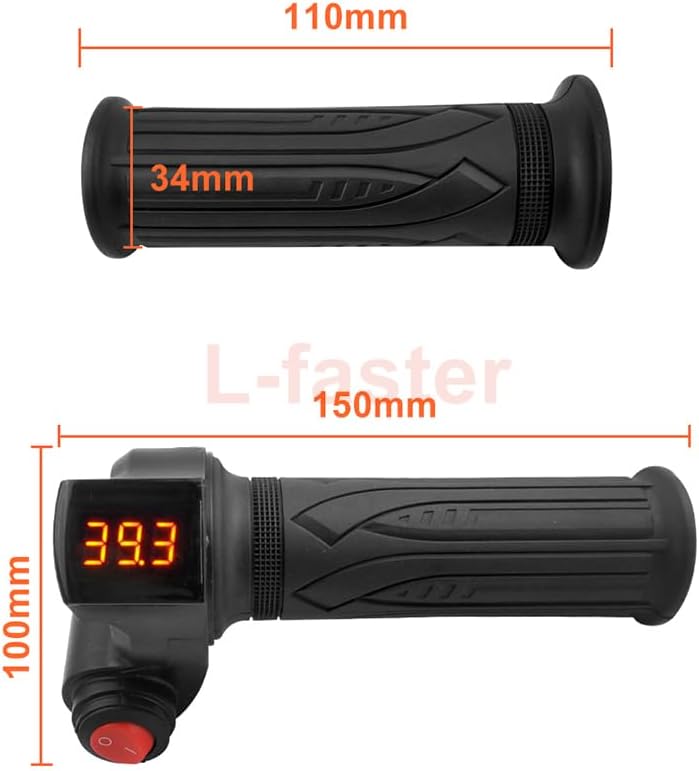
- 1x Throttle Handle (with voltmeter & button switch)
- 1x Brake Lever
- 1x Bag (for controller/battery, if applicable)
- 1x 16-inch Wheel (pre-assembled with motor)
- 2x Brake Discs

3. Specifications
Key technical specifications for the L-faster 16-inch 350W Front Drive Brushless Gear Hub Motor Kit:
| Feature | Detail |
|---|---|
| Rated Power | 350W |
| Rated Voltage | 24V / 36V / 48V (depending on variant) |
| Wheel Size | 16 Inches |
| Motor Type | Brushless Gear Hub Motor |
| Drive Type | Front Drive |
| Brake Type | Disc Brake compatible |
| Material | Aluminum |
| Approximate Speed | 25 km/h |
| Package Weight | 12 Kilograms |


4. Setup and Installation
This section guides you through the installation process of the L-faster hub motor kit. Ensure your vehicle is compatible with a 16-inch front wheel and disc brakes before proceeding.
4.1 Safety Precautions
- Always disconnect the battery before performing any installation or maintenance.
- Wear appropriate safety gear, including gloves and eye protection.
- Ensure all connections are secure and properly insulated to prevent short circuits.
- If you are unsure about any step, consult a qualified technician.
4.2 Component Identification and Wiring
Familiarize yourself with the motor controller and its various connectors. Proper connection is crucial for the system's functionality.


4.3 Installation Steps
- Prepare the Vehicle: Remove the existing front wheel from your bike or scooter.
- Install the Motor Wheel: Mount the 16-inch hub motor wheel into the front fork of your vehicle. Ensure it is centered and securely fastened.
- Install Brake Discs: Attach the provided brake discs to the hub motor wheel.
- Mount Controller and Bag: Secure the motor controller in a suitable location, preferably within the provided bag, protecting it from elements and physical damage.
- Install Throttle and Brake Lever: Mount the throttle handle and brake lever onto the handlebars. Ensure they are within easy reach for safe operation.
- Connect Wiring: Carefully connect all components to the motor controller according to the labels (refer to Figure 4.1).
- Connect the motor phase wires and Hall sensor wires from the hub motor to the controller.
- Connect the battery to the controller's battery input.
- Connect the throttle handle to the throttle input.
- Connect the brake lever to the brake (EBS) input.
- Connect any optional accessories like headlights or PAS if applicable.
- Secure Wiring: Use zip ties or cable wraps to neatly secure all wiring, preventing entanglement and damage.
- Final Check: Double-check all connections for security and correctness before powering on the system.
5. Operating Instructions
Once installed, operating your electric bike/scooter with the L-faster kit is straightforward.
5.1 Initial Power-Up
- Ensure the battery is fully charged and securely connected.
- Turn on the power switch, usually located on the throttle handle or a separate switch. The voltmeter on the throttle should display the battery voltage.
5.2 Using the Throttle
Gently twist the throttle handle to engage the motor. The motor will provide assistance based on the degree of throttle applied. Release the throttle to stop motor assistance.
5.3 Braking
Apply the brake lever to slow down or stop. The brake lever is designed to cut off power to the motor when engaged, enhancing safety.
5.4 Voltage Display
The integrated voltmeter on the throttle handle displays the current battery voltage. Monitor this to understand your remaining battery charge. A lower voltage indicates a depleted battery.
6. Maintenance
Regular maintenance ensures the longevity and safe operation of your L-faster motor kit.
- Cleanliness: Keep the motor, controller, and wiring clean and free from dirt, dust, and moisture.
- Connections: Periodically check all electrical connections for tightness and signs of corrosion.
- Brakes: Inspect brake discs and pads regularly for wear. Replace them as needed to maintain effective braking.
- Tires: Ensure the tire on the motor wheel is properly inflated to the recommended pressure.
- Storage: When not in use for extended periods, store the kit and battery in a cool, dry place. Charge the battery periodically to maintain its health.
7. Troubleshooting
This section addresses common issues you might encounter with your L-faster motor kit.
| Problem | Possible Cause | Solution |
|---|---|---|
| Motor not engaging | Battery low/disconnected, loose wiring, faulty throttle/controller, brake lever engaged. | Check battery charge and connections. Inspect all wiring. Ensure brake lever is not pressed. Test throttle functionality. |
| Motor runs intermittently | Loose connections, damaged wiring, controller overheating. | Secure all connections. Inspect wiring for damage. Allow controller to cool down if hot. |
| Voltmeter shows incorrect reading | Loose connection to voltmeter, faulty voltmeter. | Check voltmeter wiring. If issue persists, consider replacing the throttle handle. |
| Brakes not effective | Worn brake pads, misaligned calipers, air in hydraulic system (if applicable). | Inspect and replace brake pads. Adjust brake calipers. Consult a bike mechanic for hydraulic brake issues. |
For issues not listed here, or if solutions do not resolve the problem, please contact customer support.
8. Warranty and Support
Warranty: The product specifications state "Warranty Description: NO". Please refer to your purchase agreement or retailer for any implied warranties or return policies.
Customer Support: For technical assistance or inquiries, please contact L-faster customer service through the platform where you purchased the product.