1. Introduction
This manual provides essential instructions for the safe and effective use of your Enyuly 2100mAh Ni-MH Replacement Battery, model CS-TSM200SL. This battery is designed to replace original batteries in TELETRONIC TSM2002, P-0372, TSM 2002, and E-0372 devices, offering an extended capacity of 2100mAh at 3.6V.
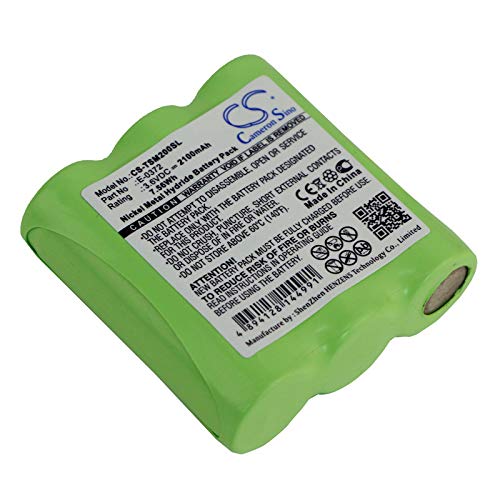
Image showing the Enyuly 2100mAh Ni-MH replacement battery, model CS-TSM200SL, with its label clearly visible, ready for installation.
2. Safety Information
Please read and follow these safety guidelines carefully to prevent damage to the battery, device, or personal injury.
- Do not disassemble, open, or shred the battery pack.
- Do not expose the battery to heat or fire. Avoid storage in direct sunlight.
- Do not short-circuit the battery. Do not store batteries haphazardly in a box or drawer where they may short-circuit each other or be short-circuited by other metal objects.
- Do not remove the battery from its original packaging until required for use.
- Do not subject batteries to mechanical shock.
- In the event of a battery leaking, do not allow the liquid to come into contact with the skin or eyes. If contact has been made, wash the affected area with copious amounts of water and seek medical advice.
- Keep batteries out of the reach of children.
- Seek medical advice immediately if a cell or battery has been swallowed.
- Always purchase the correct battery for the equipment.
- Keep batteries clean and dry.
- Recharge only with the charger specified by the manufacturer.
- Observe the plus (+) and minus (-) marks on the battery and equipment and ensure correct use.
- Dispose of batteries properly at designated collection points.
3. Package Contents
Your package should contain the following item:
- 1 x Enyuly 2100mAh Ni-MH Replacement Battery (Model: CS-TSM200SL)
4. Setup and Installation
This battery is compatible with the following device models and battery part numbers:
- Fit Models: TELETRONIC TSM2002, P-0372, TSM 2002
- Battery Part Numbers: E-0372
To install the replacement battery:
- Ensure your device is powered off and unplugged from any power source.
- Locate the battery compartment on your TELETRONIC device. Refer to your device's original user manual for specific instructions on opening the compartment.
- Carefully remove the old battery from the compartment.
- Insert the new Enyuly replacement battery, ensuring that the polarity (+ and - terminals) matches the markings inside the battery compartment.
- Close the battery compartment securely.
- Dispose of the old battery responsibly according to local regulations.
5. Operating Instructions
After installing the battery, it is recommended to fully charge it before the first use to optimize its performance and lifespan.
- Initial Charge: Place your TELETRONIC device on its charging base or connect it to its power adapter. Allow it to charge uninterrupted for at least 12-16 hours, even if the device indicates a full charge sooner.
- Regular Use: For daily use, simply return the device to its charging base when not in use. Ni-MH batteries do not suffer from a "memory effect" as severely as older Ni-Cd batteries, but occasional full discharge/recharge cycles can help maintain capacity.
- Device Specifics: Always refer to your TELETRONIC device's original user manual for detailed charging and usage instructions, as charging indicators and procedures may vary.
6. Maintenance and Storage
Proper maintenance and storage will extend the life of your battery.
- Cleaning: If necessary, gently clean the battery contacts and device contacts with a dry, clean cloth to ensure good electrical connection.
- Storage: If the battery will not be used for an extended period, store it in a cool, dry place, away from direct sunlight and extreme temperatures. It is advisable to store Ni-MH batteries with a partial charge (around 40-50%) to prevent deep discharge.
- Avoid Disassembly: Do not attempt to disassemble or modify the battery pack. This can be dangerous and will void the warranty.
7. Troubleshooting
If you encounter issues with your replacement battery, consider the following common solutions:
| Problem | Possible Cause | Solution |
|---|---|---|
| Battery not charging | Incorrect installation; dirty contacts; faulty charger/device. | Ensure battery is installed correctly with proper polarity. Clean battery and device contacts. Test with another known-good charger/device if possible. |
| Short operating time after full charge | Battery not fully charged; battery nearing end of life. | Perform a full initial charge cycle (12-16 hours). If the issue persists after several charge cycles, the battery may be degrading and require replacement. |
| Device not powering on | Battery not installed; battery completely discharged; device fault. | Verify battery installation. Place device on charger for an extended period. If still no power, the issue might be with the device itself. |
8. Specifications
| Feature | Detail |
|---|---|
| Brand | Enyuly |
| Model Number | CS-TSM200SL |
| Battery Type | Ni-MH (Nickel-Metal Hydride) |
| Voltage | 3.6V |
| Capacity | 2100mAh |
| Energy Rate | 7.56Wh |
| Dimensions | 50.12 x 51.1 x 17.36mm (1.97 x 2.01 x 0.68 inches) |
| Weight | 182.2g (6.4 ounces) |
| Compatible Device Models | TELETRONIC TSM2002, P-0372, TSM 2002 |
| Compatible Battery Part Numbers | E-0372 |
9. Warranty and Support
Enyuly provides 1 year of after-sales service for this replacement battery. For warranty claims, technical support, or any inquiries, please contact your retailer or Enyuly directly through their official support channels.
Please retain your proof of purchase for warranty validation.