
1. Introduction
This manual provides essential instructions for the safe and efficient use of your KENUBI 180W 7-Port USB-C GaN Fast Charging Station. Please read this manual thoroughly before operating the device and retain it for future reference.
2. Product Overview
The KENUBI 180W 7-Port GaN Fast Charging Station is designed to provide high-speed charging for multiple devices simultaneously. Utilizing advanced GaN (Gallium Nitride) technology, it offers efficient power delivery in a compact form factor.
2.1 Port Configuration
The charging station features a total of 7 ports:
- USB-C1: Up to 65W Power Delivery (PD 3.0)
- USB-C2: Up to 20W Power Delivery (PD 3.0)
- USB-C3: Up to 20W Power Delivery (PD 3.0)
- USB-C4: Up to 20W Power Delivery (PD 3.0)
- USB-A1: Up to 18W
- USB-A2: Up to 18W
- USB-A3: Up to 18W
The total maximum output across all ports is 180 watts.

Image: Front view of the KENUBI 180W 7-Port GaN Fast Charging Station, clearly showing the layout and labels for USB-C1 (PD65W), USB-C2, USB-C3, USB-C4 (PD20W), USB-A1, USB-A2, and USB-A3 ports.
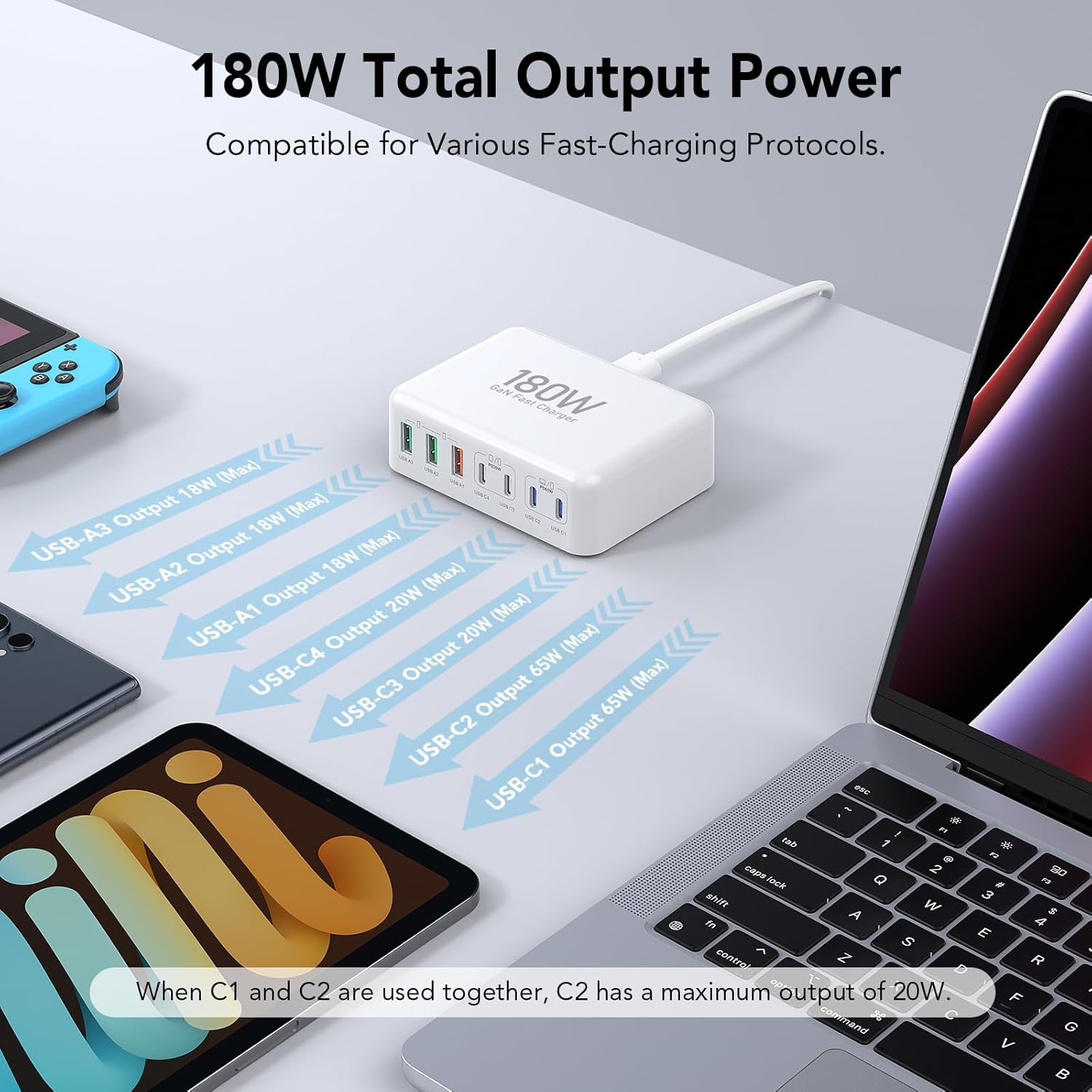
Image: A visual representation of the KENUBI 180W charging station connected to various devices, with arrows indicating the maximum output power for each port (USB-C1 65W, USB-C2 20W, USB-C3 20W, USB-C4 20W, USB-A1 18W, USB-A2 18W, USB-A3 18W), highlighting its 180W total output.
3. Safety Information
Your KENUBI charging station is equipped with multiple safety features to protect your devices and ensure safe operation. Please observe the following:
- Do not expose the device to liquids, extreme temperatures, or direct sunlight.
- Avoid dropping or subjecting the device to strong impacts.
- Do not attempt to disassemble or modify the charger.
- Ensure proper ventilation around the charger during use.
- Unplug the charger from the power outlet when not in use for extended periods.
3.1 Built-in Protections
The charger incorporates smart IC identification technology and built-in safeguards against:
- Short Circuit Protection
- Over-Current Protection
- Over-Voltage Protection
- Over-Charge Protection
- Over-Temperature Protection
- Fire-Resistance Shell

Image: An exploded view diagram of the KENUBI GaN charger, highlighting its internal smart IC chip and various safety protections including over-voltage, over-current, over-charge, short circuit, over-temperature, and fire-resistance shell.
4. Setup
- Connect to Power: Plug the provided 5FT AC extension cable into the charging station, then connect the other end to a standard wall outlet.
- Connect Devices: Use appropriate USB-C or USB-A cables to connect your devices to the corresponding ports on the charging station.
- Verify Charging: Ensure your devices indicate that they are charging.

Image: A 'Before and After' comparison showing a cluttered desk with multiple individual chargers versus a tidy setup using the single KENUBI 7-port charging station to power several devices, illustrating improved organization.
5. Operating Instructions
The KENUBI 180W charging station automatically detects connected devices and delivers the optimal charging current. It supports simultaneous charging of up to 7 devices.
- For fastest charging, connect high-power devices like laptops to the USB-C1 (65W) port.
- When multiple devices are connected, the charger intelligently distributes power. Note that if USB-C1 and USB-C2 are used simultaneously, the maximum output for USB-C2 may adjust to 20W.
- Plugging in a new device may cause a brief interruption (less than 1 second) in charging for other connected devices as the charger readjusts power distribution. This is normal operation.

Image: The KENUBI 7-port charging station connected to and simultaneously charging a laptop, tablet, smartphone, smartwatch, and gaming console, demonstrating its multi-device capability.

Image: A diagram illustrating the power output of USB-C1 (65W fast charging) and how it operates when USB-C1 and USB-C2 are used simultaneously, showing USB-C2 delivering 20W in that scenario.
6. Compatibility
The KENUBI 180W charging station offers broad compatibility with a wide range of USB-C and USB-A powered devices, including but not limited to:
- Laptops: MacBook Pro/Air, HP, Dell, LG, Microsoft Surface PC, Google Chromebook, Lenovo, Huawei series.
- Tablets: iPad Pro/Air/Mini, Samsung Galaxy Tab S7/S7+/S8/S8 Ultra, Amazon Fire HD.
- Smartphones: iPhone 15/14/13/12/11 Pro Max/Mini/Plus/XS Max/XS/X/XR/8 Plus/8, Samsung Galaxy S23/S22/S22+/S22 Ultra/Note 10+/Note 10+ 5G/A91/S21/S21 Ultra/S21+ 5G/S20/S20 Ultra/S20+/S20 FE/Note 10/Note 10 5G/Note 20/20 Ultra 5G/S10 5G/Galaxy Z Fold 3 5g/A90 5G/A80/A70, Pixel, LG, Huawei, Xiaomi, Oppo, Vivo.
- Other Devices: AirPods Pro, Apple Watch, Nintendo Switch, portable fans, speakers, lamps, etc.

Image: A comprehensive compatibility chart displaying various laptops, smartphones, tablets, and other electronic devices that can be charged using the KENUBI 7-port charging station's USB-C and USB-A ports.
7. Specifications
| Feature | Detail |
|---|---|
| Model Number | HNT-PC608 |
| Total Output Power | 180W Max |
| USB-C Ports | 4 (USB-C1: 65W, USB-C2/C3/C4: 20W each) |
| USB-A Ports | 3 (USB-A1/A2/A3: 18W each) |
| Input Voltage | 120 Volts |
| Amperage | 1.5 Amps |
| Technology | GaN (Gallium Nitride) |
| Dimensions | 6.73 x 4.25 x 1.42 inches (Package) |
| Item Weight | 0.176 ounces |
| Power Source | Corded Electric (5FT AC extension cable included) |
8. Troubleshooting
If you encounter issues with your charging station, please refer to the following common solutions:
- Device not charging:
- Ensure the charging station is securely plugged into a working power outlet.
- Check that the charging cable is properly connected to both the device and the charging station.
- Try a different port on the charging station.
- Test with a different charging cable or device to isolate the issue.
- Slow charging:
- Verify that your device supports fast charging and that you are using a compatible cable.
- Ensure high-power devices are connected to the higher wattage USB-C ports (e.g., USB-C1 for laptops).
- If many devices are connected, the total power is shared, which might reduce individual port speeds. Disconnect less critical devices to prioritize others.
- Charger feels warm:
- It is normal for the charger to become warm during operation, especially when charging multiple devices at high power.
- If it becomes excessively hot, disconnect all devices and the power cable, allow it to cool, and ensure it is used in a well-ventilated area.
- Brief power interruption when plugging in a new device:
- This is a normal function of the intelligent power distribution system. The charger briefly resets to re-allocate power optimally among all connected devices.
9. Maintenance
- Keep the charging station clean and free from dust. Use a soft, dry cloth for cleaning.
- Do not use liquid cleaners or abrasive materials.
- Store the device in a cool, dry place when not in use.
10. Warranty and Support
KENUBI is committed to providing high-quality products and customer satisfaction. For any inquiries or support needs, please contact our customer service.
10.1 Service Policy
We offer a 100% hassle-free service. If you are not satisfied with your KENUBI product for any reason, you may contact us for a replacement or support. Good communication is the best solution to any problem.

Image: A graphic illustrating KENUBI's commitment to service, including a 365-day unconditional replacement, 30-day product trial, and 24-hour online after-sales support.