
1. Introduction
This manual provides detailed instructions for the CHENGDAO Wireless Controller, designed for use with PlayStation 4, PS4 Slim, PS4 Pro, PC, Android, and iPhone devices. It features a 6-axis motion sensor, double vibration, a sensitive touch pad, built-in speaker, and a 3.5mm audio jack, powered by an 800mAh battery. Please read this manual thoroughly before use to ensure optimal performance and longevity of your controller.
2. Product Features
- Wide Compatibility: Compatible with PlayStation 4/Pro/Slim/PC/Android/iPhone.
- Enhanced Gaming Experience: Sensitive 360° joysticks and trigger buttons, ergonomic design for comfort.
- Immersive Feedback: Built-in double motors for varying vibration effects and a 6-axis gyroscope for precise motion sensing.
- Versatile Play Options: Share button for capturing moments, built-in speaker, and 3.5mm headset jack for audio.
- Long-lasting Battery: Equipped with an 800mAh battery for extended gameplay.

Image: The CHENGDAO Wireless Controller showcasing its double vibration functionality, indicating enhanced haptic feedback during gameplay.

Image: The CHENGDAO Wireless Controller demonstrating its 6-axis motion sensing capability, allowing for precise in-game control through physical movement.

Image: The CHENGDAO Wireless Controller's sensitive multi-touch screen, which can be used for various in-game interactions and settings.
3. Package Contents
Upon opening the package, please verify that all items are present and in good condition.
- CHENGDAO Wireless Controller (Pink+Sky Blue, 2 Pack)
- USB Charging Cable (2 included)
- User Manual (this document)
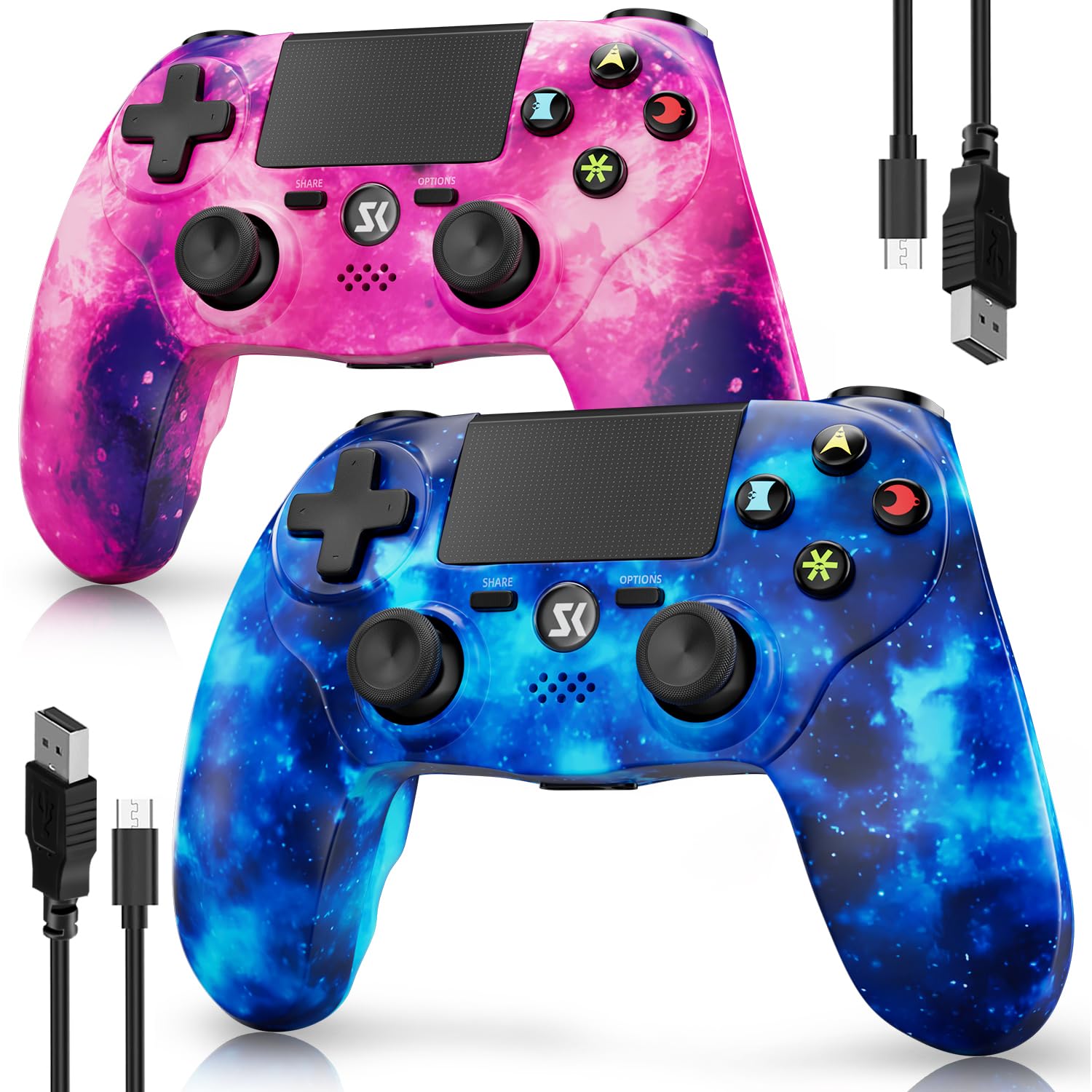
Image: A pair of CHENGDAO Wireless Controllers in pink and sky blue galaxy patterns, shown with their respective USB charging cables.
4. Controller Layout
Familiarize yourself with the buttons and features of your CHENGDAO Wireless Controller:
- Directional Pad (D-Pad): For directional input.
- Left/Right Analog Sticks: For precise movement and camera control.
- Action Buttons (Triangle, Circle, Cross, Square): For in-game actions.
- SHARE Button: To share gameplay moments.
- OPTIONS Button: To access in-game menus.
- Touch Pad: Multi-functional touch input area.
- L1/R1 Buttons: Shoulder buttons.
- L2/R2 Triggers: Analog triggers for variable input.
- PS Button: To power on the controller or access the PlayStation menu.
- 3.5mm Audio Jack: For connecting headphones.
- Micro-USB Port: For charging and wired connection.
- Built-in Speaker: For in-game audio effects.

Image: A detailed view of the left analog stick and directional pad on the CHENGDAO Wireless Controller.

Image: A close-up of the action buttons (Triangle, Circle, Cross, Square) on the CHENGDAO Wireless Controller.
5. Setup Instructions
5.1 Initial Pairing (Wired Connection)
- Ensure your PlayStation 4 console is powered on.
- Connect one end of the included USB charging cable to the Micro-USB port on the controller.
- Connect the other end of the USB cable to an available USB port on your PlayStation 4 console.
- Press the PS button on the controller. The controller will pair with the console and the light bar will illuminate.
- Once paired, you can disconnect the USB cable for wireless use.
5.2 Wireless Connection
After initial wired pairing, the controller will automatically connect wirelessly to your PlayStation 4 console when powered on. The wireless connection offers a stable range of up to 33 feet.
5.3 Connecting to PC/Android/iPhone
Refer to your device's Bluetooth pairing instructions. The controller can be paired via Bluetooth for compatible games and applications on PC, Android, and iPhone devices.

Image: Visual representation of the CHENGDAO Wireless Controller's compatibility with various platforms including PS4, PS4 Slim, PS4 Pro, PC, Android, and iPhone.
Video: A demonstration of the CHENGDAO Wireless Controller, highlighting its physical design, button responsiveness, battery life, and compatibility with various devices. This video provides a visual overview of the product's features and functionality.
6. Operating Instructions
6.1 Power On/Off
- To Power On: Press the PS button once.
- To Power Off: Hold the PS button for approximately 10 seconds until the light bar turns off.
6.2 Charging the Controller
The controller is equipped with an 800mAh Lithium Polymer battery. To charge:
- Connect the USB charging cable to the controller's Micro-USB port.
- Connect the other end to a USB port on your PS4 console or a compatible USB wall adapter.
- The light bar will slowly pulse while charging and turn off when fully charged.

Image: The pink CHENGDAO Wireless Controller being charged via its USB cable, with the charging port visible.

Image: A visual representation of the CHENGDAO Wireless Controller's 800mAh battery capacity, indicating long-lasting power.
6.3 Using the Touch Pad
The sensitive touch pad supports multi-touch input. Its functionality varies by game and application. Refer to individual game instructions for specific uses.
6.4 Audio Features
- Built-in Speaker: Provides in-game audio effects.
- 3.5mm Audio Jack: Connect your headset for private audio and communication.

Image: The pink CHENGDAO Wireless Controller with a headset connected to its 3.5mm audio jack, illustrating the audio output feature.
6.5 SHARE Button
Press the SHARE button to access sharing options, allowing you to capture screenshots, record video clips, or broadcast your gameplay without interrupting your session.
7. Maintenance
- Keep the controller clean by wiping it with a soft, dry cloth.
- Avoid exposing the controller to extreme temperatures, humidity, or direct sunlight.
- Do not disassemble the controller, as this may void the warranty.
- Store the controller in a safe place when not in use to prevent damage.
8. Troubleshooting
| Problem | Solution |
|---|---|
| Controller does not power on. | Ensure the controller is charged. Connect it to your PS4 or a USB power source using the included cable. |
| Controller does not connect wirelessly. | Perform initial pairing via wired connection as described in Section 5.1. Ensure no other Bluetooth devices are interfering. |
| Input lag or unresponsive buttons. | Ensure the controller is fully charged. Try re-pairing the controller. If using wirelessly, move closer to the console. |
| Vibration or motion sensing not working. | Check in-game settings to ensure these features are enabled. Some games may not support all features. |
If you encounter any issues not covered here, please contact CHENGDAO customer support for assistance.
9. Specifications
- Model: Wireless Controller for PS4
- Brand: CHENGDAO
- Compatibility: PlayStation 4/Pro/Slim, PC, Android, iPhone
- Battery: 800mAh Lithium Polymer (included)
- Wireless Range: Up to 33 feet
- Dimensions: 7.13 x 4.88 x 4.88 inches
- Weight: 1.34 Pounds
- Features: 6-Axis Motion Sensor, Double Vibration, Sensitive Touch Pad, Speaker, 3.5mm Audio Jack
10. Warranty and Support
CHENGDAO is committed to providing quality gaming hardware. For any product-related inquiries, technical support, or warranty claims, please contact our dedicated support team. Details for contacting support can typically be found on the product packaging or the official CHENGDAO website.
For more information about CHENGDAO products, visit the CHENGDAO Store.