
Sny-310E-V
Generic RMF-TX800U RMF-TX900U Replacement Remote Control User Manual
For Sony 4K 8K HD TV X80K X90K X95K Series 2022 Models
1. Introduction
This manual provides comprehensive instructions for the Generic RMF-TX800U RMF-TX900U replacement remote control. It is designed to function as a direct replacement for your original Sony TV remote, offering essential controls for your television. This remote utilizes infrared technology and requires no programming or pairing for most compatible Sony 4K and 8K HD TV models from 2022.
2. Compatibility
The RMF-TX800U RMF-TX900U replacement remote control is compatible with a wide range of Sony 4K 8K HD TV models from the 2022 series. This includes, but is not limited to, the following series and models:
- KD Series: KD-43X72K, KD-43X73K, KD-43X80K, KD-43X81K, KD-43X82K, KD-43X85K, KD-43X89K, KD-50X72K, KD-50X73K, KD-50X80K, KD-50X81K, KD-50X82K, KD-50X85K, KD-50X89K, KD-55X80K, KD-55X80CK, KD-55X81K, KD-55X82K, KD-55X85K, KD-55X89K, KD-65X80K, KD-65X80CK, KD-65X81K, KD-65X82K, KD-65X85K, KD-65X89K, KD-75X80K, KD-75X80CK, KD-75X81K, KD-75X82K, KD-75X85K, KD-75X89K, KD-85X85K, KD-85X89K, KD-43X85TK, KD-50X85TK, KD-55X85TK, KD-65X85TK, KD-75X85TK, KD-85X85TK
- XR Series: XR-42A90K, XR-48A90K, XR-50X90S, XR-50X92K, XR-50X94S, XR-55A75K, XR-55A80K, XR-55A80CK, XR-55A83K, XR-55A84K, XR-55A95K, XR-55X90K, XR-55X90CK, XR-55X92K, XR-55X93K, XR-55X94K, XR-65A75K, XR-65A80K, XR-65A80CK, XR-65A83K, XR-65A84K, XR-65A95K, XR-65X90K, XR-65X90CK, XR-65X92K, XR-65X93K, XR-65X94K, XR-65X95K, XR-75X90K, XR-75X90CK, XR-75X92K, XR-75X93K, XR-75X94K, XR-75X95K, XR-77A80CK, XR-77A83K, XR-77A84K, XR-85X90K, XR-85X90CK, XR-85X95K, XR-75Z9K, XR-85Z9K
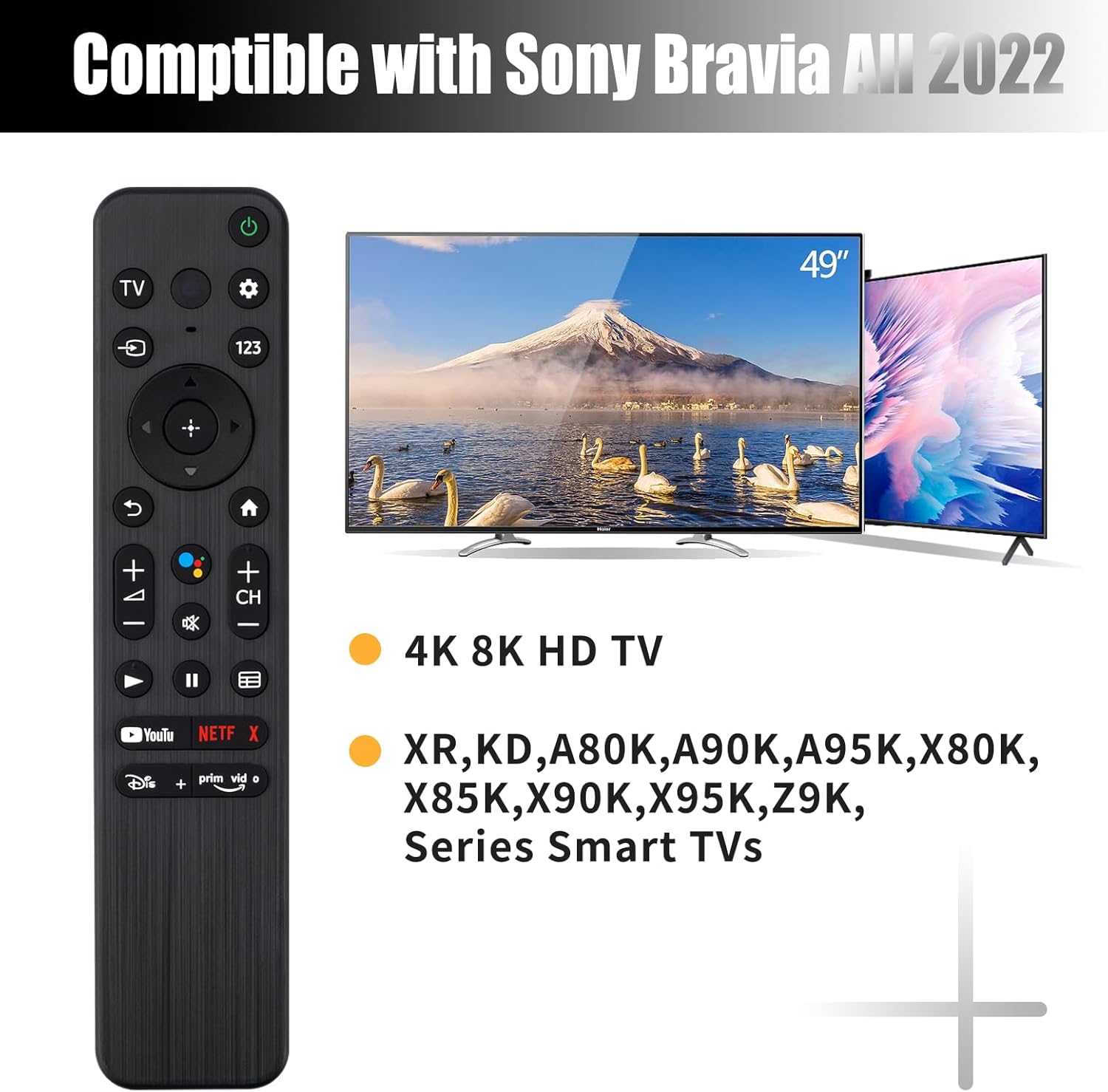
This image illustrates the remote control's compatibility with various Sony Bravia 2022 TV models, including 4K and 8K HD TVs across different series.
3. Setup
3.1 Battery Installation
The remote control requires two (2) AAA 1.5V batteries (not included). Follow these steps to install the batteries:
- Locate the battery compartment on the back of the remote control.
- Slide the battery cover downwards or in the direction indicated by the arrow to open it.
- Insert two AAA batteries, ensuring the positive (+) and negative (-) terminals align correctly with the markings inside the compartment.
- Close the battery cover by sliding it back into place until it clicks securely.

This image demonstrates the correct method for installing two AAA batteries into the remote control's battery compartment.
3.2 Initial Use
This remote control utilizes upgraded infrared technology and does not require any programming or pairing with your Sony TV. Once the batteries are correctly installed, the remote is ready for immediate use. Simply point the remote towards your television and press the desired buttons.
4. Operating Instructions
4.1 Button Functions Overview
Familiarize yourself with the layout and functions of the remote control buttons:
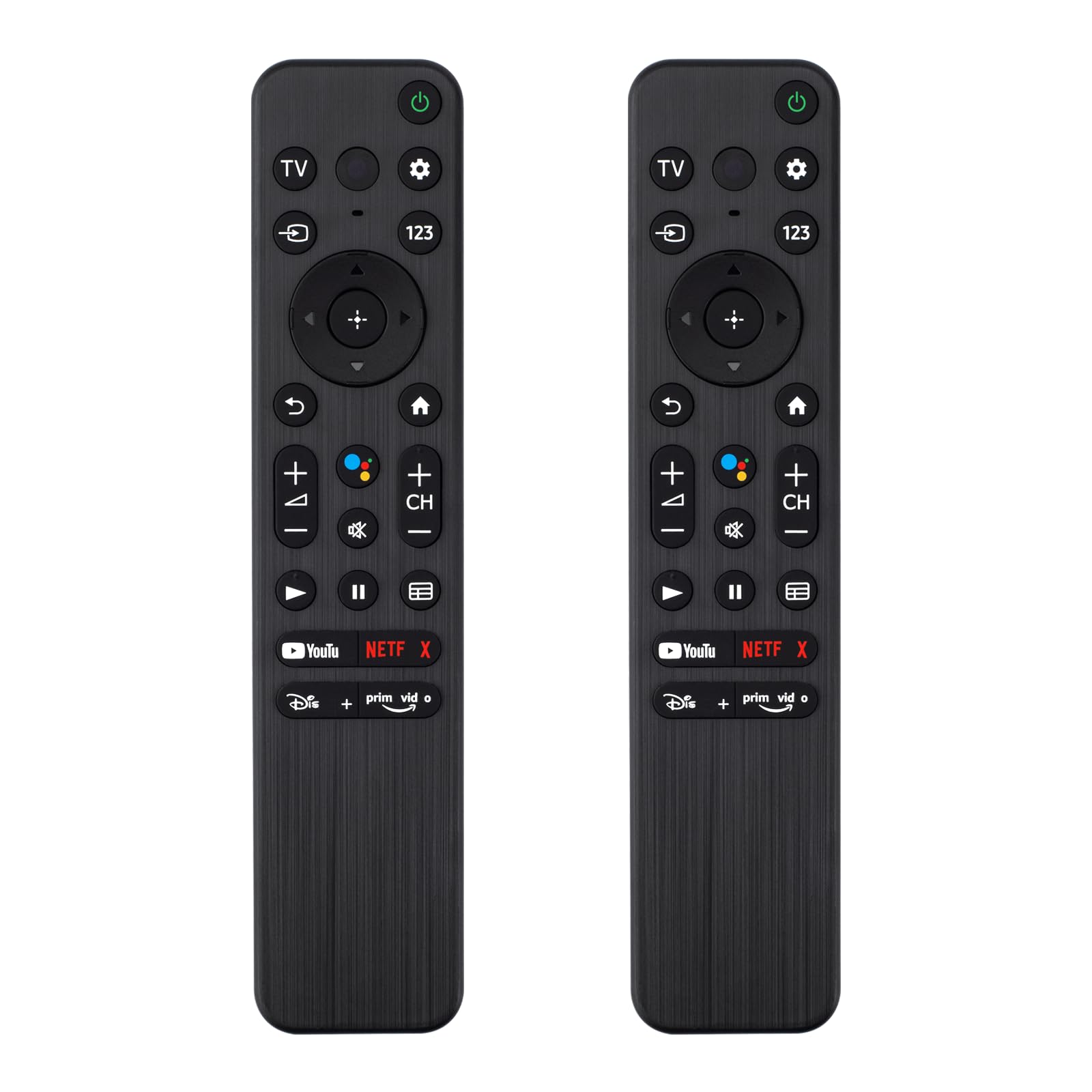
This image provides a visual guide to the remote control's buttons and their corresponding functions.
- TV Power: Turns the TV on or off.
- Quick Settings: Accesses quick settings menu.
- Control Menu (123): Opens the control menu, often for number input or additional functions.
- Input: Selects the input source (HDMI 1, HDMI 2, etc.).
- Google: Activates Google Assistant (note: this remote does NOT support voice control).
- Navigation Pad (Up/Down/Left/Right/Enter): Navigates menus and confirms selections.
- Back: Returns to the previous screen or menu.
- Home: Returns to the TV's home screen.
- Volume Keys (+/-): Adjusts the TV volume.
- Channel Keys (CH +/-): Changes TV channels.
- Mute: Mutes or unmutes the TV audio.
- Play/Pause/Stop/Fast Forward/Rewind: Controls media playback.
- Guide: Opens the electronic program guide.
- Shortcut Keys: Direct access buttons for popular streaming applications (e.g., YouTube, Netflix, Disney+, Prime Video). These are pre-programmed.
4.2 Using Shortcut Buttons
The remote features dedicated shortcut buttons for quick access to popular streaming services. Simply press the corresponding button to launch the application directly on your compatible Sony TV.

This image highlights the dedicated shortcut buttons for various streaming services, allowing for quick access.
4.3 Remote Control Range
The upgraded infrared technology allows for a long-distance remote control range of up to 40 feet (approximately 12 meters). Ensure there are no obstructions between the remote control and the TV's infrared receiver for optimal performance.

This image illustrates the effective long-distance control capability of the remote, with a signal range exceeding 40 feet.
5. Maintenance
5.1 Cleaning
To maintain the remote control's appearance and functionality, clean it regularly. Use a soft, dry cloth to wipe the surface. For stubborn dirt, slightly dampen the cloth with water or a mild, non-abrasive cleaner. Avoid using harsh chemicals, solvents, or abrasive materials, as these can damage the remote's finish or internal components.
5.2 Battery Care
- Replace batteries when the remote's response becomes sluggish or inconsistent.
- If the remote control will not be used for an extended period (e.g., one month or more), remove the batteries to prevent leakage and potential damage to the device.
- Dispose of used batteries according to local regulations.
6. Troubleshooting
If you experience issues with your remote control, refer to the following common problems and solutions:
| Problem | Possible Cause | Solution |
|---|---|---|
| Remote not responding | Dead or incorrectly installed batteries. Obstruction between remote and TV. Remote out of range. | Replace batteries with new ones, ensuring correct polarity. Remove any objects blocking the signal path. Move closer to the TV (within 40 ft). |
| Buttons not working | Dirty contacts under buttons. Remote damage. | Clean the remote surface. If specific buttons are unresponsive, the remote may be damaged and require replacement. |
| TV not responding to specific functions | TV model incompatibility for certain advanced functions (e.g., voice control). | This remote does not support voice control. Ensure your TV model is listed as compatible for all desired functions. |
7. Specifications
| Feature | Detail |
|---|---|
| Brand | Generic |
| Model Number | Sny-310E-V |
| Compatible Devices | Television (Sony 4K 8K HD TV X80K X90K X95K Series 2022 Models) |
| Connectivity Technology | Infrared |
| Maximum Range | 10 Meters (approximately 33 feet) / Up to 40 feet (12 meters) as per feature bullets |
| Battery Type | 2 x AAA 1.5V Batteries (Not Included) |
| Material | Premium ABS |
| Color | BLACK |
| Special Feature | Ergonomic |
| Button Quantity | 14 |
8. Warranty Information
Specific warranty information for this product was not provided in the available data. Please refer to the retailer or manufacturer's website for details regarding warranty coverage, if applicable.
9. Customer Support
Contact information for customer support was not provided in the available data. For assistance, please refer to the retailer where the product was purchased or check the product packaging for support details.