
1. Introduction
Thank you for choosing the BOSSIN 70-inch Fireplace TV Stand. This product combines a modern entertainment center with a functional electric fireplace, designed to enhance your living space. This manual provides essential information for safe assembly, operation, and maintenance of your new TV stand.
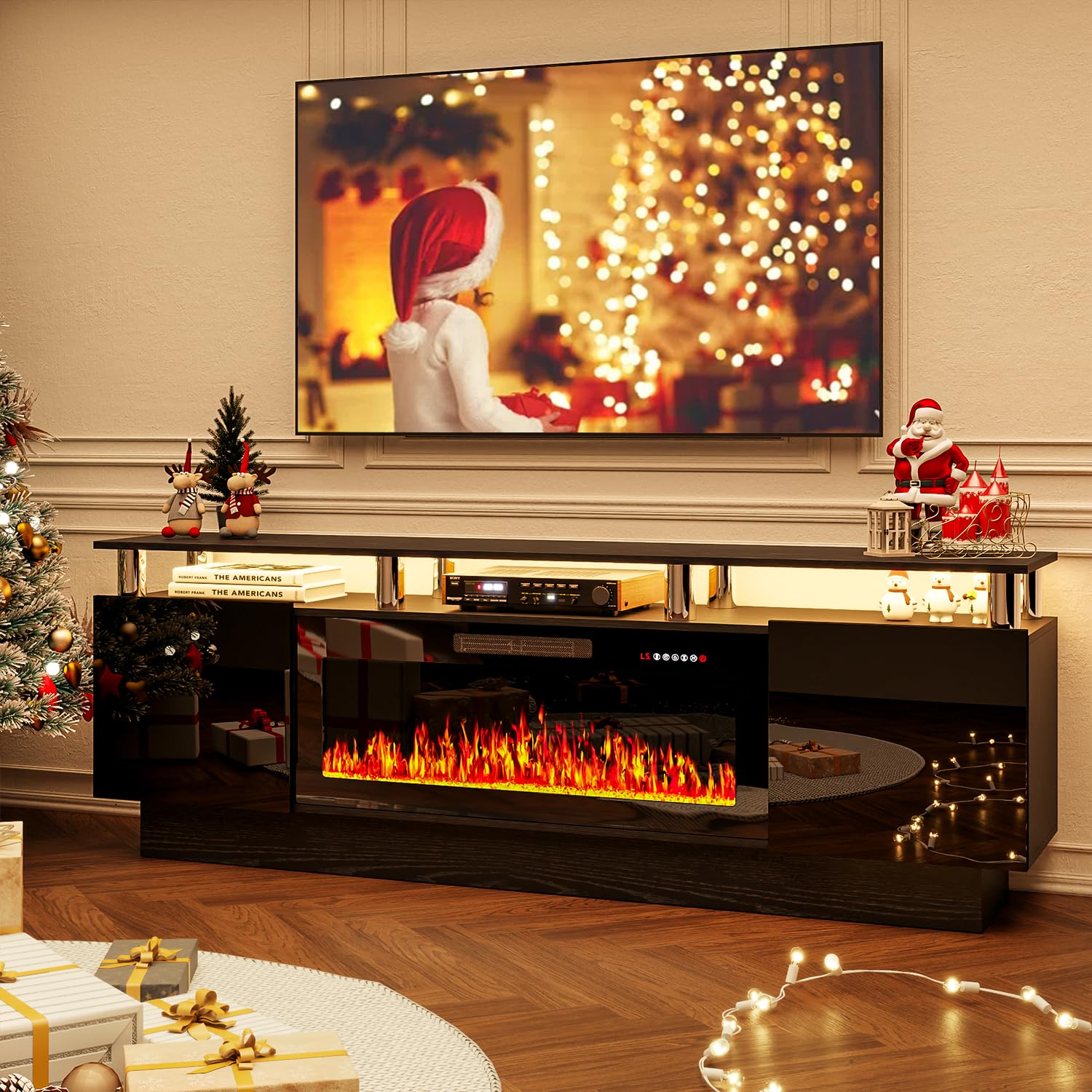
Image 1.1: The BOSSIN 70-inch Fireplace TV Stand with Electric Fireplace.
2. Safety Information
Please read all safety warnings and instructions carefully before assembly and use to prevent injury or damage.
- Ensure all components are present and undamaged before assembly. Do not use if any parts are missing or broken.
- This product is intended for indoor use only.
- Place the TV stand on a flat, stable, and level surface.
- Do not overload the TV stand. Refer to specifications for weight limits.
- Keep children and pets away from the electric fireplace when it is operating.
- Do not block the air vents of the electric fireplace. Maintain adequate clearance around the unit.
- Only use the provided power cord and plug into a grounded outlet.
- Unplug the electric fireplace from the power outlet before cleaning or maintenance.
3. Package Contents
Your BOSSIN Fireplace TV Stand will arrive in two separate packages, typically delivered on different days. Please ensure you have received both packages before beginning assembly.

Image 3.1: The TV stand and electric fireplace are shipped in two separate packages.
Each package contains:
- Package 1: TV Stand components (panels, hardware, stainless steel supports, cabinet doors, adjustable shelves).
- Package 2: 36-inch Electric Fireplace unit, remote control, power cord.
- Detailed assembly instructions for the TV stand and electric fireplace.
4. Setup and Assembly
Assembly of the BOSSIN Fireplace TV Stand is designed to be user-friendly. All parts are labeled, and detailed instructions are included. For best results and safety, a two-person assembly is recommended.
4.1 Before You Begin
- Clear a spacious area for assembly.
- Lay out all components and hardware. Verify against the parts list in the included manual.
- Gather necessary tools (e.g., screwdriver).
4.2 Assembly Steps (General Overview)
- Assemble the main frame of the TV stand according to the numbered steps in the instruction manual.
- Attach the eight stainless steel pillars/columns to support the upper tier.
- Install the adjustable shelves within the storage cabinets.
- Mount the high-gloss cabinet doors using the provided hinges.
- Carefully insert the 36-inch electric fireplace unit into its designated opening in the TV stand.
- Route power cords through the integrated cable management holes for a tidy setup.

Image 4.1: Key features like adjustable shelves, high-gloss cabinet doors, and stainless steel supports.
5. Operating Instructions
5.1 Electric Fireplace Operation
The 36-inch electric fireplace can be operated using the control panel on the unit or the included remote control.

Image 5.1: Electric Fireplace control functions.
- Power (ON/OFF): Press the power button to turn the fireplace on or off.
- Heater: Select between two heating modes: 750W (low heat) and 1500W (high heat). The heater can be used independently of the flame effect.
- Flame Speed: Adjust the speed of the flame effect through 5 available levels.
- Dimmer: Control the brightness of the flame effect with 5 dimmer settings.
- Timer: Set an automatic shut-off timer for 1 to 8 hours.
- Color: Choose from 12 realistic 3D flame effects to customize the ambiance.

Image 5.2: Examples of multi-color flame effects.

Image 5.3: Visual representation of 12 adjustable flame colors.
5.2 LED Strip Lights Operation
The TV stand features integrated LED strip lights with 20 color combinations to further customize your entertainment area.
- Use the dedicated remote control or integrated buttons to cycle through the 20 available LED colors.
- Adjust brightness and modes (e.g., static color, fading, flashing) as desired.

Image 5.4: Examples of multi-color LED light changes.

Image 5.5: Visual representation of 20 LED strip light colors.
6. Maintenance
Regular maintenance will help prolong the life and appearance of your TV stand and electric fireplace.
- Cleaning the TV Stand: Wipe surfaces with a soft, damp cloth. Avoid harsh chemicals or abrasive cleaners that may damage the finish.
- Cleaning the Electric Fireplace: Ensure the unit is unplugged and cool before cleaning. Use a soft, dry cloth to wipe the exterior. Do not spray liquids directly onto the unit.
- Dusting: Regularly dust the unit, especially around the air intake and exhaust vents of the fireplace, to ensure proper airflow.
- Inspecting Cords: Periodically check the power cord for any signs of damage. If damaged, discontinue use and contact customer support.
7. Troubleshooting
If you encounter any issues with your BOSSIN Fireplace TV Stand, please refer to the following common troubleshooting steps:
| Problem | Possible Cause | Solution |
|---|---|---|
| Electric fireplace does not turn on. | No power, unit unplugged, power switch off, remote batteries dead. | Ensure unit is plugged in and power switch is ON. Check circuit breaker. Replace remote batteries. |
| No heat output from fireplace. | Heater function not activated, thermostat setting too low, air vents blocked. | Activate heater function. Increase thermostat setting. Clear any obstructions from air vents. |
| Flame effect not working. | Flame effect function not activated. | Ensure flame effect function is turned on via control panel or remote. |
| LED strip lights not working. | LED power off, loose connection. | Check LED power connection and ensure it is turned on. |
If the problem persists after attempting these solutions, please contact BOSSIN customer support.
8. Specifications

Image 8.1: Product dimensions of the TV stand and electric fireplace.

Image 8.2: The TV stand is suitable for TVs up to 80 inches.
| Feature | Detail |
|---|---|
| Brand | BOSSIN |
| Model Number | f4175983-8bda-439c-a715-4133b5409df3 |
| Product Dimensions | 70"W x 14"D x 24"H (TV Stand), 36"W x 5.51"D x 18.2"H (Fireplace) |
| Material | Stainless Steel (supports), Engineered Wood (panels) |
| Color | Black |
| Power Source | Corded Electric |
| Heater Output | 750W / 1500W |
| Flame Effects | 12 realistic 3D flame effects |
| LED Lights | 20 color combinations |
| Max TV Size Supported | Up to 80 inches |
| Installation Type | Freestanding |
9. Warranty and Support
The BOSSIN Fireplace TV Stand comes with a limited warranty. Please refer to the warranty card included in your package for specific terms and conditions.
For any questions, missing parts, or assistance with assembly or operation, please contact BOSSIN customer support. Our team is available 24/7 to provide reliable support.
Customer Support Contact: Refer to the contact information provided in your product packaging or on the official BOSSIN website.