
CSZZD 001
CSZZD Makeup Vanity Desk with Mirror and Lights - Model 001 User Manual
Comprehensive instructions for assembly, operation, and maintenance.
1. Introduction
This manual provides detailed instructions for the assembly, operation, and care of your CSZZD Makeup Vanity Desk with Mirror and Lights, Model 001. Please read this manual thoroughly before assembly and use to ensure proper function and longevity of your product.
2. Safety Information
WARNING:
- Assembly may require the use of tools. Exercise caution to prevent injury.
- Be cautious when handling electrical components to avoid injury or damage. Ensure all connections are secure before plugging into a power source.
- Do not overload the power strip. Refer to specifications for maximum load.
- Keep electrical components away from water or excessive moisture.
3. Package Contents
Verify that all components are present before beginning assembly. If any parts are missing or damaged, please contact customer support.
- Vanity Desk components (panels, drawers, shelves)
- Mirror with LED light bulbs
- RGB LED Cabinet
- Stool with cushion
- Power strip with 2 AC outlets and 2 USB ports
- Side storage bag
- Assembly hardware (screws, dowels, cam locks, etc.)
- Instruction manual
4. Assembly Instructions
Assembly is required for this product. It is recommended to have a clear, spacious area for assembly. Follow the detailed instructions provided in the package. Each accessory is labeled for easy identification.
- Unpack and Organize: Carefully unpack all components and lay them out. Organize hardware by type. This step significantly reduces assembly time and frustration.
- Assemble the Main Desk Frame: Follow the diagrams to connect the main desk panels. Ensure all connections are tight and secure.
- Install Drawers: Assemble the drawers according to the instructions and slide them into their designated slots.
- Attach Mirror and Lighting: Secure the mirror to the desk. Install the LED light bulbs around the mirror. Connect the lighting power cable.
- Install RGB LED Cabinet: Mount the RGB LED cabinet. Connect its power source.
- Integrate Charging Station: Install the power strip with USB ports and AC outlets into its designated compartment.
- Assemble Stool: Put together the stool frame and attach the cushion.
- Attach Side Storage Bag: Secure the side storage bag to the desk.
Tip: A cordless drill/screwdriver can expedite the assembly process, but use caution to avoid overtightening screws.

Figure 4.1: Fully assembled CSZZD Makeup Vanity Desk with mirror, lights, and stool.

Figure 4.2: Overview of the vanity desk's storage features, including drawers, shelves, and the RGB cabinet.
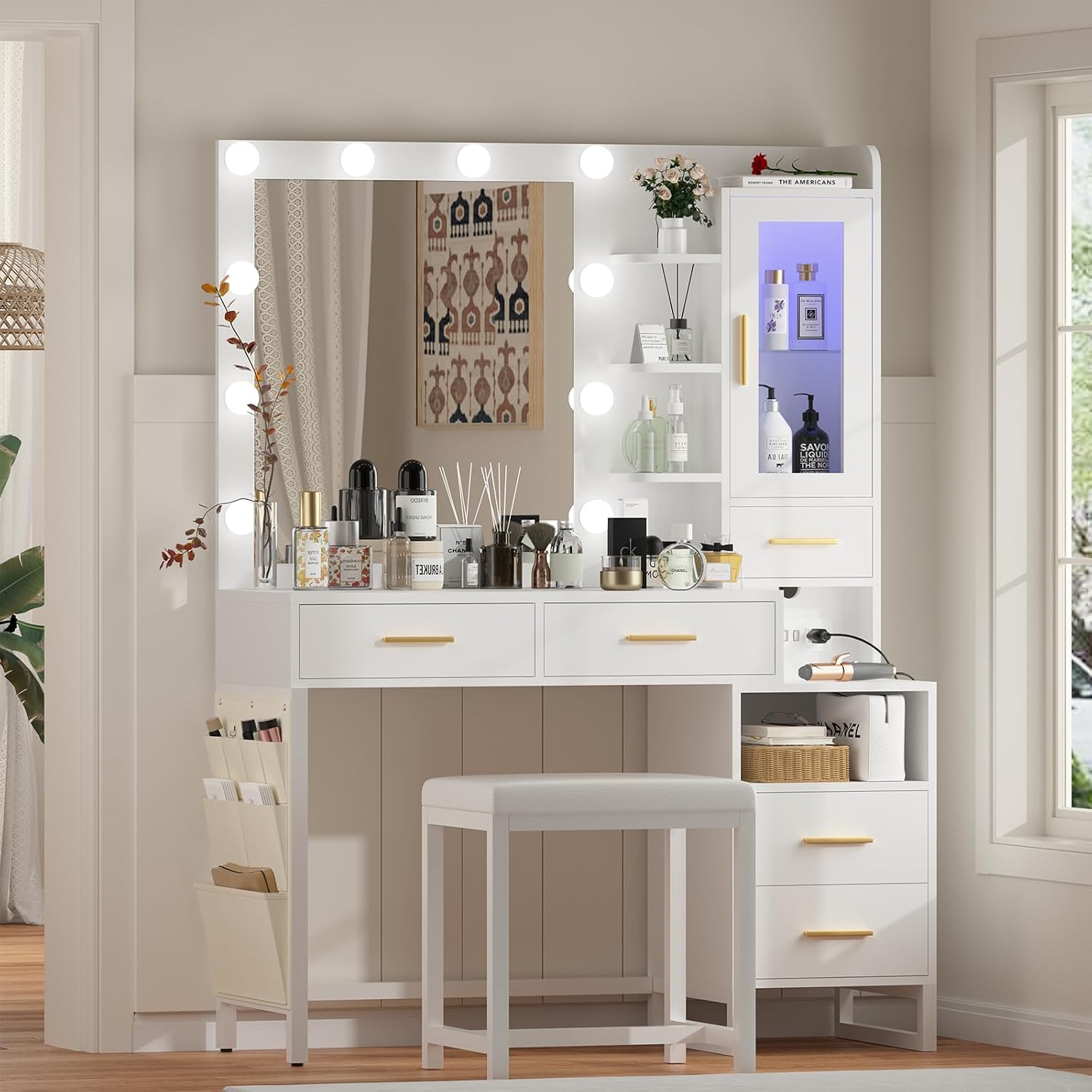
Figure 4.3: Dimensional drawing illustrating the overall size and key measurements of the vanity desk and stool.
5. Operating Instructions
5.1 Mirror Lighting Modes
The vanity mirror is equipped with 10 LED light bulbs offering three color modes and adjustable brightness.
- Power On/Off: Press the switch to turn the lights on or off.
- Change Color Mode: Briefly press the switch to cycle through the three color modes: Warm Yellow, Warm White, and Cool White.
- Adjust Brightness: Press and hold the switch to adjust the brightness from 0% to 100%. Release when the desired brightness is reached.

Figure 5.1: Illustration of the three available lighting modes and brightness adjustment for the mirror lights.
5.2 RGB LED Cabinet Operation
The cabinet features an RGB lighting system that can be controlled via a mobile application or a switch. This system offers over 60,000 static colors and multiple lighting modes, including music synchronization.
- App Control: Scan the QR code provided in the product packaging to download the control application. Follow the app's instructions to connect and customize the lighting.
- Switch Control: Use the integrated switch to cycle through basic lighting options.
- Adjustable Shelves: The cabinet includes height-adjustable laminates. To adjust, carefully remove the shelves and reposition them into the desired slots.

Figure 5.2: The RGB LED cabinet displaying various color options and the mobile app interface for control.

Figure 5.3: Close-up view of the adjustable shelves within the RGB LED cabinet, showing three possible height settings.
5.3 Charging Station
The vanity desk includes a built-in power strip with two standard AC outlets and two USB ports for convenient charging of electronic devices.
- AC Outlets: Use for hair dryers, curling irons, or other small appliances.
- USB Ports: Ideal for charging smartphones, tablets, and other USB-powered devices.
- Power Cord: The charging station is connected via a 5.9-foot power cord.

Figure 5.4: Close-up of the integrated charging station, showing the AC outlets and USB ports in use.
6. Maintenance
To ensure the longevity and appearance of your vanity desk, follow these simple maintenance guidelines:
- Cleaning: Wipe the surfaces with a dry, soft cloth. Avoid abrasive cleaners or harsh chemicals that may damage the finish.
- Spills: Immediately wipe up any spills to prevent staining or damage to the wood.
- Electrical Components: Ensure all electrical connections are dry and free from dust. Do not attempt to clean electrical components with liquid.
- Stool Cushion: Spot clean the fabric cushion with a mild detergent and damp cloth if necessary.
7. Troubleshooting
If you encounter issues with your vanity desk, refer to the following common problems and solutions:
- Mirror Lights Not Working:
- Check if the power cord is securely plugged into a working outlet.
- Ensure the light switch is functioning correctly. If the switch feels loose or unresponsive, it may need replacement.
- Verify that all light bulbs are properly screwed in.
- RGB LED Cabinet Lights Not Functioning:
- Confirm the cabinet's power connection is secure.
- If using the app, ensure your device is properly paired and within range.
- Check the cabinet's internal switch for proper operation.
- Charging Station Not Providing Power:
- Ensure the main power cord for the vanity desk is plugged into a live outlet.
- Check if the devices you are trying to charge are properly connected to the outlets/USB ports.
- Avoid overloading the power strip. Disconnect some devices if too many are connected.
- Stool Instability:
- Check all screws and fasteners on the stool frame and tighten them if loose.
- Ensure the stool is placed on a flat, even surface.
If these steps do not resolve the issue, please contact customer support for further assistance.
8. Specifications
| Feature | Detail |
|---|---|
| Brand | CSZZD |
| Model Number | 001 |
| Product Dimensions (L x W x H) | 39.4" x 15.7" x 58.7" (15.7"D x 39.4"W x 58.7"H) |
| Frame Material | Wood |
| Furniture Finish | White |
| Seat Material Type | Fabric |
| Mirror Lighting | 10 LED bulbs, 3 color modes (Warm Yellow, Warm White, Cool White), 0-100% adjustable brightness |
| RGB LED Cabinet | Over 60,000 static colors, multiple lighting modes, music synchronization, app/switch control, adjustable shelves |
| Charging Station | 2 standard AC outlets (125V/12A), 2 USB ports (5V/2.1A), 5.9 ft power cord |
| Storage | 3 open shelves, 1 RGB cabinet, 5 drawers (2 large, 2 standard, 1 open), 1 extra side storage bag |
| Assembly Required | Yes |
| Product Care Instructions | Wipe with Dry Cloth |
9. Warranty and Support
For any inquiries, missing parts, or issues not covered in the troubleshooting section, please contact the seller directly. The product may be eligible for extended protection plans, which can be purchased separately.
- Contact Support: Refer to your purchase documentation or the online retailer's "Contact Seller" option for direct assistance.
- Protection Plans: Optional 3-Year Protection Plan and Complete Protect plans are available for purchase. These are separate from the manufacturer's standard support.
Ask a question about this manual
Ask about setup, troubleshooting, compatibility, parts, safety, or missing instructions. Manuals+ will review the question and use this page’s manual context to help answer it.