Introduction
This manual provides detailed instructions for the setup, operation, and maintenance of your Generic MR-8108G Digital Watch. Please read this manual carefully to ensure proper use and to maximize the lifespan of your watch.
Product Overview
The MR-8108G is a digital wristwatch designed for daily wear, featuring a large digital display, night light, alarm, and chronograph functions. It is also water-resistant for everyday use.

Figure 1: Front view of the Generic MR-8108G Digital Watch, showing the large digital display with red numerals, alarm indicator, and function buttons.
Setup
1. Initial Power-On and Time Setting
Your watch comes with a pre-installed battery. If the display is blank, press any button to activate it. To set the time and date:
- Press the MODE button repeatedly until the time setting mode is displayed (usually indicated by flashing digits).
- Use the START button to adjust the flashing digit (hours, minutes, seconds).
- Use the RESET button to move to the next setting (e.g., from hours to minutes).
- Once all settings are correct, press the MODE button to exit the setting mode.
2. Adjusting the Strap
The watch features a plastic strap with a buckle closure. Adjust the strap to fit comfortably around your wrist, ensuring it is not too tight or too loose. The buckle should securely fasten the watch.
Operating Instructions
1. Basic Time Display
In normal time mode, the watch displays the current time (hours, minutes, seconds) and day of the week.
2. Night Light Function
Press the LIGHT button (usually located on the top left) to illuminate the display for a few seconds, allowing you to read the time in low-light conditions.
3. Setting and Using the Alarm
- Press the MODE button until the alarm setting mode is displayed.
- Use the START button to adjust the alarm hour and the RESET button to switch between hour and minute settings.
- Press MODE to confirm and exit.
- To turn the alarm ON/OFF, press the START button while in alarm mode. An alarm icon will appear/disappear.
- When the alarm sounds, press any button to stop it.
4. Chronograph (Stopwatch) Function
- Press the MODE button until the chronograph mode is displayed (usually showing "00:00:00").
- Press the START button to begin timing.
- Press START again to pause timing.
- Press RESET to clear the stopwatch to zero.
- Press MODE to exit chronograph mode.
5. Water Resistance
This watch is rated as "Water Proof" (WR 30M), meaning it is suitable for everyday use and can withstand splashes, rain, and brief immersion in water. It is not recommended for swimming, diving, or hot water activities as steam and pressure changes can compromise the seals.
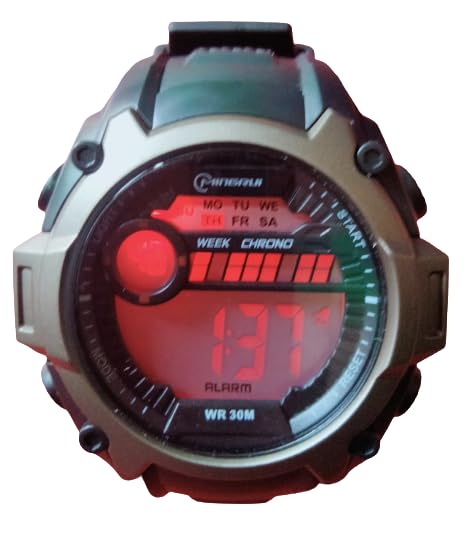
Figure 2: Front view of the Generic MR-8108G Digital Watch, showing the digital display with blue numerals and the "WR 30M" water resistance indicator.
Maintenance
1. Cleaning
Wipe the watch case and strap with a soft, damp cloth. Avoid using harsh chemicals or abrasive cleaners, as these can damage the watch's finish or seals.
2. Battery Replacement
When the display becomes dim or the watch stops functioning, the battery may need replacement. It is recommended to have the battery replaced by a qualified watch technician to ensure the water resistance seal is properly maintained.
3. Water Resistance Care
Do not operate buttons while the watch is submerged in water. Avoid exposing the watch to extreme temperatures or sudden temperature changes, which can affect the water resistance seals.
Troubleshooting
| Problem | Possible Cause | Solution |
|---|---|---|
| Display is blank or dim. | Low or dead battery. | Replace the battery. |
| Time is inaccurate. | Time not set correctly. | Refer to "Initial Power-On and Time Setting" section to reset the time. |
| Alarm does not sound. | Alarm is turned off or not set correctly. | Ensure the alarm is set and activated (alarm icon visible). |
| Water inside the watch. | Water resistance compromised due to button operation underwater or extreme conditions. | Stop using the watch immediately and seek professional repair. |
Specifications
- Model: MR-8108G
- Display Type: Digital
- Movement Type: Quartz
- Case Material: Plastic
- Band Material: Plastic
- Band Colour: Black (as per product details, though images show variants)
- Case Thickness: 15 Millimetres
- Water Resistance: WR 30M (Water Proof)
- Power Source: Battery Powered
- Product Dimensions: 26 x 5 x 1 cm
Warranty and Support
For warranty information or technical support, please refer to the documentation provided at the time of purchase or contact the seller directly. Keep your purchase receipt as proof of purchase.


