
1. Introduction
Thank you for choosing the BOSYTRO 2000W Full Spectrum LED Grow Light. This product is designed to provide optimal lighting conditions for indoor plants throughout all growth stages, from germination to flowering. Please read this manual carefully before installation and operation to ensure safe and efficient use.
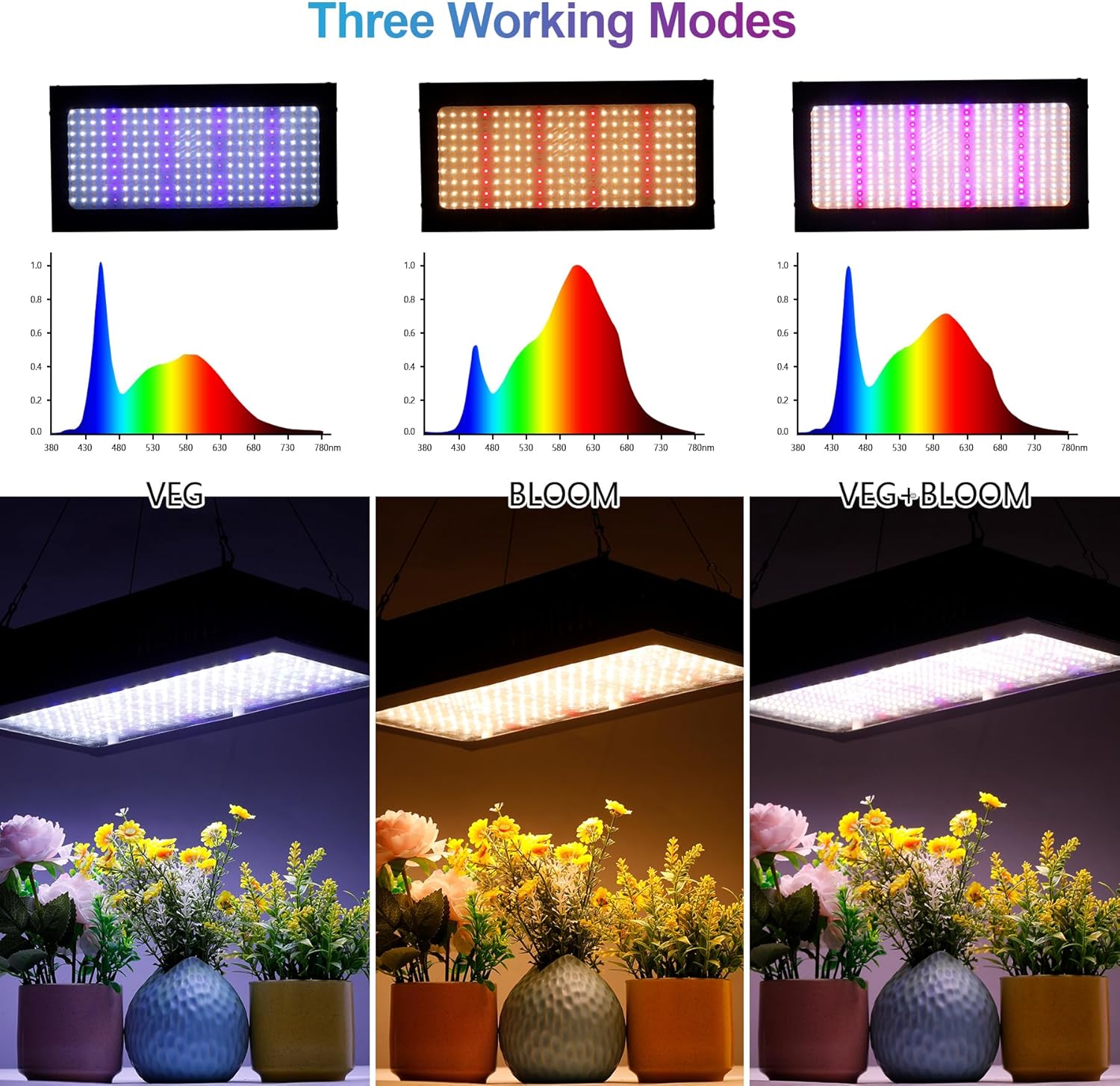
Image: The BOSYTRO 2000W Full Spectrum LED Grow Light, showcasing its rectangular design and LED array.
2. Safety Information
- Always disconnect the power supply before installation, cleaning, or maintenance.
- Do not look directly at the LED lights when the unit is operating, as this may cause eye strain or damage.
- Ensure the grow light is installed in a well-ventilated area to prevent overheating.
- Keep the device away from water and other liquids. This product is for indoor use only.
- Do not attempt to disassemble or modify the grow light. Refer all servicing to qualified personnel.
- Ensure the hanging system is securely fastened and can support the weight of the grow light.
3. Package Contents
Verify that all components are present and in good condition:
- BOSYTRO 2000W LED Grow Light (1 unit)
- Power Cable (1 unit)
- Hanging Kit (1 set)
- User Manual (This document)
4. Product Features
- Full Spectrum LED: Incorporates 3000K warm white, 5000K white, 460nm blue, 660nm red, 730nm infrared, and 400nm UV light to simulate natural sunlight and support all plant growth stages.
- Dual Switch Modes (VEG & BLOOM): Separate switches for vegetative and flowering stages, allowing precise control over the light spectrum.
- Efficient Cooling System: Equipped with 3 integrated fans to effectively dissipate heat, ensuring stable operation and extending the product's lifespan.
- Daisy Chain Function: Allows connecting multiple grow lights in series to expand the illuminated area and increase light intensity.
- Energy Saving: Utilizes Samsung LM281B chips, providing high light quality and efficiency with an actual power consumption of approximately 200W, equivalent to traditional 2000W HPS/MH lamps.
LED Spectrum Details

Image: A visual representation of the 432 Samsung LM281B diodes, detailing the quantity and wavelength of each light type (warm white, white, red, blue, IR, UV).
Cooling System

Image: A diagram highlighting the three cooling fans on the top of the grow light, designed for efficient heat dissipation.
5. Setup
- Unpack: Carefully remove the grow light and all accessories from the packaging.
- Inspect: Check the unit for any signs of damage. Do not use if damaged.
- Hang the Light: Attach the provided hanging kit to the designated points on the grow light. Securely hang the light from a sturdy support structure in your grow area. Ensure it is level and at an appropriate height above your plants (refer to operating instructions for recommended heights).
- Connect Power: Plug the power cable into the grow light's power input port, then plug the other end into a compatible 220V AC power outlet.
6. Operating Instructions
The BOSYTRO grow light features dual switches for different growth stages:
- VEG Switch: Activates blue and white LEDs, ideal for seedlings and plants in the vegetative growth phase.
- BLOOM Switch: Activates red and white LEDs, suitable for plants during the flowering and fruiting stages.
- VEG + BLOOM (Dual-On): For maximum light intensity and full spectrum coverage during the flowering and fruiting stages, activate both switches.

Image: Visual representation of the three working modes (VEG, BLOOM, VEG+BLOOM) and their respective light spectra and effects on plants.
Recommended Hanging Heights and Lighting Schedule:
| Growth Stage | Switch Mode | Recommended Height | Lighting Duration |
|---|---|---|---|
| Seedling | VEG | 60-75 cm (24-30 inches) | 14-18 hours/day |
| Vegetative | VEG | 45-60 cm (18-24 inches) | 12-16 hours/day |
| Flowering | VEG + BLOOM | 30-45 cm (12-18 inches) | 10-12 hours/day |
Note: These are general recommendations. Adjust height and duration based on specific plant needs and environmental conditions.
Daisy Chain Function
The grow light supports daisy-chaining, allowing you to connect multiple units from a single power outlet. This is suitable for larger grow areas.
- Ensure the total wattage of all connected lights does not exceed the capacity of your power outlet and circuit breaker.
- Connect the power cable from the first grow light to the wall outlet.
- Use the provided daisy chain cable to connect the output port of the first light to the input port of the second light, and so on.
- It is recommended to connect a maximum of 3 units in a daisy chain to prevent overloading.

Image: Illustration of the daisy chain function, demonstrating how multiple grow lights can be connected in series from a single power source.
7. Maintenance
- Cleaning: Periodically clean the surface of the grow light and the LED panel with a soft, dry cloth to remove dust and debris. Ensure the unit is unplugged before cleaning. Do not use liquid cleaners.
- Ventilation: Ensure the cooling fans are free from obstructions to maintain proper airflow.
- Cable Inspection: Regularly check the power cable and hanging wires for any signs of wear or damage. Replace immediately if any damage is found.
8. Troubleshooting
| Problem | Possible Cause | Solution |
|---|---|---|
| Light does not turn on | No power supply; loose connection; faulty switch | Check power cable connection; ensure outlet is working; verify switches are in 'ON' position. |
| Fans are not working | Dust accumulation; fan malfunction | Clean fans gently; if still not working, contact support. |
| Light output is weak | Incorrect mode selected; dust on LEDs | Ensure appropriate VEG/BLOOM mode is selected; clean LED panel. |
| Overheating | Poor ventilation; blocked fans | Ensure adequate airflow around the unit; clear any obstructions from fans. |
9. Specifications
| Feature | Specification |
|---|---|
| Model Number | BSC-TX2000-EU |
| Dimensions (L x W x H) | 40 x 20 x 6 cm (15.7 x 7.9 x 2.4 inches) |
| Weight | 3 Kilograms (6.6 lbs) |
| Actual Power Consumption | Approx. 200 Watts |
| HPS/MH Equivalent | 2000 Watts |
| Input Voltage | 220 Volts (AC) |
| Number of LEDs | 432 (Samsung LM281B Diodes) |
| Spectrum | Full Spectrum (3000K, 5000K, 460nm, 660nm, 730nm, 400nm) |
| Material | Metal |
| Special Features | Energy Efficiency, Cooling Fans, Daisy Chain Function |
10. Warranty and Support
This product comes with a standard manufacturer's warranty. For specific warranty details, please refer to the documentation provided at the time of purchase or contact your retailer.
For technical support, troubleshooting assistance, or inquiries about replacement parts, please contact BOSYTRO customer service through the retailer's platform or the official BOSYTRO website.


