
1. Important Safety Guidelines
Operating the LMRC-12 Drone requires adherence to safety protocols to ensure safe flight and prevent damage or injury. Please read and understand all instructions before operation.
- Pre-Flight Check: Always ensure the drone and remote control batteries are fully charged. Inspect propellers for damage and ensure they are securely attached.
- Environmental Conditions: Fly in open areas, away from people, animals, buildings, and obstacles. Avoid flying in strong winds, rain, snow, or fog.
- Line of Sight: Maintain visual line of sight with the drone at all times during flight.
- Battery Safety: Use only original LMRC batteries and charging cables. Do not overcharge or puncture batteries. Store batteries in a cool, dry place.
- Age Recommendation: This drone is recommended for adults and children aged 8-12 under adult supervision.
- No-Fly Zones: Do not fly near airports, military bases, or other restricted airspace. Respect local regulations regarding drone operation.
- Low Battery Warning: Pay attention to low battery warnings and land the drone immediately to prevent uncontrolled descent.

Image: The LMRC-12 drone flying with indicators for signal loss and low battery, emphasizing the importance of safety precautions during flight.
2. Package Contents
Verify that all components are present in the package:
- LMRC-12 Drone (1)
- Remote Control (1)
- Rechargeable Batteries (2)
- Propellers (4, plus spares)
- Charging Cables (2)
- Screwdriver (1)
- Product Operation Manual (1)

Image: A visual representation of all items included in the LMRC-12 Drone package, including the drone, remote, batteries, propellers, charging cables, screwdriver, and manual.
3. Product Overview
The LMRC-12 is a foldable, lightweight drone designed for ease of use, featuring a 4K HD camera and brushless motors for stable flight.

Image: The LMRC-12 drone in both folded and unfolded states, alongside its remote control, two batteries, spare propellers, charging cables, and a carrying case.

Image: The LMRC-12 drone in its compact, folded state, highlighting its portability and weight of less than 249g, which typically does not require FAA registration.
Key Features:
- 4K HD Camera: Built-in 4K HD Camera with 90° adjustable angle for high-quality video and aerial photos. Features dual camera switching and FPV Real-Time transmission to your mobile device.
- Brushless Motor: Equipped with brushless motors for more stable, faster, and quieter flight, contributing to a longer product lifespan.
- Foldable Design: Compact and lightweight (less than 249g), making it highly portable and easy to store.
- Extended Flight Time: Two high-capacity modular batteries provide up to 26 minutes of flight time.
- User-Friendly Controls: Includes Headless Mode, One Key Start/Landing, Hand Gesture Photo/Video, and Altitude Hold for simplified operation.

Image: Close-up view of the LMRC-12 drone's 4K camera, highlighting its shock absorption feature and 90-degree rotating adjustable lens for improved shooting and transmission.

Image: Detailed view of the drone's brushless motor, illustrating its design for enhanced stability and resistance to wind during flight.
4. Setup Guide
4.1 Charging the Batteries
The LMRC-12 drone comes with two modular lithium polymer batteries. Ensure they are fully charged before first use.
- Connect the provided USB charging cable to the battery.
- Plug the other end of the USB cable into a USB power adapter (e.g., phone charger, computer USB port).
- The battery indicator lights will show charging status. Once all lights are solid, the battery is fully charged.
- Charging time is approximately 90-120 minutes per battery.

Image: Two LMRC-12 drone batteries, illustrating their modular design and highlighting the 26 minutes flight time and USB 3.0 secure charging capability.
4.2 Battery Installation (Drone)
- Ensure the drone is powered off.
- Locate the battery compartment on the rear of the drone.
- Insert the charged battery into the compartment until it clicks securely into place.
4.3 Propeller Installation
The drone comes with pre-installed propellers. If replacement is needed, ensure correct orientation:
- Each propeller is marked with 'A' or 'B'.
- Match the propeller type (A or B) to the corresponding motor arm on the drone.
- Use the provided screwdriver to secure the propellers with the small screws.
4.4 Remote Control Setup
- Open the battery compartment on the back of the remote control.
- Insert 3 x AAA batteries (not included), ensuring correct polarity.
- Close the battery compartment.
- Extend the phone holder on the remote control if you plan to use the FPV feature.
4.5 App Installation (FPV & Smart Features)
To utilize the 4K FPV camera and intelligent flight modes, download the dedicated LMRC drone app:
- Scan the QR code in the manual or search for "LMRC Drone" in your mobile device's app store (iOS/Android).
- Install the app and grant necessary permissions (camera, storage, Wi-Fi).
5. Operating Instructions
5.1 Pairing the Drone and Remote Control
- Place the drone on a flat, level surface.
- Power on the drone by pressing and holding the power button until indicator lights flash.
- Power on the remote control.
- Push the left joystick up then down. The drone's indicator lights will become solid, indicating successful pairing.
5.2 Takeoff and Landing
- One Key Takeoff: After pairing, press the One Key Takeoff/Landing button. The drone will automatically ascend to a stable hovering height.
- Manual Takeoff: Push both joysticks diagonally outwards and downwards simultaneously to start the propellers. Then, slowly push the left joystick up to ascend.
- One Key Landing: Press the One Key Takeoff/Landing button again. The drone will automatically descend and land.
- Emergency Stop: In an emergency, press and hold the One Key Takeoff/Landing button for 3 seconds to immediately stop the motors.
5.3 Flight Modes and Controls
- Altitude Hold: The drone will maintain its current altitude automatically, allowing easier control of horizontal movement.
- Headless Mode: When activated, the drone's orientation becomes irrelevant to the remote control's direction. Forward on the remote will always be forward relative to the pilot, regardless of the drone's front.
- 3-Level Flight Speed: Adjust the flight speed (low, medium, high) using the speed switch button on the remote control to suit your skill level and environment.
- Gravity Control: (Via App) Tilt your mobile device to control the drone's direction.
5.4 Camera Operation (Photo & Video)
- Connecting to FPV: Open the LMRC app on your mobile device. Connect your phone's Wi-Fi to the drone's Wi-Fi network (usually named "LMRC-XXXXXX"). The live video feed will appear in the app.
- Taking Photos: Press the photo button on the remote control or tap the camera icon in the app.
- Recording Video: Press the video button on the remote control or tap the video icon in the app to start/stop recording.
- Adjusting Camera Angle: Use the dedicated button on the remote or slider in the app to adjust the 90° adjustable camera angle.
5.5 Intelligent Flight Functions
- Hand Gesture Photo/Video:
- Ensure the drone's camera is facing you.
- To take a photo, make a "V" gesture with your fingers.
- To start/stop video recording, make a "palm" gesture.

Image: Demonstrates the gesture control feature, showing hand gestures for taking photos and recording videos with the LMRC-12 drone.
- Trajectory Flight:
In the LMRC app, draw a desired flight path on the screen. The drone will automatically follow this path.
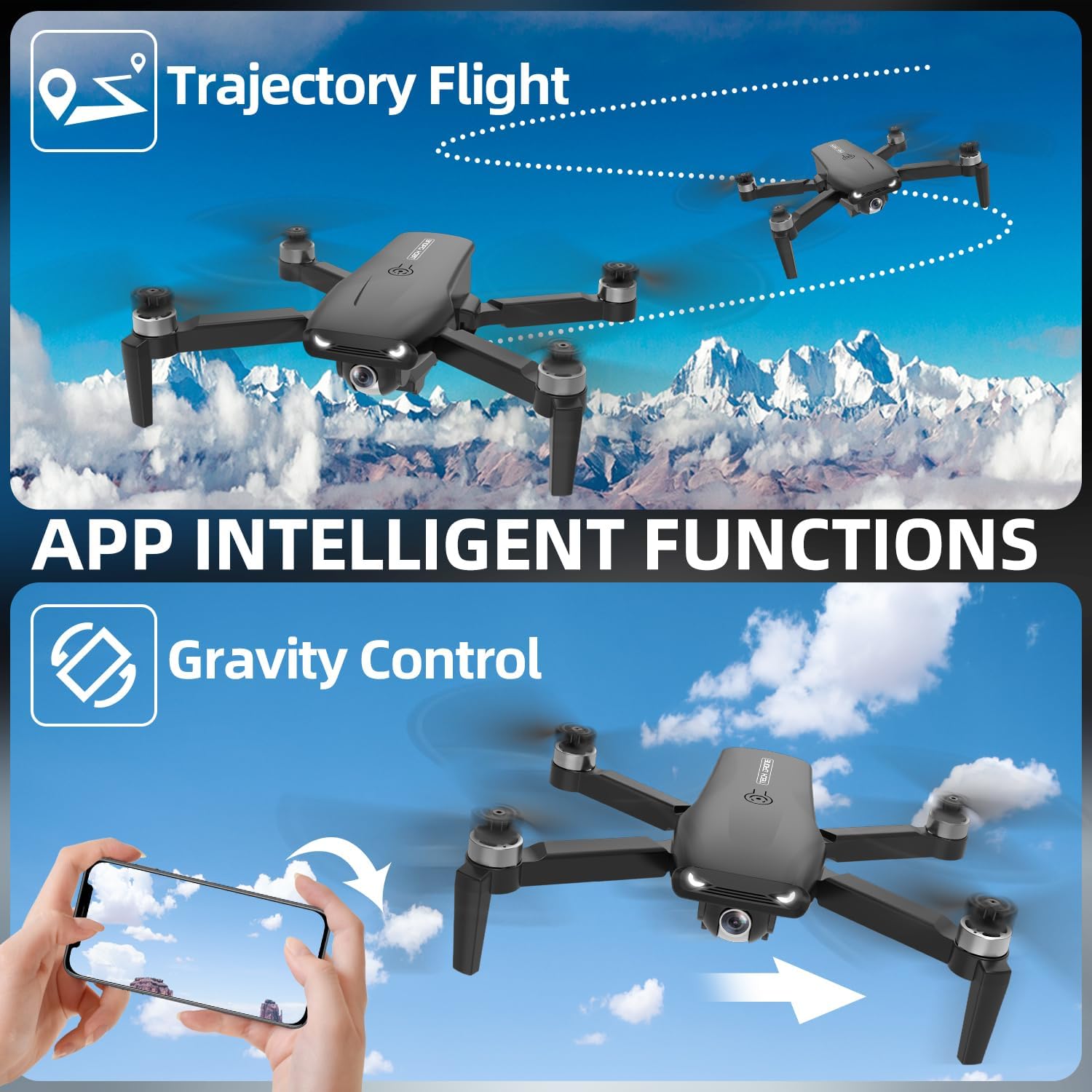
Image: Illustrates the "Trajectory Flight" feature where the drone follows a drawn path, and "Gravity Control" where the drone responds to phone tilting.
6. Maintenance
6.1 Cleaning
- Use a soft, dry cloth to clean the drone body and camera lens.
- Do not use liquid cleaners or solvents.
6.2 Storage
- Store the drone and accessories in a cool, dry place, away from direct sunlight.
- Remove batteries from the drone and remote control if storing for extended periods.
- Charge batteries to approximately 50% before long-term storage to prolong battery life.
6.3 Propeller Replacement
- If a propeller is damaged, replace it immediately with a spare.
- Ensure the correct 'A' or 'B' propeller is installed on the corresponding motor arm.
- Use the provided screwdriver to loosen and tighten the propeller screws.

Image: A close-up of the LMRC-12 drone, pointing out its robust construction with ABS material, resilient propellers, strong joints, and brushless motors, contributing to its crashworthiness.
7. Troubleshooting
| Problem | Possible Cause | Solution |
|---|---|---|
| Drone does not respond to remote. | Not paired; low battery (drone/remote); out of range. | Re-pair drone and remote. Charge batteries. Ensure drone is within operating range. |
| Drone drifts during flight. | Not calibrated; strong wind. | Perform gyroscope calibration (refer to full manual for steps). Avoid flying in windy conditions. |
| Camera feed is choppy or disconnected. | Weak Wi-Fi signal; too far from drone; app issue. | Ensure strong Wi-Fi connection. Fly closer to the drone. Restart the app and drone. |
| Drone won't take off. | Low battery; propellers blocked; not armed. | Charge drone battery. Check for obstructions. Ensure motors are armed (joysticks diagonally outwards). |
8. Specifications
| Feature | Detail |
|---|---|
| Brand | LMRC |
| Model Name | LMRC 12 |
| Color | Black |
| Product Dimensions | 10.2"L x 8.3"W x 3.3"H (Unfolded) |
| Item Weight | Less than 249g (0.55 lbs) |
| Video Capture Resolution | 4K (Photo), 1080p (Video) |
| Connectivity Technology | 2.4GHz (Remote), Wi-Fi (FPV) |
| Flight Time | Up to 26 minutes (with 2 batteries) |
| Battery Type | Lithium Polymer |
| Motor Type | Brushless Motor |
| Skill Level | Beginner |
| Control Type | Remote Control, App Control |
| Operating Temperature | 32 Degrees Fahrenheit (0°C) and above |
9. Warranty and Support
The LMRC-12 Drone is FCC certified. LMRC provides technical guidance and support for any issues encountered during use.
- For technical assistance, please refer to the contact information provided in the original product packaging or visit the official LMRC website.
- Keep your purchase receipt as proof of purchase for any warranty claims.
- Protection plans may be available for extended coverage. Please check with your retailer for details.
For further information or to purchase replacement parts, please visit the LMRC Store on Amazon.