
Hama 00223164
Hama Power Extension Strip User Manual
Model: 00223164
Brand: Hama
1. Introduction
Thank you for choosing the Hama 00223164 Power Extension Strip. This device is designed to provide multiple AC outlets for your electronic devices, featuring a 2-meter cable and an integrated on/off button for convenient power control. Please read this manual carefully before using the product to ensure safe and optimal performance.
2. Safety Instructions
- This product is intended for indoor use only. Do not expose to moisture or extreme temperatures.
- Do not overload the power strip. Ensure the total power consumption of connected devices does not exceed the maximum rating of the strip.
- Do not connect multiple power strips in series.
- Keep out of reach of children.
- Do not open or modify the device. Repairs should only be performed by qualified personnel.
- Always unplug the power strip from the wall outlet before cleaning or if it will not be used for an extended period.
- Ensure the power plug is fully inserted into the wall outlet.
3. Product Overview
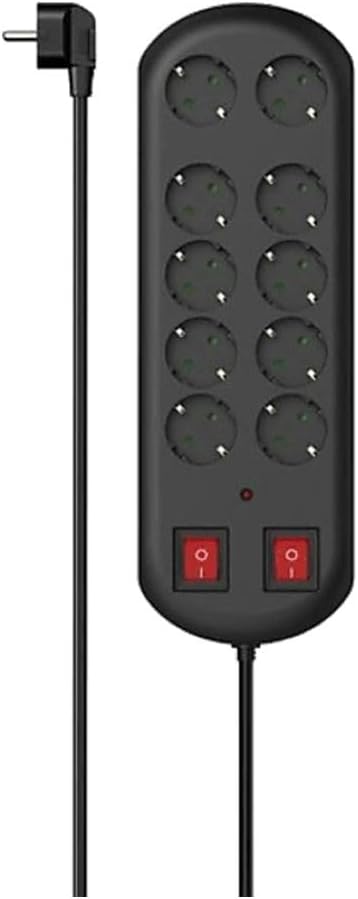
Figure 3.1: Front view of the Hama 00223164 Power Extension Strip, showing the 10 AC outlets, two red on/off switches, and the attached power cord with a right-angle plug.

Figure 3.2: The Hama 00223164 Power Extension Strip displayed within its retail packaging, highlighting key features like 'Power Strip 10-Way' and 'Overvoltage Protection'.
The Hama 00223164 Power Extension Strip features 10 Type F AC outlets, suitable for European plugs. It includes two integrated on/off buttons, allowing you to control power to groups of outlets. A red indication light confirms the power status. The power strip is equipped with a 2-meter cable and a curved power plug for convenient placement.
4. Setup
- Unpack the Power Strip: Carefully remove the power extension strip from its packaging.
- Choose a Location: Select a dry, indoor location away from direct sunlight, heat sources, and moisture. Ensure there is sufficient space around the power strip for proper ventilation and to avoid cable strain.
- Plug into Wall Outlet: Insert the power strip's plug firmly into a grounded wall AC outlet.
- Connect Devices: Plug your electronic devices into the available AC outlets on the power strip. Ensure all plugs are fully inserted.
5. Operating
- Powering On: Press the red on/off button(s) to supply power to the connected devices. The indication light will illuminate when power is active.
- Powering Off: Press the red on/off button(s) again to cut power to the connected devices. The indication light will turn off.
- Individual Control: If your model has multiple on/off buttons, each button controls a specific group of outlets. Refer to the markings on the power strip to identify which button controls which outlets.
6. Maintenance
- Cleaning: Before cleaning, always unplug the power strip from the wall outlet. Use a dry, soft cloth to wipe the surface. Do not use liquid cleaners or abrasive materials.
- Storage: When not in use, store the power strip in a dry, cool place, away from direct sunlight and moisture.
- Cable Care: Avoid bending or kinking the power cable excessively. Do not place heavy objects on the cable.
7. Troubleshooting
| Problem | Possible Cause | Solution |
|---|---|---|
| No power to connected devices. | Power strip is off. | Press the on/off button(s) to turn on the power strip. |
| Power strip is not plugged in correctly. | Ensure the power strip's plug is fully inserted into the wall outlet. | |
| Wall outlet has no power. | Test the wall outlet with another device or check your circuit breaker. | |
| Overload protection tripped. | Too many devices connected or devices drawing too much power. | Unplug some devices. Wait a few minutes, then reset the power strip (if applicable, by pressing the on/off button or a dedicated reset button). |
8. Specifications
| Feature | Detail |
|---|---|
| Model Number | 00223164 |
| Cable Length | 2 m |
| Placement Supported | Indoor |
| AC Outlet Types | Type F |
| AC Outlets Quantity | 10 |
| Built-in On/Off Button | Yes |
| Power Plug Form Factor | Curved |
| Number of Poles | 2 |
| Indication Light | Yes |
| Product Colour | Black |
| Product Dimensions | 14.06 x 4.45 x 1.5 inches |
| Item Weight | 1.73 pounds (783.31 Grams) |
| Voltage | 250 Volts |
| Power Plug Type | Type E / F - 2 pin (EU Hybrid) |
9. Warranty and Support
Hama products are manufactured with care and undergo strict quality controls. In the unlikely event of a defect, please contact your retailer or the Hama customer support team. Please retain your proof of purchase for warranty claims. Specific warranty terms and conditions may vary by region and retailer.
For further assistance or technical support, please visit the official Hama website or contact their customer service department. Contact information can typically be found on the product packaging or the Hama website.
Ask a question about this manual
Ask about setup, troubleshooting, compatibility, parts, safety, or missing instructions. Manuals+ will review the question and use this page’s manual context to help answer it.