
Introduction
The ACEGMET DTX10 is a versatile 3-in-1 digital measuring tool designed for precision and efficiency. It combines a traditional tape measure, a laser measurement tool, and advanced calculation functions, making it ideal for a wide range of professional and DIY projects. This manual provides comprehensive instructions for setup, operation, maintenance, and troubleshooting to ensure optimal performance of your device.
Key Features
- Unrivaled Precision: Patented AccuMeasure technology delivers digital accuracy within +/- 1/32 inch.
- Dual Tape/Laser Measurements: Seamlessly switch between tape and laser modes for close and distant measurements (laser range up to 330ft).
- Smart Calculations: Automatically computes area, volume, indirect horizontal distance, and height.
- Innovative Functions: Features incremental measurements, internal measurement using rear reference, and a green laser line for alignment.
- User-Friendly Display & App: Equipped with a color display, customizable screen settings, and SMARTLIFE App connectivity for real-time data sync.
What's in the Box
- ACEGMET DTX10 3-in-1 Digital Tape Measure
- Rechargeable Lithium Metal Battery
- USB-C Charging Cable
- Allen Key Tool with Phillips Head (for battery compartment)
- Handheld Lanyard
- Semi-rigid Carrying Case
- User Manual (this document)

The ACEGMET DTX10 device along with its carrying case, battery, charging cable, and tools.
Setup
Battery Installation and Charging
The DTX10 comes with a rechargeable lithium metal battery. To install or remove the battery for charging, use the provided Allen key tool with the Phillips head to open the battery compartment. Insert the battery, ensuring correct polarity, and secure the compartment cover. Charge the battery using the supplied USB-C cable.
Initial Power On
Press the power button to turn on the device. The color LCD screen will boot up, displaying the main measurement interface.
Operating Instructions
Digital Level Function
The DTX10 features a built-in digital level. Simply place the device on a flat surface, and the LCD screen will display the angle in degrees, indicating its inclination. This feature utilizes the flat bottom of the device for accurate readings.

The real-time digital display provides clear and instant measurement readouts.
Tape Measure Operation
The device includes a 12-foot physical tape measure. Pull out the tape to extend it, and the digital display will show the exact measurement in real-time. The tape has a default resistance for controlled retraction. Press the release button to retract the tape smoothly.

Easily switch between traditional tape measurement and advanced laser measurement modes.
Laser Measurement Function
For distances beyond 12 feet, up to 330 feet, utilize the laser measurement mode. Activate the laser, point it at the target, and the measurement will appear on the screen. The bright green laser line provides a clear visual guide for precise alignment, even in well-lit conditions.
Demonstration of the 3-in-1 Digital Tape Measure's various functions, including laser measurement.
Smart Calculations (Area, Volume, Indirect Measurement)
The DTX10 can perform complex calculations automatically. Navigate through the modes using the control buttons to select Area, Volume, or Indirect Measurement. Follow the on-screen prompts to take the necessary individual measurements, and the device will instantly calculate the result, eliminating manual computations.

The device automatically calculates area and volume based on input measurements.
Incremental Measurement
This feature allows you to zero out the measurement at any point, enabling easy incremental or decremental readings without complex math. Simply set the current reading to zero and continue measuring from that new reference point.
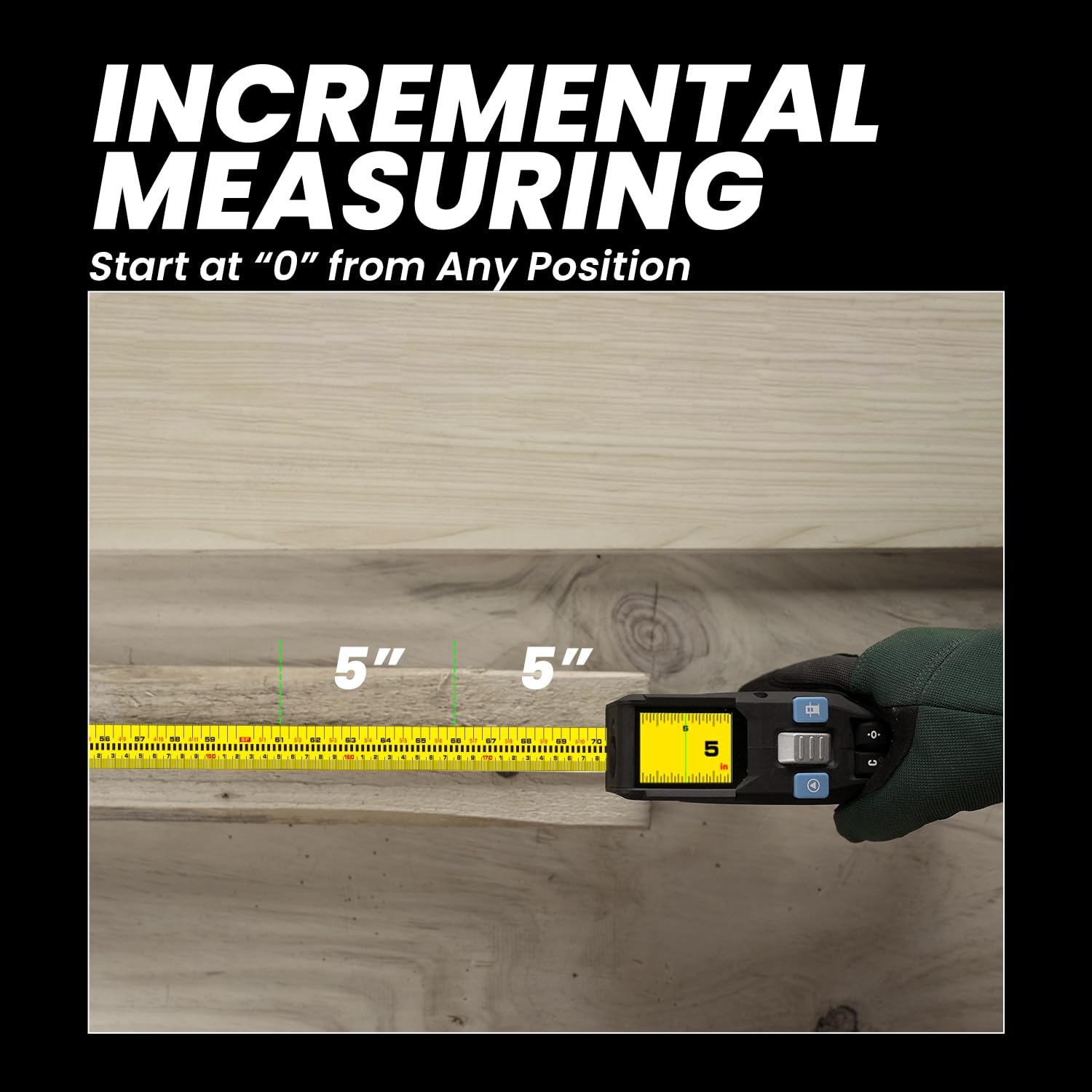
Perform incremental measurements by setting the starting point to zero at any position.
A short demonstration of the DTX10's incremental measurement capability.
Internal Measurement
For precise internal measurements, such as inside a cabinet or window frame, use the rear reference point of the device. This ensures that the measurement includes the full length from the back of the device to the tape's end.

Measure internal spaces accurately by utilizing the device's rear reference point.
App Data Sync
Connect your DTX10 to the SMARTLIFE App for real-time data synchronization and sharing. This feature allows you to organize and manage your measurement tasks efficiently on your mobile device.

Sync measurement data in real-time with the SMARTLIFE App for efficient project management.
A brief look at the real-time measurement display and its responsiveness.
Unit Conversion and Display Settings
The DTX10 allows for easy switching between imperial (feet, inches) and metric (millimeters) units. The color display offers various customizable screen settings, including left/right-hand reading, black or white font, and a large font mode for optimal readability.

The user-friendly display offers various options for units and visual preferences.
Maintenance
General Care
To ensure the longevity and accuracy of your ACEGMET DTX10, keep it clean and free from dust and debris. Wipe the device with a soft, dry cloth. Avoid exposing it to extreme temperatures, moisture, or direct sunlight for prolonged periods. Store it in its provided semi-rigid carrying case when not in use to protect it from impacts.
Battery Care
Regularly charge the battery to maintain its performance. As the battery is removable for charging, ensure it is properly reinstalled and the compartment is securely closed using the provided tool. Avoid overcharging or completely draining the battery, as this can reduce its lifespan.
Troubleshooting
- Difficulty with App Connection: Ensure Bluetooth is enabled on your mobile device and the DTX10. Restart both devices and try pairing again. Refer to the SMARTLIFE App's specific instructions for connection issues.
- Inaccurate Readings: Verify that the device is placed on a stable surface for digital level readings. For tape and laser measurements, ensure the measuring points are clear and unobstructed. Calibrate the device if necessary, following instructions in the full user guide.
- Battery Not Charging: Check the USB-C cable and charging adapter for damage. Ensure the battery is correctly inserted into the compartment and the compartment cover is securely fastened. If issues persist, try a different charging cable or power source.
Specifications
| Feature | Detail |
|---|---|
| Product Dimensions | 4 x 2 x 8 inches |
| Item Model Number | DTX10 |
| Item Weight | 1.1 Pounds |
| Batteries | 1 Lithium Metal battery required (included) |
| Blade Length | 12 Feet (Tape Measure) |
| Laser Measurement Range | Up to 330 Feet |
| Measurement Accuracy | +/- 1/32 inch |
| Color | Blue |
| Manufacturer | ACEGMET |
Warranty and Support
ACEGMET offers a free extended warranty of up to 24 months for the DTX10. Please refer to the official ACEGMET website or the included warranty card for registration details and terms and conditions.

Benefit from an extended warranty for your ACEGMET DTX10.
For further assistance, detailed operational guides, or technical support, please consult the comprehensive User Guide PDF available online or contact ACEGMET customer service.