
SKYRC SK-100198-01
SkyRC B6neo Smart Charger User Manual
Model: SK-100198-01
Introduction
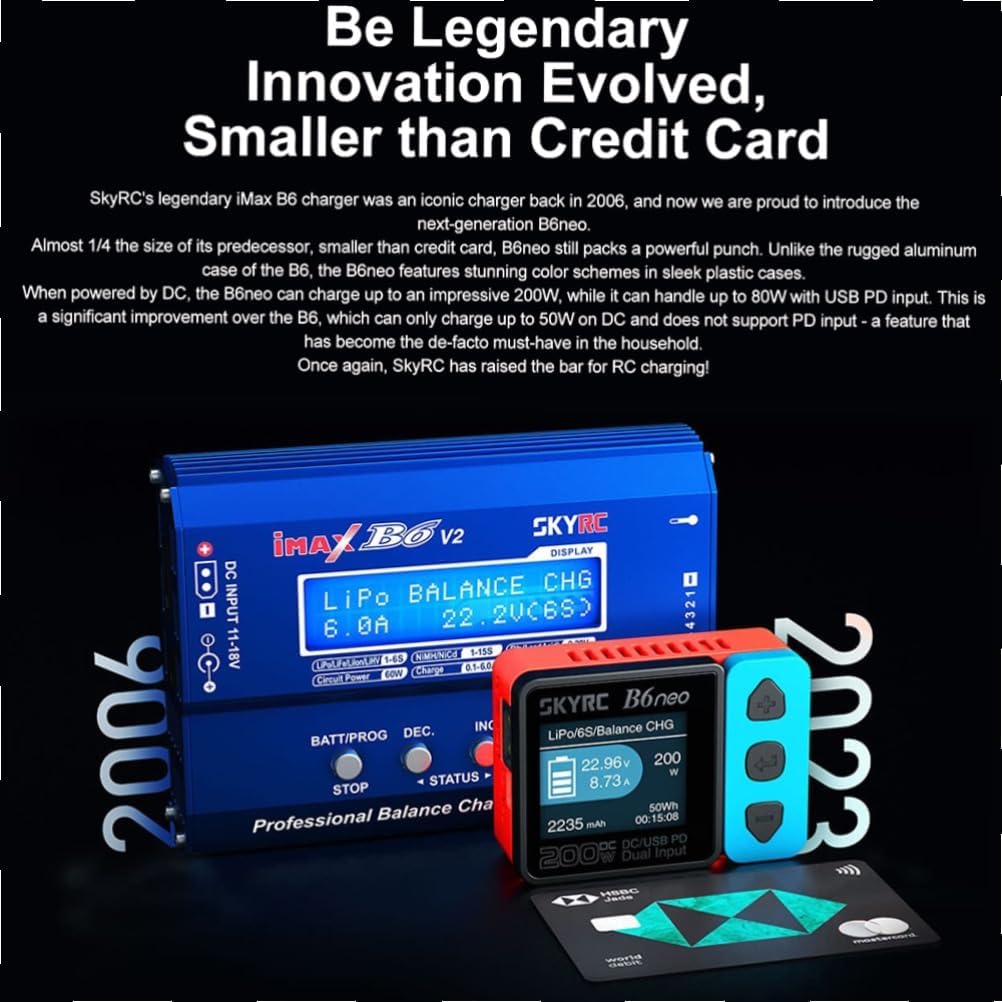
The SkyRC B6neo is a compact and powerful smart charger designed for various battery types. It features a dual input system, supporting up to 200W DC power and 80W Power Delivery (PD) via USB-C. Its small footprint makes it highly portable while offering robust charging capabilities for RC enthusiasts.

Key Features
- High Power Output: Up to 200W DC charging power and 80W Power Delivery (PD) input.
- Compact Design: Smaller than a credit card, highly portable.
- Dual Input: Supports XT60 for DC input and USB-C for PD input.
- Intuitive Interface: Easy-to-use buttons and LCD display for navigation.
- Versatile Charging: Compatible with various battery chemistries (LiPo, LiIon, LiFe, LiHV, NiMH, NiCd, Pb).
- Safety Features: Built-in protections against over-current, over-voltage, over-temperature, and short-circuit.

Setup
Package Contents
- SkyRC B6neo Smart Charger
- Quick Start Guide
- (Note: Cables for power input and battery connection are typically sold separately.)
Connecting Power Source
The B6neo supports two types of power input:
- DC Input (XT60): Connect a DC power supply (e.g., 10-28V) to the XT60 port on the charger. Ensure the power supply can provide sufficient current for your desired charging power (up to 200W).
- PD Input (USB-C): Connect a USB Power Delivery (PD) compatible power adapter (e.g., laptop charger) to the USB-C port. This input supports up to 80W.


Operating Instructions
User Interface
The charger features an LCD screen and three control buttons: Up, Down, and Enter/Select. These buttons are used to navigate menus and adjust settings.
Basic Charging Procedure
- Connect Battery: Plug your battery's main discharge lead into the charger's output port (e.g., XT60). For LiPo/LiIon/LiFe/LiHV batteries, also connect the balance lead to the corresponding balance port.
- Select Program: Use the Up/Down buttons to navigate to the desired charging program (e.g., LiPo Balance Charge, NiMH Charge). Press Enter to select.
- Adjust Settings: Set the battery type, cell count (for lithium batteries), charging current, and other parameters as required. Refer to your battery's specifications for safe charging rates.
- Start Charging: Confirm settings and press Enter to start the charging process. The screen will display real-time charging data.
- Monitor Progress: Periodically check the charging status on the LCD. The charger will automatically stop when the battery is fully charged or an error occurs.
- Disconnect Battery: Once charging is complete, disconnect the battery, first the balance lead (if applicable), then the main discharge lead.
Discharge Function
The B6neo can also discharge batteries. This function is useful for storage charging or cycling batteries. Note that discharge rates can be slow, especially for larger batteries.
Battery Checker Function
Without external power, you can connect a battery's balance lead to the charger to check its total voltage and individual cell voltages. This is a convenient feature for quick battery status checks.
Maintenance
- Keep the charger clean and free from dust and debris.
- Ensure proper ventilation around the charger during operation. The internal fan helps dissipate heat.
- Avoid exposing the charger to extreme temperatures or moisture.
- Regularly inspect cables and connectors for wear or damage.
- Do not attempt to open the charger or modify its internal components, as this will void the warranty.

Troubleshooting
Common Issues and Solutions
- Charger not powering on:
- Ensure the power source is correctly connected and providing sufficient voltage (10-28V DC or compatible USB-C PD). Check power cables for damage.
- "Connection Break" or "Input Voltage Error":
- Verify that the power input cable is securely connected and the voltage is within the specified range. For PD input, ensure the USB-C adapter is PD compatible and provides enough power.
- "Battery Voltage Error" or "Cell Count Error":
- Check that the battery's main lead and balance lead (if applicable) are correctly connected. Ensure the selected battery type and cell count in the charger settings match your battery.
- Slow discharge rate:
- The discharge function is designed for low power output. This is normal behavior. For faster discharge, consider external dischargers.
- Fan noise or grinding:
- While some fan noise is normal during operation, excessive grinding may indicate an issue. Ensure the fan vents are not obstructed. If the issue persists, contact support.
- Inaccurate voltage readings:
- Some users report needing calibration. Refer to the advanced settings in the full manual (if available) or contact SkyRC support for calibration procedures. Ensure both main and balance leads are connected during calibration for lithium batteries.
Specifications
| Feature | Detail |
|---|---|
| Model Number | SK-100198-01 |
| Input Voltage | DC 10-28V (XT60), USB-C PD 12-20V |
| Charge Power | DC: Max 200W, PD: Max 80W |
| Discharge Power | Max 10W |
| Charge Current | 0.1-10.0A |
| Discharge Current | 0.1-2.0A |
| Balance Current | Max 0.5A |
| Supported Battery Types | LiPo/LiIon/LiFe/LiHV (1-6S), NiMH/NiCd (1-15S), Pb (3-6S) |
| Display Type | LCD |
| Dimensions | 70 x 50 x 32 mm (2.76 x 1.97 x 1.26 inches) |
| Weight | 82g (2.89 oz) |

Warranty and Support
SkyRC products typically come with a limited warranty against manufacturing defects. For specific warranty terms and conditions, please refer to the official SkyRC website or contact your local distributor.
For technical support, firmware updates, or further assistance, please visit the official SkyRC support page or contact their customer service. Keep your purchase receipt as proof of purchase for warranty claims.
Important Note: Tampering with the device, including opening the casing, may void the warranty. Always ensure the "Warranty Void if Seal is Tampered" sticker remains intact.
Related documentsSK-100198-01


Ask a question about this manual
Ask about setup, troubleshooting, compatibility, parts, safety, or missing instructions. Manuals+ will review the question and use this page’s manual context to help answer it.