
1. Introduction
This manual provides detailed instructions for the installation, operation, and maintenance of your Philips DDL200 Fingerprint Wireless Keypad. This keypad is designed exclusively to enhance the functionality of your Philips 3000 Series WiFi Smart Retrofit Locks, specifically models DDL230X-10HW and DDL230X-1HWP. Please read this manual thoroughly before use to ensure proper setup and optimal performance.
2. Product Overview and Features
The Philips DDL200 Fingerprint Wireless Keypad offers convenient and secure access to your home when paired with a compatible Philips 3000 Series WiFi Smart Retrofit Lock. Its wireless design allows for flexible placement, and multiple access methods provide enhanced security and ease of use.
- Exclusive Compatibility: This keypad is engineered to work seamlessly with Philips 3000 Series WiFi Smart Retrofit Locks, models DDL230X-10HW and DDL230X-1HWP. It is not compatible with other lock models.
- Smart Fingerprint Unlock: Utilize advanced fingerprint recognition technology for quick and secure access. The system supports up to 50 unique fingerprints, allowing personalized security for multiple users.
- Customized PIN Code Access: Create and manage up to 100 sets of passcodes. Options include periodic and time-limited passcodes, offering flexible security solutions for various scenarios.
- One-Touch Locking: Secure your door instantly with a single press, providing immediate peace of mind.
- Wireless Design & Easy Installation: The wireless nature of the keypad allows for placement in a convenient location. For optimal performance, ensure the keypad is installed within 39 inches (approximately 1 meter) of the paired Philips Smart Lock.

Image 1: Philips DDL200 Fingerprint Wireless Keypad and its retail packaging, highlighting fingerprint and PIN code access, one-touch locking, and easy installation.
3. Package Contents
Verify that all items are present in the package:
- 1 x Philips DDL200 Fingerprint Wireless Keypad
- 2 x AAA Batteries (included)
- 1 x User Manual (this document)
- 1 x Wall Mount Accessory (optional)
- 1 x Mounting Strip
- 2 x Mounting Screws
4. Setup and Installation
Follow these steps to set up and install your wireless keypad:
- Battery Installation: Open the battery compartment on the back of the keypad. Insert the two AAA batteries, ensuring correct polarity. Close the compartment securely.
- Pairing with Philips Smart Lock: Refer to your Philips 3000 Series WiFi Smart Retrofit Lock (DDL230X-10HW or DDL230X-1HWP) manual for specific instructions on how to pair a new accessory. The keypad must be paired with the lock via the Philips Home Access app.
- Keypad Placement: Choose a suitable location for the keypad. It should be easily accessible and within 39 inches (approximately 1 meter) of your Philips Smart Lock for reliable wireless communication. Avoid placing it in direct sunlight or areas exposed to extreme weather conditions.
- Mounting (Optional):
- Adhesive Mounting: Clean the desired surface thoroughly. Remove the backing from the mounting strip and firmly press the keypad onto the surface.
- Screw Mounting: Use the provided mounting accessory and screws to securely attach the keypad to a wall or door frame. Ensure the surface is suitable for drilling.

Image 2: The Philips DDL200 Fingerprint Wireless Keypad mounted on a wall, demonstrating a user interacting with the fingerprint sensor. The image emphasizes flexible placement.

Image 3: A hand holding the Philips Smart Lock component next to a door, indicating the simple installation process to convert a standard deadbolt into a smart lock system.
5. Operation
The Philips DDL200 Keypad offers multiple methods for unlocking your door:
- Fingerprint Unlock: Place your registered finger firmly on the fingerprint sensor located at the top of the keypad. The lock will disengage upon successful recognition.
- PIN Code Unlock: Enter your pre-set PIN code using the numerical keypad. Press the checkmark (✓) button to confirm your entry. The lock will disengage if the PIN code is correct.
- One-Touch Lock: To lock the door from the outside, simply press the checkmark (✓) button on the keypad. The lock will engage automatically.
- App Control: For remote control and management of fingerprints and PIN codes, use the Philips Home Access mobile application.
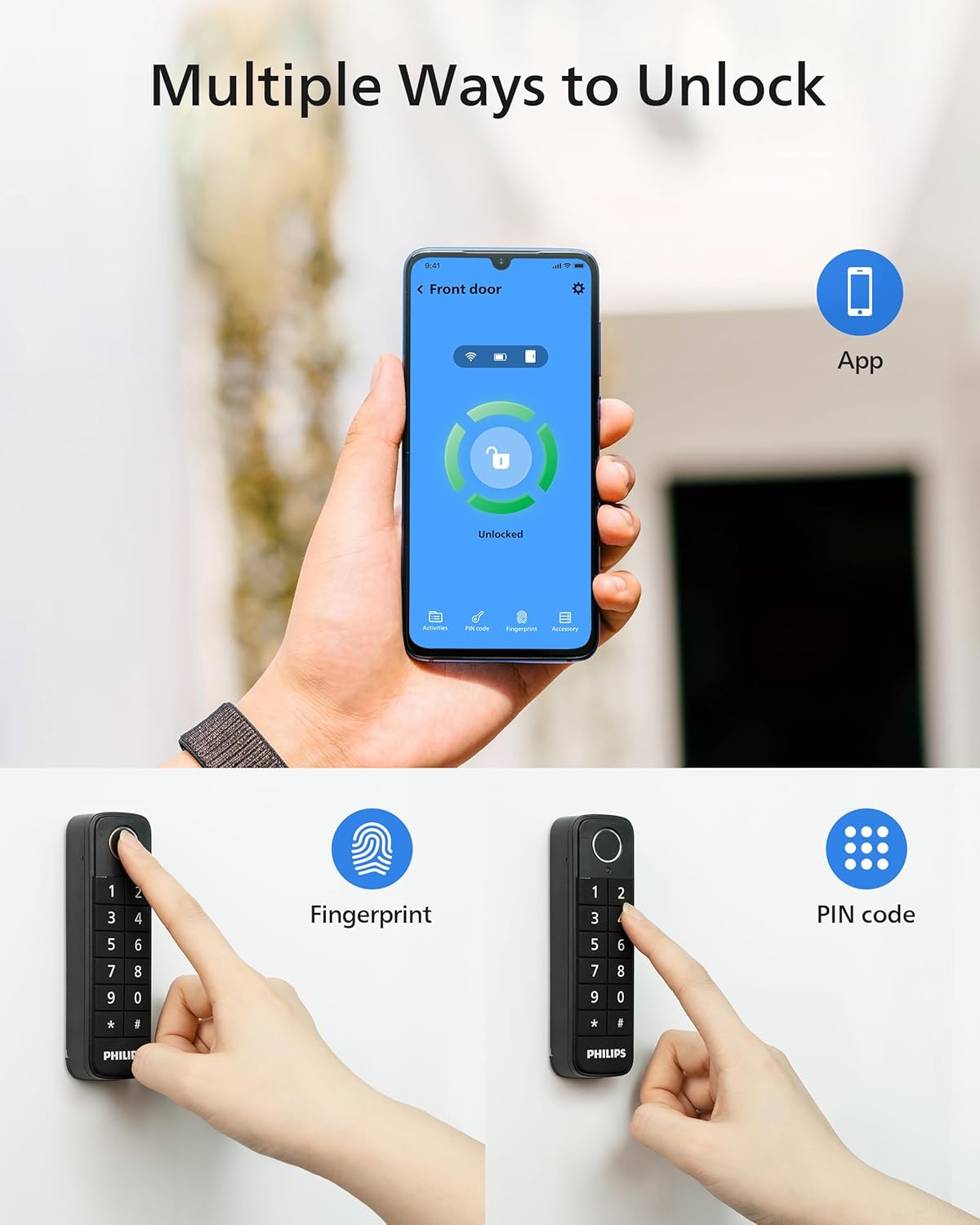
Image 4: A visual representation of the multiple ways to unlock the Philips Smart Lock system, including using the mobile app, fingerprint recognition on the keypad, and entering a PIN code on the keypad.

Image 5: A user interacting with the Philips Home Access mobile application on a smartphone, demonstrating remote control capabilities for the smart lock system.
6. Maintenance
Proper maintenance ensures the longevity and reliable operation of your keypad:
- Battery Replacement: The keypad uses 2 AAA alkaline batteries. When the battery level is low, the keypad may indicate this through a visual or audible alert. Replace both batteries promptly to avoid interruption of service.
- Cleaning: Wipe the keypad surface with a soft, dry cloth. Avoid using abrasive cleaners, solvents, or harsh chemicals, as these can damage the finish or electronic components.
- Fingerprint Sensor Care: Keep the fingerprint sensor clean and free of dirt or moisture to ensure accurate recognition.
7. Troubleshooting
If you encounter issues with your Philips DDL200 Keypad, refer to the following common solutions:
- Keypad Not Responding: Check the batteries. Replace them if they are low or depleted. Ensure the keypad is within the recommended 39-inch range of the Philips Smart Lock.
- Fingerprint Not Recognized: Ensure your finger is clean and dry. Try re-registering your fingerprint through the Philips Home Access app. Ensure your finger covers the entire sensor area.
- PIN Code Entry Issues: Double-check that you are entering the correct PIN code. Verify the PIN code settings in the Philips Home Access app.
- Connectivity Problems: If the keypad loses connection with the smart lock, try re-pairing it via the Philips Home Access app. Ensure there are no significant obstructions between the keypad and the lock.
- Lock Not Engaging/Disengaging: Confirm that the Philips Smart Lock itself is functioning correctly. Refer to the smart lock's manual for troubleshooting specific lock issues.
For persistent issues, consult the Philips Home Access app's help section or contact Philips customer support.
8. Specifications
| Brand | PHILIPS |
| Model Name | Philips Fingerprint Wireless Keypad (DDL200) |
| Part Number | DDL200 |
| Special Features | Fingerprint, One-Touch Lock, Passcode Unlock |
| Lock Type Compatibility | Philips 3000 Series WiFi Retrofit Lock (DDL230X-10HW & DDL230X-1HWP) |
| Dimensions (L x W x H) | 4.88 x 3.66 x 1.18 inches (12.4 x 9.3 x 3 cm) |
| Material | Plastic |
| Color | Black |
| Item Weight | 4.2 ounces (119 grams) |
| Batteries | 2 AAA batteries required (included) |
| Battery Cell Type | Alkaline |
| Connectivity Protocol | Bluetooth, Wi-Fi (via compatible Philips Smart Lock) |
| Control Method | Touch |
| UPC | 850048306226 |
9. Warranty and Support
For warranty information and technical support, please refer to the documentation included with your Philips 3000 Series WiFi Smart Retrofit Lock or visit the official Philips Home Access website. You may also contact Philips customer service directly for assistance with your DDL200 Fingerprint Wireless Keypad.


