
1. Introduction
The DUMBORC X6PM-350 is a lightweight 2.4GHz mini RC transmitter and receiver system designed for various RC models including cars, trucks, crawlers, racing vehicles, boats, and tanks. This compact system offers a transmission distance of 350-400 meters and includes several advanced functions for enhanced control and customization.
Key features include:
- Mixed Mode Functionality: Channels 1-2 and 3-4 can be configured for mixed mode operation, allowing for complex control setups.
- Channel Reversing: Channels 1, 2, 3, 4, and 6 can have their direction reversed.
- Integrated Gyroscope: The receiver features a gyroscope function to assist with steering and direction stability.
- Low-Voltage Alarm: A visual indicator on the transmitter flashes when battery voltage is low, providing timely alerts.
- Throttle Speed Limit: A unique throttle speed limit adjustment function is included, beneficial for beginners to practice at a safe speed.
The X6PM-350 is compatible with various DUMBORC receivers, including X6F, X6FG, X6DC, X6DCG, X4FM, X4FMG, X6FP, BL3F, BL3FG, and LZD models.

Figure 1: DUMBORC X6PM-350 Mini RC Transmitter.

Figure 2: The DUMBORC X6PM-350 is suitable for various RC models.
2. Setup
2.1. Battery Installation
The transmitter requires 4 AA batteries (not included). Open the battery compartment cover on the underside of the transmitter and insert the batteries, ensuring correct polarity. Close the cover securely.
2.2. Receiver Connections
Connect your servo, Electronic Speed Controller (ESC), and motor to the appropriate channels on the receiver. Refer to the receiver's port labels for correct connections.
2.3. Binding Procedure
To establish communication between the transmitter and receiver (binding), follow these steps:
- Ensure the transmitter is powered OFF.
- Connect the receiver to power (e.g., via ESC). The receiver's LED will typically blink, indicating it's in binding mode.
- Press and hold the bind button on the receiver.
- While holding the bind button, power ON the transmitter.
- Release the bind button on the receiver once the LED on the receiver turns solid green, indicating successful binding.
- Test the controls to ensure proper function.
Important: Always power on the transmitter first, then the receiver. Power off the receiver first, then the transmitter. This sequence helps prevent unintended control inputs.
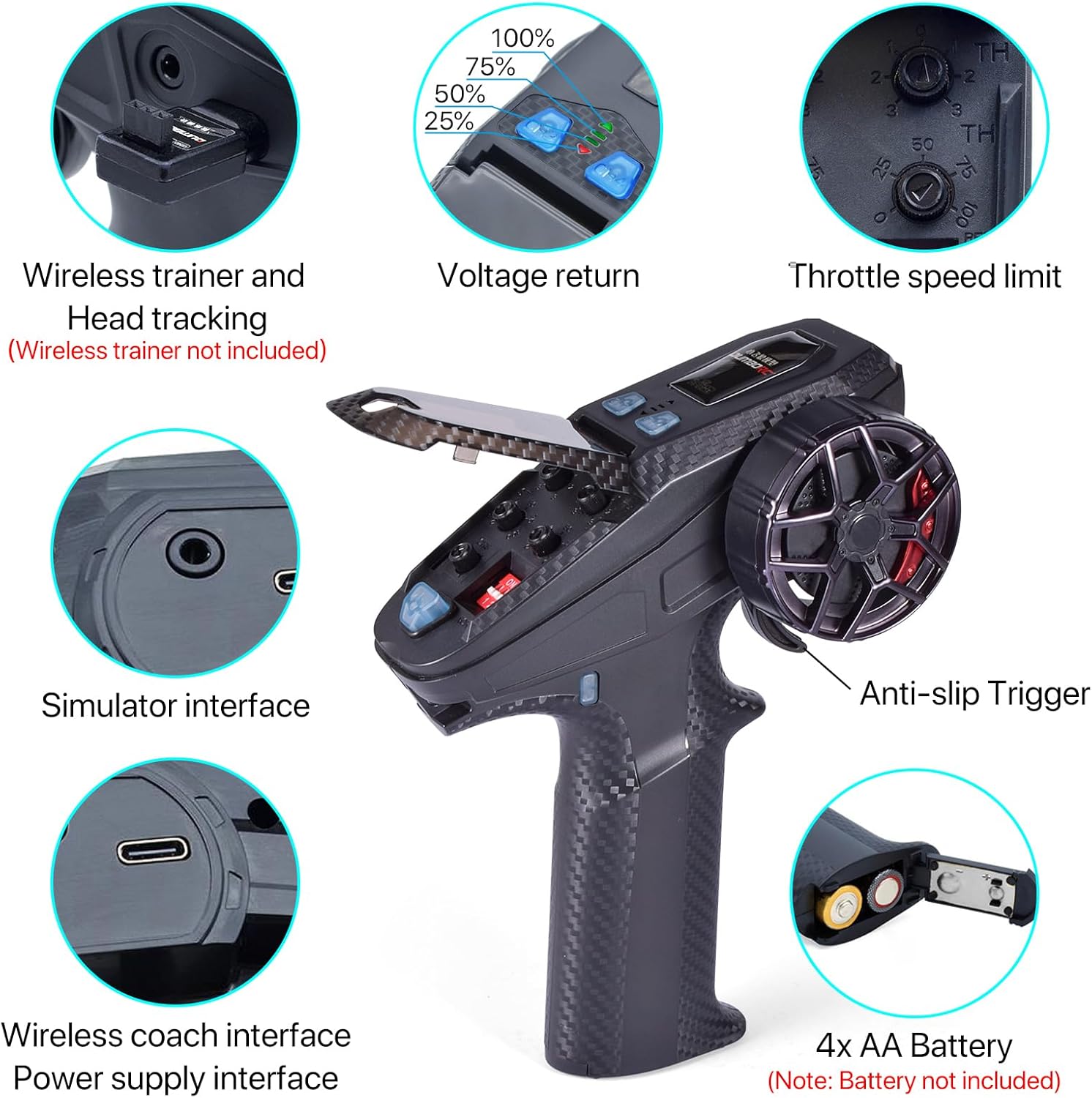
Figure 3: Transmitter features and battery compartment location.
Video 1: Detailed explanation of DUMBORC X6PM transmitter and X6FG receiver functions, including binding and gyroscope setup.
3. Operating Instructions
3.1. Mixed Control Mode
The transmitter supports mixed control for channels 1-2 and 3-4. This allows for advanced control of dual-motor setups or other complex configurations. For example, in a mixed mode for channels 1 and 2, the trigger controls forward/backward movement, while channel 1's directional wheel adjusts the speed of two motors for differential steering.

Figure 4: Mixed Control Mode setup for dual motors.
3.2. CH3 & CH4 Mixed Control
Channels 3 and 4 can be used for jog signals. Pressing the respective button activates the channel output, and releasing it returns to a neutral signal. This is useful for controlling servos, winches, tank barrels, turrets, and other accessories. The default factory setting for travel and reverse direction in CH3/CH4 mixed mode is 50% range.

Figure 5: CH3 & CH4 Mixed Control operation.
3.3. Gyroscope Function
The receiver's gyroscope function helps stabilize steering. To activate or adjust the gyroscope:
- Switching Modes: Fast press the binding button on the receiver 3 times to toggle between gyro mode and normal mode.
- Adjusting Direction: Fast press the binding button 2 times to adjust the gyroscope direction.
- Sensitivity Adjustment: Adjust gyroscope sensitivity using the knob on Channel 5 of the transmitter.
- Indicator: The green indicator light is always on in normal mode, while the yellow indicator is always on in gyro mode.

Figure 6: LED indicators and gyroscope effect on steering.
3.4. Low-Voltage Alarm Indicator
The button at the top of the RC remote will flash to indicate low voltage. This visual cue helps you monitor battery levels and prevent unexpected power loss during operation.
3.5. Throttle Speed Limit Adjustment
Utilize the unique throttle speed limit adjustment function to set a maximum speed for your RC model. This is particularly useful for beginners to safely learn control without excessive speed.
4. Maintenance
To ensure the longevity and optimal performance of your DUMBORC X6PM-350 system, follow these maintenance guidelines:
- Cleaning: Regularly wipe the transmitter and receiver with a soft, dry cloth. Avoid using harsh chemicals or solvents.
- Storage: Store the system in a cool, dry place away from direct sunlight, moisture, and extreme temperatures. Remove batteries from the transmitter if storing for extended periods.
- Battery Care: Always use fresh AA batteries for the transmitter. If the low-voltage alarm activates, replace the batteries promptly.
- Avoid Impact: Protect the transmitter and receiver from drops and impacts, which can damage internal components.
5. Troubleshooting
- No Response from Model:
- Ensure both transmitter and receiver are powered on.
- Verify successful binding (receiver LED solid green). If not, re-perform the binding procedure.
- Check battery levels in the transmitter.
- Inspect all connections between the receiver, ESC, servo, and motor.
- Gyroscope Not Functioning:
- Ensure the gyroscope mode is activated (receiver LED yellow). Fast press the bind button 3 times to toggle.
- Check the gyroscope sensitivity knob on Channel 5.
- Low Voltage Alarm:
- The transmitter's top button flashing indicates low battery. Replace the 4 AA batteries immediately.
6. Specifications
| Brand | DUMBORC |
| Model | X6PM-350 |
| Product Dimensions | 5.11 x 2.6 x 7.08 inches |
| Item Weight | 5.9 ounces (168g) |
| Channels | 6CH |
| Radio Transmitter Distance | 350-400 meters |
| Remote Control Working Current | 80-120mA |
| Voltage Alarm | 10.8V | 7.4V | 4.4V |
| Modulation Mode | GFSK |
| Remote Control Voltage Range | 4.8-12V |
| Receiver Voltage Range | 4.8-10V |
| RF Power | <20dbm |
| Product Size (Transmitter) | 180*130*65mm |
| Batteries Required | 4 AA batteries (not included) |
| Spreading Mode | FHSS 67 channel pseudo-random frequency hopping |
| Recommended Age | 14 years and up |
| What's in the box | Receiver |

Figure 7: Transmitter dimensions.
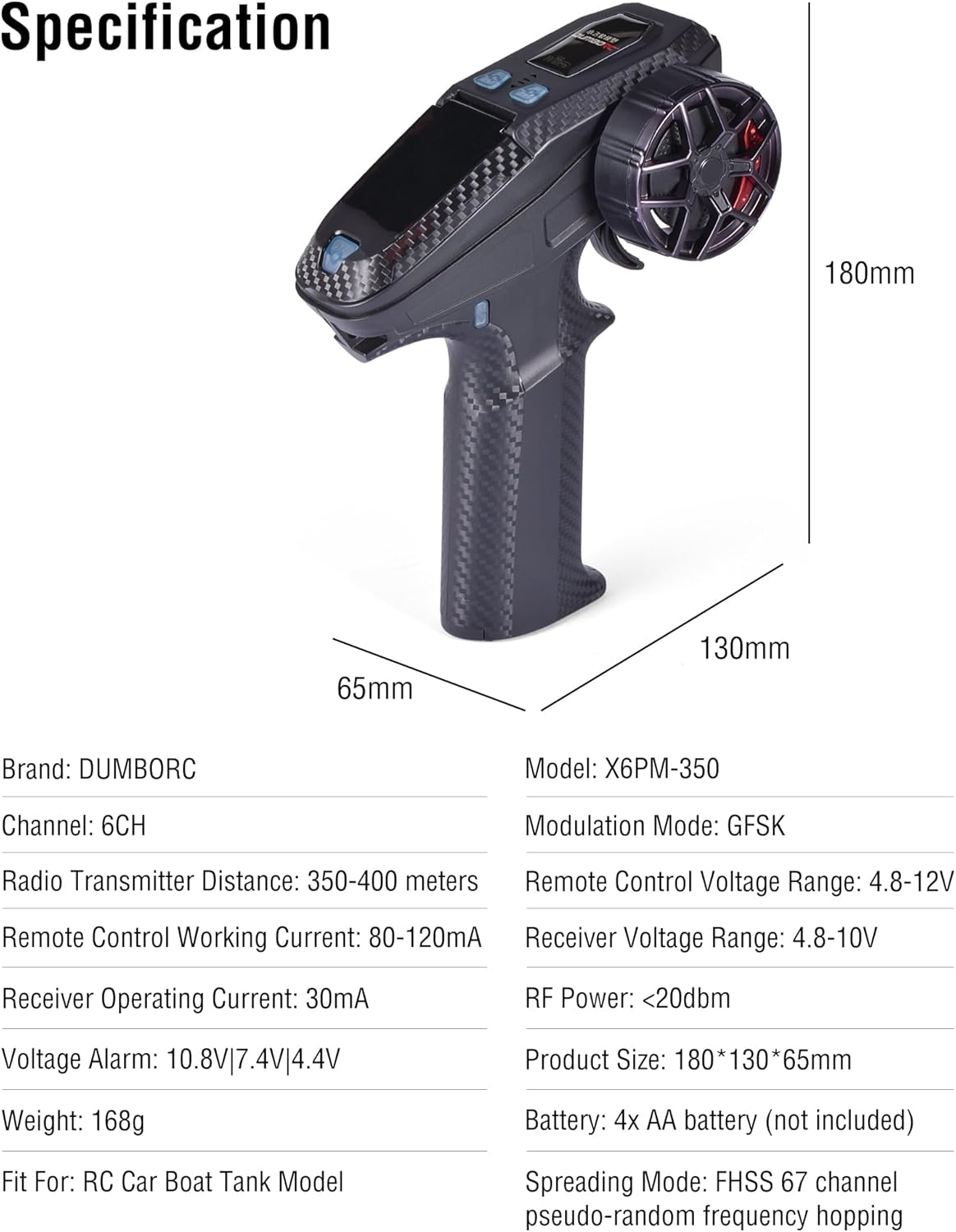
Figure 8: Detailed specifications of the DUMBORC X6PM-350 system.
7. Warranty and Support
For warranty information, technical support, or service inquiries, please contact DUMBORC customer service through their official channels or the retailer from whom the product was purchased. Please retain your proof of purchase for warranty claims.


