Introduction
Thank you for choosing the ZREBZYR Cordless Weed Wacker. This ultra-lightweight, battery-powered grass trimmer is designed for efficient and comfortable weeding in various outdoor environments. Its versatile design, adjustable features, and multiple blade types make it suitable for a wide range of gardening tasks, from trimming grass to cutting thick weeds and small branches.
This manual provides essential information for the safe operation, assembly, maintenance, and troubleshooting of your new weed wacker. Please read it thoroughly before first use and keep it for future reference.
Important Safety Information
Always prioritize safety when operating power tools. Failure to follow these instructions may result in serious injury or property damage.
- Read the entire manual: Understand all operating instructions and safety warnings before use.
- Wear appropriate personal protective equipment (PPE): Always wear safety goggles to protect your eyes from debris. Protective work gloves are also recommended.
- Double Safety Switch: Ensure the double safety start switch is engaged before operation to prevent accidental starts.
- Weed Splash Protection Cover: Keep the weed splash protection cover in place during use to prevent personal injury from flying debris.
- Keep away from children: Store the weed wacker and its accessories out of reach of children to avoid injury.
- Battery Care: Fully charge the battery before first use. Unload the battery immediately after use. Charge the battery once a month to prevent damage, even if not in use.
- Blade Safety: Be cautious when handling and changing blades. Stainless steel blades are sharp; avoid contact with stones to prevent damage.
- Environmental Awareness: Be aware of your surroundings. Avoid cutting near delicate plants, obstacles, or areas where debris could cause harm.
Package Contents
Verify that all items listed below are included in your package:
- 1 x ZREBZYR Cordless Weed Wacker
- 2 x 10000mAh Rechargeable Batteries
- 2 x Saw Blades (for pruning branches, small saplings, thick vines)
- 2 x Rhombus Alloy Blades (suitable for cutting thick weeds and hedges)
- 2 x S-Alloy Blades (perfect for thicker stalks and heavy-duty weeds)
- 1 x Fast Charger
- 1 x User Manual (this document)
- 1 x Protective Work Gloves
- 1 x Safety Goggles
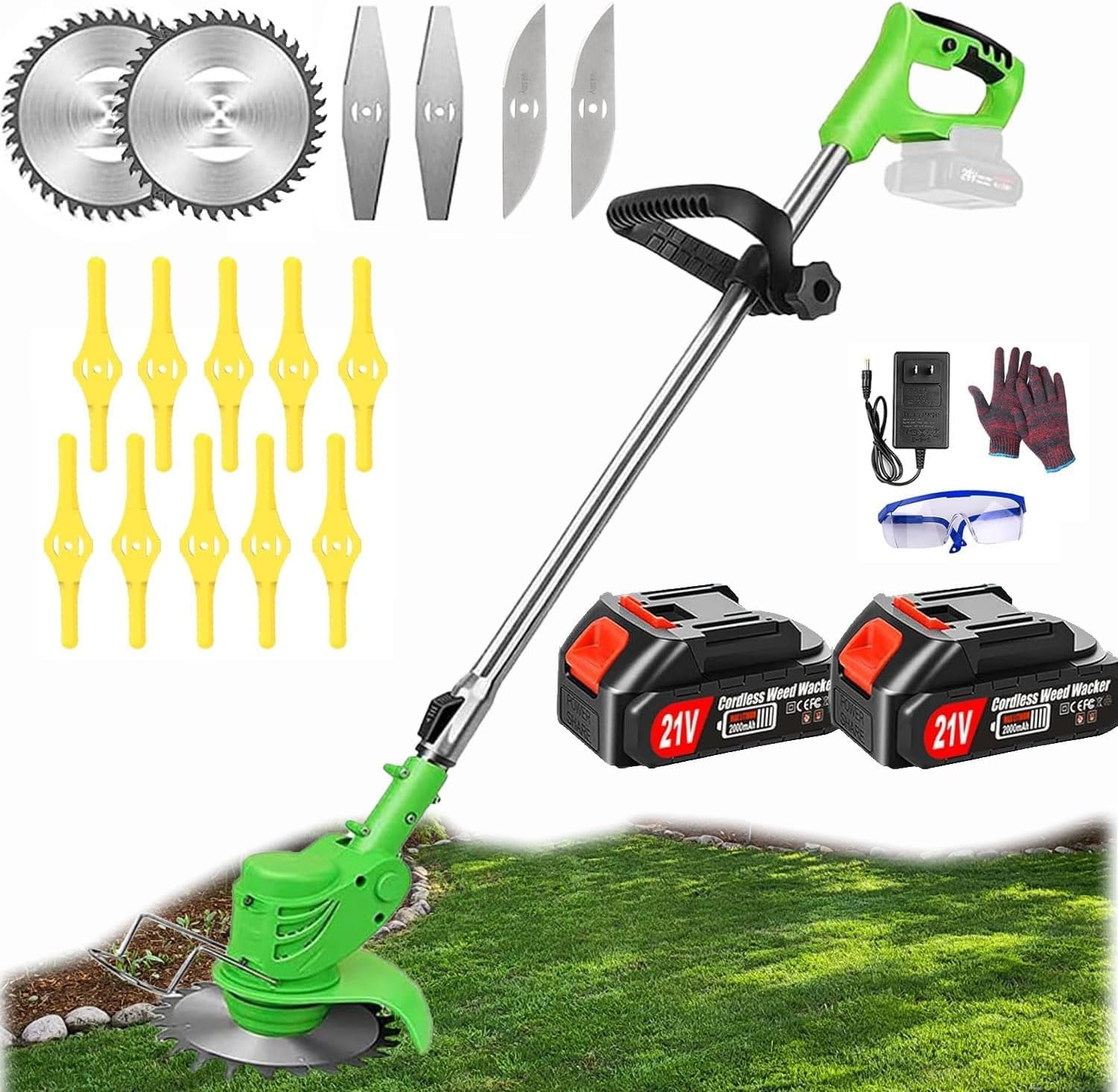
Image: The ZREBZYR Cordless Weed Wacker shown with its various components and accessories, including different blade types, batteries, charger, gloves, and safety goggles.
Setup and Assembly
The ZREBZYR Cordless Weed Wacker requires minimal assembly. Follow these steps to prepare your device for use:
- Attach the Handle: Secure the adjustable handle to the main shaft. Ensure it is tightened firmly for comfortable and controlled operation.
- Install the Blade:
- Select the appropriate blade for your task (Saw, Rhombus, or S-Alloy).
- Align the blade with the cutting head.
- Secure the blade using the provided anti-loosening screw. Ensure it is firmly attached to prevent detachment during operation.
- Attach the Safety Guard: Position the weed splash protection cover over the cutting head and secure it. This guard is essential for user safety.
- Insert the Battery: Ensure the battery is fully charged. Slide the battery into the designated slot on the handle until it clicks securely into place.

Image: A detailed diagram highlighting key components such as the ON/OFF trigger, lock-off button, 2.0AH large capacity lithium battery, adjustable handle, adjustable length shaft, flower guard, cutting head locking button, and safety guard.
Operating Instructions
Getting Started
- Power On: Press the lock-off button and then squeeze the ON/OFF trigger to start the motor.
- Adjust Height: The telescopic pole can be adjusted from 33 to 47 inches. Loosen the locking mechanism on the shaft, extend or retract to your desired height, and then secure the lock. This allows for comfortable operation without bending.
- Adjust Cutting Angle: The cutting head angle is adjustable from 0-90°. Press the lock button on the cutting head to switch the angle as needed for different trimming tasks, such as edging or reaching tight spaces.

Image: Illustration of the weed wacker's adjustable shaft, showing how it can be extended or retracted to suit different user heights.

Image: Close-up view of the cutting head demonstrating its ability to pivot 90 degrees for versatile trimming and edging.
Using Different Blades
Your ZREBZYR Cordless Weed Wacker comes with three types of cutting blades, each designed for specific tasks:
- Rhombus Blade: Ideal for cutting thick weeds and hedges.
- S-Blade: Best suited for thicker stalks and heavy-duty weeds.
- Saw Blade: Excellent for taking down small saplings, thick, thorny vines, and bramble.

Image: A visual representation of the three distinct blade types: saw blades, rhombus alloy blades, and S-alloy blades, each designed for different cutting needs.
General Operation Tips
- Move the trimmer slowly and steadily across the area you are cutting.
- Avoid hitting hard objects like rocks, fences, or concrete, as this can damage the blade and the tool.
- For optimal performance and battery life, avoid continuous heavy-duty cutting for extended periods.
- The independent motor drive ensures quieter operation and lower failure rate compared to traditional gear-driven models.
Video: A demonstration of the ZREBZYR Cordless Weed Wacker in action, showcasing its effectiveness in various real-world usage scenarios, including cutting through thick brush and grass.

Image: A collage of before and after photos illustrating the significant clearing capabilities of the weed wacker in overgrown areas.
Maintenance
- Cleaning: After each use, disconnect the battery and clean the cutting head and guard. Remove any accumulated grass, dirt, or debris. Use a damp cloth; do not use harsh chemicals.
- Blade Inspection: Regularly inspect blades for wear, damage, or dullness. Replace worn or damaged blades immediately to ensure efficient and safe cutting.
- Battery Storage: Store batteries in a cool, dry place away from direct sunlight and extreme temperatures. Ensure batteries are charged at least once a month to maintain their lifespan.
- General Storage: Store the weed wacker in a dry, secure location, out of reach of children.

Image: A visual showing the battery charging status (charging vs. full charge) and highlighting internal battery protection features such as over-current, over-voltage, over-temperature, and charging protection.
Troubleshooting
If you encounter issues with your ZREBZYR Cordless Weed Wacker, refer to the following common problems and solutions:
| Problem | Possible Cause | Solution |
|---|---|---|
| Weed wacker does not start. | Battery not charged or not properly inserted. Safety switch not engaged. | Ensure battery is fully charged and securely inserted. Press the lock-off button before squeezing the trigger. |
| Reduced cutting performance. | Dull or damaged blade. Excessive debris around the cutting head. | Replace the blade if dull or damaged. Clean the cutting head and remove any tangled grass or debris. |
| Battery drains quickly. | Battery not fully charged. Old or damaged battery. Overworking the tool. | Ensure battery is fully charged before use. Consider replacing the battery if it's old. Avoid continuous heavy-duty cutting. |
| Unusual noise or vibration. | Loose blade or component. Internal damage. | Check all connections and ensure the blade is securely fastened. If the problem persists, discontinue use and contact customer support. |
If you experience any issues not covered here, or if the problem persists, please contact ZREBZYR customer support for assistance.
Specifications
| Feature | Detail |
|---|---|
| Brand | ZREBZYR |
| Model | B0C85NKTC1 |
| Power Source | Battery Powered |
| Color | Grass green |
| Item Weight | 3 Pounds |
| Cutting Width | 6 Inches |
| Speed | 20000 RPM (No-load) |
| Assembly Required | Yes |
| Number of Batteries | 2 Lithium Ion batteries (included) |
| Product Dimensions | 35.4 x 7.08 x 5 inches |
| Adjustable Height | 33-47 inches |
| Cutting Head Angle | 0-90° adjustable |
Warranty and Support
ZREBZYR is committed to 100% customer satisfaction. If you have any questions regarding the use, missing parts, product defects, battery charging, or installation, please do not hesitate to contact our after-sales team and technicians.
Our support team is available 24 hours a day to provide online service and resolve any issues you may encounter. Please refer to your purchase documentation or the ZREBZYR official website for specific warranty details and contact information.
For direct support, please visit the ZREBZYR Store on Amazon or contact the seller directly through your Amazon order history.