
Introduction
Thank you for choosing the ERICAT Cordless Vacuum Cleaner. This manual provides essential information for the safe and efficient use, assembly, operation, maintenance, and troubleshooting of your new vacuum cleaner. Please read this manual thoroughly before first use and keep it for future reference.
Product Components
Before assembly, please ensure all components listed below are present in your package:
- Main machine (motor unit with dust cup)
- Floor brush
- Extension rods (2 pieces)
- Brush attachment
- Dual-purpose suction nozzle (two-in-one flat suction)
- Filter element
- Instruction Manual (this document)

Figure 1: Included components of the ERICAT Cordless Vacuum Cleaner.
Setup and Assembly
- Attach the Extension Rods: Connect the two extension rods together by aligning the connectors and pushing firmly until they click into place.
- Connect to Main Machine: Attach one end of the assembled extension rod to the main machine's suction port.
- Attach Floor Brush: Connect the floor brush to the other end of the extension rod. For handheld use, you can directly attach the brush attachment or dual-purpose suction nozzle to the main machine.
- Initial Charging: Before first use, fully charge the vacuum cleaner.
Charging the Vacuum Cleaner
The ERICAT Cordless Vacuum Cleaner supports USB charging. Connect the provided USB charging cable to the vacuum cleaner's charging port and plug the other end into a compatible USB power adapter (not included) or a USB port. A full charge takes approximately 3.5 hours.
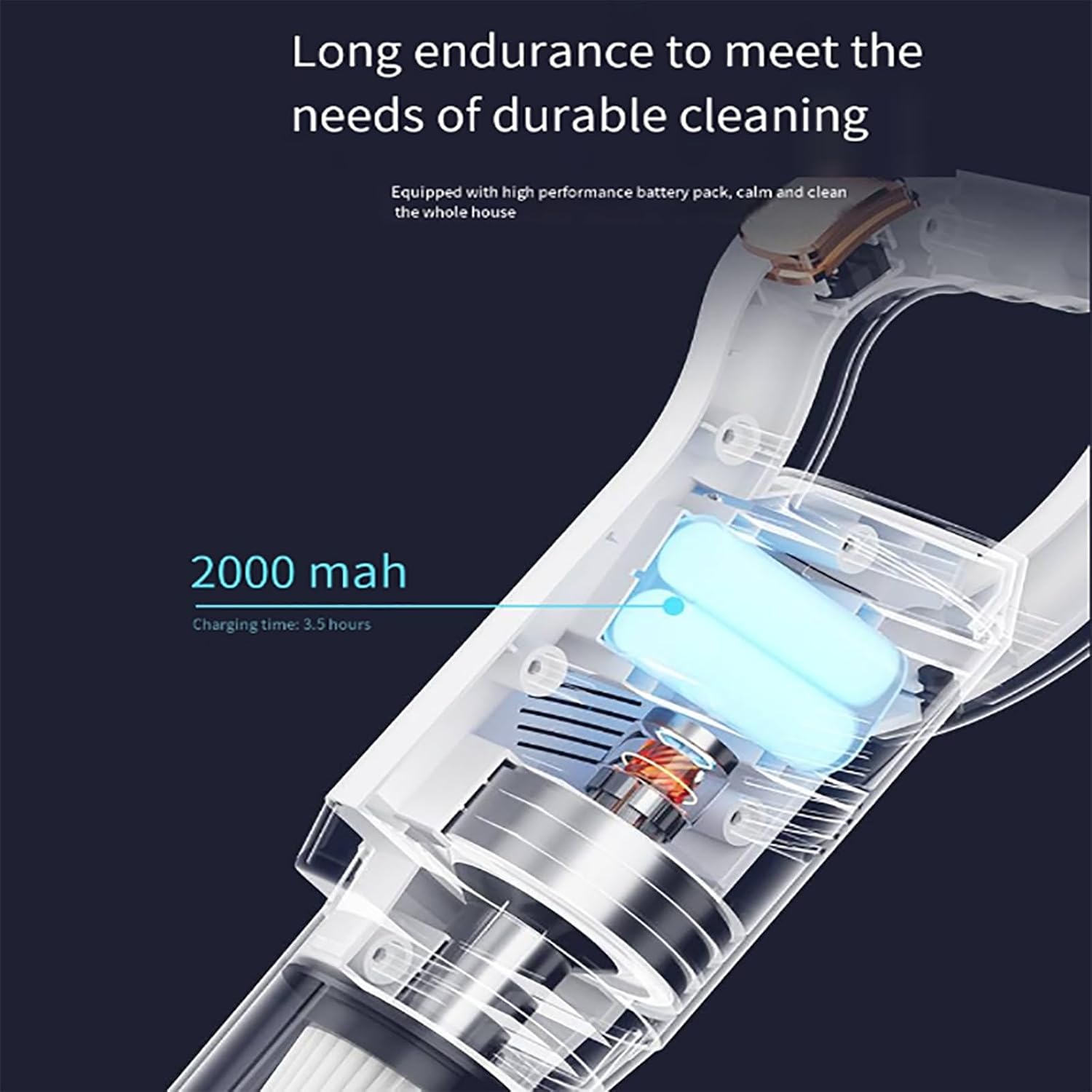
Figure 2: Battery specifications and charging time.
Operating Instructions
Power On/Off
To turn the vacuum cleaner on or off, press the power button located on the handle. This is a one-button start system for convenient operation.

Figure 3: Ergonomic handle and one-button operation.
Cleaning Modes and Usage
The ERICAT Cordless Vacuum Cleaner offers dual-use functionality, allowing it to be used as a traditional stick vacuum or a handheld unit. It is suitable for various surfaces, including hard floors, and is effective for pet hair.
- Stick Vacuum Mode: Use with the extension rods and floor brush for cleaning large floor areas. The flexible brush head can reach under furniture and into dark areas.
- Handheld Vacuum Mode: Detach the extension rods and attach the brush or dual-purpose suction nozzle directly to the main machine. This mode is ideal for cleaning sofas, car interiors, keyboards, and tight gaps.

Figure 4: Versatile handheld and stick vacuuming modes.
Maintenance
Regular maintenance ensures optimal performance and extends the lifespan of your vacuum cleaner.
Emptying the Dust Cup
The vacuum cleaner features a 700ml clean dust cup. To maintain strong suction and prevent fine dust from returning to the air, empty the dust cup regularly. The triple dust filter system separates large debris and fine dust effectively.
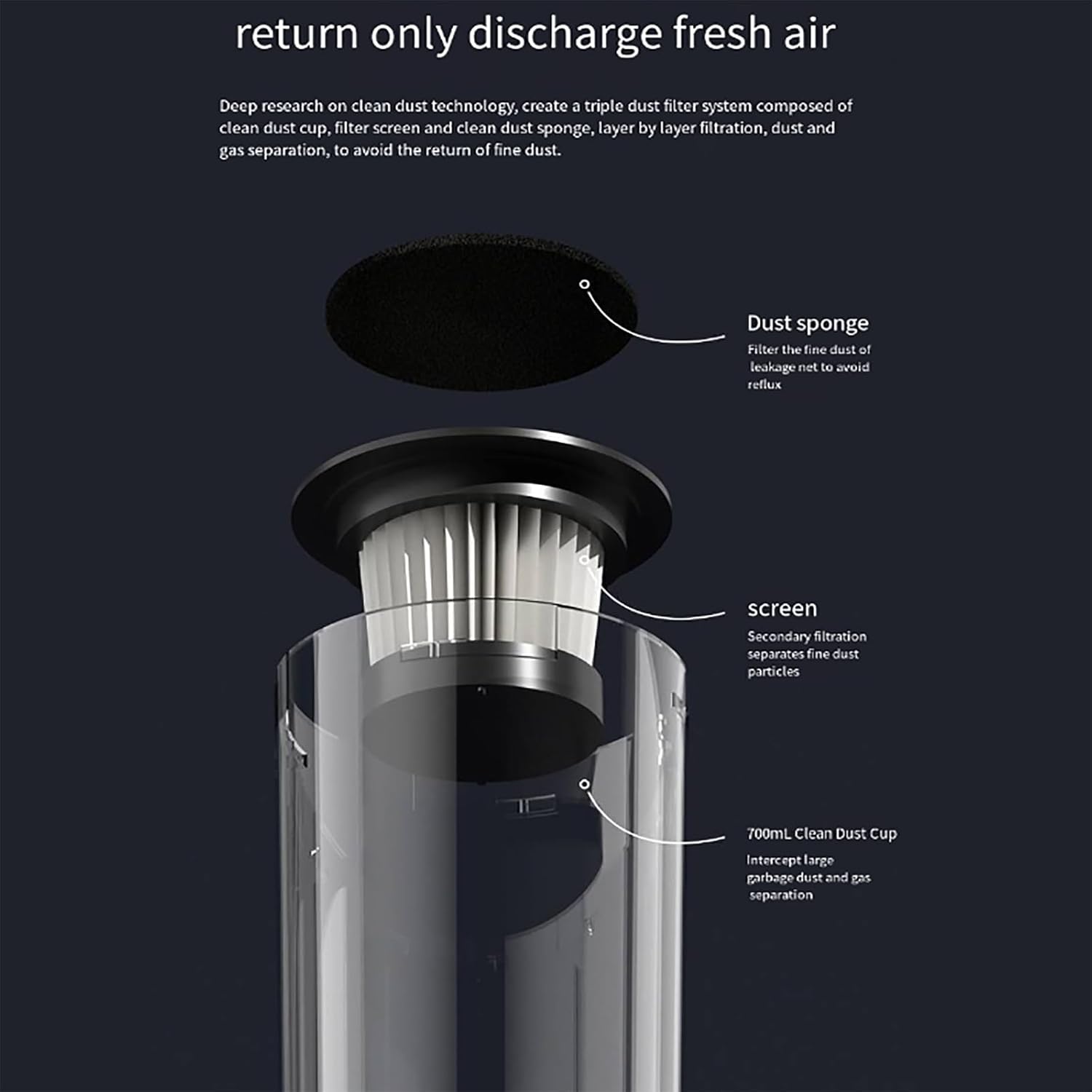
Figure 5: Dust cup and filtration system components.
Cleaning the Filter Element
The high-density filter element is crucial for preventing secondary air pollution. Wash the filter regularly to maintain strong suction power. The screen component of the filter is detachable and washable, reducing the need for frequent consumables replacement.
- Remove the filter element from the dust cup.
- Separate the screen from the filter element.
- Rinse both the screen and the filter element under running water until clean.
- Allow all parts to air dry completely before reassembling and placing them back into the vacuum cleaner. Ensure they are thoroughly dry to prevent mold or damage.
Figure 6: Detachable and washable filter screen.
Troubleshooting
If you encounter any issues with your ERICAT Cordless Vacuum Cleaner, please refer to the following common problems and solutions:
| Problem | Possible Cause | Solution |
|---|---|---|
| Vacuum does not turn on. | Battery is depleted. | Charge the vacuum cleaner fully (approx. 3.5 hours). |
| Weak suction power. | Dust cup is full or filter is clogged. | Empty the dust cup and clean the filter element thoroughly. Ensure filter is completely dry before reinserting. |
| Unusual noise during operation. | Obstruction in the brush head or suction path. | Turn off the vacuum and check the floor brush and extension rods for any blockages. Remove any tangled hair or debris. |
| Battery not charging. | Charging cable or adapter issue. | Ensure the USB cable is securely connected to both the vacuum and the power source. Try a different USB adapter or port. |
If the problem persists after trying these solutions, please contact customer support.
Specifications
| Feature | Detail |
|---|---|
| Product Name | Cordless Vacuum Cleaner |
| Brand | ERICAT |
| Model | B0C84DK524 |
| Rated Power | 45W |
| Battery Capacity | 1500mAh |
| Vacuum Suction | 8500 Pa |
| Charging Time | Approximately 3.5 hours |
| Dust Cup Capacity | 700ml |
| Filter Type | Cartridge, High-Density (Washable) |
| Form Factor | Handheld, Stick |
| Surface Recommendation | Hard Floor |
| Connectivity Technology | USB |
| Dimensions (Assembled) | Approximately 105.5cm (Height) x 24.2cm (Width of floor brush) x 8.8cm (Depth of floor brush) |

Figure 7: Product dimensions.
Warranty and Support
For warranty information, please refer to the warranty card included in your product package. Typically, products come with a limited manufacturer's warranty covering defects in materials and workmanship.
If you require technical assistance, have questions about your product, or need to report a defect, please contact ERICAT customer support through the contact information provided on your warranty card or the official ERICAT website.
Please have your model number (B0C84DK524) and purchase date ready when contacting support.