
1. Introduction
This manual provides essential information for the proper installation, operation, and maintenance of your BELVA BB200ABv2 Class A/B Monoblock Amplifier. Please read this manual thoroughly before attempting installation or operation to ensure optimal performance and safety. Keep this manual for future reference.
2. Safety Information
- Always disconnect the vehicle's negative battery terminal before beginning any electrical work.
- Ensure all wiring is properly routed and secured to prevent damage or short circuits.
- Use appropriate gauge wiring for power, ground, and speaker connections as specified in this manual.
- Mount the amplifier securely in a location that allows for adequate ventilation and is protected from moisture and excessive heat.
- Do not operate the amplifier if it is damaged or malfunctioning. Refer to the troubleshooting section or seek professional assistance.
- This amplifier is designed for 12V DC automotive electrical systems. Do not attempt to use it with other voltage systems.
3. Package Contents
Verify that all items are present in the package:
- BELVA BB200ABv2 Monoblock Amplifier
- Remote Bass Knob with Cable
- Mounting Hardware
- User Manual (this document)

Figure 3.1: Front-side view of the BELVA BB200ABv2 monoblock amplifier, showcasing its brushed aluminum finish and the BELVA logo.
4. Setup and Installation
Proper installation is crucial for the performance and longevity of your amplifier. If you are unsure about any part of the installation process, consult a professional installer.
4.1 Mounting Location
Choose a mounting location that:
- Provides adequate air circulation for cooling.
- Is protected from direct sunlight, moisture, and excessive vibration.
- Allows for secure attachment to a solid surface.
- Is easily accessible for wiring and adjustments.
4.2 Wiring Connections
Before making any connections, ensure the vehicle's battery is disconnected.

Figure 4.1: Power input terminals (+12V, Remote, GND) and speaker output terminals on one side of the BELVA BB200ABv2 amplifier, along with the fuse holder.
4.2.1 Power Connection (+12V)
Connect a suitable gauge power cable (e.g., 8 AWG or larger for runs up to 17 feet) directly from the vehicle's positive battery terminal to the +12V terminal on the amplifier. Install an in-line fuse holder (25A fuse included) within 18 inches (45 cm) of the battery. The fuse protects the vehicle's electrical system from short circuits.
4.2.2 Ground Connection (GND)
Connect a power cable of the same gauge as the +12V wire from the GND terminal on the amplifier to a clean, unpainted metal surface on the vehicle's chassis. Ensure a solid, low-resistance connection. Sand away any paint or rust from the contact point.
4.2.3 Remote Turn-On (REM)
Connect a remote turn-on wire (e.g., 18 AWG) from the REM terminal on the amplifier to the remote output of your head unit. This wire signals the amplifier to turn on when the head unit is activated.
4.2.4 Speaker Connections
Connect your subwoofer(s) to the SPEAKER terminals on the amplifier. This is a monoblock amplifier, designed for a single channel output. Ensure the total impedance of your speaker configuration is within the amplifier's stable operating range (2-ohm stable). Connect positive (+) speaker wires to the amplifier's positive (+) terminal and negative (-) speaker wires to the amplifier's negative (-) terminal.
4.2.5 Input Connections
The BB200ABv2 offers two input options:
- RCA Inputs (Low-Level): For head units with RCA pre-outs. Connect RCA cables from the head unit's subwoofer or full-range pre-outs to the INPUT RCA jacks on the amplifier.
- High-Level Input: For head units without RCA pre-outs. Connect the speaker-level output wires from your head unit to the HIGH INPUT terminal block. Refer to your head unit's manual for speaker wire polarity.
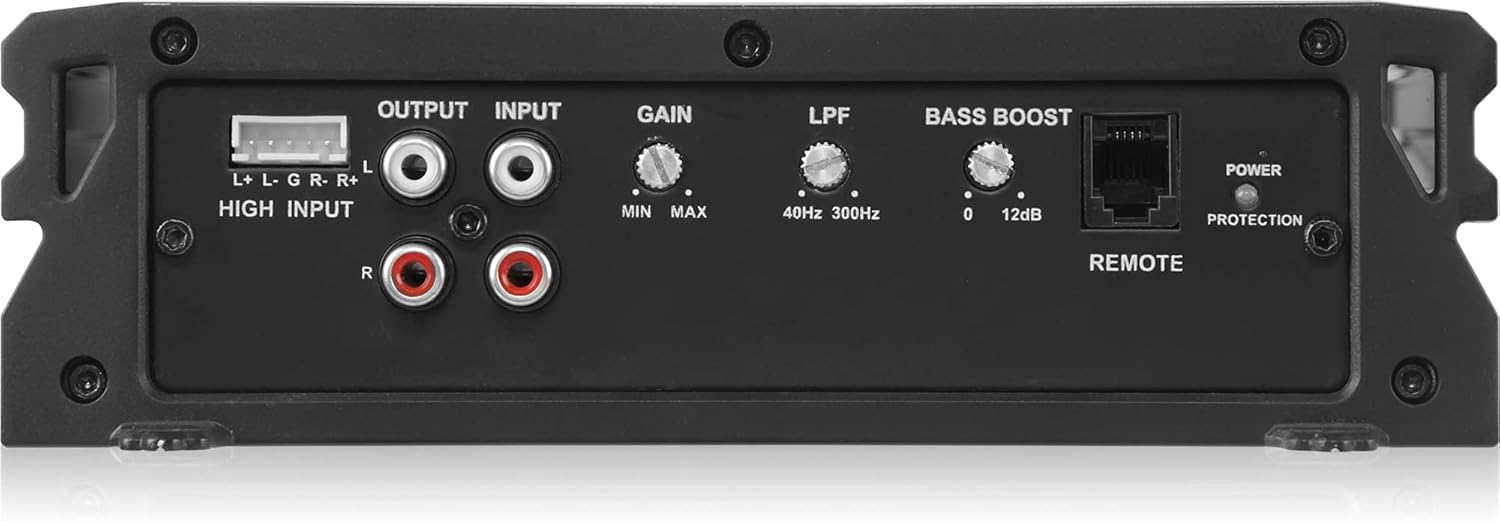
Figure 4.2: The control panel of the BELVA BB200ABv2 amplifier, showing RCA inputs, high-level input, gain control, low-pass filter (LPF) adjustment, bass boost control, and the remote bass knob port.
5. Operating and Adjustments
Once the amplifier is installed, you can adjust its settings for optimal audio performance.
5.1 Gain Control (MIN/MAX)
The Gain control matches the amplifier's input sensitivity to the output level of your head unit. Start with the gain set to minimum. Play a familiar track at about 75% of your head unit's maximum volume. Slowly increase the amplifier's gain until you hear distortion, then back it off slightly. This is not a volume control.
5.2 Low-Pass Filter (LPF) (40Hz-300Hz)
The LPF control allows only frequencies below the set point to pass through to the subwoofer. This is essential for proper subwoofer integration. Adjust the LPF between 40Hz and 300Hz to blend the subwoofer's output with your main speakers. A common starting point is around 80Hz-100Hz.
5.3 Bass Boost (0-12dB)
The Bass Boost control provides an adjustable increase in bass output at a specific frequency. Use this feature sparingly and adjust carefully to avoid distortion or damage to your speakers. Start at 0dB and increase gradually if desired.
5.4 Remote Bass Knob
Connect the included remote bass knob to the REMOTE port on the amplifier. This allows for convenient adjustment of the bass level from the driver's seat without accessing the amplifier directly.
6. Maintenance
The BELVA BB200ABv2 amplifier requires minimal maintenance.
- Periodically inspect all wiring connections to ensure they are secure and free from corrosion.
- Keep the amplifier clean and free of dust and debris. Use a soft, dry cloth for cleaning.
- Ensure that the amplifier's cooling fins are not obstructed to maintain proper heat dissipation.
- If the fuse blows, replace it only with a fuse of the same type and rating (25A).
7. Troubleshooting
If you experience issues with your amplifier, refer to the following common problems and solutions:
| Problem | Possible Cause | Solution |
|---|---|---|
| No Power / Amplifier does not turn on |
|
|
| No Sound Output |
|
|
| Distorted Sound |
|
|
| Amplifier Overheats / Goes into Protection Mode |
|
|
8. Specifications
Technical specifications for the BELVA BB200ABv2 Monoblock Amplifier:
| Feature | Specification |
|---|---|
| Model Number | BB200ABv2 |
| Amplifier Class | Class A/B |
| Number of Channels | 1 (Monoblock) |
| Peak Power Output | 500 Watts |
| RMS Power (4 Ohms) | 200 Watts |
| RMS Power (2 Ohms) | 500 Watts |
| Minimum Stable Impedance | 2 Ohms |
| Low-Pass Filter (LPF) | 40Hz - 300Hz |
| Bass Boost | 0 - 12dB |
| Input Type | RCA (Low-Level) and High-Level |
| Fuse Rating | 25A |
| Operating Voltage | 12V DC (Maximum Supply Voltage: 14 Volts) |
| Dimensions (Package) | 11.46 x 10.79 x 4.41 inches |
| Item Weight | 5.35 pounds |
9. Warranty Information
BELVA products are designed for reliability and performance. For specific warranty terms and conditions, please refer to the warranty card included with your product or contact BELVA customer support. Keep your proof of purchase for warranty claims.
10. Support
If you have questions or require assistance with your BELVA BB200ABv2 amplifier, please refer to the troubleshooting section of this manual. For further support, contact BELVA customer service through their official website or the retailer where the product was purchased.