
1. Introduction
This user manual provides detailed instructions for the installation, operation, and maintenance of your new Generic Android 15 7-inch Car Stereo. This head unit is specifically designed for Renault Megane 3 models manufactured between 2009 and 2014. Please read this manual thoroughly before installation and use to ensure proper function and safety.
Key features include an Android 15 operating system, 7-inch QLED touchscreen, integrated DSP amplifier, wired CarPlay, Bluetooth, GPS navigation, Wi-Fi, and 4G connectivity. It supports various multimedia formats and offers advanced functionalities like split-screen and Picture-in-Picture.
2. Safety Information
- Professional Installation Recommended: Due to the complexity of car electrical systems, professional installation is highly recommended to prevent damage to the unit or vehicle.
- Power Supply: Ensure the car stereo is connected to a 12V DC power supply with negative grounding.
- Driving Safety: Do not operate the unit's advanced features or watch videos that may distract you while driving. Always prioritize road safety.
- Wiring: Incorrect wiring can cause damage. Refer to the wiring diagram carefully.
- Temperature: Avoid exposing the unit to extreme temperatures or direct sunlight for prolonged periods.
3. Package Contents
Verify that all items listed below are present in your package:
- Android Head Unit (1x)
- Power Cable (1x)
- RCA Cable (1x)
- GPS Antenna (1x)
- USB Adapters (Multiple)
- 4G Antenna (1x)
- External Microphone (1x)
- Installation Frame/Mounting Accessories
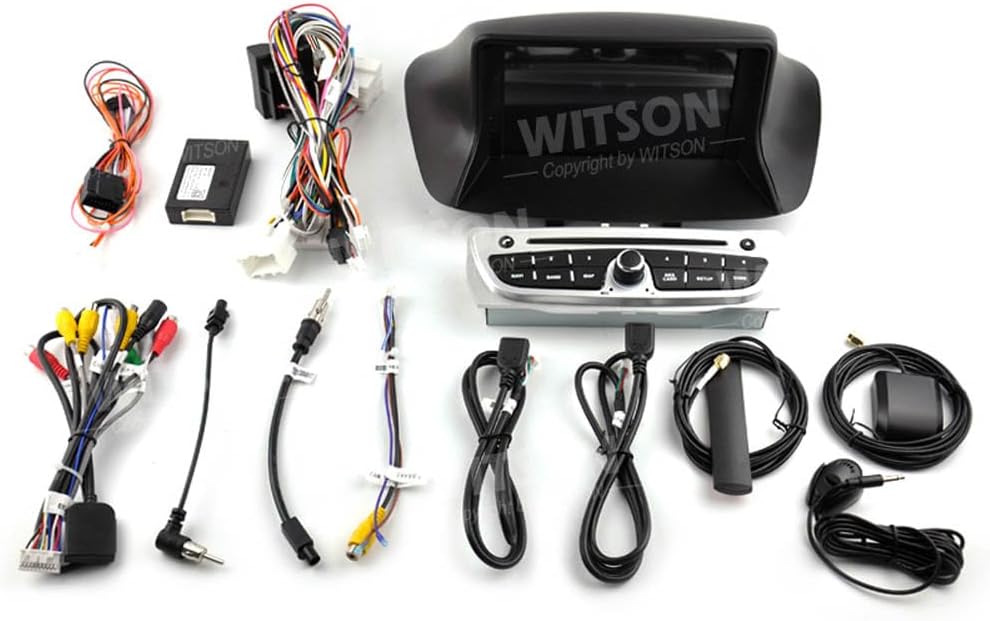
This image displays the complete set of components included with the car stereo, such as the main head unit, various wiring harnesses, GPS antenna, USB cables, and other accessories required for installation.
4. Installation
4.1 Pre-Installation Check
Before beginning installation, ensure that the car stereo is compatible with your vehicle's dashboard. Refer to the image below for proper fitment.
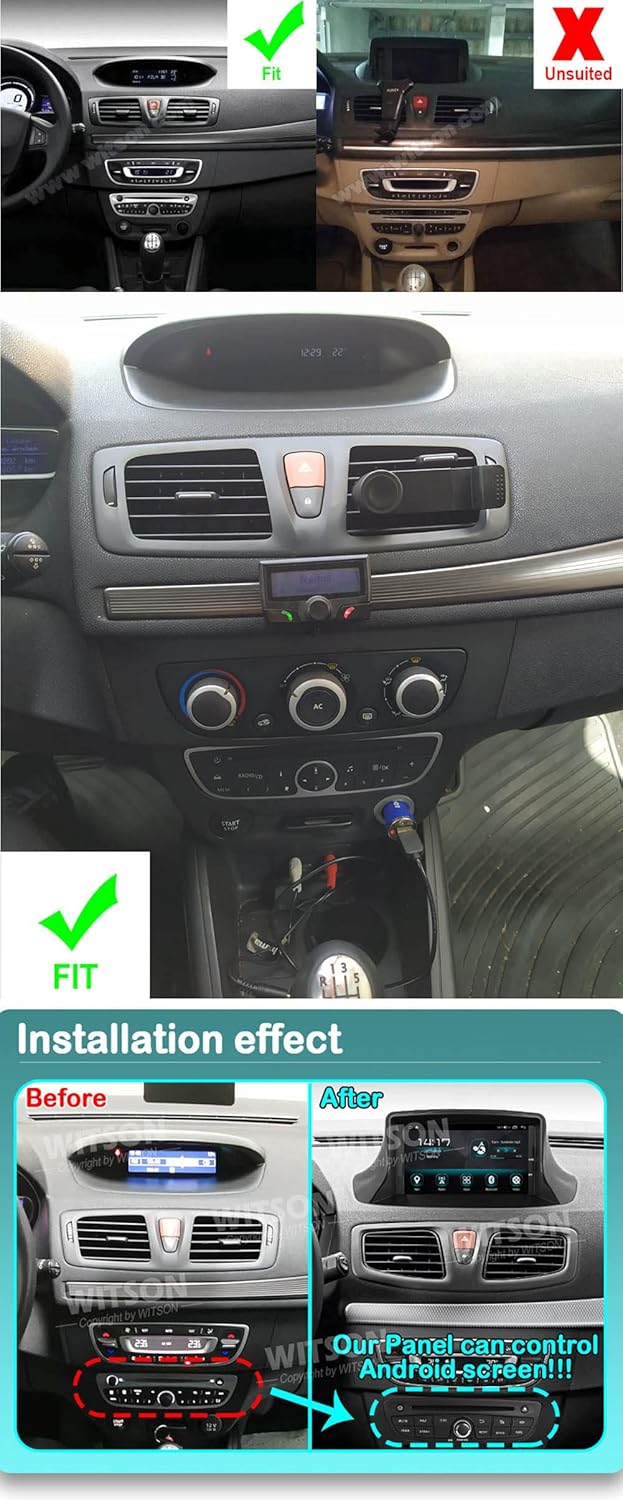
This image illustrates the proper fitment of the car stereo in a Renault Megane 3 dashboard (left side, marked 'Fit') compared to an unsuitable installation (right side, marked 'Unsuited'). Below, it shows the dashboard 'Before' and 'After' the installation of the new Android screen, highlighting the integrated control panel.
4.2 Wiring and Connections
Carefully connect all necessary cables according to the provided wiring diagram. Ensure all connections are secure to prevent malfunctions.

The rear view of the car stereo unit, illustrating the different ports and connectors for power, audio, video, and data inputs/outputs.

A detailed view of the multi-pin connectors and wiring harnesses, essential for connecting the car stereo to the vehicle's electrical system.
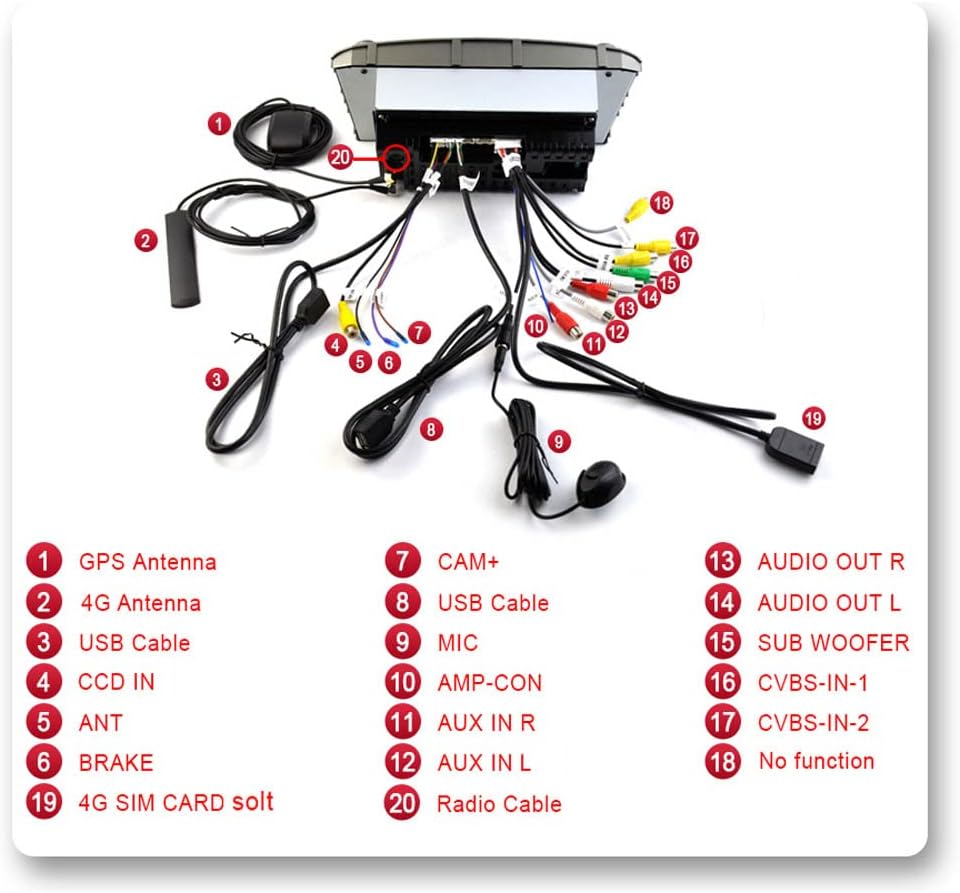
This diagram provides a comprehensive overview of all connection points on the car stereo, with each port clearly numbered and labeled (e.g., GPS Antenna, 4G Antenna, USB Cable, CAM+, Audio Out, etc.) to guide proper wiring.
4.3 General Installation Steps
- Disconnect the vehicle's battery to prevent electrical shorts.
- Carefully remove the original car stereo unit and any associated trim.
- Connect the new car stereo's wiring harness to the vehicle's wiring. Ensure all connections (power, speakers, antenna, etc.) are correct.
- Install the GPS antenna in a location with a clear view of the sky.
- Mount the new head unit securely into the dashboard opening.
- Reconnect the vehicle's battery.
- Test all functions before fully reassembling the dashboard trim.
5. Initial Setup
- Power On: After installation, turn on your vehicle's ignition to power on the car stereo.
- Language and Time Settings: Follow the on-screen prompts to select your preferred language, set the correct time zone, and adjust the date and time.
- Wi-Fi Connection: Navigate to the settings menu, select Wi-Fi, and connect to an available network to enable online features and app downloads.
- GPS Setup: Ensure the GPS antenna is properly installed. The system should automatically detect satellites. You may need to download or update map data if using offline navigation.
- Steering Wheel Control Learning: If your vehicle has steering wheel controls, go to the settings menu to configure and map the buttons to the stereo's functions.
6. Operating Instructions

A clear front view of the Android 15 car stereo head unit, displaying its 7-inch screen and integrated control buttons.

A composite image showcasing key features: the Android 15 operating system interface, details about the QLED 1280x720 screen, the integrated DSP (32EQ) for enhanced audio, and various customizable user interface designs.

This image highlights additional functionalities such as 1080P video playback, 4G and Wi-Fi internet connectivity, Bluetooth for hands-free calls and audio streaming, FM/AM RDS radio, split-screen and Picture-in-Picture capabilities, support for optional DAB+ tuner and DVR camera, and USB media playback.
6.1 Android 15 Operating System
The unit runs on Android 15, providing a familiar smartphone-like interface. Navigate through apps, settings, and features using the touchscreen. The Octa-Core UIS8581A (SC9863A) ARM Cortex-A55 1.6 GHz processor with 2GB RAM and 32GB ROM ensures smooth performance.
6.2 Wired CarPlay
Connect your iPhone via USB to activate wired CarPlay. This integrates your phone's essential features like navigation, music, messages, and calls directly onto the car stereo display, allowing for safe operation while driving.
6.3 Bluetooth Functionality
- Hands-Free Calling: Pair your smartphone via Bluetooth to make and receive calls directly from the head unit.
- Audio Streaming (A2DP): Stream music wirelessly from your paired smartphone to the car stereo.
6.4 GPS Navigation
The integrated GPS module supports both online and offline navigation applications. Download maps for offline use or use online services via Wi-Fi/4G connection.
6.5 Wi-Fi and 4G Connectivity
Connect to Wi-Fi hotspots or insert a 4G SIM card (if supported by the specific model) to access the internet, browse the web, and download applications from the Android Store.
6.6 Multimedia Playback
Play music, videos, and view photos from USB drives or TF cards. The unit supports 1080P video playback for a clear visual experience.
6.7 Digital Sound Processor (DSP)
The integrated DSP with 48-band EQ allows for precise audio customization, enhancing the sound quality to your preference.
6.8 Steering Wheel Control
Once configured, use your vehicle's existing steering wheel controls to adjust volume, answer calls, and change tracks, ensuring minimal distraction while driving.
6.9 Split Screen and Picture-in-Picture (PIP)
Utilize the split-screen function to run two applications side-by-side, such as navigation and music. The Picture-in-Picture feature allows you to minimize a video window while using other applications.
6.10 FM/AM RDS Radio
Tune into your favorite FM/AM radio stations. The RDS (Radio Data System) feature displays station information and program details where available.
6.11 Optional Accessories Support
The unit supports various optional accessories for extended functionality:
- DAB+ Tuner: For enhanced digital radio reception.
- TPMS (Tire Pressure Monitoring System): Displays tire pressure data.
- OBD2: Connects to your vehicle's diagnostic system.
- DVR Camera: Records driving footage.
- Rear View Camera: Automatically displays the rear view when reversing.
- Mirror Link: Wirelessly mirror your smartphone screen to the head unit.
7. Maintenance
- Screen Cleaning: Use a soft, lint-free cloth to clean the touchscreen. Avoid abrasive cleaners or harsh chemicals.
- Software Updates: Periodically check for software updates through the system settings or the manufacturer's website to ensure optimal performance and access to new features.
- General Care: Keep the unit free from dust and moisture.
8. Troubleshooting
If you encounter issues, refer to the following common problems and solutions:
- No Power: Check all power connections and the vehicle's fuse box. Ensure the ignition is on.
- No Sound: Verify speaker connections. Check volume levels and audio output settings. Ensure the mute function is not active.
- GPS Not Working: Ensure the GPS antenna is properly connected and has a clear view of the sky. Check GPS settings in the system.
- Bluetooth Connection Issues: Ensure Bluetooth is enabled on both the head unit and your smartphone. Try unpairing and re-pairing the devices.
- Touchscreen Unresponsive: Try restarting the unit. If the problem persists, a factory reset might be necessary (note: this will erase all user data).
- Unit Freezes/Crashes: Perform a soft reset by pressing the reset button (if available) or by turning off the vehicle's ignition and restarting.
For persistent issues not covered here, please contact customer support.
9. Specifications
| Brand | Generic |
| Model | Android 15 7-inch Car Stereo for Renault Megane 3 (2009-2014) |
| Operating System | Android 15 |
| Processor | Octa-Core UIS8581A (SC9863A) ARM Cortex-A55 1.6 GHz |
| RAM | 2GB |
| ROM | 32GB |
| Screen Size | 7 Inches |
| Display Type | QLED LCD |
| Display Resolution | 1024x600 |
| Connectivity | Bluetooth, USB, Wi-Fi, 4G |
| Compatible Devices | Smartphone |
| Audio Output Mode | Stereo |
| Amplifier | TDA7850 4 x 50W |
| DSP | Integrated (48EQ) |
| UPC | 671310761471 |
| ASIN | B0C81HXPFX |
10. Warranty and Support
10.1 Warranty Information
No specific warranty information is provided in the product details. Please refer to your purchase documentation or contact your retailer for details regarding warranty coverage.
10.2 Customer Support
For technical assistance, troubleshooting, or any questions regarding your Generic Android 15 Car Stereo, please contact the retailer from whom you purchased the product. They will be able to provide the most accurate and timely support.