1. Introduction
Thank you for choosing the GOWENIC YAW1F9 AC Remote Control. This remote is designed as a direct replacement for damaged or lost original remote controls for various air conditioner brands, including Gree, Montana, Daitsu, and Hiyasu, specifically compatible with original remote models Yaw1f1 and Yaw1f4. It offers all the essential functions of your original remote, ensuring seamless control over your air conditioning unit. Constructed from durable ABS material, it provides a comfortable grip and reliable performance.

Image 1: Front view of the GOWENIC YAW1F9 AC Remote Control. This image displays the remote's LCD screen, which shows the temperature and various indicators, along with its array of control buttons such as On/Off, Fast Cool, Fan, Mode, Sleep, Swing, Timer, I Feel, WiFi, Light, and temperature adjustment arrows.
2. Setup: Battery Installation
The GOWENIC YAW1F9 remote control requires two AAA 1.5V batteries (not included) for operation. Please follow these steps to install the batteries correctly:
- Locate the battery compartment on the back of the remote control.
- Slide the battery compartment cover downwards or press the latch and lift to open it.
- Insert two AAA 1.5V batteries, ensuring the positive (+) and negative (-) terminals align correctly with the markings inside the compartment.
- Close the battery compartment cover by sliding it back into place until it clicks securely.
Important Battery Information:
- Do not mix new and worn batteries.
- Do not mix different types of batteries.
- Do not dispose of batteries in fire; they may explode or leak.
- Remove batteries if the remote will not be used for an extended period to prevent leakage.

Image 2: Back view of the GOWENIC YAW1F9 AC Remote Control with the battery compartment open. This image clearly shows the two slots for AAA batteries and the spring contacts, indicating the correct orientation for battery insertion.
3. Operating Instructions
The remote control provides intuitive access to all standard air conditioner functions. Point the remote control directly at the air conditioner's receiver when operating.
Button Functions:
- On/Off: Powers the air conditioner on or off.
- Fast Cool: Activates a rapid cooling mode for quick temperature reduction.
- Fan: Adjusts the fan speed (e.g., Auto, Low, Medium, High).
- Mode: Cycles through operating modes (e.g., Cool, Heat, Dry, Fan, Auto).
- Sleep: Activates sleep mode, which adjusts temperature and fan speed for comfortable sleep and energy saving.
- Swing: Controls the vertical louver movement for air direction.
- Timer: Sets a timer for the air conditioner to turn on or off automatically.
- I Feel: Activates a function where the remote's built-in sensor measures the ambient temperature and sends it to the AC unit for more precise temperature control around the remote.
- WiFi: Activates or deactivates the Wi-Fi function for smart control (if supported by the AC unit).
- Light: Turns the display light on or off on the indoor unit.
- Temperature Up (▲) / Down (▼): Adjusts the desired temperature setting.
- Keypad Lock: To lock or unlock the keypad, press the Temperature Up (▲) and Temperature Down (▼) buttons simultaneously for 3 seconds.
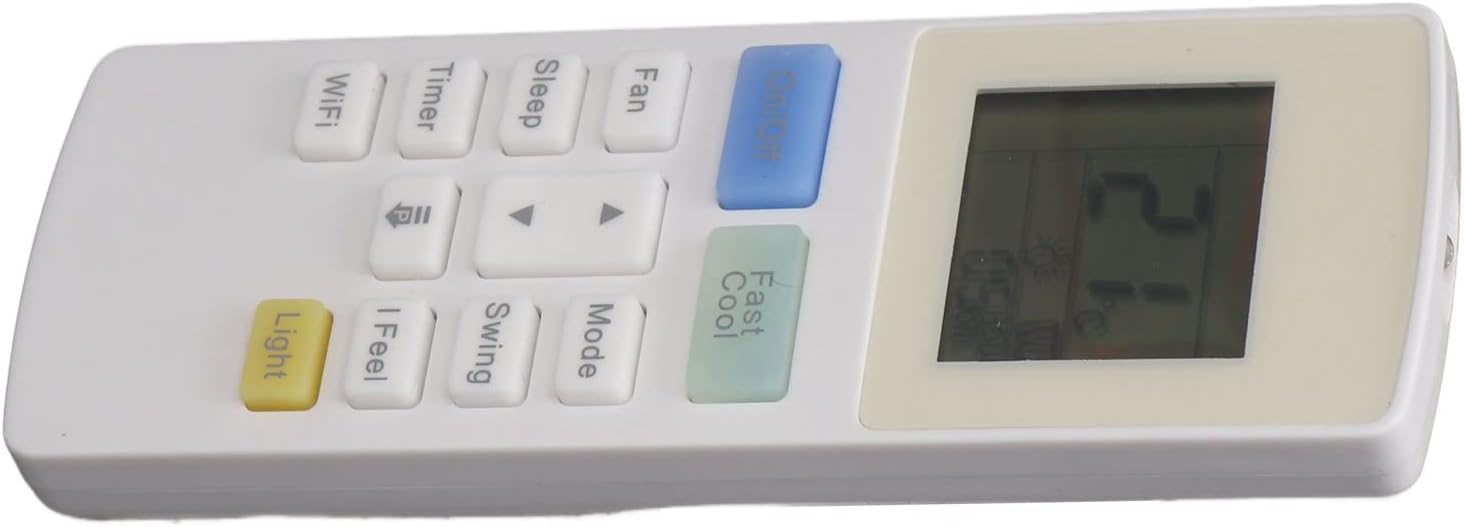
Image 3: Angled view of the GOWENIC YAW1F9 AC Remote Control. This perspective provides a clear view of the button arrangement, including the On/Off, Fast Cool, Fan, Mode, Sleep, Swing, Timer, I Feel, WiFi, Light buttons, and the temperature adjustment arrows.
4. Maintenance
Proper maintenance ensures the longevity and optimal performance of your remote control.
Cleaning:
- Wipe the remote control with a soft, dry cloth.
- For stubborn dirt, slightly dampen the cloth with water or a mild, non-abrasive cleaner.
- Do not use harsh chemicals, solvents, or abrasive cleaning agents, as these can damage the remote's surface or internal components.
Battery Replacement:
Replace batteries when the remote's signal becomes weak or the display fades. Refer to Section 2 for detailed battery installation instructions. Always replace both batteries at the same time with new ones of the same type (AAA 1.5V).
5. Troubleshooting
If you experience issues with your remote control, try the following troubleshooting steps:
- Remote not responding: Check if the batteries are inserted correctly and have sufficient charge. Replace them if necessary.
- Weak or inconsistent signal: Ensure there are no obstructions between the remote control and the air conditioner's receiver. The maximum effective range is approximately 10 meters.
- Air conditioner not responding to specific buttons: Verify that the air conditioner unit supports the specific function (e.g., WiFi, I Feel). Some advanced functions may only work with compatible AC units.
- Keypad is locked: If the remote buttons are unresponsive, check if the keypad lock function is active. Press the Temperature Up (▲) and Temperature Down (▼) buttons simultaneously for 3 seconds to unlock.
6. Specifications
| Feature | Specification |
|---|---|
| Brand | GOWENIC |
| Model Name | YAW1F9 |
| Internal Model Number | GOWENICnrz0bqgf59 |
| Material | ABS |
| Battery Type | 2 x AAA 1.5V (not included) |
| Maximum Range | 10 Meters |
| Supported Devices | 1 Air Conditioner Unit |
| Compatibility | Gree, Montana, Daitsu, Hiyasu Air Conditioners (Yaw1f1, Yaw1f4) |
| Country of Origin | China |
7. Warranty and Support
Warranty Information:
This GOWENIC product comes with a 1 Year Warranty Against Manufacturer Defects. Please retain your proof of purchase for warranty claims.
Customer Support:
For further assistance or if you encounter issues not covered in this manual, please refer to the seller's support channels or the GOWENIC official website for contact information. Ensure you have your product model number (YAW1F9) and purchase details ready when contacting support.