
1. Introduction
This manual provides essential instructions for the safe and effective operation, maintenance, and troubleshooting of the Unimall UT522 Earth Resistance Tester. The UT522 is a digital instrument designed for precise measurement of earth resistance and earth voltage in various electrical systems, lightning protection equipment, and ground systems.
2. Safety Information
Always adhere to the following safety precautions to prevent personal injury and damage to the instrument:
- Read and understand all instructions before using the tester.
- Do not use the instrument if it appears damaged or operates abnormally.
- Ensure proper connection of test leads before performing any measurements.
- Avoid touching exposed wires or terminals during testing.
- Do not use the tester in wet environments or explosive atmospheres.
- Replace batteries promptly when the low battery indicator appears.
- Always disconnect the test leads from the circuit before changing the function switch.
3. Product Overview and Features
The Unimall UT522 is a robust digital earth resistance tester equipped with a range of features for accurate and convenient measurements.

Figure 1: Front view of the Unimall UT522 Earth Resistance Tester, showing the digital display, function buttons, and rotary switch.
Key Features:
- Precise 3-wire and simple 2-wire earth resistance measurement capabilities.
- Earth voltage measurement.
- Large digital LCD with backlight for clear readings.
- Data Hold function to freeze displayed values.
- 20-group data storage and recall.
- Automatic power-off after approximately 10 minutes of inactivity.
- Low battery indication.
- Over-range indication and test lead connection alarm.
- Double insulation protection for enhanced safety.
- Contact badness display.
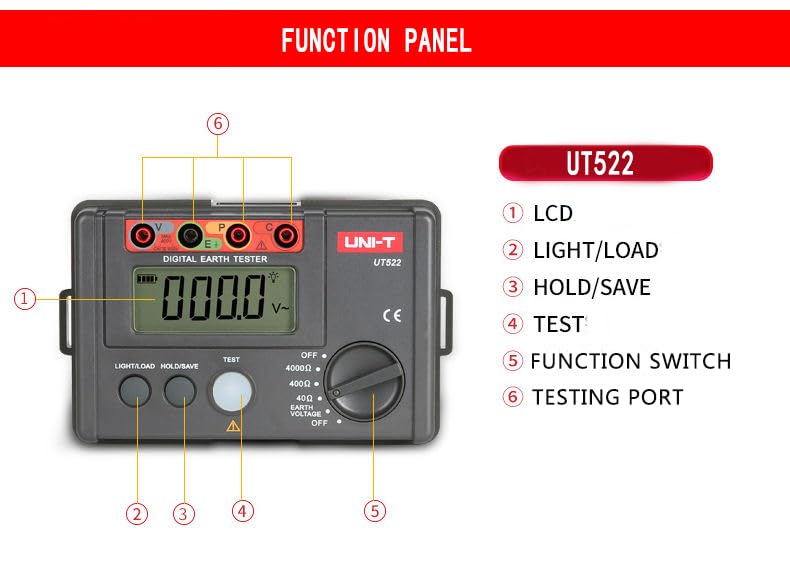
Figure 2: Diagram illustrating the function panel of the UT522, labeling the LCD, LIGHT/LOAD button, HOLD/SAVE button, TEST button, Function Switch, and Testing Ports.
4. Setup
4.1 Battery Installation
- Locate the battery compartment on the rear of the instrument.
- Open the battery cover.
- Insert six (6) 1.5V AA batteries, ensuring correct polarity.
- Close the battery cover securely.
4.2 Connecting Test Leads
Refer to Figure 2 for the location of the testing ports. Connect the provided test leads to the corresponding ports (V, E, P, C) based on the measurement type (2-wire or 3-wire) you intend to perform. Ensure connections are firm and secure.
5. Operating Instructions
5.1 Power On/Off
Rotate the Function Switch (5 in Figure 2) from the 'OFF' position to any measurement range (e.g., 40Ω, 400Ω, 4000Ω, EARTH VOLTAGE) to power on the device. To power off, rotate the switch back to the 'OFF' position. The device also features an auto power-off function after approximately 10 minutes of inactivity.
5.2 Earth Resistance Measurement (2-wire and 3-wire)
- Connect the test leads to the appropriate terminals and the circuit under test.
- Select the desired earth resistance range (40Ω, 400Ω, or 4000Ω) using the Function Switch.
- Press the TEST button (4 in Figure 2) to initiate the measurement. The measurement value will be displayed on the LCD.
- Release the TEST button to stop the measurement.
5.3 Earth Voltage Measurement
- Connect the test leads to the appropriate terminals and the circuit.
- Rotate the Function Switch to the 'EARTH VOLTAGE' position.
- The earth voltage will be displayed directly on the LCD.
5.4 Data Hold and Backlight
- Press the HOLD/SAVE button (3 in Figure 2) briefly to freeze the current reading on the display. Press again to release.
- Press the LIGHT/LOAD button (2 in Figure 2) briefly to turn the LCD backlight on or off.
5.5 Data Logging
The UT522 can store up to 20 groups of measurement data.
- To save data: While a measurement is held (using the HOLD/SAVE button), press and hold the HOLD/SAVE button for approximately 2 seconds until a save indicator appears.
- To recall data: Press and hold the LIGHT/LOAD button for approximately 2 seconds. Use the LIGHT/LOAD button to cycle through stored data. Press HOLD/SAVE to exit recall mode.
6. Maintenance
6.1 Cleaning
Wipe the instrument with a damp cloth and mild detergent. Do not use abrasives or solvents. Ensure the instrument is dry before storage or next use.
6.2 Battery Replacement
When the low battery indicator appears on the display, replace all six 1.5V AA batteries as described in Section 4.1. Remove batteries if the instrument will not be used for an extended period.
6.3 Storage
Store the instrument in a cool, dry place, away from direct sunlight and extreme temperatures. Use the provided carrying bag for protection.
7. Troubleshooting
- No Display / Instrument Not Powering On: Check battery installation and ensure batteries are not depleted. Replace if necessary. Ensure the Function Switch is not in the 'OFF' position.
- 'OL' or Over-Range Indication: The measured value exceeds the selected range. Switch to a higher measurement range or verify the circuit conditions.
- Low Battery Indicator: Replace all six 1.5V AA batteries immediately.
- Contact Badness Display: This indicates poor contact with the test leads or probes. Re-establish firm connections to the circuit and the instrument.
- Inaccurate Readings: Ensure test leads are correctly connected and not damaged. Verify the measurement setup and environmental conditions.
8. Specifications
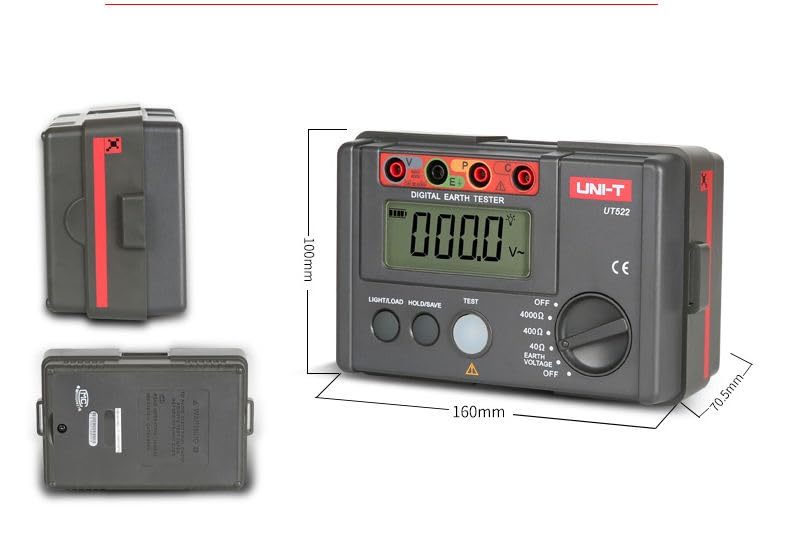
Figure 3: Side and front views of the UT522, illustrating its physical dimensions.
| Parameter | Specification |
|---|---|
| Model | UT522 |
| Earth Resistance Ranges | 0~40Ω, 0~400Ω, 0~4000Ω |
| Earth Resistance Accuracy | ±(2%+20) for 0~40Ω ±(2%+3) for 0~400Ω, 0~4000Ω |
| Earth Voltage Range | 0~400V |
| Earth Voltage Accuracy | ±(1%+6) |
| Frequency | 50Hz/60Hz |
| Display Type | Digital Only |
| Data Logging | 20 groups |
| Auto Power Off | Approx. 10 minutes |
| Power Source | 6 x 1.5V AA Batteries |
| LCD Size | 70.6mm X 34mm |
| Product Size | 160mm X 100mm X 70.5mm |
| Product Net Weight | 560g |
| Operating Temperature | Normal atmospheric temperature |
| Manufacturer | Unimall US |
| UPC | 783103515045 |
9. Accessories
The Unimall UT522 Earth Resistance Tester package includes the following accessories:
- 1.5V AA Batteries (x6)
- Carrying Bag
- Simple Test Leads
- Test Probes
- Gift Box
- User Manual (this document)
10. Warranty and Support
For warranty information, technical support, or service inquiries, please contact your retailer or the manufacturer directly. Keep your purchase receipt as proof of purchase.