
1. Introduction
Thank you for choosing the BEAUTME Vanity Mirror with Lights. This Hollywood-style makeup mirror is designed to enhance your daily beauty routine with its adjustable lighting, smart touch controls, and versatile installation options. Please read this manual carefully before use to ensure proper setup, operation, and maintenance.
2. Safety Information
- Handle the mirror with care to prevent breakage.
- Ensure the power adapter is connected to a suitable power outlet.
- Do not expose the mirror to excessive moisture or direct water spray.
- Keep out of reach of children.
- Unplug the mirror from the power source before cleaning or performing any maintenance.
- Do not attempt to disassemble or repair the mirror yourself. Contact customer support for assistance.
3. Package Contents
Verify that all items are present in the package:
- BEAUTME Vanity Mirror with 12 LED Bulbs
- Detachable Base (for tabletop use)
- Power Adapter (1.5M/5FT Cable)
- 10x Magnifying Mirror with Suction Cups
- Screwdriver and Mounting Hardware (for base attachment and wall mounting)
- User Manual
4. Setup
4.1 Tabletop Installation
- Carefully unpack the mirror and its components.
- Attach the provided base to the bottom of the mirror using the included screws and screwdriver. Ensure the base is securely fastened.
- Place the mirror on a stable, flat surface.

Image: The BEAUTME Vanity Mirror set up on a tabletop, showcasing its stable base and illuminated bulbs.
4.2 Wall Mount Installation
- If the base is attached, remove it by unscrewing the fasteners.
- Identify the pre-installed wall mounting brackets on the back of the mirror.
- Measure the distance between the mounting points on the mirror.
- Mark the desired location on your wall, ensuring the marks are level and match the mirror's mounting points.
- Install the appropriate wall anchors and screws (provided) into the marked locations.
- Carefully hang the mirror onto the installed screws.

Image: A close-up of the back of the mirror, highlighting the integrated wall mounting brackets for secure installation.
4.3 Power Connection
Connect the power adapter cable to the designated port on the mirror and plug it into a standard electrical outlet.
5. Operating Instructions
The BEAUTME Vanity Mirror features smart touch controls located on the mirror surface.

Image: The mirror's surface showing the smart touch control icons for power, mode, and brightness adjustment.
5.1 Power On/Off
Touch the central power button icon to turn the mirror lights on or off.
5.2 Adjusting Color Temperature
Short press the 'M' (Mode) button icon to cycle through three different light color modes: White Light (6500K), Natural Light (4800K), and Warm Light (3200K).
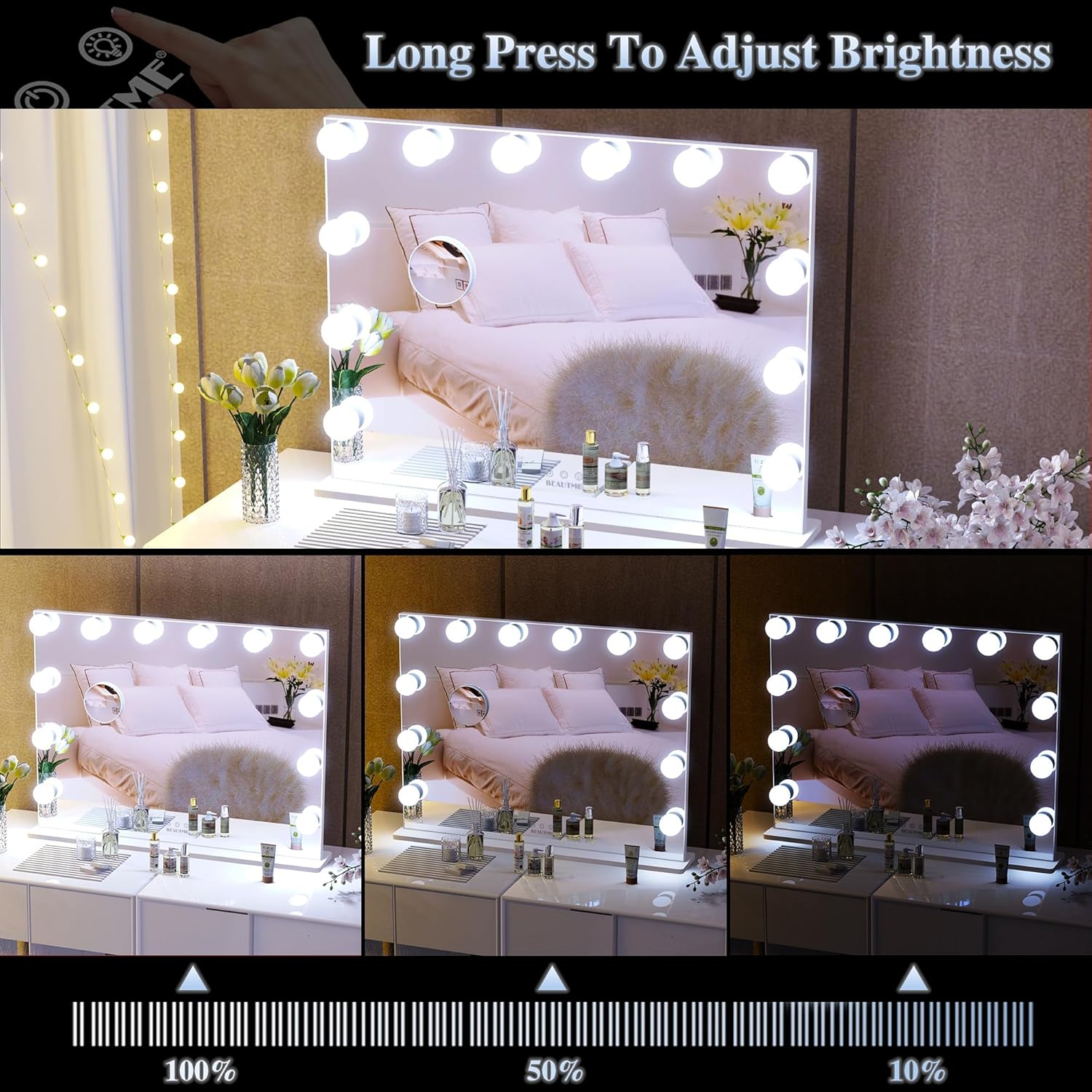
Image: The mirror displaying the three distinct light color temperatures: white, natural, and warm, suitable for various makeup needs.
5.3 Adjusting Brightness
Long press the 'P' (Brightness) button icon to adjust the brightness level of the selected light mode. Release the button when the desired brightness is achieved. The mirror features a memory function that remembers your last used light setting.

Image: The mirror demonstrating various brightness levels, from 100% to 10%, controlled by the touch sensor.
5.4 Using the 10x Magnifying Mirror
The included 10x magnifying mirror can be attached to the main mirror surface using its suction cups for detailed makeup application or grooming. It can be easily removed and repositioned as needed.

Image: A close-up of the 10x magnifying mirror, showing its suction cup attachment to the main mirror for detailed viewing.
5.5 Product Video Demonstration
Watch this video for a visual guide on the mirror's features and operation:
Video: A demonstration of the BEAUTME Vanity Makeup Mirror, showcasing its 10x magnification feature and various lighting modes.
6. Maintenance
6.1 Cleaning the Mirror
To clean the mirror surface, unplug the unit and use a soft, lint-free cloth with a non-abrasive glass cleaner. Do not spray cleaner directly onto the mirror or bulbs; apply it to the cloth first.
6.2 Bulb Replacement
The LED bulbs are designed for long-lasting use. In the event a bulb needs replacement, contact BEAUTME customer support for compatible replacement bulbs and instructions.
7. Troubleshooting
- Lights not turning on: Ensure the power adapter is securely plugged into both the mirror and the wall outlet. Check if the outlet is functional.
- Touch controls unresponsive: Ensure your fingers are clean and dry. Try unplugging the mirror for a few minutes and then plugging it back in to reset the system.
- Lights flickering: Check the power connection. If the issue persists, contact customer support.
8. Specifications
| Feature | Detail |
|---|---|
| Brand | BEAUTME |
| Product Dimensions | 21.3"L x 28.3"W (54.1 cm L x 71.9 cm W) |
| Frame Material | Aluminum |
| Frame Color | White |
| Mounting Type | Desktop / Wall Mount |
| Light Modes | 3 Color Light Modes (White, Natural, Warm) |
| Brightness Adjustment | Dimmable |
| Additional Features | Smart Touch Control, Memory Function, 10x Magnifying Mirror |
| Item Weight | 5 Kilograms (11 lbs) |
| Required Assembly | Yes (for base attachment) |
9. Warranty and Support
BEAUTME products come with a standard manufacturer's warranty. For specific warranty details, please refer to the product packaging or contact BEAUTME customer service.
For any product issues, technical support, or inquiries, BEAUTME offers 24/7 online service. Please feel free to reach out to us, and we will resolve your concerns promptly.
Contact Information: Refer to your product packaging or the official BEAUTME website for the most up-to-date contact details.
