Replacement Remote Control User Manual
For NAXA NT-4001, NT-2208, NT-2410B, NT-1502, NT-1506, NT-1508 Smart LCD LED HDTV Televisions
Introduction
This document provides instructions for the use and maintenance of your replacement infrared (IR) remote control. This remote is designed to be compatible with various NAXA Smart LCD LED HDTV Television models, including NT-4001, NT-2208, NT-2410B, NT-1502, NT-1506, and NT-1508. It functions as a direct replacement for your original remote, offering essential control over your television.
Package Contents
- 1 x Replacement Remote Control
Please note: Batteries and a printed instruction manual are not included with this replacement remote control.
Setup
Battery Installation
The remote control requires two (2) AAA batteries for operation. Follow these steps to install the batteries:
- Locate the battery compartment on the back of the remote control. The compartment cover is typically located at the bottom rear.
- Gently slide the battery compartment cover downwards or press the latch and lift to open it.
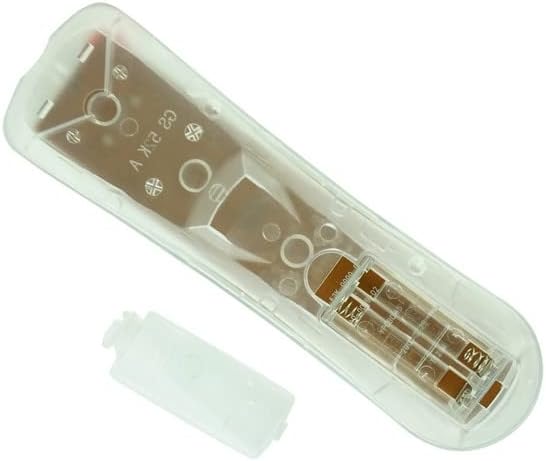
Image: Rear view of the remote control with the battery cover open, revealing the battery compartment.
- Insert two (2) AAA batteries into the compartment, ensuring that the positive (+) and negative (-) ends align correctly with the polarity indicators inside the compartment. Incorrect insertion can prevent the remote from functioning.

Image: Angled view of the remote control with the battery cover detached, showing the open battery slots.
- Slide the battery compartment cover back into place until it clicks securely.
Once batteries are installed, the remote control is ready for use. No programming is typically required for this replacement remote.
Operating Instructions
This remote control operates via infrared (IR) signals. Ensure there is a clear line of sight between the remote's IR emitter (located at the top front of the remote) and the IR receiver on your television.

Image: Front view of the remote control, displaying its button layout.
Basic Functions:
- Power (Red Button): Turns the television on or off.
- Mute: Mutes or unmutes the television audio.
- Number Buttons (0-9): Used for direct channel selection.
- Volume (+/-): Increases or decreases the television volume.
- Channel (PROG +/-): Changes the television channel up or down.
- Source: Cycles through input sources (HDMI, AV, Component, etc.).
- Navigation Buttons (Up, Down, Left, Right, Enter): Used to navigate menus and confirm selections.
- Menu: Opens the television's main menu.
- Exit: Exits the current menu or function.
- EPG (Electronic Program Guide): Accesses the program guide (if supported by TV).
- Info: Displays information about the current program or input.
- Zoom: Adjusts the screen zoom level.
- MTS (Multi-channel Television Sound): Selects audio modes (Stereo, SAP, Mono).
- Sleep: Sets a timer for the TV to turn off automatically.
- Other buttons may provide specific functions depending on your NAXA TV model.
Maintenance
- Cleaning: Use a soft, dry cloth to clean the remote control. Do not use liquid cleaners or abrasive materials.
- Battery Replacement: Replace batteries when the remote's response becomes sluggish or it stops working. Always replace both batteries at the same time with new ones.
- Storage: Store the remote control in a cool, dry place away from direct sunlight and extreme temperatures. If not used for an extended period, remove the batteries to prevent leakage.
- Avoid Drops: Protect the remote from physical impact, as drops can damage internal components.
Troubleshooting
- Remote is not working:
- Ensure new AAA batteries are correctly installed with the correct polarity (+/-).
- Check if the batteries are depleted and replace them if necessary.
- Verify there is a clear line of sight between the remote and the TV's IR receiver. Obstructions can block the signal.
- Ensure the remote is pointed directly at the TV.
- Some buttons or functions do not work:
- This is a replacement remote. While designed for compatibility, some advanced or specific functions of your original TV remote may not be supported.
- Refer to your television's original user manual for specific functions if this remote does not provide them.
- TV responds intermittently:
- Batteries may be low. Replace them.
- Ensure no strong light sources (like direct sunlight) are interfering with the TV's IR receiver.
Specifications
| Feature | Detail |
|---|---|
| Product Type | Replacement Remote Control |
| Brand | Generic (Compatible with NAXA) |
| Compatible Devices | NAXA NT-4001, NT-2208, NT-2410B, NT-1502, NT-1506, NT-1508 Smart LCD LED HDTV Televisions |
| Connectivity Technology | Infrared (IR) |
| Controller Type | Button Control |
| Batteries Required | 2 x AAA batteries (not included) |
| Manufacturer | SZHKHXD |
| Country of Origin | China |
Important Notes
- This remote is a replacement unit and may not offer all the exact functions or features of your original equipment manufacturer (OEM) remote.
- No programming is required; simply insert new batteries to begin use.
- Ensure your television model is listed as compatible before purchase.
Warranty and Support
As this is a generic replacement product, specific warranty details may vary. For any issues or support inquiries regarding this remote control, please contact the seller directly through the platform where it was purchased. They can provide assistance with product functionality or returns if necessary.


