
1. Introduction
This manual provides instructions for the Generic RAV372 Infrared (IR) replacement remote control. This remote is designed to function with various Yamaha A/V receivers, including models such as RAV356, RAV357, RAV272, RAV273, RAV353, RAV352, WF365400, HTR-5990, HTR-6290, RX-V1600, and DSP-AX1600. It operates as a direct replacement and typically requires no programming.
Important Note: This remote control is not universal. Please verify compatibility with your specific A/V receiver model before use. Refer to your receiver's original manual to confirm the correct remote control part number.
2. Setup
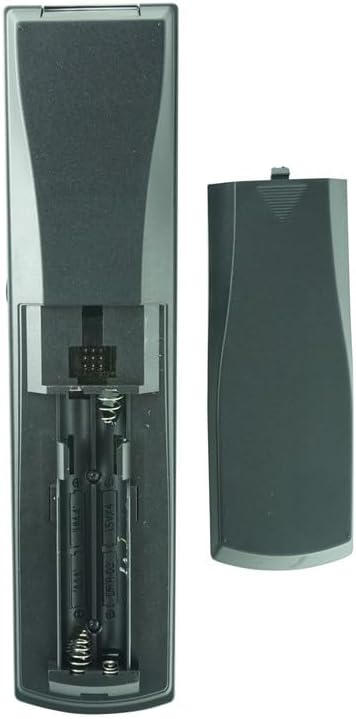
Figure 2.1: Battery compartment with cover removed.

Figure 2.2: Remote control with battery cover installed.
2.1 Battery Installation
- Locate the battery compartment on the back of the remote control.
- Slide the battery cover downwards and remove it.
- Insert four (4) AAA batteries, ensuring the positive (+) and negative (-) terminals align correctly with the markings inside the compartment.
- Replace the battery cover by sliding it back into position until it clicks securely.
The remote control is now ready for use. No additional programming or code entry is required for compatible Yamaha A/V receivers.
3. Operating Instructions

Figure 3.1: Front view of the RAV372 remote control.

Figure 3.2: Angled view of the RAV372 remote control.
The RAV372 remote control operates using infrared (IR) technology. Ensure a clear line of sight between the remote's IR emitter and your A/V receiver's IR sensor for optimal performance. The maximum effective range is approximately 10 meters (33 feet).
3.1 Basic Functions
- POWER: Turns the A/V receiver on or off.
- INPUT SELECTOR (e.g., TV, AV, CD, DVD, TUNER, PHONO, V-AUX, CBL/SAT, MD/TAPE, CD-R, VCR1, DVR/VCR2, DVD): Selects the desired audio/video input source.
- VOLUME (+/-): Adjusts the master volume level of the receiver.
- MUTE: Temporarily silences the audio output. Press again to restore sound.
- AMP/SOURCE: Switches between controlling the amplifier and selecting the source.
- TV VOL (+/-), TV CH (+/-): Controls the volume and channel of a connected television, if supported by your receiver's configuration.
- NAVIGATION BUTTONS (Up, Down, Left, Right, ENTER): Used to navigate menus and confirm selections on the receiver's display.
- DISPLAY: Changes the information displayed on the receiver's front panel or on-screen display.
- AUDIO SELECT: Cycles through available audio modes or settings.
- SLEEP: Activates the sleep timer function on the receiver.
3.2 Advanced Functions (Refer to your receiver's manual for detailed use)
- SOUND FIELD PROGRAMS (e.g., STEREO, MUSIC, ENTERTAIN, MOVIE, THX, STANDARD, EXT. SUR.): Selects various sound field programs for different listening experiences.
- LEVEL, BAND, PRESET/CH, SET MENU, PURE DIRECT, NIGHT, STRAIGHT, EFFECT: These buttons control specific audio processing, tuner functions, menu navigation, and sound enhancements.
- MACRO, LEARN, CLEAR: These functions may be present for advanced customization or learning capabilities, depending on the specific remote model and receiver.
4. Specifications
| Feature | Description |
|---|---|
| Model Number | RAV372 |
| Brand | Generic |
| Connectivity Technology | Infrared (IR) |
| Controller Type | Button Control |
| Compatible Devices | Yamaha A/V Receivers (Specific models listed in Introduction) |
| Max Number of Supported Devices | 1 |
| Maximum Range | 10 Meters (approx. 33 feet) |
| Color | Black |
| Batteries Required | 4 x AAA (not included) |
5. Maintenance
5.1 Cleaning
To clean the remote control, use a soft, dry cloth. For stubborn dirt, lightly dampen the cloth with water or a mild, non-abrasive cleaner. Avoid using harsh chemicals or abrasive materials, as these can damage the remote's surface or buttons.
5.2 Battery Replacement
Replace batteries when the remote control's response becomes sluggish or stops functioning. Always replace all four AAA batteries at the same time with new ones. Do not mix old and new batteries, or different types of batteries, as this can lead to leakage or damage.
5.3 Storage
If the remote control will not be used for an extended period, remove the batteries to prevent potential leakage and damage to the device.
6. Troubleshooting
- Remote not responding:
- Ensure fresh batteries are correctly installed.
- Check for any obstructions between the remote and the A/V receiver's IR sensor.
- Verify that the remote control is pointed directly at the receiver.
- Confirm that your A/V receiver is powered on.
- Specific functions not working:
- Ensure the remote is in the correct mode (e.g., AMP/SOURCE button pressed to control the amplifier).
- Some advanced functions may require specific settings on your A/V receiver. Consult your receiver's original manual.
- Remote does not control my device:
- This remote is a replacement for specific Yamaha A/V receiver models. It is not a universal remote. Double-check the compatibility list and your receiver's model number.
- If your receiver is not listed as compatible, this remote may not work.
7. Warranty and Support
7.1 Warranty Information
This product typically comes with a 90-day warranty from the date of purchase. This warranty covers manufacturing defects under normal use. It does not cover damage resulting from misuse, accidents, unauthorized modifications, or battery leakage.
7.2 Customer Support
For technical assistance or warranty claims, please contact the retailer or manufacturer from whom you purchased this product. Provide your purchase details and a clear description of the issue.


