
1. Introduction
This manual provides essential instructions for the Generic replacement remote control, model Easytry19739. This remote is designed for use with various Yamaha A/V AV Receiver Amplifier models. Please refer to the compatible model list in the title to ensure this remote is suitable for your specific device. This remote operates using Infrared (IR) technology.
2. Setup
2.1 Battery Installation
The remote control requires four (4) AAA batteries (not included) for operation.
- Locate the battery compartment on the back of the remote control.
- Slide the battery cover downwards or outwards to open it.
- Insert four new AAA batteries, ensuring that the positive (+) and negative (-) terminals align correctly with the markings inside the compartment.
- Slide the battery cover back into place until it clicks securely.
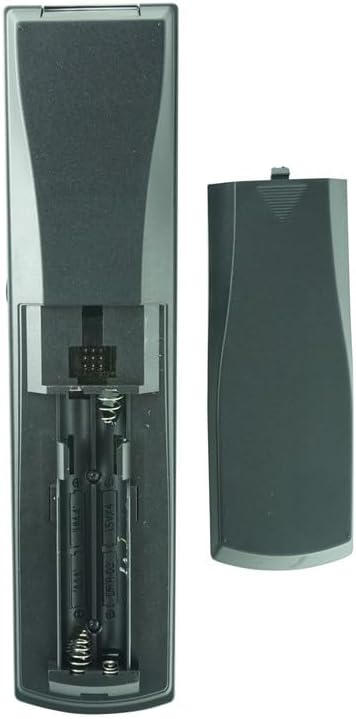
Figure 1: Open battery compartment showing AAA battery slots.
2.2 Initial Pairing
This remote control operates via Infrared (IR) technology. Typically, IR remotes do not require a pairing process and should work directly with compatible devices once batteries are installed. If your Yamaha receiver specifically requires a pairing procedure for a replacement remote, please consult your receiver's original instruction manual for detailed steps. This remote is designed to function as a direct replacement for the listed Yamaha models.
3. Operating Instructions
This remote control provides access to various functions of your compatible Yamaha A/V AV Receiver. Below is a general overview of common button functions. For specific operations, refer to your receiver's user manual.

Figure 2: Front view of the remote control with button layout.
- POWER (TV, AV, System): Turns the respective device (TV, AV receiver) on or off.
- INPUT SELECTORS (e.g., TV, AV, CD, DVD, TUNER, DTV, VCR): Selects the desired audio/video input source connected to your receiver.
- VOLUME +/-: Adjusts the master volume level of the receiver.
- MUTE: Toggles the audio output on or off.
- NAVIGATION BUTTONS (Up, Down, Left, Right, ENTER): Used for navigating menus and confirming selections on your receiver's display or connected TV.
- MENU: Accesses the receiver's on-screen menu system.
- SOUND MODES (e.g., STEREO, SUR. DECODE, EFFECT): Selects different audio processing modes or sound fields.
- NUMBER PAD (0-9): For direct input, such as radio station frequencies or track numbers.
- AMP/SOURCE: Switches between controlling the amplifier and selecting sources.
4. Maintenance
4.1 Battery Replacement
When the remote's performance diminishes or it stops responding, it is time to replace the batteries. Follow the battery installation steps outlined in Section 2.1. Always replace all four AAA batteries simultaneously with new ones to ensure optimal performance.
4.2 Cleaning
To clean the remote control, gently wipe its surface with a soft, dry cloth. Avoid using liquid cleaners, solvents, or abrasive materials, as these can damage the remote's finish or internal components.
5. Troubleshooting
If you encounter issues with your remote control, please refer to the following common troubleshooting steps:
- Remote not responding:
- Ensure that the batteries are inserted correctly with the proper polarity (+/-).
- Replace old batteries with new AAA batteries.
- Check for any physical obstructions between the remote control and the receiver's infrared (IR) sensor.
- Ensure you are pointing the remote directly at the receiver's IR sensor within its operational range (up to 10 meters).
- Some functions not working as expected:
- As a replacement remote, some advanced or highly specific functions might not be fully supported or may require particular settings on your Yamaha receiver. Refer to your receiver's original manual for details on specific functions.
- Verify that the remote is indeed compatible with your specific Yamaha receiver model.
- Remote requires pairing (despite being IR):
- While IR remotes typically do not require pairing, if your specific Yamaha receiver model has a unique pairing requirement for replacement remotes, consult your receiver's original instruction manual for the exact pairing procedure.
6. Specifications
| Brand | Generic |
| Model Number | Easytry19739 |
| Connectivity Technology | Infrared (IR) |
| Controller Type | Button Control |
| Maximum Range | 10 Meters |
| Number of Supported Devices | 1 (Audio/Video Receiver) |
| Compatible Devices | Audio/Video Receiver (Specific Yamaha models listed in title) |
| Power Source | 4 x AAA batteries (not included) |
| Color | Black |
7. Warranty and Support
7.1 Warranty Information
This Generic remote control comes with a 90-day warranty from the date of purchase. Please retain your proof of purchase (e.g., order confirmation, receipt) as it will be required for any warranty claims. The warranty covers manufacturing defects under normal use.
7.2 Customer Support
For further assistance, troubleshooting beyond this manual, or warranty inquiries, please contact the seller directly through the platform where the product was purchased. You may also refer to the original product listing for additional information or contact details.